Wood Turning 3D - Carving Game
- 363.00
- 4.2
- Installs
- 10.00M
- Price
- Free
Screenshots

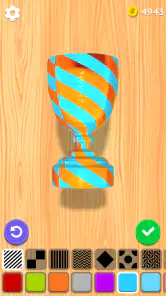


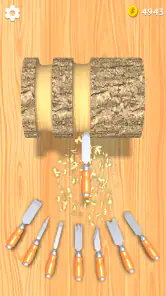
Analysis by Reviewed
I judge Wood Turning 3D - Carving Game by how well its small, focused idea works on a phone: it turns shaping wood into a tactile little challenge rather than a deep workshop simulator. That focus is its appeal. I can pick it up for a short break, concentrate on a shape, and put it down without needing to learn a complicated system. If you enjoy patient, hands-on simulations, it is an easy game to understand; if you want a demanding crafting game with long-term planning, this is a lighter kind of experience.
A quick carving session that rewards care
The game is a free simulation from Eliten, and its central loop is easy to grasp: work a piece of wood toward a target shape, then judge how closely your carving matches it. The useful part is the contrast between the simple controls and the attention the later designs ask for. I found it works best when I make small, deliberate adjustments instead of trying to remove too much material at once. That approach makes the precision goal feel more manageable and gives the carving a calmer rhythm.
It is also a good fit for the odd stretch of downtime when I do not want to follow a story or remember a quest. A level gives me one clear task, so I can play while waiting for a ride or taking a short break. The trade-off is that the same focused structure may feel repetitive if I want varied objectives, character progression, or a strong sense of discovery. This is more about the moment-to-moment satisfaction of shaping a piece than building toward a larger adventure.
The broad audience figures suggest that plenty of players have tried it: it has passed ten million installs and holds a 4.2 average from around 39,000 ratings. Those numbers do not decide whether it suits me, but they place it among familiar casual mobile games rather than a niche tool for woodworking enthusiasts. It is rated for Everyone, and the current version is 3.12; the game requires Android 6.0 or later. There are optional in-app purchases, listed at $1.99 to $3.99 per item, while the game itself is free to download.
Whittling Away with Precision
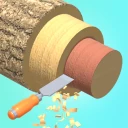
First off, the premise of the game is pretty straightforward. You’re handed a chunk of wood and a set of tools, and your job is to carve it into a specific shape. Sounds simple, right? Well, let me tell you, it's a mix of zen and challenge all wrapped up in one. Each level presents you with a different design to replicate, and the closer you get to the model, the higher your score.
Graphics and Gameplay
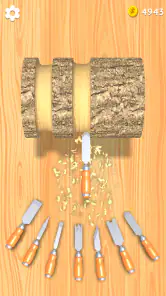
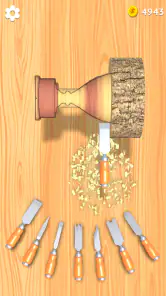
The graphics in Wood Turning 3D are surprisingly detailed for a mobile game. The wood textures are realistic, and the carving action feels smooth and satisfying. I was genuinely impressed with how the wood shavings curled away as I worked my way through each piece. The game mechanics are intuitive, making it easy for anyone to pick up and start carving without a hitch.
But don't let the simplicity fool you. As you progress, the designs become more intricate, demanding a steady hand and a keen eye for detail. It's akin to a digital meditative practice, where patience truly pays off. The satisfaction of chiseling away to reveal a perfect replica is a reward in itself.
More From Our News Desk

Weather by Xiaomi Review: Clear at a Glance, Less Clear Up Close

X Under Pressure: Can It Recover When Posting Goes Wrong?

Clash of Clans Is Won Between the Battles

Android Auto Makes the Case for Quieter Car Software

MobiOffice: Transforming Mobile Productivity with Seamless Integration

EA SPORTS FC™ Mobile Soccer: Redefining Mobile Sports Gaming
Tools of the Trade
One of the aspects I really enjoyed was the variety of tools available in the game. From chisels to sanders, each tool serves a purpose and adds a layer of strategy to your carving process. Deciding which tool to use and when to switch can make or break your final product. It's a neat little feature that keeps the gameplay fresh and engaging.
Making the most of each piece
A practical habit that helped me was to treat the rough shaping and the final detailing as separate passes. I start by bringing the overall outline close to the guide, then slow down when I reach narrow edges or small changes in contour. This reduces the temptation to chase a perfect score with broad, risky cuts. The game’s simple format is forgiving to learn, but patience matters more than speed once the target becomes more intricate.
Compared with typical casual puzzle games, this one gives me a more tactile task: I am not matching tiles or solving a grid, but gradually changing a physical-looking object. Compared with a full crafting or building simulation, though, the scope is much narrower. There is no need to manage a workshop or plan a complex project; the appeal is the direct feedback of carving. That makes it a better choice for a quick, calming session than for someone looking for a deep simulation of real woodworking.
Reading the shape before making a cut
I get the most out of a level when I pause briefly to compare the target’s broad outline with the piece in front of me before touching a tool. That little check helps me spot whether the challenge is mainly about narrowing a section, rounding a curve, or preserving a thin edge. It is a useful way to avoid treating every part of the wood as if it needs the same amount of work. The game rewards attention to the silhouette, not just constant movement.
There is also a helpful mental distinction between accuracy and neatness. A surface can look pleasing while still drifting away from the requested profile, so I try to prioritize the reference shape before fussing over the finish. If I am playing casually, I can stop once the object looks satisfying to me; if I am chasing a better result, I slow down and check the outline again. That choice lets the same level serve either as a low-pressure break or a modest precision test.
Endless Possibilities
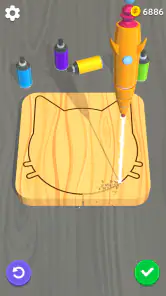
Besides following the set designs, Wood Turning 3D also gives you the freedom to let your creativity run wild. There’s a sandbox mode where you can carve anything you dream up. It's a fantastic way to unwind and explore your artistic side without any pressure. I spent hours just experimenting and was pleasantly surprised by how addictive it became.
For an everyday example, I would choose a short level when I have a few minutes between errands, then save open-ended experimenting for a longer, more relaxed moment. In the creative mode, I would try a simple silhouette first and use the tools to refine its edges rather than aiming for an elaborate design immediately. That keeps experimentation enjoyable and makes it easier to notice how different tool choices affect the finish. The point is not to produce a real woodworking plan, but to enjoy shaping something without the mess or equipment of a physical hobby.
Choosing between guided and free-form play
The two ways of approaching the carving suit different moods. A guided design gives me a clear endpoint and a reason to be careful; it is the better choice when I want a short task with an obvious sense of completion. Free-form play is more appealing when I want to experiment without judging every contour against a model. I would not treat the open-ended option as a replacement for the structured challenges, though: one provides direction, while the other depends on me bringing an idea of my own.
If I am unsure which mood I am in, I would start with a guided piece and switch to experimenting only if I still want to play afterward. That keeps a brief session from turning into aimless tapping, while leaving room to explore when I have more time. It also helps set expectations: the creative appeal comes from trying out shapes, not from a progression system or a promise that each experiment will become a polished design.
Who will enjoy the slower pace
I would recommend it to players who like satisfying hand movements, visual feedback, and self-contained levels. It may also suit someone curious about woodworking who wants a playful introduction to the idea of shaping a form, as long as they understand this is entertainment rather than practical instruction. Younger players can approach it too, given its Everyone rating, though the simple premise will matter more than realistic craft learning for anyone hoping to develop a real skill.
It is particularly easy to recommend to someone who wants a game that asks for attention without demanding a long commitment. You can understand the immediate goal quickly, and there is no elaborate plot to keep in mind between sessions. That makes it a reasonable option for a shared device or a casual player who prefers visual tasks to action-heavy games. I would still keep expectations modest: being suitable for a wide age range does not make the carving a lesson in how to use actual tools.
When a different kind of game is a better fit
I would skip it if I needed a highly varied simulation, a competitive challenge, or a game where every session unlocks a complex new system. The carving can become samey when the basic action is what you want to avoid, and the later demand for accuracy may feel fussy rather than relaxing if you prefer fast progress. The best way to approach it is as a small, focused pastime, not as a substitute for a full workshop or a long-form crafting game.
It is also not the choice I would make for a player who wants a strong sense of consequence. The central satisfaction comes from the shape taking form and the quality of the match, rather than from building a larger world or making choices that change a story. If you usually stay interested through new mechanics, competitive goals, or a steady stream of different activities, a broader simulation or a conventional puzzle game may hold your attention longer. Here, the appeal is deliberately narrower.
Where the relaxing appeal has limits
My main reservation is that a calming loop can also narrow the experience. Repeating the same broad process is pleasant for a while, but it may not hold my attention indefinitely if I am not in the mood to refine shapes. I also would not choose it for detailed real-world woodworking guidance: its purpose is to make carving feel accessible and satisfying, not to teach safe tool handling or material technique. Players comparing free games should keep the optional purchases in mind, but the basic no-cost entry point makes it straightforward to try before deciding whether to spend.
Another practical consideration is how you respond to precision-based play on a phone. Small movements and close visual checks can be satisfying when I am settled and paying attention, but less so when I am distracted or trying to rush through a level. I would save the more detailed designs for a moment when I can focus, rather than expecting them to work as effortless background play. That is a small adjustment, but it makes the game’s careful pace feel intentional instead of frustrating.
For someone wondering whether the game is worth trying without paying, the free download makes that decision simple: I would first see whether the basic carving loop suits me, then consider optional purchases only if I keep returning and understand what I want from them. The listed items range from $1.99 to $3.99 each, so spending is a choice rather than a requirement to understand the premise. I would not buy anything just to solve a problem that is really about whether I enjoy repeating this kind of task.
A small, satisfying niche rather than a full workshop
In conclusion, Wood Turning 3D - Carving Game is a delightful escape that combines creativity with precision. Whether you're looking to kill some time or dive into a new hobby, this app offers a unique and satisfying experience. Give it a try, and you might just find yourself hooked, chisel in hand, ready to carve your digital masterpiece.
My recommendation is strongest for people who enjoy a calm, tactile mobile activity and are happy to focus on one object at a time. It gives a clearer sense of hand-guided shaping than a standard match or grid puzzle, while asking far less commitment than a full crafting simulator. That middle ground is its best quality and its boundary: it offers the pleasure of making a form, not the depth of a woodworking game built around planning, learning, or long-term projects.
So I would try it during a quiet break, use the guided shapes to see whether careful carving clicks for me, and move to open-ended play when I want room to experiment. If the repetition starts to outweigh the satisfaction, I would move on without feeling that I had missed a hidden layer. For the right player, its simple loop is enough; for someone seeking constant variety or practical craft knowledge, another kind of game will be a better use of their time.
Wood Turning 3D - Carving Game Frequently Asked Questions
Is Wood Turning 3D suitable for someone who has never played a carving game?
Yes. Wood Turning 3D is a casual simulation game built around shaping and decorating wood, so it is approachable even if you have not tried a carving game before. Its hands-on activity makes the goal easy to understand: work on a wooden piece and refine its appearance. The appeal is more about enjoying a creative task than mastering complicated game systems.
Is Wood Turning 3D free, and are there optional purchases?
Wood Turning 3D is free to download and play, with optional in-app purchases priced from $1.99 to $3.99 per item. You can enjoy the core carving activity without spending money, while purchases offer an additional way to customize the experience. If you prefer not to make extra purchases, review your device’s purchase settings before playing, particularly if children may use the game.
What kind of experience does Wood Turning 3D offer?
Wood Turning 3D is a creative simulation game centered on shaping and decorating wood. You work with virtual tools to carve wooden pieces, refine their forms, and create designs. The experience is intended to be relaxing, making it a fit for players who want a light, hands-on activity rather than a fast-paced or competitive game. Its simple premise is easy to pick up and explore.
Does Wood Turning 3D work on older Android devices?
Wood Turning 3D requires Android 6.0 or later, so it can run on many devices that are not using the newest Android release. Before downloading, check your device’s Android version and make sure you have enough available storage for the installation. The game is a simulation focused on shaping and decorating wood, so a compatible device is the main practical requirement to consider.
What devices can run Wood Turning 3D?
Wood Turning 3D is available for Android devices running Android 6.0 or later. It is also offered for iOS, so players can enjoy the carving game on a compatible Apple device. As with any mobile game, it is sensible to check that your phone or tablet has room for the download and runs a supported operating system before installing.
Pros
- Realistic wood carving simulation
- Easy to learn controls
- Relaxing gameplay experience
- Wide variety of carving tools
- Creative design possibilities
Cons
- Limited level variety
- Ads can be disruptive
- Graphics could be improved
- Repetitive tasks over time
- Lacks multiplayer mode
- Category
- Simulation
- Version
- 3.12