Tut world:Home Town builder
- 173.00
- 4.6
- Installs
- 5.00M
- Price
- Free

Screenshots





Analysis by Reviewed
I like town builders best when a small choice gives me an immediate reason to make another one: place something, see the town change, then decide what deserves attention next. Tut World: Home Town Builder leans into that cozy, creative appeal. It is a role-playing game from Hainan Hengdou Network Technology Co., Ltd., with a colorful, dollhouse-like presentation that makes shaping a little community feel inviting rather than demanding.
That makes it an easy game to imagine opening in a spare moment. I might pick it up while waiting for a friend, adjust one corner of town, and leave with a clear idea for the next visit. The appeal is less about mastering a complicated simulation and more about seeing personal choices take shape. Still, whether that loop suits you depends on what you want from a builder: room to decorate is not the same thing as deep planning or a demanding strategy challenge.
Welcome to Your New World
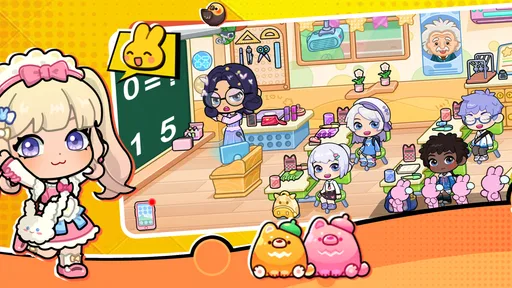
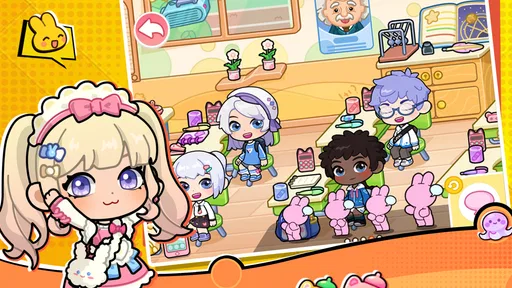
When you first open Tut World: Home Town Builder, you're greeted with a charming landscape that’s just begging to be developed. The graphics are bright, colorful, and surprisingly detailed for a mobile app. I found myself immediately drawn in by the whimsical design, which makes the whole experience feel like playing with a delightful dollhouse.
Building and Customizing
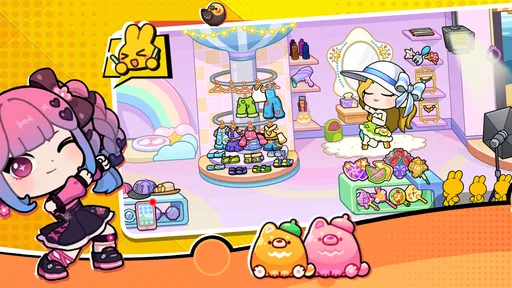
The core of the game revolves around building and customizing your town. The range of buildings and infrastructure you can add is quite impressive. From quaint little houses to bustling marketplaces, there's no shortage of variety. I particularly enjoyed the ability to tweak the aesthetic of my town. Whether you want a modern metropolis or a rustic village, the freedom is yours. And trust me, I’ve tried both!
One practical way I’d approach that freedom is to work in small visual passes instead of trying to perfect the whole town at once. I’d first choose a mood, such as cozy and rural, then place a few buildings that support it before revisiting details. That keeps experimentation manageable on a phone and helps reveal whether a layout feels cohesive. If you tend to change your mind, treat early choices as sketches rather than a final plan; the pleasure here is in shaping the scene, not in getting every decision right immediately.
Before settling into a longer session, I’d also check the game’s current version and the device’s available space, especially on an older phone. The game is listed for Android 7.0 and later, and its current version is 1.0.18. Those details are useful compatibility checks, but they don’t tell you how smoothly it will run on every device, so I’d try a short session first if performance matters to you. This is a free game, though optional in-app purchases range from $0.99 to $159.99 per item. I’d keep purchases separate from the basic appeal of decorating and decide on a spending limit before browsing any paid extras.
One of the features that caught my attention is the game’s intuitive interface. It’s so user-friendly that even my tech-challenged grandmother could navigate through it. With just a few taps, you can construct new buildings or upgrade existing ones. The satisfaction of seeing your town grow and thrive is what makes this app truly addictive.
More From Our News Desk

Weather by Xiaomi Review: Clear at a Glance, Less Clear Up Close

X Under Pressure: Can It Recover When Posting Goes Wrong?

Clash of Clans Is Won Between the Battles

Android Auto Makes the Case for Quieter Car Software

MobiOffice: Transforming Mobile Productivity with Seamless Integration

EA SPORTS FC™ Mobile Soccer: Redefining Mobile Sports Gaming
Engaging Challenges
As you play, you’ll encounter various challenges and tasks that keep the gameplay fresh and engaging. Whether it's managing resources or keeping your citizens happy, there's always something to keep you on your toes. The game does a good job of balancing difficulty, ensuring that it remains fun without becoming overwhelming. And let's be real, who doesn't like a good challenge?
That rhythm is a useful fit for short breaks: take on a task, make a change, and see how the town responds before putting the phone away. For a more satisfying return, I’d leave myself one simple next step rather than trying to remember a complicated plan—perhaps deciding which area needs attention or which task to tackle first. The loop works best when progress feels like a nudge to keep creating, not an obligation to check in constantly. If you prefer games where every session ends with a major strategic victory, this gentler pattern may feel light.
Compared with more number-heavy city simulators, the attraction here is the approachable, characterful town-making rather than intricate economic optimization. Compared with avatar dress-up games, it gives the creative impulse a broader setting: instead of focusing only on one character’s look, you can think about the feel of a whole community. I’d choose it when I want a relaxed visual project; I’d choose a deeper management game when I’m craving tightly linked systems, or a dedicated dress-up app when outfit experimentation is the whole point.
Social Interaction and Community
Another aspect that I found quite delightful is the social interaction. You can connect with friends, visit their towns, and even exchange resources. It adds a whole new layer of fun when you can show off your town’s progress or get inspired by others. I’ve lost count of how many times I’ve borrowed ideas from friends to enhance my little town.
For me, visiting a friend’s town is most useful as a source of specific ideas rather than a reason to copy a whole design. I might notice how they balance busy-looking areas with open space, then borrow that principle for my own layout. If you enjoy sharing creative work, that social layer can give a town a purpose beyond private decorating. If you would rather play entirely alone, the building and task loop still provides the main attraction, so social play need not be the reason you install it.
In addition, there’s a vibrant community of players who are always ready to lend a helping hand. Whether you’re stuck on a particular challenge or just want to share your latest town design, there’s a friendly community waiting to chat.
The game is rated Everyone, and it has an average rating of 4.5 from around 7,500 ratings, with more than 1 million installs. Those figures suggest it has found a sizeable audience, but they won’t tell you whether its relaxed pace matches your taste. I’d especially recommend trying it if you like colorful customization, enjoy small creative projects, and want a game that can fit around everyday routines. I’d skip it if you mainly want intricate city economics, a competitive challenge, or a tightly guided story.
Overall, Tut World: Home Town Builder is a delightful escape into a world of creativity and strategy. With its charming graphics, engaging gameplay, and the opportunity for social interaction, it’s a must-try for anyone looking to indulge in some town-building fun. So, why not give it a whirl and see if you’ve got what it takes to build the town of your dreams?
A Routine-Friendly Way to Play
A realistic use for this kind of game is a short wind-down after dinner: I can open it, finish a manageable task, and spend a few minutes adjusting the town’s appearance without needing to block out an evening. That is a different promise from a city sim built around long chains of production or careful resource planning. Here, the value of a session can be a visible change that feels personal, even if it is modest. I would keep a loose goal in mind—such as making one area feel more welcoming—rather than measuring a session by how much territory I develop.
For anyone wondering whether it works as a quick game, the strongest fit is a player who is comfortable stopping after one small improvement. I would avoid beginning a session when I only want a highly structured objective with a definitive win condition; the appeal is more open-ended. It also makes a pleasant shared activity for a child and an adult to discuss visual choices, though I would still supervise any account or purchase decisions and remember that the Everyone age rating is not a promise that every player will enjoy the same pace.
Making Creative Choices Feel Easier
One useful habit is to decide what the town should communicate before placing more buildings. A village can feel calm through a consistent palette and uncluttered arrangement; a busier town can feel lively when different building types sit together. I would take a moment to look at the whole scene after each small batch of changes instead of tapping through placements quickly. That pause helps distinguish a layout that is genuinely pleasing from one that only looks interesting while I am focused on a single item.
There is a trade-off in that freedom. A player who loves decorating may enjoy being able to revise a visual idea, but someone who needs a clear sequence of unlocks and a constant stream of guided objectives may find an open creative task less motivating. I would also resist judging the town by how quickly it grows. The satisfying part is the relationship between a choice and the look of the place afterward, not simply filling every available area as fast as possible.
It is worth approaching optional purchases with the same deliberate mindset. Because the game is free to start and paid items can vary substantially in cost, I would decide in advance whether I am happy to play without spending and keep that boundary clear. A purchase should solve a want I already understand, not become the default response whenever progress or customization feels slower than I hoped. That is especially sensible for a casual game opened in spare moments, where it is easy to browse extras without having planned to buy anything.
Who Will Enjoy the Pace
I would point a younger player, a casual decorator, or anyone who likes making small visual projects toward this game before recommending a demanding management sim. Its bright presentation and accessible actions lower the barrier to trying town-building, while the role-playing framing gives the world a softer feel than a spreadsheet-like city planner. People who enjoy showing friends a personal creation may also get more from it, since another player’s layout can spark ideas without turning the experience into a contest.
On the other hand, I would steer away someone looking for intricate production chains, precise city-wide optimization, or a strong competitive ladder. A dedicated avatar creator is a better fit if the main goal is designing a character’s appearance, while a deeper builder is preferable when the pleasure comes from solving interdependent logistical problems. Those alternatives are not better in every way; they simply satisfy a different creative appetite. Tut World sits most comfortably between a relaxed decorating toy and a light town-management experience.
What to Expect When You Return
The reason I would come back is not the promise of a dramatic reset, but the chance to look at the town with fresh eyes and choose a new small improvement. A useful stopping point is to leave one clear intention for next time: reconsider an awkward corner, finish a task, or borrow an arrangement idea from a friend’s town. That makes the next session easy to start without turning play into a checklist. The loop is strongest when the reward is both practical progress and a town that feels a little more like your own.
My overall recommendation is therefore specific: try it if a gentle, colorful building game sounds like a good companion for short breaks and you enjoy shaping a setting more than mastering a system. Give it a brief first session and see whether the act of placing and adjusting things feels satisfying on your device. If you find yourself wanting more layered planning, stricter goals, or a focused fashion editor, you will know early that another style of game is a better match. For the right player, though, this small, flexible creative loop is an inviting reason to return.
Tut world:Home Town builder Frequently Asked Questions
Who makes Tut world:Home Town builder, and what kind of game is it?
Tut world:Home Town builder is a role-playing game developed by Hainan Hengdou Network Technology Co., Ltd. Its store summary describes it as “My Chibi Life Maker: Anime Cartoon Avatar Creator & Dress Up Girl Makeover Game,” while its short description is “Tut world.” That gives prospective players a sense of its chibi and avatar-making theme before they decide whether it suits them.
What age rating does Tut world:Home Town builder have?
Tut world:Home Town builder is rated Everyone, so its stated content rating is intended for a broad audience. Parents and players should still consider whether the game’s character-creation and dress-up theme is a good fit for the person who will be playing. The age rating can help with that first check, while the game’s style and features are also worth considering.
What is Tut world:Home Town builder?
Tut world:Home Town builder is an engaging simulation game where players are tasked with constructing and managing their own town. The game offers a unique blend of strategy and creativity as players build homes, manage resources, and interact with various characters. With its immersive graphics and interactive gameplay, it's a perfect choice for those who enjoy city-building games.
How do I start building my town in Tut world:Home Town builder?
To start building your town in Tut world:Home Town builder, you need to first complete the tutorial, which guides you through the basics of construction and resource management. Once you've completed the tutorial, you'll have access to various building options and can start expanding your town by placing structures and upgrading them to improve your town's overall productivity.
What are the main features of Tut world:Home Town builder?
Tut world:Home Town builder offers a wide array of features including detailed town-building mechanics, resource management, and character interactions. Players can customize buildings, unlock new structures, and participate in special events. The game also features a dynamic storyline that unfolds as you progress, adding depth and engagement to the gameplay experience.
Pros
- Engaging town-building mechanics
- Diverse customization options
- Regular updates with new content
- Family-friendly gameplay
- Offline mode available
Cons
- In-app purchases can be pricey
- Occasional lag on older devices
- Limited multiplayer features
- Resource collection can be slow
- Ads can be intrusive