Total Snooker Classic Pro
- 12.00
- 1.0
- Installs
- 10.00K
- Price
- $1.99

Screenshots
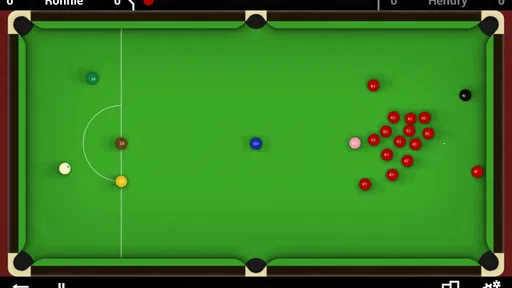
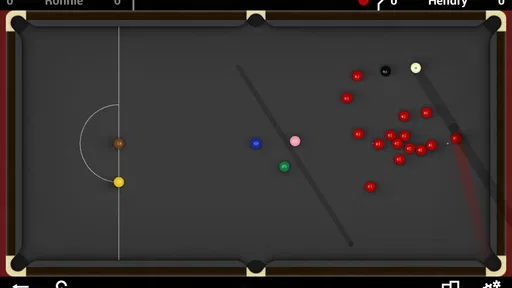
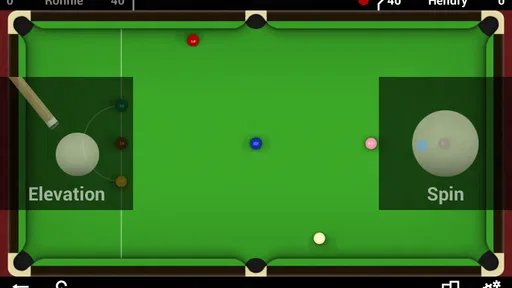
Analysis by Reviewed
I tried Total Snooker Classic Pro as a small, focused way to play snooker on an Android phone, and its appeal became clearest in a shared-device situation. It is the sort of game someone can pick up for a short match when the television is busy, when a friend is sitting nearby, or when I want a quiet challenge against the computer without setting up anything complicated. It comes from Friendly Monster and belongs to the sports-game category, with a simple promise: bring a snooker table to the phone and let me play either another person or the AI.
That narrow focus is both its strength and its limitation. I did not approach it expecting a broad collection of sports, a social hub, or a modern billiards simulation packed with extras. I approached it as a dedicated snooker game, and that made the experience easier to judge. The game is at its best when I want the basic rhythm of aiming, striking, positioning, and clearing balls. It is less convincing for anyone who wants a polished, feature-heavy alternative to the biggest pool and snooker games available on mobile.
How it works on a shared Android device
I find that a shared Android device works best when everyone agrees on a simple routine before the match begins. Keeping the screen in a spot where both players can see it makes each turn easier to follow, and it helps the game feel like a small social activity rather than a phone being passed around without a plan. That practical rhythm also makes it easier to think through setup and everyday use.
A practical game for short household matches
The most natural use case is a shared Android phone or tablet passed between two people. One player can take a turn, hand over the device, and let the other continue. That makes it suitable for a relaxed match at home, especially when two people want something more thoughtful than a fast arcade game. A snooker turn has a built-in pause between shots, so the device does not need to stay in one person’s hands continuously.
I also found that the game’s sports format works well for mixed skill levels. A person who understands cue sports can think about position and safety, while a casual player can concentrate on simply making contact and potting a ball. That does not make the game equally easy for everyone, but it gives a household a shared activity without requiring both players to know every rule before starting.
The important expectation is that this is a turn-based pass-and-play style of experience rather than a replacement for meeting at a real snooker table. The physical device becomes the shared object, and the quality of the match depends heavily on how comfortable both players are with taking turns and keeping track of whose shot is next. If you want a private session, the AI option is more convenient. If you want a social session, the game makes more sense when both people are in the same room.
Why the focused format can be useful
Many mobile sports games try to hold attention with progression systems, online events, cosmetic collections, or a long list of modes. Total Snooker Classic Pro is easier to understand because the central activity is the table itself. I can open it with a specific intention: play a few frames, practice reading angles, or challenge the computer. That directness is valuable on a shared device, where the next person may not want to learn a complicated account system before taking a turn.
More From Our News Desk

 Gmail
GmailGmail in a Busy Inbox: Who Benefits Most?
From first account to crowded workday, Gmail earns its place through dependable search and flexible sorting—but its best fit depends on how much inbox maintenance you can tolerate.

 Prime Video
Switching to Prime Video: What Changes in Your Viewing Routine
Prime Video can make a compelling second home for streaming, but switching means learning a different catalog, rental layer, and route from browsing to playback.

 Universal TV Remote Control
Universal TV Remote Control Works Best as a Reliable Backup
A phone remote earns its place through quick setup and reliable habits. Here is how to get more from Universal TV Remote Control—and where its limits show.

 Weather - By Xiaomi
Weather by Xiaomi Review: Clear at a Glance, Less Clear Up Close
Xiaomi’s weather app makes everyday forecasts quick to scan, but its calm surface can leave useful details and recovery paths harder to find than they should be.

 X
XX Under Pressure: Can It Recover When Posting Goes Wrong?
A resilience-focused review of X, examining setup, mistaken posts, interruptions, weak connections, and the gaps that matter when recovery needs to be dependable.

 Clash of Clans
Clash of Clans Is Won Between the Battles
Its raids are quick; its community is a long-term project of coordination, teaching, rivalry, and shared responsibility—with all the friction that entails.
Latest News



There is also a practical advantage to keeping the game mentally self-contained. A short household match does not need a public profile, a team identity, or a continuing campaign to feel complete. The players can decide their own stakes, such as the winner choosing the next film or simply earning bragging rights. That flexibility is more useful than it may sound because it lets the game fit around a family evening instead of asking the evening to revolve around the game.
Still, a focused design can feel old-fashioned if I compare it with newer sports titles. The game was released on April 26, 2012, and its current version is 1.10.0. Those details set the right expectations: I see it as an established, lightweight snooker title rather than a newly built mobile showcase. Its age may appeal to someone who wants a straightforward game, but it also means modern presentation and convenience should not be assumed.
Setting expectations before the first match
The store summary presents the core choice clearly: play snooker on Android against friends or challenge the AI. In practice, that description is enough to explain the game’s purpose, but not enough to tell every household whether it will be a good fit. I would first decide who will use it and how. One person looking for solo practice has a different need from two siblings sharing a tablet after school.
For a shared device, I would recommend agreeing on the order of play before starting. That sounds obvious, but turn-based games can become awkward when the phone is passed around without a clear routine. It is also useful to decide whether a match will be played in one sitting or paused between frames. The game is easier to enjoy when the household treats it as a small activity with a beginning and an end, rather than as an always-running competition.
Setup boundaries and day-to-day handling
Before adding a paid game to a household device, I would decide who manages the purchase and who may use the installation. A quick trial on the intended phone or tablet can also show whether the screen feels comfortable for aiming, especially for someone with less experience. With those basics settled, the next question is how different people can take part fairly.
What I would check before handing it to someone else
The game is listed for Android and has a minimum operating-system requirement of 7.0. That makes compatibility worth checking on older household phones and tablets before paying for it. A device that is shared for calls, schoolwork, or streaming may also have limited storage or an older display, so I would not assume that every Android device will provide the same comfort. The basic requirement is clear, but the physical experience still depends on screen size, touch response, and how easily the player can see the table.
A larger tablet can make aiming and turn-taking more comfortable because both players can view the table without crowding the screen. A phone is more convenient to pass around, but small controls can make a careful shot feel more demanding. This is one of the less obvious trade-offs: portability helps with spontaneous play, while a larger shared screen makes the game feel more like a communal tabletop activity.
The listed price is $1.99. For me, that changes the decision in a useful way. I would not buy it expecting a large entertainment package; I would buy it as an inexpensive, dedicated snooker game. The price is easier to justify for someone who already enjoys cue sports or wants a simple two-person activity. It is harder to justify for a player who only occasionally plays sports games and could be satisfied by a broader free alternative.
Keeping boundaries clear on a household device
Because the game may be used by several people, I would separate the question of access from the question of ownership. The person who installs or purchases it may be the account holder, while other household members are simply players. That distinction matters when a child, guest, or visiting friend uses the same device. I would make sure everyone knows which account is being used for the purchase and avoid treating a shared phone as if every player had a separate personal profile.
I would also avoid promising a personal record system or individual progress unless I had personally seen such a feature in the version being used. The safest way to organize a household competition is to keep a simple paper scorecard or shared note outside the game. That gives each player a clear history without assuming the app separates users automatically. It is a small workaround, but it prevents arguments when several people use one installation.
This is especially helpful when the device belongs to a parent or one member of a household. A child can enjoy a match without being given control of the purchasing account, and a guest can play without needing to create a separate identity. The game itself remains the game; the household handles the boundaries around it.
Making the controls work for different players
Snooker is more sensitive to control comfort than many quick sports games. A player needs time to line up a shot, judge the intended path, and decide how much force to use. On a shared device, I would let each person take a few non-competitive shots before starting a serious match. That short trial reveals whether the screen is comfortable and whether the player understands the aiming interaction.
Another useful approach is to give beginners a low-pressure first frame. Instead of correcting every missed shot, I would let the new player learn how the cue responds and how much patience is needed. Experienced players can make the game more welcoming by explaining one idea at a time, such as choosing a safer contact rather than always attempting the most ambitious pot. This turns the game into a teaching activity without requiring a formal tutorial session.
For a household with different abilities, I would avoid using the first match as a final judgment. A snooker game can feel unforgiving when someone is unfamiliar with the table, and the strongest player may dominate early. Rotating partners, changing the length of sessions, or keeping informal scores can make repeated play more enjoyable. These are not built-in features; they are practical ways to make a focused game work for more than one type of player.
Coordination between friends, children, and adults
When friends, children, and adults share a match, I would keep the first round informal and let newcomers learn the aiming and turn-taking at their own pace. Experienced players can make the session more welcoming by explaining one shot decision at a time instead of turning every miss into a lesson. That approach gives everyone a chance to enjoy the game, while leaving the question of audience suitability to the household.
Playing with another person in the same room
The friend-versus-friend option is most useful when both players are physically together. I would place the device where both people can see it, agree on turn order, and pass it only after the shot is complete. That simple routine keeps the match moving and reduces disputes about whether a shot was taken correctly. It also makes the game feel more social than playing alone against the AI.
A realistic example would be two people sharing a tablet after dinner. One person enjoys snooker and wants to think carefully about positioning; the other is less experienced but likes competitive games. They can play a short frame, stop when the conversation moves on, and return later with their informal score. The game does not need to dominate the evening, which is exactly why it can work well in a household setting.
For friends who are not together, I would be more cautious about choosing this game as the main activity. The store summary mentions competing against friends, but the most dependable shared-device scenario is local and face to face. If remote competition, messaging, matchmaking, or a persistent online league is the reason you are shopping, a newer connected sports game may be a better choice. I would not select this title solely on the assumption that it provides the same online experience as a modern multiplayer product.
Using the AI when nobody else is available
The AI gives the game a useful second purpose. I can play alone when the household is busy, and that makes the purchase less dependent on finding a partner at the right moment. It is also a practical way for a beginner to become comfortable with the table before playing against a more experienced friend. Losing to the computer may feel less embarrassing than losing in front of someone, while winning can provide enough confidence to try a local match.
At the same time, an AI opponent is not automatically a substitute for a human. The appeal of snooker includes the social tension of watching another person choose a shot, and a computer cannot recreate every part of that experience. I would use solo play for practice and convenience, but I would choose another game if my priority were a lively online community or a broad competitive ladder.
One useful household routine is to let each player practice alone, then meet for a match later. That reduces the skill gap without requiring anyone to coach constantly. It also gives the more experienced player a reason to experiment with safer shots rather than simply trying to win every turn. The game becomes a shared reference point, not just a contest.
Coordinating a fair match
Snooker naturally rewards patience, so I would set rules that protect the fun rather than turning every mistake into an argument. A first-time player might be allowed a practice frame, while regular players can keep a running household score. If the device is passed between several people, writing down the order avoids confusion. These small arrangements matter more here than in a game where each round lasts only a few seconds.
I would also keep the room comfortable for concentration. Background conversation is fine, but a player who is lining up a difficult shot may need a quiet moment. That is another non-obvious strength of the format: it can support calm, shared attention instead of constant noise. The trade-off is that a rushed group may find the deliberate pace slow, especially if everyone wants rapid action.
Age, trust, and choosing the right audience
The Everyone rating makes the game a plausible option for a broad household, but I would still consider whether its patient, tactical pace suits each player. Children who enjoy angles and careful turns may take to it, while those looking for rapid action may be happier with an arcade-style sports game. Thinking about both the age label and the player’s temperament is the clearest way to decide who will genuinely enjoy it.
What the age label means in practice
The content rating is Everyone, so the game is positioned as suitable for a broad audience. That makes it easier to consider for a household with children, parents, and grandparents using the same device. The sports setting is also familiar and non-confrontational in a way that may feel more comfortable than games built around combat or intense competition.
Even with an Everyone rating, I would still match the game to the child rather than relying only on the label. Younger players may need help understanding turn order, aiming, and the patience required for a snooker shot. A child who enjoys quick reactions may prefer an arcade sports game, while one who likes puzzles, angles, and quiet competition could find this a good fit.
The game’s suitability also depends on trust around the device. Since it is a paid title, an adult should handle the purchase and explain who is allowed to use the installation. If several people share the phone, I would keep the purchase account separate from informal player scores. A simple household rule—ask before buying anything and record scores outside the game—avoids confusion without pretending that every player has an independent account.
Who will appreciate it most
I would recommend it to someone who specifically wants a compact snooker game for Android, enjoys turn-based play, and is comfortable with an older, focused mobile experience. It is also a reasonable choice for a household that wants a two-person activity on one device, especially when the players are willing to create their own match routines.
It may suit an adult who remembers older mobile games and values simplicity over presentation. It can also work for a young player who is interested in cue sports and wants to learn by playing against the AI. The Everyone rating makes the age context straightforward, but the game’s deliberate pace remains the deciding factor.
Who should choose something else
I would skip it if you want a highly modern presentation, extensive customization, a large online community, or a deep progression structure. I would also look elsewhere if your main goal is a broad pool package with several table games rather than a dedicated snooker experience. Newer alternatives may offer smoother onboarding, more visible multiplayer systems, and stronger support for people who expect constant updates.
The average rating is 1.0 from over 500 ratings, so I would take that as a serious warning rather than dismissing it. A low score does not explain every individual complaint, but it does tell me not to recommend the game blindly. The install figure is over 10 thousand, which shows that people have tried it, but popularity alone does not overcome the need to judge whether its older style and narrow scope fit your expectations.
How it compares with usual sports-game alternatives
Compared with a general sports game, Total Snooker Classic Pro offers less variety but more concentration. I do not have to move between football, tennis, racing, and basketball modes; the table is the entire point. That is a benefit when I want snooker specifically, but a weakness when I want a game that can entertain a group with different interests.
Compared with a pool-focused game, snooker brings a more deliberate tactical feel. The larger table concept and emphasis on planning can make each shot feel like part of a longer sequence rather than a quick attempt at a single ball. Players who enjoy thinking several shots ahead may prefer that rhythm. Players who want immediate success, bright effects, or short rounds may find a pool or arcade title more welcoming.
Compared with newer multiplayer sports games, this title is easier to use as a quiet local activity but less attractive as a connected social platform. I would choose it for a shared tablet on a coffee table, not for building an online rivalry with friends in different cities. That distinction is important because the same phrase—playing with friends—can describe two very different experiences.
The game’s version number, 1.10.0, does not by itself tell me how modern the experience feels, so I would judge it by its actual fit rather than by the number. The release history points to an older product, and the low average rating reinforces the need for realistic expectations. For a small paid download centered on one sport, that may be acceptable; for someone comparing it with current premium mobile releases, it may not be.
My household verdict after using it
I see Total Snooker Classic Pro as a niche purchase with a clear purpose. It is not the game I would place on every family device, and I would not recommend it to someone who wants the newest or most connected sports experience. But for a person who specifically likes snooker, the combination of solo AI play and local competition can be useful. The game has enough focus to become a small routine rather than another distracting app.
My strongest recommendation is to treat it as a shared tabletop activity. Use a larger screen when possible, agree on turn order, keep household scores outside the game, and let beginners have a practice frame before judging their ability. Those steps address the practical issues that the short store description cannot explain. They also make the experience more welcoming for children and casual players without inventing controls or account features that may not exist.
The final decision comes down to priorities. If you want a straightforward Android snooker game, are comfortable with an older title, and value a low-cost way to play alone or beside a friend, the $1.99 price can be reasonable. If you want polished modern graphics, remote multiplayer, broad sports variety, or a strong public rating, I would choose a different option. For my own household use, I would keep it as a focused, occasional game rather than a main entertainment platform, and I would recommend it only to someone whose interest in snooker is specific enough to outweigh its limitations.
Total Snooker Classic Pro Frequently Asked Questions
What devices can run Total Snooker Classic Pro?
Total Snooker Classic Pro is an Android snooker game from Friendly Monster. It requires Android 7.0 or later, so check your device’s operating system before downloading. The game offers a portable way to play snooker, but it is not listed as an iOS release. If you are looking for a snooker game on an iPhone or iPad, check the platform and compatibility details before proceeding.
What is Total Snooker Classic Pro?
Total Snooker Classic Pro is a mobile snooker game designed for players who enjoy realistic table-based gameplay on Android or iOS. It typically focuses on cue control, ball positioning, aiming, spin, and tactical shot selection rather than fast arcade action. The game is suitable for casual matches, practice sessions, and users who want to improve their understanding of snooker fundamentals through a portable experience.
Is Total Snooker Classic Pro suitable for beginners?
Yes, beginners can generally start with Total Snooker Classic Pro, although the controls may take some practice to master. New players should spend time learning how to aim accurately, control shot strength, apply cue-ball spin, and plan several shots ahead. The game is more enjoyable when approached patiently, because successful breaks depend on positioning and strategy rather than simply hitting the balls as hard as possible.
Does Total Snooker Classic Pro require an internet connection?
The connection requirements may depend on the specific mode and version available on your device. Offline practice or single-player features may work without a constant internet connection, while online competitions, advertisements, cloud features, or updates can require access to the internet. Before downloading, it is worth checking the store listing and testing the game in offline mode if playing without mobile data is important to you.
Does the game include realistic snooker controls and gameplay?
Total Snooker Classic Pro is aimed at players who prefer a more traditional snooker experience, so its gameplay generally emphasizes aiming, shot power, cue-ball control, and positioning. The level of realism can vary according to the device, settings, and control method. Players should expect a learning curve, particularly when using spin or attempting precise safety shots, but this depth adds value for fans of authentic table strategy.
Pros
- Realistic snooker physics make positional play feel rewarding.
- Multiple table layouts and match formats add variety.
- Responsive touch controls suit both quick and careful shots.
- Offline play allows matches without an internet connection.
- Clean interface makes rules and game options easy to understand.
Cons
- The visual presentation feels dated compared with newer pool games.
- Advanced opponents can make matches feel slow and overly defensive.
- Limited customization reduces long-term personalization options.
- Some shots require very precise aiming on smaller screens.
- The game may feel repetitive once the available tournaments are completed.