Super3DS Pro Multi Emulator
- 104.00
- 3.5
- Installs
- 10.00K
- Price
- $3.99

Screenshots


Analysis by Reviewed
When I’m choosing a retro game emulator for a phone, I start with a simple question: do I want the convenience of keeping several old systems in one place, or do I want the most dependable setup for one particular game? Super3DS Pro Multi Emulator is aimed at the first kind of player. It’s an arcade game from Super Multi Emulator, and the appeal is being able to return to familiar games without carrying a separate device. The important trade-off is that convenience still depends on your game files, phone, and preferred controls.
Choosing an emulator that fits your routine
Emulators are only one part of a retro-gaming setup: you also need game files you are entitled to use, and the comfort of playing depends on the device and controls. I would decide first whether you mainly want a casual session on a phone screen or a more deliberate, controller-led setup. The app’s Everyone age rating makes it broadly accessible, but it does not change the need to make thoughtful choices about game files.
At $3.99, this is a paid app rather than a free trial-style way to browse emulation options. Its average rating is 3.5 from around 400 ratings, alongside just over 100 written reviews, so I would treat it as a product with a mixed reception rather than assume it will work perfectly for every setup. It has over 10,000 installs, was released in April 2021, and version 3.4-DS-Pro requires Android 6.0 or later. Those details help set expectations, but your own phone and preferred games matter more than a headline score.
Revisiting classic games on a phone
Imagine having a pocket-sized time machine that lets you dive back into the era of 8-bit and 16-bit games. That’s exactly what the Super3DS Pro Multi Emulator offers. With its robust compatibility, you can play a multitude of games from different consoles. Whether you’re a fan of early Nintendo classics or have a soft spot for the Sega masterpieces, this app has got you covered.
What quick play feels like
One of the first things I noticed after firing up this emulator was how smoothly it operates. The interface is user-friendly, so you don’t have to be a tech wizard to figure out how to get things rolling. The games load quickly, and the graphics, despite being retro, appear crisp and clean on modern screens. It’s like having your favorite childhood games remastered.
The fast-loading feel is most useful when I have only a few minutes and don’t want to spend the whole break navigating setup. For example, while waiting for an appointment, I’d pick a familiar game, get to a safe stopping point, and put the phone away when called. That routine is more practical than starting a long session that needs constant attention. I’d also try the game I care about first, before adding several others; that makes it easier to notice whether the basic controls and performance suit my phone.
Controls, comfort, and a small setup test
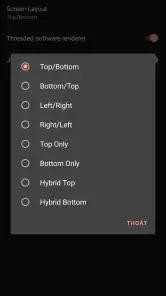
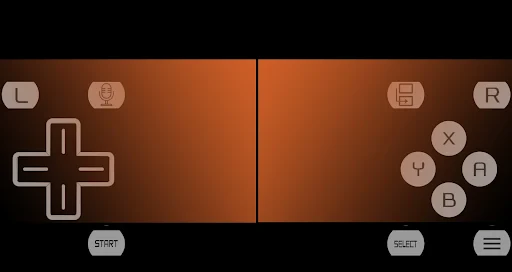
What’s even cooler is the level of customization available. You can tweak the controls to suit your play style, whether you like your buttons bigger or prefer a different layout altogether. The app also supports external controllers, which is a game-changer if you ask me. It brings a console-like feel, making the gaming experience even more authentic. There’s something incredibly satisfying about using a controller to play these classics once again.
More From Our News Desk

Weather by Xiaomi Review: Clear at a Glance, Less Clear Up Close

X Under Pressure: Can It Recover When Posting Goes Wrong?

Clash of Clans Is Won Between the Battles

Android Auto Makes the Case for Quieter Car Software

MobiOffice: Transforming Mobile Productivity with Seamless Integration

EA SPORTS FC™ Mobile Soccer: Redefining Mobile Sports Gaming
I would treat control setup as part of choosing a game, not as a one-time detail to ignore. A platform game that asks for precise jumps may feel quite different from a slower turn-based game on a touchscreen. Before attempting a difficult section, I’d adjust button size and placement during a forgiving moment, then play for a few minutes without changing anything. That quick test helps separate a game’s difficulty from a layout that simply doesn’t suit my hands.
There is also a useful distinction between playing at home and playing in short bursts. Touch controls keep the whole setup on the phone, which is convenient when I’m out, but my thumbs cover part of the display and the buttons have no physical travel. A controller can make longer sessions more comfortable, yet it means bringing another item and connecting it before playing. If I’m deciding whether to rely on touch alone, I’d test a game with frequent simultaneous inputs rather than judge comfort from a menu.
Saving progress without losing the challenge
Save states can also change how I approach a game: I can preserve a point before a tricky passage and return to it later instead of replaying a long stretch. I would use that flexibility deliberately, rather than saving constantly, so it supports progress without removing the challenge I enjoy. Cheat support is similarly best treated as optional; it may help when I am stuck or experimenting, but it can make a carefully balanced game feel less rewarding.
For someone fitting play around errands or a busy day, a save point can turn a game that once required a long uninterrupted stretch into something easier to revisit. I’d save at a natural breakpoint, such as before a hard section, rather than create a trail of near-identical saves that becomes confusing later. If I’m playing for the satisfaction of mastering a level, I’d keep cheats out of that run and use them only for a separate experiment. The choice is less about whether these tools are available and more about what makes a particular session enjoyable.
What the extra tools are good for
This emulator doesn’t just stop at playing games. It also offers save states, which is a lifesaver for those tricky levels where you just can’t seem to get past. You can save your progress whenever you want and resume from the same point, avoiding the frustration of starting over. Plus, the cheat code support is like a cherry on top, giving you that extra edge when you need it.
These options are most valuable when they solve a specific problem. If I only have a short break, saving lets me pause without needing to finish a full stage; if a difficult passage is blocking progress, a save gives me a way to practise from nearby. Cheats can be useful for exploring or getting past a section that has stopped being fun, but they can also flatten the sense of achievement. I’d think of them as tools to shape a session, not a reason by themselves to choose an emulator.
Where a different option may suit you better
If I already own a handheld or prefer a dedicated gaming device, that hardware may be a better fit for long sessions, tactile buttons, and a setup that does not depend on a phone screen. A single-console emulator can also be a simpler choice when I only want to revisit one system and would rather avoid a broad, multi-console library. By contrast, this app is appealing if I value having different retro systems gathered in one place and am willing to adjust the controls to suit each game.
The comparison is really about priorities, not a universal winner. A dedicated handheld is easier to hold for extended play and has physical controls built into the experience. A single-system emulator may make more sense if my entire goal is one console and I want a focused setup. A multi-emulator approach is attractive when I like switching between kinds of retro games on the same phone, but it asks me to be more attentive about which game files I use and how I configure controls for each one.
There is a practical trade-off in using a phone: the screen is portable, but virtual buttons occupy part of it and do not provide the physical feedback of a controller. An external controller can improve comfort, though it adds pairing and carrying steps. Before paying, I would check that the games I want to play are compatible with the emulator and that I can supply them legitimately. A fast-loading experience matters only after those basics are in place.
What I would check before settling in
A sensible first session is a small compatibility and comfort test, not a full migration of every game I own. I’d start with one game I’m legally entitled to use, try it with the default touch layout, and see whether the controls feel manageable during actual play. Then I’d change one setting at a time, so I know which adjustment helped. If the game is a poor fit or performance is not what I want, I can learn that before investing time in a larger collection.
It is also worth deciding where your progress should live in your routine. If you switch between games often, note which save belongs to which title and avoid relying on memory alone. If you mostly play one game in short sessions, a straightforward save habit will matter more than exploring every option. This is the kind of practical discipline that makes an emulator easier to live with, even though the app itself cannot decide what you want to play or how you prefer to hold your phone.
My recommendation for the right player
Having spent some quality time with the Super3DS Pro Multi Emulator, I can say it’s a must-have for any retro gaming enthusiast. It’s packed with features that not only enhance the gaming experience but also make it incredibly accessible. Whether you want to relive your childhood memories or introduce classic games to a new generation, this app is the perfect bridge between past and present. So go ahead, download it, and let the games begin!
Who is likely to enjoy it?
I would shortlist it for someone who already has legitimate game files, enjoys sampling more than one retro console, and appreciates being able to tailor on-screen controls or connect a controller. It is less suitable for someone who expects a library of games included, wants physical controls without extra setup, or needs a guaranteed fit for a particular title before trying it. If certainty for one specific game is the priority, I would test that title early rather than build a whole routine around the emulator.
It may also be the wrong pick if you want a ready-made catalogue that opens straight into games, or if you do not want to manage files and control layouts yourself. For a player who already knows which titles they want to revisit, the flexibility is more useful; for someone who is just curious about retro gaming and has no games prepared, a different route may be less work. I would make that distinction before treating a low-cost mobile app as a complete gaming setup.
The decision I’d make
My recommendation is therefore enthusiastic but conditional: Super3DS Pro is worth considering as a flexible mobile option, not as a substitute for every dedicated handheld or single-system setup. Its $3.99 price asks for a little confidence up front, while the rating of 3.5 suggests I should keep expectations measured. If its control options match your habits and your intended games run as you hope, it can make short retro sessions easy to fit into ordinary downtime.
For me, the strongest reason to choose it is the combination of mobile convenience and room to tailor a session, especially when I want to move between different retro systems without carrying dedicated hardware. The strongest reason to pause is that an emulator is only as useful as the games and controls I can actually use with it. I’d pay for it when I already have a clear, legitimate game-file plan and am comfortable trying a short setup session. If I need physical buttons every time or want certainty around a single title, I’d choose a dedicated device or a more focused option instead.
Super3DS Pro Multi Emulator Frequently Asked Questions
What does Super3DS Pro Multi Emulator cost, and what should I check before downloading it?
Super3DS Pro Multi Emulator is a paid game in the Arcade category, priced at $3.99. Before downloading, check that your device runs Android 6.0 or later and that you have enough space for the app and any game files you plan to use. The age rating is Everyone, so it is suitable for a general audience.
What is Super3DS Pro Multi Emulator, and how is it presented to players?
Super3DS Pro Multi Emulator is an arcade game developed by Super Multi Emulator. Its short description is “Super3DS Pro,” and it is presented as a very fast emulator. It has an average rating of 3.5 from 402 ratings, with 104 written reviews and more than 10,000 installs. The current version is 3.4-DS-Pro, and it was released on April 24, 2021.
What platforms does the Super3DS Pro Multi Emulator support?
The Super3DS Pro Multi Emulator is designed to run on Android and iOS devices. It provides seamless emulation for various gaming consoles, allowing users to enjoy their favorite games across multiple platforms. However, users should ensure their devices meet the app's minimum system requirements for optimal performance.
Is the Super3DS Pro Multi Emulator legal to use?
Yes, the Super3DS Pro Multi Emulator itself is legal to use, as it does not come bundled with any game ROMs. Users must own the original game copies to legally download ROMs for personal use. It’s crucial to respect copyright laws and only use ROMs from games you own.
What are the key features of the Super3DS Pro Multi Emulator?
The Super3DS Pro Multi Emulator offers a range of features including high compatibility with various gaming consoles, customizable controls, high-definition graphics, and support for external controllers. Additionally, it offers save and load game functionality, allowing users to pick up right where they left off.
Pros
- Supports multiple gaming platforms.
- Regular updates enhance compatibility.
- User-friendly interface design.
- High-quality graphics rendering.
- Customizable control options.
Cons
- Requires a high-end device.
- Some games experience lag.
- Limited online support.
- Occasional crashes reported.
- Not all games are supported.
- Category
- Arcade
- Version
- 3.4-DS-Pro