Sport Star - Team Manager Game
- 339.00
- 4.3
- Installs
- 500.00K
- Price
- Free

Screenshots
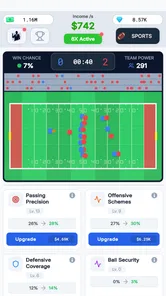
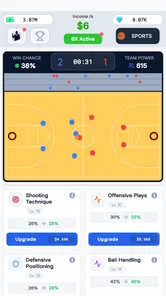
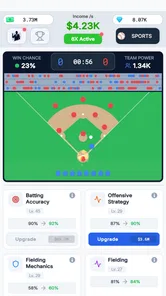
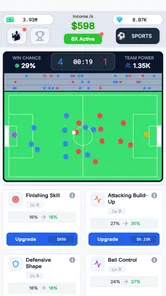
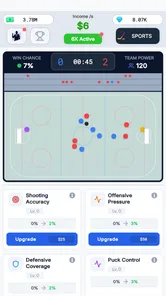
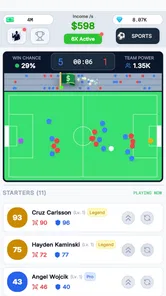
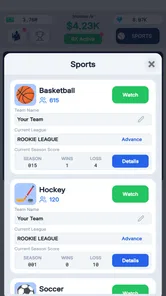
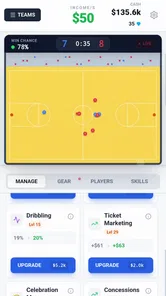
Analysis by Reviewed
I approached Sport Star - Team Manager Game as a casual sports-management game rather than a substitute for a full simulation. Its central appeal is the idea of building a team-based sports empire, but what matters in everyday use is how comfortably that idea fits into a short break, how easy it is to understand, and whether the management layer stays enjoyable after the first few sessions. My overall impression is positive, with an important qualification: this is best suited to players who enjoy planning and gradual progress more than direct, moment-to-moment sports action.
Developed by Gryphon Games, the game is free to start and is listed for Everyone. It runs on devices using at least iOS or Android version 12, depending on the platform version available to you. The current release is version 1.3.0, and the game has reached over 500 thousand installs. Its average rating sits at 4.3 from around 6 thousand ratings, which suggests a healthy level of interest without making the game automatically right for every type of sports fan.
How clearly the team-building experience communicates
The first thing I look for in a manager game is whether I can understand what matters without constantly stopping to decode the interface. Sport Star has a straightforward premise: I am not simply controlling one athlete; I am making decisions that shape a wider team operation. That gives the game a different rhythm from arcade sports titles, where success depends mainly on reflexes or timing.
For a new player, the most useful approach is to treat the opening sessions as an orientation period. Rather than trying to optimize every decision immediately, I would first identify which screens represent the team’s current situation, which actions advance progress, and which choices have a cost. This habit is especially helpful for players who find dense management interfaces tiring. It reduces the feeling that every button must be understood at once.
The game’s strongest communication point is its broad objective. Building a sports empire is easy to grasp, even if the details of reaching that goal require experimentation. I found that this kind of framing works well for players who prefer a visible long-term purpose instead of isolated matches with no wider context. It also makes the game easier to explain to someone who has not played a manager title before.
Readability is not only about text size. It also includes how much information appears together, how clearly the game separates important decisions from optional details, and whether a player can recover after making an imperfect choice. On a smaller phone, management games can become uncomfortable when several values, icons, and menus compete for attention. I would recommend playing Sport Star in portrait or landscape orientation according to whichever gives you more room to inspect the screen, rather than assuming one arrangement will suit every device.
A useful personal rule is to make one decision, observe the result, and only then change another part of the team. That creates a simple cause-and-effect trail. If I change several things at once, it becomes harder to know what helped and what created a setback. This is a small but meaningful accessibility advantage because it lets players with different levels of gaming experience learn through controlled steps instead of pressure.
More From Our News Desk

Weather by Xiaomi Review: Clear at a Glance, Less Clear Up Close

X Under Pressure: Can It Recover When Posting Goes Wrong?

Clash of Clans Is Won Between the Battles

Android Auto Makes the Case for Quieter Car Software

MobiOffice: Transforming Mobile Productivity with Seamless Integration

EA SPORTS FC™ Mobile Soccer: Redefining Mobile Sports Gaming
Navigation that works better in short sessions
Sport Star fits naturally into short sessions because its appeal comes from managing progress rather than requiring a long uninterrupted match. I can imagine opening it while waiting for an appointment, making a few team decisions, and leaving without feeling that I have abandoned an active contest. That makes it more approachable than sports games that punish a player for putting the phone down at the wrong moment.
There is also a practical benefit for people who divide their attention. A manager game can be easier to use during a commute or a quiet break because the player is generally considering options instead of reacting to every second. I would still avoid playing while walking or doing anything that requires visual attention. The slower structure may be more forgiving than an action game, but it does not make a phone screen safe to use in hazardous situations.
Players who are sensitive to visual clutter should take a gradual approach. I would begin by learning the main route through the game and ignore optional areas until the basic loop feels comfortable. This avoids the common mistake of opening every available menu simply because it exists. In a team-management game, more information does not always mean better decisions; sometimes it only increases fatigue.
One of the more useful strategies I found was to separate “maintenance” decisions from “ambition” decisions. Maintenance means keeping the team moving smoothly, while ambition means spending attention or resources on a larger improvement. Making those choices separately helps prevent a short session from turning into a confusing chain of changes. It is a simple workflow, but it gives the game more structure for players who benefit from predictable routines.
Motor, sensory, and situational considerations
Because Sport Star belongs to the sports category but focuses on team management, it asks for a different kind of physical interaction than a traditional sports game. I would not choose it for the thrill of swiping through a live match or controlling every movement. Its management emphasis may be more comfortable for players who prefer deliberate taps and reading over rapid gestures, though the exact comfort will depend on the phone, display, and individual needs.
That distinction matters for players with limited dexterity or difficulty with fast repeated input. A planning-focused game can reduce the need for reflex-heavy actions, but it does not automatically remove every motor barrier. Small controls, closely placed options, or a need to move through several screens can still make a session tiring. Before settling into a long play period, I would test the game with the device held in the position that feels most stable and use a stand if gripping the phone becomes uncomfortable.
For players with visual sensitivities, the key question is not simply whether the game looks attractive. It is whether the screen remains understandable after several minutes. I recommend lowering the device brightness to a comfortable level and avoiding glare, especially when reading management information. If a player relies on system-level display adjustments, those settings may improve comfort, but they cannot guarantee that every visual element will remain equally clear.
Players with hearing differences may find a management game easier to approach than a title that depends on spoken instructions or audio cues for success. I would still avoid assuming that sound is irrelevant. Any game can use audio for feedback, atmosphere, or confirmation, and a player who cannot rely on those cues should pay attention to what is visibly communicated. If an action is not obvious without sound, that becomes a practical limitation rather than a minor preference.
For players who experience motion sensitivity, the management format is promising because it is not built around constant camera movement or rapid on-screen action. Even so, I would judge comfort during actual play rather than from the genre label alone. Menus, transitions, and animated feedback can affect people differently. Short test sessions are the safest way to decide whether the presentation is comfortable.
Who will find the game welcoming
I think Sport Star is most welcoming to players who enjoy sports but do not necessarily want to master complicated controls. It can also suit people who like spreadsheets, planning, or incremental improvement but want those ideas wrapped in a lighter sports setting. The game’s Everyone rating makes it broadly positioned, yet age suitability and ease of use are not identical. A younger player may understand the sports theme quickly but still need help with evaluating choices or understanding optional purchases.
That last point deserves attention. The game is free to download, but in-app purchases range from $0.99 to $109.99 per item. I would recommend deciding in advance whether you want to play without spending, permit only small purchases, or use device-level purchase controls. This is particularly important when children share a phone or tablet. The broad age rating should not replace a parent’s decision about spending boundaries and supervision.
For an older player who is new to mobile games, the team-building concept may be easier to approach than a fast sports title. I would introduce it by explaining the goal in plain language: make a decision, see how the team develops, and repeat. There is no need to understand every part of the game during the first sitting. That slower learning curve can make the experience less intimidating than a game that expects immediate familiarity with complex controls.
A realistic everyday session
Imagine having ten quiet minutes before an evening appointment. I would open the game, check the team’s current position, make one improvement-oriented decision, and then stop to see whether the result matches my expectation. If I still had time, I would review another area, but I would avoid spending everything in one burst. This approach keeps the session manageable and makes it easier to notice whether progress feels meaningful.
On a longer weekend session, I would use a notebook or a simple phone note to record what I changed and why. That may sound excessive for a casual game, but it is helpful when several decisions appear connected. It also supports players who have memory difficulties or who return after a few days and cannot remember their previous plan. A short note such as “focus on stability before expansion” can make the next session much less disorienting.
The game is less suitable for someone who wants a complete sports match every time they play. If your ideal experience is direct control, realistic competition, or immediate physical excitement, a conventional sports title will probably be a better choice. Sport Star asks you to enjoy the decisions around the team, not just the spectacle of the sport itself.
Where access still has limits
The biggest limitation is that a general sports-management structure does not automatically solve interface accessibility. Players may still encounter text, icons, menus, or touch targets that are comfortable for one person and difficult for another. I would not describe the game as universally accessible simply because its pace is calmer than an action game. The calmer pace helps, but it is only one part of the experience.
Another barrier is cognitive load. Team-building games can quietly accumulate decisions, currencies, upgrades, and competing priorities. Even when each individual choice is simple, the total number of choices can become tiring. My advice is to define one goal per session. For example, focus on improving the team’s immediate position first, then return later for broader planning. This prevents the game from becoming a test of memory and attention rather than a relaxing hobby.
Resource pressure can also affect inclusion. The free entry point is helpful for players who want to try the game before committing, but the presence of purchases means that progression and spending should be considered together. A player who feels pressured to buy something in order to keep pace may have a very different experience from someone happy to progress slowly. I would treat every purchase as optional until the game itself proves otherwise through your own experience, rather than buying automatically to remove temporary frustration.
Players with limited internet access, older hardware, or restricted storage should also think about their personal situation before making the game part of a daily routine. The minimum operating-system requirement is version 12, so devices below that threshold are not a practical fit. On a supported device, performance and comfort can still vary with screen size and hardware age. A larger display may make management information easier to inspect, while a compact phone may be more convenient for quick sessions but harder on the eyes.
There is a social barrier as well: management games often require patience. Someone who expects immediate rewards may interpret the slower progress as lack of excitement, while a player who enjoys gradual construction may find that same pace satisfying. This is not a flaw in isolation, but it is a clear compatibility issue. I would skip Sport Star if you dislike waiting for plans to develop or if you prefer games where every session ends with a dramatic result.
How it compares with familiar alternatives
Compared with arcade sports games, Sport Star is less dependent on reflexes and more dependent on judgment. That may make it more comfortable for players who find rapid tapping difficult, but it also means there is less direct control over the action. Compared with highly detailed management simulations, it appears easier to approach because the sports-empire idea is immediately understandable, although players seeking deep professional-level realism may want something more specialized.
Compared with a simple idle game, it offers a more active sense of responsibility. I am not merely watching numbers rise; I am thinking about what kind of direction the team should take. The trade-off is that it can demand more attention than a purely passive progress game. Compared with a board-game-style sports manager, the phone format is convenient for brief sessions, but the small screen can make information-heavy decisions less comfortable.
That comparison helps identify the right audience. Choose Sport Star when you want a lighter manager experience that can be checked in small portions. Choose an action sports game when physical control is the main attraction. Choose a deeper simulation when you are willing to spend more time learning systems and tracking long-term consequences. The best alternative depends less on the sport itself than on how much control, detail, and reading you want.
My inclusive verdict
I enjoyed Sport Star most when I treated it as a calm planning game with a sports identity. Its free entry makes it easy to test, its Everyone rating gives it a broad starting point, and its team-building focus can work well for players who prefer decisions over reflexes. The current version, 1.3.0, is the version to look for when checking compatibility, while devices need at least operating-system version 12.
My recommendation is strongest for casual sports fans, management-game newcomers, and players who want something they can revisit in short sessions. I would also suggest it to someone who finds traditional sports games too demanding physically but still enjoys the idea of guiding a team. The slower format creates room to think, and the ability to set one small objective at a time makes the experience easier to organize.
I would be more cautious for players with significant visual, motor, or cognitive access needs. The game’s management focus may reduce fast-action demands, but it does not guarantee large controls, specialized input support, or a fully adjustable presentation. Test it on your own device, use system comfort settings where helpful, and stop if the interface becomes tiring. For children, pair the Everyone rating with clear purchase restrictions because individual in-app items can cost from $0.99 up to $109.99.
In the end, Sport Star succeeds when its broad goal is enough to keep you curious: make a choice, watch the team develop, and decide what deserves attention next. It is not the right game for every sports player, but it has a clear place between quick arcade action and demanding simulation. If you want a manageable team-building game that rewards patience more than speed, Sport Star is worth trying before deciding whether its longer-term rhythm suits you.
Sport Star - Team Manager Game Frequently Asked Questions
Who developed Sport Star - Team Manager Game, and what kind of game is it?
Sport Star - Team Manager Game is a sports management game developed by Gryphon Games. Its central idea is building a sports team and guiding its development, so it is aimed at players who enjoy making decisions about a team rather than simply taking direct control during every moment of play. The store summary captures that focus in the phrase “Build your sports team empire!”
What is Sport Star - Team Manager Game?
Sport Star - Team Manager Game is a sports management simulation in which you take responsibility for building and developing your own team. You typically manage important areas such as player selection, training, tactics, competitions, and club progress. Instead of controlling every action directly during a match, your decisions as a manager influence the team’s performance and long-term success.
How do you play Sport Star - Team Manager Game?
Gameplay focuses on making strategic decisions before and during your team’s season. You may need to organize the squad, improve player abilities, choose formations, manage resources, and adjust tactics for different opponents. The experience is designed for players who enjoy planning and progression, although newcomers may need a little time to understand how all management systems work together.
Can I play Sport Star - Team Manager Game on my phone or tablet?
Sport Star - Team Manager Game is available for mobile devices, and its listed minimum operating-system requirement is version 12. Before downloading, check that your device meets that requirement and has enough available storage for the installation. If you use more than one device, keep in mind that your experience may depend on the platform and how the game handles saved progress.
Is Sport Star - Team Manager Game free to download and play?
The game is free to download, and it offers in-app purchases ranging from $0.99 to $109.99 per item. Like many mobile management games, these purchases may cover progression-related items or conveniences. You can decide whether to spend while playing, and it is sensible to review purchase settings before handing the device to a younger player.
Pros
- Easy-to-learn management controls suit casual players.
- Matches are quick
- making it convenient for short gaming sessions.
- Team customization adds a personal touch to your club.
- Progression gives you clear goals to work toward.
- Offline play may be useful when an internet connection is unavailable.
Cons
- Progress can feel slow without frequent play or optional purchases.
- Match outcomes may sometimes feel influenced by luck.
- The interface can become crowded as more features unlock.
- Limited sport variety may reduce long-term appeal for some players.
- Notifications can become distracting if left enabled.