

Ride for Tips
- 7.00
- 2.6
- Installs
- 1.00M
- Price
- Free
Screenshots
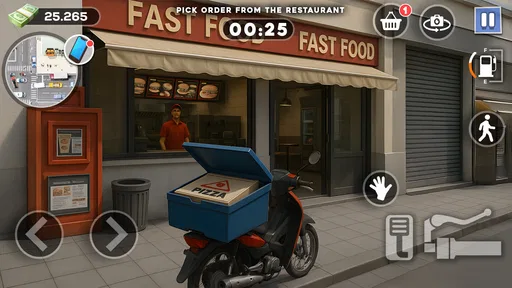
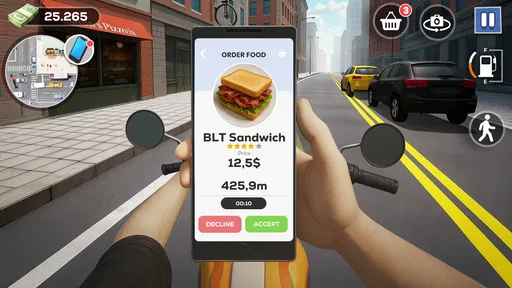
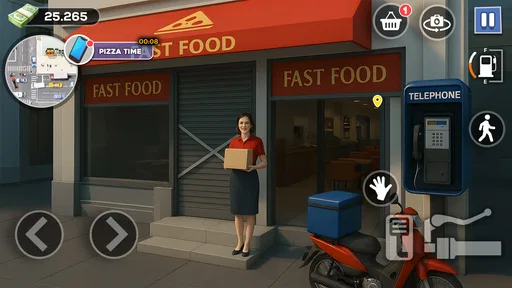
Analysis by Reviewed
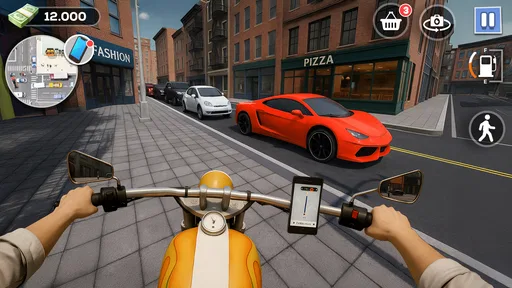
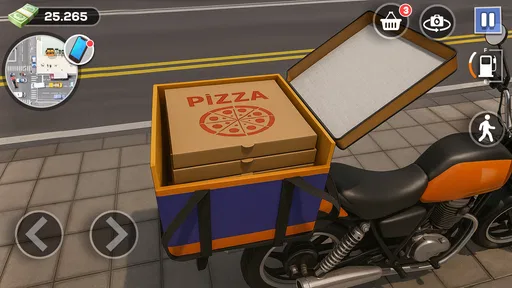
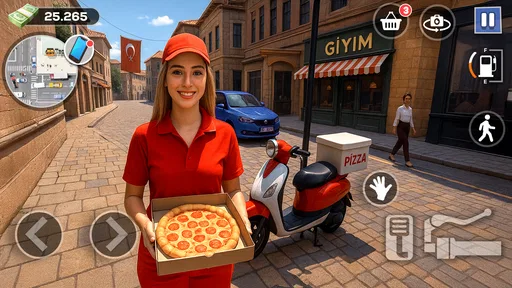
I’d approach Ride for Tips as a quick, light simulation for anyone who likes the idea of handling deliveries on two wheels. The appeal is in balancing movement with a small job to complete: get through fast-food missions, ride carefully, and try a wheelie when the route allows. That gives each outing a simple purpose without asking me to learn a complicated management system first.
What to expect from a delivery run
The central question for a new player is whether the riding itself feels comfortable. A delivery mission sounds straightforward, but combining movement, route awareness, and a trick can make a short ride feel busier than its premise suggests. I’d resist trying to do everything at once on an early run: focus on reaching the destination, then see whether adding a wheelie feels enjoyable rather than distracting.
That order also gives you a clearer way to judge the game. If a delivery feels difficult, try to identify whether you were moving too quickly, attempting a stunt at the wrong moment, or simply still getting used to the controls. Treating each attempt as a small experiment is more useful than repeating the same rushed approach and hoping it will suddenly work.
What the riding loop is best suited to
This is a better fit for short breaks than for a long, story-driven session. I can imagine opening it while waiting for a friend or taking a quiet moment between errands, then focusing on one delivery at a time. The combination of riding and completing a task gives the game more direction than a free-roaming ride, while wheelies add a little showmanship to the basic delivery premise.
It may suit players who enjoy casual vehicle simulations and want a clear, repeatable activity. If you’re looking for deep bike tuning, a realistic courier career, or a large world to explore, I’d choose a different simulation. The concept here is narrower: the fun depends on whether riding through mission-style routes feels satisfying to you, not on a broad collection of systems.
A realistic way to try it is during a short wait when you have enough attention to steer but don’t want to commit to a long session. I wouldn’t start a run while distracted by a conversation or while walking somewhere; a game built around riding and balance is more enjoyable when you can look at the screen and react. If you only have a moment, finishing one objective calmly is a better test than trying to squeeze in several rushed attempts.
Where a run can feel less smooth
My main caution is that a simple premise puts more weight on the feel of each ride. If steering or judging a wheelie takes practice, an early attempt can feel awkward rather than rewarding. I’d start by concentrating on completing the delivery, then experiment with tricks once I’m comfortable with the route. That keeps the objective manageable and makes it easier to tell whether a mistake came from rushing or from the controls.
More From Our News Desk

 Gmail
GmailGmail in a Busy Inbox: Who Benefits Most?
From first account to crowded workday, Gmail earns its place through dependable search and flexible sorting—but its best fit depends on how much inbox maintenance you can tolerate.

 Prime Video
Switching to Prime Video: What Changes in Your Viewing Routine
Prime Video can make a compelling second home for streaming, but switching means learning a different catalog, rental layer, and route from browsing to playback.

 Universal TV Remote Control
Universal TV Remote Control Works Best as a Reliable Backup
A phone remote earns its place through quick setup and reliable habits. Here is how to get more from Universal TV Remote Control—and where its limits show.

 Weather - By Xiaomi
Weather by Xiaomi Review: Clear at a Glance, Less Clear Up Close
Xiaomi’s weather app makes everyday forecasts quick to scan, but its calm surface can leave useful details and recovery paths harder to find than they should be.

 X
XX Under Pressure: Can It Recover When Posting Goes Wrong?
A resilience-focused review of X, examining setup, mistaken posts, interruptions, weak connections, and the gaps that matter when recovery needs to be dependable.

 Clash of Clans
Clash of Clans Is Won Between the Battles
Its raids are quick; its community is a long-term project of coordination, teaching, rivalry, and shared responsibility—with all the friction that entails.
Latest News



Tips are part of the game’s theme, but I wouldn’t treat them as a promise of predictable progress or a reason to play if you dislike repeating a task. A useful approach is to view each run as practice: notice where you lose control, make a calmer attempt, and save riskier wheelies for a stretch where you can focus on riding. That trade-off matters most if you prefer steady, low-pressure play.
There is also a difference between liking the idea of a stunt and enjoying the timing needed to attempt it. A wheelie can be fun as a small change of pace, but it may compete with the delivery goal if you try it before you know how the ride behaves. I’d keep the two aims separate at first: learn to complete the trip, then choose a moment to experiment. That gives you a fairer sense of whether the game’s core is for you.
Simple checks before you blame the game
If the opening feels confusing, I’d begin with basic checks rather than assuming something is broken. Make sure you have a stable moment to play, give the controls your full attention, and try a straightforward delivery before judging the trickier parts. A brief pause between attempts can help too; when I rush straight back into a route, it is easy to repeat the same mistake without noticing what caused it.
For an Android player, the minimum requirement is Android 7.0. If the game behaves unexpectedly, closing it and reopening it is a sensible first step, followed by checking that the device has enough free space and that its operating system meets that requirement. These are general troubleshooting steps, not a guarantee that every issue has the same cause, but they can separate a temporary device hiccup from a problem with the game experience itself.
When a run goes wrong, I’d change just one thing on the next try. Ride more cautiously, or skip the wheelie, rather than changing several habits at once. That makes it easier to tell whether the result improved because you gave the delivery more attention or because you altered your timing. It is a small, practical way to learn a short simulation without turning it into a frustrating test.
Who should give it a try
Wayfu Studio’s free simulation game is rated for Everyone and has reached over a million installs, though its average rating is 2.6 from around 435 ratings. I’d take that mixed response as a reason to keep expectations measured rather than assume the game will suit everyone. It runs on Android 7.0 or later, and version 1.04 is the current release. Optional in-app purchases cost $2.99 per item, so I’d check each purchase prompt carefully and try the free experience before spending anything.
That makes it easiest to recommend to someone who is curious about a focused delivery-and-riding loop and is comfortable deciding quickly whether its controls suit them. The low commitment of a free starting point is useful, but I would not go in expecting a substantial career simulation. If you usually need a clear progression path, lots of modes, or detailed customization to stay interested, a broader vehicle game is more likely to hold your attention.
The mixed average rating is worth treating as context, not as a verdict on what you will personally enjoy. I’d use the first few attempts to answer a practical question: do I like controlling the ride enough to want another delivery? If yes, the narrow focus may be exactly what makes it easy to pick up. If no, there is little reason to keep pushing through just because the premise sounds appealing.
Compared with a conventional driving simulator, this puts delivery goals and bike tricks ahead of broad vehicle variety or realism. Compared with an endless runner, it gives the ride a job to complete rather than asking you simply to last as long as possible. That distinction makes it more appealing when I want a small objective, but less appealing when I want lots of modes or a detailed simulation to settle into.
When the problem may be elsewhere
Not every frustrating session points to a flaw in the riding loop. A small screen, an uncomfortable grip, interruptions, or trying to play while doing something else can all make timing harder. I’d test the game while seated and unhurried before deciding that a control feels impossible; a calmer setup can make it easier to tell whether the challenge is enjoyable or simply inconvenient.
If the game stops responding or does not behave as expected, I’d first close and reopen it, then check the basic Android requirement and whether the device is under unusual pressure from other running tasks. If the issue continues, avoid making repeated purchases or changing several settings at random. A careful restart and a single, clear test are more informative than a string of guesses.
There is a useful distinction between a technical interruption and a design preference. If the game runs but its repeated delivery structure does not hold your interest, troubleshooting will not turn it into a larger simulation. On the other hand, if you enjoy the premise but a particular attempt feels awkward, a quieter setting and a less ambitious ride can help you decide whether practice makes a difference.
Getting Started with Ride for Tips
Upon downloading Ride for Tips, the sign-up process was a breeze. A quick registration using either your email or social media account, and you're in. The app's interface is clean and user-friendly, which makes navigating through the different features quite enjoyable. I appreciated the lack of clutter, as it allowed me to focus on what really matters: finding and providing excellent service.
Features and Functionality
One of the standout features of the app is its real-time tracking system. Whether you're a customer waiting for a ride or a service provider on your way to a gig, the app's GPS functionality ensures that both parties are always in the loop. This feature not only enhances convenience but also adds an extra layer of safety, which is always a plus in my book.
Another aspect I found impressive is the tipping mechanism. Unlike other apps where tipping can sometimes feel obligatory, Ride for Tips encourages genuine appreciation. Users have the option to tip based on the quality of service, which adds a personalized touch to each transaction. It's refreshing to see an app that values quality over quantity.
User Experience and Community
The community aspect of Ride for Tips is something I didn't expect to enjoy as much as I did. The app fosters a sense of camaraderie among its users, with features that allow for feedback and reviews. It's a win-win situation: service providers can build a reputation based on merit, and customers can make informed decisions based on real experiences.
Moreover, the app's support team deserves a shoutout. They are prompt and efficient, addressing any issues or concerns you might have with utmost professionalism. It's always reassuring to know that help is just a message away.
Final Thoughts
In conclusion, Ride for Tips has managed to carve out a niche for itself in the crowded service app market. Its emphasis on quality service, combined with user-friendly features, makes it a standout option for both service providers and customers alike. Whether you're looking to earn a little extra or seeking top-notch service, this app has got you covered.
If you're on the fence about giving it a try, I'd say go for it. The ease of use, combined with the potential to connect with a community that values quality service, makes it a worthwhile addition to your app roster. Trust me, once you start using it, you'll wonder how you ever managed without it!
Ride for Tips Frequently Asked Questions
Is Ride for Tips free to download, and does it include in-app purchases?
Ride for Tips is free to download, so you can try its fast-food delivery and riding missions without paying upfront. The game also offers in-app purchases priced at $2.99 per item. Consider whether optional purchases suit your preferences before installing, and review any purchase prompts carefully, especially if someone else, such as a child, uses your device.
What age group can play Ride for Tips, and what kind of game is it?
Ride for Tips is a simulation game with an Everyone content rating, making it suitable for a broad audience. Its store summary highlights riding, delivering, and performing wheelies during fast-food missions. If you enjoy games built around vehicle movement and completing delivery-themed tasks, this gives you a clear idea of its central premise before you download.
What is Ride for Tips and how does it work?
Ride for Tips is an innovative app designed to connect drivers with passengers who are willing to offer additional tips for exceptional service. The app allows passengers to offer incentives directly to drivers, encouraging better service and creating a fair, competitive environment. Simply download the app, register, and start enjoying enhanced rides with motivated drivers.
Is Ride for Tips available on both Android and iOS platforms?
Yes, Ride for Tips is available for download on both Android and iOS platforms. Users can easily find the app on the Google Play Store and the Apple App Store. Ensure your device meets the minimum software requirements to install and run the app smoothly for the best user experience.
How does the tipping system work in Ride for Tips?
In Ride for Tips, the tipping system is integrated directly into the app, allowing passengers to offer tips at their discretion. After each ride, passengers can rate their experience and provide tips based on the quality of service. This system promotes a more personalized and rewarding interaction between drivers and passengers.
Pros
- User-friendly interface for easy navigation.
- Supports multiple payment methods.
- Real-time ride tracking and updates.
- Wide availability across various cities.
- Responsive customer support team.
Cons
- Limited vehicle options in smaller cities.
- Occasional app glitches during peak hours.
- Higher rates during surge pricing.
- Requires constant internet connection.
- No loyalty rewards program available.











