Paint by Number: Coloring Game
- 637.00
- 4.8
- Installs
- 5.00M
- Price
- Free

Screenshots
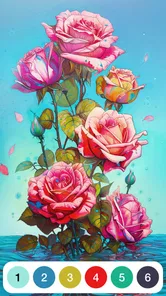




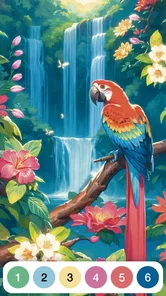


Analysis by Reviewed
I tend to reach for a paint-by-number game when I want something quiet to do with my hands but don’t want to plan a project. Paint by Number: Coloring Game fits that small, everyday gap: it turns coloring into a sequence of numbered areas to fill, rather than asking me to choose colors or draw from scratch. That makes it approachable, though it also means the experience depends on how comfortable you are with tapping small parts of an image and following a visual guide.
Oakever Games makes this casual game, which is free to start and rated for Everyone. It has a 4.8 average from around 16,000 ratings, and has passed 5 million installs. Those figures suggest that the format appeals to a broad audience, but they don’t guarantee that every image or interaction will suit every player. My impression is that its main strength is offering a low-pressure activity; it is less suited to anyone seeking deep creative control or a demanding game.
Finding your way through the coloring experience
I find the easiest way to judge a paint-by-number game is to separate learning its rules from managing the picture itself. Here, the basic task is straightforward, but image detail can change how much concentration it asks of me. The next section looks at how that balance affects navigation and readability, including a practical way to choose a picture that suits the time and attention I have.
A simple premise, with a visual task to manage
Paint by number is easy to understand: look for the area associated with a color, then tap to fill it. Compared with a blank digital canvas, this removes decisions about palettes and composition. Compared with a conventional coloring book, it handles the color matching for you. I find that particularly helpful when I want to relax without having to think up a design, or when I’d rather spend a few minutes completing parts of an image than commit to a longer activity.
That simplicity has a trade-off. The numbered areas are the work, so the player’s attention has to move between the image and its color cues. If you enjoy making independent choices, such as selecting shades or changing the look of a picture, this guided approach can feel restrictive. It’s better understood as a focused coloring pastime than as a drawing tool.
For a first session, I’d treat the game as a short break rather than a project to finish in one sitting. Pick an image, work through the color currently being indicated, and pause when the screen starts to feel busy. Returning later can be more comfortable than rushing through tiny sections simply to complete the picture. This is a practical way to keep a relaxing activity relaxing, especially if close visual attention tires you.
Clarity depends on the detail in the picture
The format is most readable when an image has larger, clearly separated regions. Small areas naturally demand more careful aiming, and a crowded picture can take longer to interpret because there is more to scan. That difference matters more than the general ease of the rules: a player can understand paint-by-number immediately and still find a particular image fiddly.
More From Our News Desk

Weather by Xiaomi Review: Clear at a Glance, Less Clear Up Close

X Under Pressure: Can It Recover When Posting Goes Wrong?

Clash of Clans Is Won Between the Battles

Android Auto Makes the Case for Quieter Car Software

MobiOffice: Transforming Mobile Productivity with Seamless Integration

EA SPORTS FC™ Mobile Soccer: Redefining Mobile Sports Gaming
I’d choose pictures according to the kind of attention I have available. When I’m tired or distracted, a simpler-looking composition is a sensible starting point; when I want a longer, more absorbing session, a denser image may be more satisfying. This is also a useful adjustment for someone who is new to the format: learn the rhythm on an uncomplicated picture before deciding whether intricate coloring is enjoyable.
The game’s current version is 5.1.13, and it requires Android 7.0 or later. If you’re deciding whether an older Android device is suitable, that minimum system requirement is worth checking before downloading. The game is free, while optional in-app purchases range from $4.99 to $69.99 per item, so it’s sensible to keep purchase controls and expectations in mind if children will play.
Comfort, control, and different ways to play
A simple tap-based activity can still feel different depending on a player’s comfort with fine movements, visual focus, and screen time. I’d pay attention not just to whether the game feels calm, but to whether the specific image and moment make it comfortable to use. The following section considers those trade-offs and how I’d fit a session into ordinary downtime.
Fine tapping is the main motor consideration
There is no complicated control scheme to learn: the central action is selecting areas on the picture. That’s a real advantage for casual play, but it does not automatically make every image easy to use. Where regions are small or close together, accurate tapping may be harder for someone with tremor, limited finger mobility, or difficulty maintaining a steady touch. A simple mechanic can still have a precision barrier.
A useful approach is to take your time and work in short stretches rather than treating speed as part of the challenge. If a section feels uncomfortable to tap, switching to a picture with broader spaces may be more enjoyable than forcing a difficult one. I would not assume that a paint-by-number format is equally accessible to every motor ability just because it uses tapping instead of complex controls.
The same distinction applies to children and older players. The Everyone rating indicates a broad age classification, but it is not a promise that every child can use the interface independently or that small details will be comfortable for every adult. For a younger player, I’d first see whether they can follow the color cues and target the picture areas without frustration. For an older relative, I’d let them try a simpler image and judge the actual tapping experience rather than relying on the game’s casual label.
A quiet activity, but not a substitute for every kind of downtime
Because the activity is visual and relies on touch, it suits a calm moment when you can look at the screen and interact with it. I can imagine using it while waiting for a meal or taking a short pause between household tasks: finish a small portion, put the phone down, and carry on. It can also be a low-stakes shared activity, with one person spotting the next color while another taps, as long as both enjoy looking at the same screen.
That scenario has limits. It is not an especially good fit when you need to keep your eyes on your surroundings, such as walking through a station, or when you want a pastime that can run mostly in the background. Nor would I choose it as an alternative to audio entertainment for someone who needs to rest their eyes. The game’s calm character comes from concentrated visual interaction, so the context matters.
For sensory comfort, the safest expectation is simply that this is a screen-based coloring activity. I wouldn’t pick it as a guaranteed way to avoid visual strain, and I’d pause if the close attention starts to feel tiring. A short session with breaks is a more sensible habit than assuming that a soothing subject automatically means a comfortable experience for every sensory preference.
Where it differs from other coloring choices
Against freehand drawing apps, the game removes much of the pressure to invent an image and choose a palette. That can make it easier to begin, but it also limits creative ownership: you are following the picture’s color plan rather than making one. Against paper coloring books, it offers a digital version of the same broad pleasure without needing physical pencils, while the small touch targets can be less forgiving than coloring a large printed area with a broad tool.
It also differs from puzzle games that reward planning or solving. The main appeal here is steady progress through colored sections, not testing strategy. If you want a demanding challenge, a puzzle or a drawing app is probably a better choice. If you want a guided activity that gives your attention a simple task, this game has a clearer case.
One non-obvious way to decide whether it suits you is to notice what you enjoy about coloring in the first place. If the pleasure comes from selecting colors and experimenting, the fixed-number format may feel like too much instruction. If the pleasure comes from seeing a picture gradually fill in, the structure can be a relief. That distinction is more useful than simply asking whether you like art games.
Making a short session work in everyday life
I’d use the game as a deliberate pause rather than something to keep open whenever a spare second appears. For example, while waiting for a kettle or for a family member to get ready, I’d choose one image and set myself a modest stopping point, such as finishing the areas for one color. That gives the session a natural endpoint, avoids the feeling that I must complete the whole picture, and makes it easier to put the phone away when the interruption ends.
There is also a practical way to decide whether a picture is worth continuing: try a few areas from different parts of it before settling in. If the numbered sections are consistently tiny or hard to distinguish, switching early is more sensible than investing time and then finding the image uncomfortable. This is especially useful when playing in a brief break, because the picture’s density can affect how relaxing the task feels more than the basic rules do.
Who is likely to enjoy the format
The game is a better match for people who like visible progress but don’t want to make artistic decisions at every step. It can suit a beginner who finds a blank canvas intimidating, someone who wants a quiet hands-on diversion, or a family member who enjoys sharing a picture without needing to agree on a design. The shared-screen idea works best when one person can comfortably see the details and the other is happy to help spot the next area; it is not a substitute for independent controls or a collaborative mode.
I would steer away from it if your preferred downtime is social conversation, audio, or movement rather than close screen focus. It is also a poor fit for someone who regards choosing colors as the most enjoyable part of coloring. In that case, a freehand art app or a paper book with open-ended coloring offers more control. The key question is not whether the game is relaxing in general, but whether following its color plan feels satisfying to you.
Costs, limitations, and who should choose it
A free starting point makes it easy to try the coloring loop, while optional purchases and the fixed, guided format are worth weighing before settling in. I’d test the experience against what I actually want from a break: quiet progress, creative freedom, or less time looking at a screen. The final section brings those choices together and explains who I think is most likely to enjoy it.
Free to begin, with purchases to consider
You can start without paying, but optional in-app purchases are priced from $4.99 to $69.99 per item. That wide span makes it worth being deliberate: the free entry point does not mean every possible purchase is inexpensive. I’d try the basic experience first and avoid buying anything until I know that the coloring style, image detail, and tapping feel are comfortable for me.
For a family device, I’d also make the purchase decision before handing the game to a child. The Everyone rating makes it broadly suitable in age classification, but spending choices still deserve adult attention. This is a practical point rather than a criticism of the coloring itself: knowing how optional purchases fit your budget helps keep a casual game from becoming an unexpected expense.
The most likely friction is repetition. The central loop remains identifying a color and filling its matching areas; anyone who tires of that pattern may find that more play does not make the game more varied in the way they want. Similarly, players who prefer precise creative tools, rapid action, or strong gameplay progression should look elsewhere instead of expecting a coloring game to become a different kind of experience.
How to tell whether it will work for you
I’d recommend trying it if you want a calm, guided coloring activity, appreciate clear rules, and are comfortable with touch-based visual tasks. It may also suit someone who wants a low-pressure way to occupy a short break without having to plan a drawing. Its large audience and strong average rating make it a familiar choice in casual coloring, but your own comfort with the image details is the more important test.
I’d skip it if fine tapping is painful or difficult, if close visual work quickly tires you, or if you want full freedom over colors and composition. In those cases, a paper coloring book with larger spaces, an audio-based pastime, or a drawing app with more control could be a better match. The right alternative depends on whether your main need is larger targets, less screen focus, or creative freedom.
A considerate option, with clear limits
Paint by Number: Coloring Game works best when its guided structure is a feature rather than a compromise. I like the idea of being able to focus on filling an image instead of planning one, and I’d recommend giving it a brief, low-pressure try if that sounds appealing. The developer is Oakever Games, and the game’s casual format makes its purpose easy to understand; the important question is whether the picture detail and touch interaction suit your abilities and the moment you’re playing.
My inclusive verdict is positive but measured: it offers an approachable activity for many people, not a universal solution for every kind of vision, movement, or sensory need. Start with a short session, choose an image that does not feel crowded, and take a break when needed. If that rhythm feels comfortable, it can be a pleasant little ritual. If the detail becomes work, there is no reason to push through—another coloring format may serve you better.
Paint by Number: Coloring Game Frequently Asked Questions
What is Paint by Number: Coloring Game?
Paint by Number: Coloring Game is a digital coloring app where pictures are divided into numbered sections, with each number corresponding to a color in the palette. Tap a section to fill it in and gradually reveal the finished image. It is designed for casual, relaxing play rather than freehand drawing, and picture themes and available features can vary by app version.
Is Paint by Number: Coloring Game free to download and play?
The app may be available to download for free, but that does not necessarily mean every feature or picture is free. Some versions include advertisements, optional purchases, subscriptions, or premium collections. Check the store listing and the in-app purchase details for your device before downloading, and review any subscription terms carefully so you know whether charges renew automatically.
Does the game require an internet connection?
An internet connection may be needed to download the app, load new coloring pictures, display advertisements, or access online features. Previously opened images may remain available offline in some versions, but offline access is not guaranteed and can differ between updates. If you plan to play without Wi-Fi or mobile data, test the app beforehand and check whether your selected pictures have finished loading.
Is Paint by Number: Coloring Game suitable for children?
The simple tap-to-color format can be accessible to children, but suitability depends on the child’s age and the specific version of the app. Advertising, social or sharing features, and optional purchases may be present. Parents should check the age rating, privacy information, and store listing, then consider enabling purchase restrictions or parental controls before letting a child use the app.
What should I check before installing Paint by Number: Coloring Game?
Before installing, confirm that the app is offered by the developer you intended to download from and that it is compatible with your device and operating-system version. Review its permissions, privacy policy, ratings, recent reviews, and any stated subscription or purchase costs. Also consider available storage and whether you are comfortable with potential advertisements or features that may require an internet connection.
Pros
- Simple tap-to-fill controls make coloring easy to pick up.
- Numbered sections provide clear guidance for beginners.
- A broad selection of pictures offers different coloring subjects.
- Completed artworks can be saved and shared.
- Coloring can be a relaxing way to unwind between tasks.
Cons
- Small sections may be difficult to fill accurately on a phone.
- Some images or features may require an internet connection.
- Ads can interrupt the coloring experience.
- Hints and other extras may be limited without in-app purchases.
- The number-guided format offers less freedom than freehand drawing.













