Munzee
- 272.00
- 3.4
- Installs
- 100.00K
- Price
- Free

Screenshots
Analysis by Reviewed
Munzee is an unusual kind of adventure game because the screen is only part of the experience. The real activity happens outside, where you search for QR codes, capture them, and turn an ordinary walk into a small scavenger hunt. I found that appealing immediately: it gives a reason to explore a familiar neighborhood instead of simply asking me to stare at a map or complete another set of on-screen challenges.
At the same time, this is not a game that feels effortless from the first tap. Its enjoyment depends on location, mobile connectivity, readable codes, and a little patience when the app or the environment does not cooperate. My overall impression is that it works best as a shared outdoor activity or a personal reason to take a different route, rather than as a replacement for a traditional adventure game.
Where the real friction begins
The biggest surprise for a new player is that Munzee does not create the whole adventure inside the phone. The phone helps me find and capture the target, but the hunt itself depends on something being physically present in the world. That changes the rhythm completely. I cannot assume that opening the game will instantly give me a smooth level, a clear objective, and a guaranteed reward.
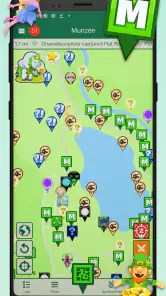
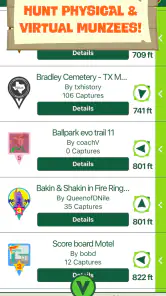
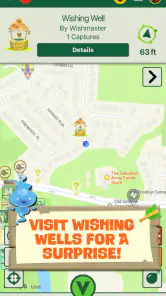
The first obstacle is often understanding what a nearby marker actually means. A point on a map is an invitation to investigate, not proof that the code will be visible from the pavement or easy to reach. It may be placed in a busy area, behind an object, slightly away from the obvious path, or somewhere that is technically nearby but inconvenient to access. I learned to treat the map as a planning aid rather than a precise promise.
That distinction matters when I am walking with children or friends. A short-looking hunt can take longer because we stop to search, check the surroundings, and decide whether a location is appropriate. The game is more satisfying when everyone expects a bit of discovery. It is less satisfying when someone assumes every marker will be as easy to find as a pin on a navigation app.
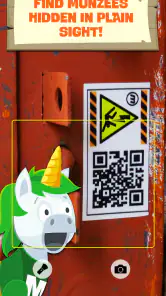
Scanning can also be a point of friction. A QR code may be exposed to weather, printed at an awkward angle, partly covered, or difficult to read in strong sunlight. I found that moving the phone rather than repeatedly tapping the screen is usually the better first response. Stepping back, changing the angle, wiping the camera lens, and waiting for the image to settle can make a bigger difference than restarting immediately.
The important mindset is to separate “I cannot see the code” from “the app is broken.” Those are different problems and need different solutions. If the marker is hidden, damaged, or placed somewhere I should not enter, no amount of button pressing will solve it. The sensible choice is to stay in a public, permitted area and move on when the search becomes unsafe or intrusive.
Why the map can feel less certain than expected
Munzee is a global scavenger hunt, so the quality of a session naturally depends on the places available around me. A dense urban area may offer a more active route, while a rural or unfamiliar location may require more planning. I would not judge the game solely by a quiet first map view, because the experience is strongly tied to where I happen to be and how far I am willing to walk.
There is also a difference between discovering a marker and enjoying the route to it. A cluster of nearby targets can turn into a pleasant loop, but isolated points may feel like errands. Before leaving, I prefer to look at the general spread of locations and choose a route that makes sense with my existing plans. That simple habit prevents the game from turning into unnecessary backtracking.
For an everyday example, I can imagine using it during a weekend walk rather than planning an entire day around it. I would check the area before leaving, choose a few reachable points, and keep the phone ready without making the hunt the only purpose of the outing. If one marker is missing or inaccessible, the walk still has value because the game is supporting the trip rather than controlling it.
Setup checks that prevent avoidable problems
Before blaming the game, I would begin with the basics. Munzee is free to install, but it includes optional in-app purchases ranging from $0.99 to $99.99 per item. That makes it worth deciding in advance whether I want to use it casually without spending or whether I am comfortable examining optional purchases later. I would not treat payment as a requirement for deciding whether the outdoor activity suits me.
The app is rated for Everyone, which makes it approachable for family use, but an age label does not remove the need for adult judgment outdoors. Children may enjoy searching for codes, yet an adult should still handle road crossings, private property, poor weather, and locations that are not suitable for stopping. The safest hunt is one that respects the surroundings rather than treating every nearby point as a challenge that must be completed.
On the device side, I would make sure the phone is running at least Android 5.1 or a compatible newer system before spending time troubleshooting. I would also begin with a charged phone, a clean camera lens, and enough practical battery for the walk home. These are simple checks, but an outdoor game becomes frustrating quickly when the phone is already low on power or the camera struggles with every scan.
Connectivity is another sensible check. Because the experience involves location and capturing codes, I would avoid assuming that a weak signal will behave like a stable connection. If the app appears slow, I would first move to a place with better reception and allow the current screen time to respond instead of repeatedly submitting the same action. Repeated taps can make it harder to tell whether anything actually happened.
Location accuracy deserves a similar approach. If the map places me slightly away from where I am standing, I would pause in an open area and let the phone settle before walking in circles. Buildings, trees, and crowded streets can make positioning feel inconsistent. I would use nearby landmarks and the physical environment as additional clues, not follow the map blindly into a driveway, construction area, or restricted space.
The current version is 4.1.252, and keeping the installed app current is a reasonable first step when something behaves strangely. I would also close other camera-heavy or location-heavy apps before a planned hunt if my phone is older or already under strain. That is not a guarantee of perfect performance, but it reduces the number of variables when I am trying to understand a problem.
A better first session
My preferred setup is deliberately modest. I would choose a familiar public area, select a short route, and begin with one or two targets instead of trying to cover everything visible on the map. This gives me time to learn how the capture process feels, how accurately the map reflects the walk, and how much searching is comfortable for the people with me.
I would also avoid starting during a rushed commute. A hunt works better when I can stop without blocking other pedestrians and when I am not tempted to cross a road just to save a few minutes. The game rewards attention to the surroundings, so using it while distracted defeats much of what makes it different from a normal mobile adventure.
One useful habit is to note the last successful action mentally before moving to the next location. If I know which marker I just reached and whether the capture appeared to complete, I can recover more easily if the screen later looks uncertain. Without that reference point, it is easy to repeat a scan or assume a location was missed when the real issue was only a delayed response.
Recovering a hunt when something goes wrong
When a capture does not seem to register, I would resist the urge to scan the same code over and over. First I would check whether the code is fully visible, hold the phone steady, and try a slightly different distance or angle. If the camera recognizes the code but the app does not visibly move forward, I would wait briefly and check the connection before attempting the action again.
If the app becomes unresponsive, my recovery order would be simple: stop moving, confirm the phone still has a usable connection and location signal, close and reopen the app, then return to the same marker. I would avoid wandering to several new locations during the problem because that makes it difficult to know which captures were completed. A calm, repeatable process is more useful than trying random fixes.
There is a practical difference between a failed scan and a failed visit. A failed scan means the camera did not read what was in front of it. A failed visit may involve the marker being damaged, hidden, unreachable, or simply not where I expected. In the second case, documenting the situation for myself and continuing the route is often better than treating the same location as an endless puzzle.
When traveling with a group, I would let one person operate the phone while another searches. Passing the device between several people can lead to accidental taps, blocked camera views, and confusion about whether the code was already captured. This small division of roles makes the activity calmer and gives everyone a job without turning the hunt into a competition over the screen.
Weather creates its own recovery rules. Rain, glare, and wet printed material can make a code difficult to read, while cold hands make precise phone handling harder. I would protect the device, seek better light, and postpone a difficult marker if conditions are making the search unpleasant. A scavenger hunt should remain optional; forcing a scan in bad conditions is not a sign of better play.
How I would plan around a missing or inaccessible marker
I would build flexibility into the route from the start. If three points appear close together, I would regard them as a small area to explore rather than a guaranteed sequence. That way, one unavailable marker does not ruin the outing. I can continue to the next point, enjoy the walk, and return another day if the location seems worth another attempt.
This is also where Munzee differs from a conventional puzzle game. In a fully digital adventure, a blocked objective is usually a clear software problem. Here, the physical world can change independently of the app. A shop may close, a sign may be removed, or a public path may become unsuitable. The game cannot make those circumstances disappear, so the player needs to judge the situation in person.
I would never enter private property, climb unsafe structures, disturb landscaping, or stop in a place that puts me or others at risk simply to complete a capture. The best route is the one that leaves room for common sense. If the marker cannot be reached legally and safely, skipping it is the correct outcome, not a failure of patience.
When the app is not the cause
Some disappointing sessions are really caused by expectations. If I want a fast game that works on a sofa, Munzee is probably the wrong choice. Its appeal comes from combining a digital map with physical searching, so the pace is naturally less predictable than a standard adventure title. I need to be comfortable with walking, waiting, looking around, and occasionally deciding that a target is not worth pursuing.
It is also not an ideal substitute for a navigation tool. I would use ordinary directions to reach an area and rely on normal road awareness during the walk. The game can give an outing a purpose, but it should not be the only source of route decisions, especially in unfamiliar places. Looking down at a phone while moving is a poor trade for a successful capture.
The same applies to camera performance. If a phone has trouble focusing on small printed details in general, Munzee may expose that weakness more clearly than other apps. Better lighting, a clean lens, and a steady hand may help, but they cannot turn every older camera into a reliable scanner. Someone who dislikes dealing with physical codes may prefer a purely digital adventure game.
Location availability is another deciding factor. A user who lives far from active hunting areas may find that the game requires more travel than expected. In that situation, I would not recommend installing it with the assumption that every neighborhood will provide a dense, ready-made route. It makes more sense for people who enjoy exploring and are willing to combine the hunt with a walk, trip, park visit, or city outing.
On the other hand, the outdoor format is exactly why I would recommend it to certain players. Families can use it to add structure to a walk, travelers can use it to look at a destination differently, and friends can turn a casual afternoon into a cooperative search. It is especially good for people who enjoy small discoveries rather than constant action or elaborate storytelling.
The numbers around the app suggest that it has reached a meaningful audience: Munzee has over 100K installs, an average rating of 3.4 from around 1.3K ratings, and 272 written reviews. I read that combination as a sign of a niche game with real appeal but uneven experiences. The moderate average fits my own judgment: the concept is distinctive, while the quality of a session depends heavily on location and conditions.
How it compares with ordinary adventure games
Most mobile adventure games give me a controlled environment. Objectives are displayed on the screen, progress is usually immediate, and the game world does not depend on whether a physical sticker is visible beside a path. Those games are better when I want reliable entertainment during a short break, on a flight, or at home.
Munzee is better when I want a reason to leave the house. It turns discovery into a physical activity and gives a walk more purpose without requiring the same kind of continuous attention as an action game. I can pause to talk, look at the surroundings, or change the route. That flexibility is a strength, although it also means the experience can feel quiet or incomplete if the local environment does not cooperate.
Compared with a conventional QR-scanning utility, it adds the motivation of a hunt. A utility would be judged mainly by speed and reliability, while this game is judged by whether finding a code feels rewarding enough to justify the search. That makes the extra walking and uncertainty part of the design rather than merely an inconvenience.
Compared with a fully guided scavenger-hunt event, it offers more independence. I can choose when to play and how far to go, but I do not receive the same guaranteed structure as a professionally organized route. People who need a fixed schedule, clear supervision, or a polished story may prefer an organized activity or a traditional game instead.
My practical verdict
I recommend Munzee to anyone who likes QR codes, walking, and the feeling of noticing details that would normally pass by. The free entry makes it easy to test the idea without committing to a purchase, while the Everyone rating makes it approachable for family outings when adults handle the practical safety decisions. Freeze Tag Games has built something more physical and unpredictable than a typical adventure app.
I would begin with a short, familiar route and treat the first session as a trial rather than a mission to complete every nearby point. Check the phone, camera, connection, and location behavior before leaving; keep the route flexible; and remember that a marker can be inconvenient for reasons unrelated to the software. Those habits remove much of the avoidable frustration.
The in-app purchase range means I would pay attention before confirming anything, especially if children are using the device. I would first decide whether the basic hunting loop is enjoyable on its own. If the walking, searching, and scanning do not feel rewarding, extra spending will not fix that fundamental mismatch.
My final view is positive but specific: this is not the game I would open for instant action, polished storytelling, or a guaranteed objective. It is the one I would choose when I want a walk to feel like a small expedition. Munzee is at its best when the real world is part of the game, not merely the background.
Pros
- Rewards outdoor exploration with geocache-style location challenges.
- Large global community provides many places to discover and visit.
- Scanning Munzees is quick and easy with the in-app camera.
- Progress tracking
- badges
- and statistics encourage regular participation.
- Supports different Munzee types
- including virtual and seasonal finds.
Cons
- Many activities depend on having nearby Munzees in your area.
- GPS accuracy can vary in dense cities
- forests
- or poor-signal locations.
- Some features and rewards require a paid premium membership.
- Outdoor hunts may involve private property or difficult-to-access locations.
- Battery and mobile data usage can increase during extended GPS sessions.

- Category
- Adventure
- Version
- 4.1.252