MLB 9 Innings 25
- 35.63K
- 4.4
- Installs
- 10.00M
- Price
- Free

Screenshots



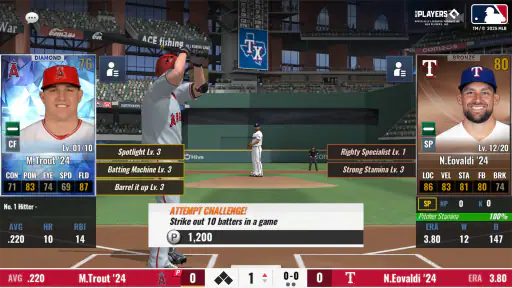
Analysis by Reviewed
I like baseball games most when the small decisions feel meaningful, not just the final score. MLB 9 Innings 25 is a mobile sports game from Com2uS that aims for a mix of on-field action and team management. It has a lot to explore, though its menus and progression can take patience if you are new to this kind of baseball game. The main question I would ask before installing it is whether you want a baseball game to occupy your attention between matches, not only during them.
Where getting started can feel confusing
The first hurdle is not necessarily batting or pitching; it is learning how the different parts of the game fit together. Team management, matches, events, and community options all compete for attention. I suggest starting with one mode and getting comfortable with its rhythm before trying to keep up with everything at once. That makes the experience easier to read and helps you decide which activities you actually enjoy.
It is also worth setting expectations about the pace. MLB 9 Innings 25 is free to play, but it includes in-app purchases ranging from $0.99 to $129.99 per item. You can begin without paying, while optional purchases may appeal to players who want to spend. I would treat spending as a personal choice rather than a requirement, and avoid buying anything until you understand what it changes for your own progress.
One useful way to keep the opening hours manageable is to separate learning the match flow from learning team management. If you try to understand every menu while also making lineup changes and reacting to a game, it is easy to lose track of what you were trying to accomplish. I would first play enough to get a feel for the baseball decisions, then explore the management screens when there is no match demanding your attention. That small change in order makes the game feel less like a checklist.
Simple setup checks and a steadier routine
Before settling in for a longer session, make sure the game is updated to version 10.0.4 and that your device meets the minimum requirement of Android 7.0 if you are playing on Android. The game is rated Everyone, but its baseball management and many available options are best suited to players who enjoy taking time to learn a sports simulation rather than expecting a very simple arcade match.
For a practical routine, I would check the team and lineup before starting a match, then focus on one objective at a time. If a screen seems busy, pause and read the labels instead of tapping through quickly; management choices can matter as much as what happens during play. That habit is especially useful when returning after a break, since it helps you reorient yourself without making rushed changes.
If you are deciding whether to install it on a phone you use for quick breaks, think about how you like to play sports games. This is a better fit when you can give a session enough attention to make sense of the menus and match choices. A reliable connection is also a sensible basic check before using online or community options; if those screens behave differently from ordinary play, check your connection before assuming your team or game state is the problem.
More From Our News Desk

Weather by Xiaomi Review: Clear at a Glance, Less Clear Up Close

X Under Pressure: Can It Recover When Posting Goes Wrong?

Clash of Clans Is Won Between the Battles

Android Auto Makes the Case for Quieter Car Software

MobiOffice: Transforming Mobile Productivity with Seamless Integration

EA SPORTS FC™ Mobile Soccer: Redefining Mobile Sports Gaming
Gameplay and Features
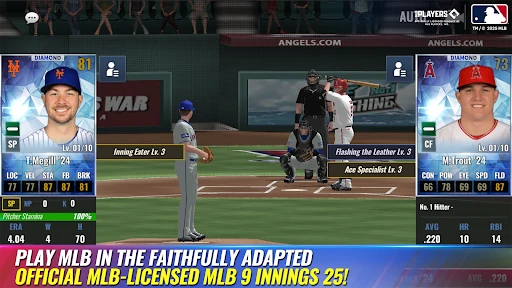
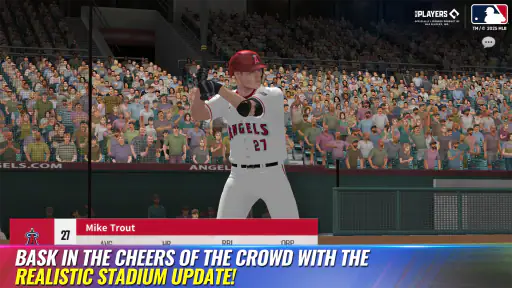
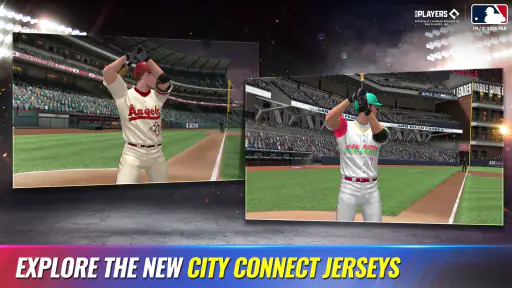
The first thing you'll notice about MLB 9 Innings 24 is its graphics. The player models and uniform details help give matches a recognizable baseball look. I would not choose it solely for visual spectacle, though: the stronger reason to stay is having a baseball setting where playing and managing a team sit alongside each other.
One of the standout features is the broad roster of players, with current players and updated stats. The game also offers modes such as League Mode, Live Battle, and Club Mode. Each gives you a different way to engage with the game, so it is worth trying them gradually rather than assuming you need to divide your time evenly among all of them.
User Interface and Controls
The user interface is generally straightforward to navigate, but the number of menus can make it feel dense when you are new. During a match, responsive controls matter because baseball decisions happen in sequence; away from the field, the challenge is more about slowing down enough to understand what each option is for. I would take a moment to read a screen before confirming a choice, especially when a change could affect the lineup you plan to use.
The strategic side is what gives those menus a purpose. You can manage your lineup and make in-game decisions, so the experience is not limited to batting or pitching inputs. A helpful habit is to change one roster choice at a time and see how it feels across later matches. That gives you a clearer sense of cause and effect than making several adjustments at once and then trying to guess which one mattered.
Community and Updates
Club and community options give players another reason to return, particularly if they enjoy comparing progress or taking part in activities beyond a solo match. I see that as an optional layer rather than the main attraction: someone who prefers a private, self-paced baseball game can focus on the modes they like, while a more social player has another part of the experience to explore.
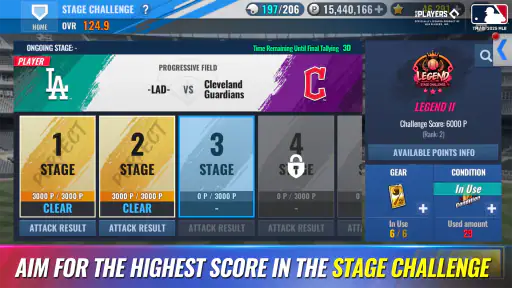
Events and challenges can also give a session a specific purpose. Instead of opening the game without a plan and tapping through every available screen, I would pick one activity that sounds worthwhile and make that the focus. This is a practical way to keep the game from turning into a long list of things to claim or check, and it helps you decide which recurring activities genuinely add to your enjoyment.
Choosing the right way to play
Compared with a quick arcade baseball game, this one puts more emphasis on roster choices, match decisions, and returning to different activities. That extra layer is the appeal if you like building a team over time; it is also the trade-off if you only want a short, uncomplicated hit of baseball. I would recommend it to fans who enjoy following player stats and thinking about a lineup, while someone who dislikes menus or long-term progression may be happier with a simpler sports game.
A realistic use case is a short session during a commute or break: check the lineup, play a match, and leave deeper team decisions for a quieter moment. I find that splitting those tasks works better than trying to manage everything in one sitting. It also gives you a useful way to judge whether the strategic side is fun for you or feels like homework.
It can work well as a game you return to in small windows, but I would not treat every spare minute as an invitation to clear every activity. A better routine is to decide in advance whether you want a match, a team-management session, or a social activity. That keeps the experience focused and makes it easier to stop when you have had enough. If you want a game that is instantly understandable with no attention required between plays, a simpler arcade alternative is likely a better match.
When a session does not go to plan
If the game feels slow or a screen does not respond as expected, I would first check the basics: close and reopen it, confirm it is up to date, and make sure the device has a stable connection when using online or community features. If the issue persists, restarting the device is a sensible next step. These checks cannot solve every problem, but they help distinguish a temporary hiccup from frustration with the game’s pace or interface.
When coming back after a break, avoid trying to reconstruct every decision at once. Check the lineup, identify the mode you want to play, and make only the changes that seem necessary for that session. If you have forgotten why a setting or roster choice was made, leaving it alone until you understand its role is safer than making several guesses. This is a simple recovery workflow, but it prevents confusion from turning into a chain of unnecessary adjustments.
When the app may not be the cause
Not every difficult match means something is wrong with the app. Baseball outcomes can be uneven, and a lineup decision that looks sensible may not pay off immediately. I recommend changing one thing at a time and watching how it affects your next games rather than repeatedly reshuffling the team. That makes it easier to learn what is helping and keeps the management side from becoming guesswork.
Likewise, if an online or community screen is slow, first consider whether the connection is stable and whether other online activity on your device is behaving normally. A temporary connection issue can resemble a game problem. If ordinary match play works but a connected feature does not, that difference is useful when deciding what to check next. Restarting the game and device is a reasonable basic step, but repeated reinstalls or rapid-fire taps are not a good first response to a brief slowdown.
Who will get the most from it
The game has a 4.4 average from around 237,000 ratings, and it has been installed over 10 million times. Those figures suggest a broad audience, but the best fit is more specific: people who like baseball, team-building decisions, and a game they can revisit. It is less suited to players who want a purely action-focused experience, or who would rather avoid optional purchases altogether.
For a new player, I would judge the fit by trying a few different parts of the game rather than deciding from one match alone. Notice whether you enjoy preparing a lineup, whether the menus make sense after a little time, and whether you want to return for another session. If the preparation is part of the fun, the game’s extra layers are a strength. If it feels like work you must do before reaching the baseball, that is a good reason to choose a simpler alternative instead.
MLB 9 Innings 25 first released on October 12, 2016, and its current version is 10.0.4. Com2uS has built a substantial baseball experience with both match play and management to explore, but its many choices can feel busy at first. My practical advice is to begin with the mode you enjoy most, take time over roster decisions, and avoid spending until you know what you value. If that balance sounds appealing, it is worth trying; if you want a straightforward arcade game, I would look elsewhere.
Community and Updates
Another great aspect of MLB 9 Innings 24 is its active community. Whether you're looking to join a club or participate in league discussions, there's always something happening. The developers frequently update the game with new events, players, and features, ensuring that the game stays fresh and exciting.
Moreover, the game offers various events and challenges that keep players coming back. These events not only provide entertainment but also offer a chance to earn rewards that can enhance your team.
In conclusion, MLB 9 Innings 24 is a comprehensive baseball simulation that offers plenty for fans who enjoy matches alongside team decisions. Its graphics, multiple modes, and community options give it more breadth than a quick arcade game, though that breadth comes with menus and a learning curve. Whether you are a longtime baseball fan or simply curious about a more involved mobile sports game, I would give it a try if you are comfortable learning at your own pace. Grab a short session, explore one mode, and see whether the strategy makes you want to come back.
MLB 9 Innings 25 Frequently Asked Questions
Can I play MLB 9 Innings 25 on both Android and iOS?
MLB 9 Innings 25 is a mobile baseball game, so it is intended for play on a phone or tablet. The Android version requires Android 7.0 or later. Before downloading, check that your device meets the relevant platform’s requirements and has enough available storage for the game. This helps avoid installation problems and makes it easier to enjoy the game on your device.
What kind of game is MLB 9 Innings 25?
MLB 9 Innings 25 is a sports game built around baseball. Its short description is simply “MLB 9 Innings,” while the game’s central appeal is experiencing the thrill of baseball on a mobile device. It may be a good fit if you enjoy baseball-themed games, whether you follow the sport closely or are looking for a mobile sports game to explore.
Is MLB 9 Innings 25 suitable for someone new to baseball games?
MLB 9 Innings 25 is a baseball game for mobile, so it may appeal to both baseball fans and players curious about the sport. Its focus is on experiencing the thrill of baseball through a game on your phone or tablet. The content rating is Everyone, making it suitable for a broad audience, though players who are new to the genre may want to take time to get familiar with its gameplay.
What is MLB 9 Innings 24?
MLB 9 Innings 24 is a mobile baseball simulation game that allows players to experience the thrill of Major League Baseball on their devices. Featuring realistic graphics and gameplay, players can manage their own teams, participate in seasons, and compete with others worldwide. The game includes updated rosters and stadiums from the 2024 MLB season, making it an ideal choice for baseball enthusiasts.
Is MLB 9 Innings 24 free to play?
Yes, MLB 9 Innings 24 is free to download and play on both Android and iOS platforms. However, it does offer in-app purchases that allow players to enhance their gaming experience by acquiring new players, stadiums, or other premium features. These purchases are optional, and players can enjoy the core game without spending any money.
Pros
- Realistic gameplay experience
- Regular updates with new features
- Extensive player database
- Engaging multiplayer mode
- High-quality graphics
Cons
- In-app purchases can be pricey
- Requires internet connection
- Occasional bugs and glitches
- Limited offline content
- Can be challenging for beginners
- Category
- Sports
- Version
- 10.0.4