Gacha Story - VN Creator
- 360.00
- 2.8
- Installs
- 1.00M
- Price
- Free

Screenshots
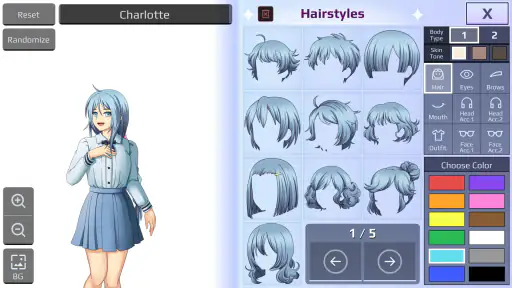
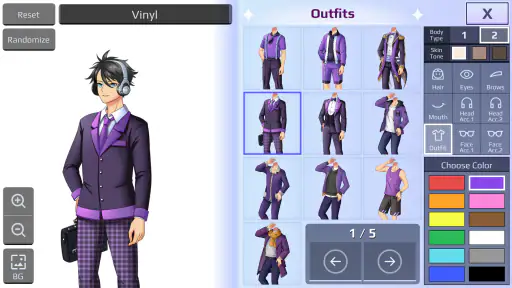
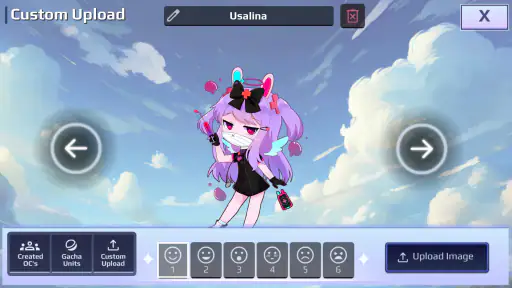
Analysis by Reviewed
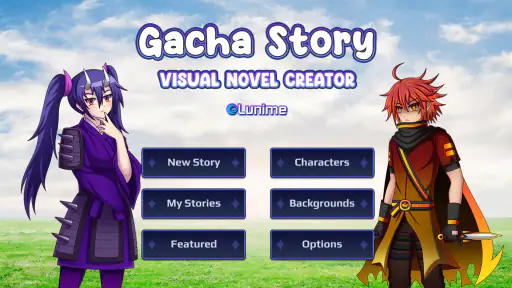
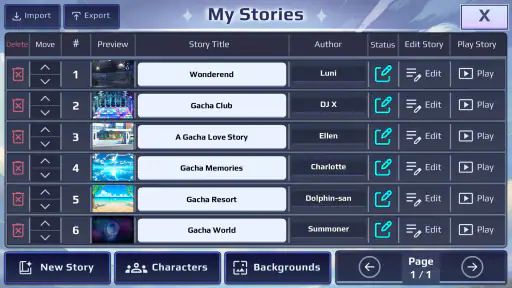
I approached Gacha Story less like a conventional role-playing game and more like a small storytelling workshop built around Gacha-style characters. Its central idea is simple: create visual novels, arrange scenes, and share the finished stories with friends. That focus makes it interesting for players who enjoy character creation and dramatic dialogue more than battles, exploration, or competitive progression.
In my experience, the appeal is not about reaching an impressive final score. It comes from turning a cast of customized characters into a short scene with a beginning, a conflict, and a payoff. That sounds modest, but it changes how I use the app. Instead of asking what reward I can unlock next, I ask what kind of scene I can make with the characters I have imagined.
The game is developed by Lunime and is available free of charge. It belongs to the role-playing category, although its role-playing side is expressed through character-driven storytelling rather than the usual combat loop. It is rated for Everyone, which makes the basic concept approachable for younger players as well as adults who enjoy casual creative tools.
Gacha Story - VN Creator review
I look at Gacha Story - VN Creator as a game whose early goals come from choosing a cast and giving its characters a reason to meet, rather than chasing combat rewards. That creative starting point can make a short session feel productive, especially if I begin with one clear scene instead of a sprawling plot. The next section considers what makes progress feel visible when the payoff is a story taking shape.
The creative capability that defines the experience
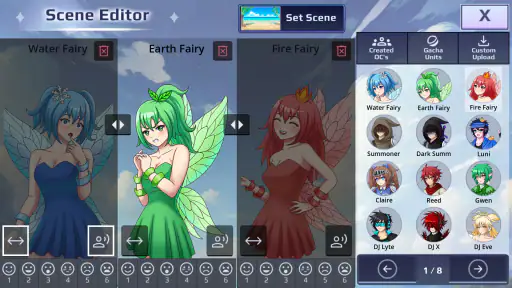
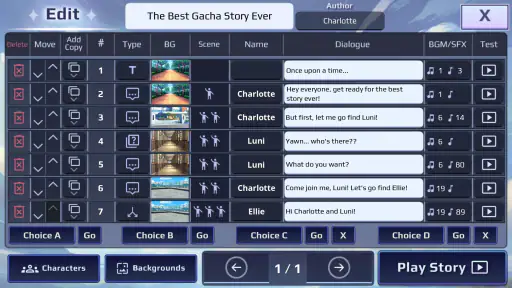
The most important capability here is the visual-novel creator. The character creator matters because it gives the scenes a cast, but the real value appears when those characters are placed into a sequence and given a reason to speak. A character design by itself is only a portrait. A sequence of portraits, dialogue, reactions, and scene changes can become a story someone else can follow.
That distinction is worth keeping in mind before installing it. If I wanted a traditional role-playing game with quests, equipment, combat, and a long progression system, this would not be my first choice. The experience is closer to directing a miniature interactive comic. I decide who appears, what happens between them, and how the reader is meant to understand the moment.
The creator also encourages a different kind of patience. A quick scene can be entertaining, but the strongest results usually come from thinking about pacing. A character should not reveal everything immediately. A reaction can sometimes communicate more than another line of dialogue. Even within a simple visual-novel format, the order of scenes affects whether a joke lands, whether a conflict feels believable, and whether the ending feels earned.
More From Our News Desk

Weather by Xiaomi Review: Clear at a Glance, Less Clear Up Close

X Under Pressure: Can It Recover When Posting Goes Wrong?

Clash of Clans Is Won Between the Battles

Android Auto Makes the Case for Quieter Car Software

MobiOffice: Transforming Mobile Productivity with Seamless Integration

EA SPORTS FC™ Mobile Soccer: Redefining Mobile Sports Gaming
The real strength is the move from character collection to character expression. Many Gacha-based experiences are satisfying because they let players assemble appealing designs. This one gives those designs a purpose. I can make a shy character avoid a conversation, place a more confident character in control of the scene, and use the contrast to create tension without needing an elaborate game system.
How I use the creator in practice
I find it easiest to begin with a very small idea rather than trying to plan a complete series. For example, I might start with two characters who need to settle a misunderstanding. That gives the first scene a clear job: introduce the problem. The next scene can reveal why each character sees the situation differently. A final scene can resolve the disagreement or deliberately leave it open.
This approach prevents the creator from becoming a collection of disconnected poses and lines. When I start by choosing dozens of characters, the project can lose direction. When I begin with one conflict, every design choice has a purpose. The clothing, expressions, character placement, and dialogue all support the same moment.
A useful workflow is to create the cast before polishing the script. I first decide what each character should communicate at a glance. One might look serious, another nervous, and another playful. Then I write dialogue that matches those impressions while allowing room for surprise. If every character speaks in the same tone, the scene feels flat even when the designs are attractive.
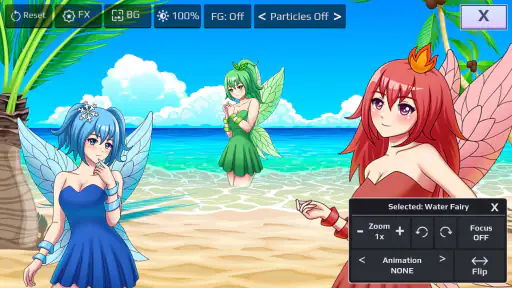
I also recommend treating each scene like a panel in a comic rather than like a paragraph in a novel. Visual changes carry weight. Moving a character closer can make a conversation feel more personal. Keeping characters apart can make the same words sound hostile or uncomfortable. This is one of the less obvious lessons of the app: the arrangement of the cast can change the meaning of otherwise ordinary dialogue.
For a first project, I would keep the cast small and the ending visible from the start. That does not mean the story has to be predictable. It simply gives the project a shape. A short, finished scene is more satisfying than a huge unfinished story with many characters who never receive a meaningful role.
A realistic everyday use case
Imagine having a short break after school or work and wanting something more creative than scrolling through videos. I could open the app, take two characters I already designed, and build a scene around a missed message or an awkward meeting. I would not need to commit to a long play session. The task could be as small as arranging the setup and writing the first exchange, then returning later to complete the ending.
That makes the game suitable for casual creative sessions. It can also work as a shared activity between friends. One person can suggest the characters and conflict, while another writes the dialogue or decides how the scene should end. Since the purpose is to share stories, the result becomes a conversation starter rather than something that stays private on one device.
For younger users, the visual format may feel more approachable than writing a story from a blank page. Characters provide an immediate starting point, and the scene-based format breaks a large creative task into smaller decisions. Adults can use the same structure for comedy, fan-inspired original characters, short drama, or simple experiments with dialogue.
There is also a practical benefit for anyone who struggles with the first sentence of a story. A character standing in a setting creates an immediate prompt: why are they there, what do they want, and what prevents them from getting it? The app does not replace imagination, but it lowers the effort needed to begin.
Sharing changes how I judge a finished story
The sharing element affects the creative process even before a story is complete. When I know another person may read the result, I pay more attention to clarity. A private scene can rely on information I already understand, but a shared visual novel needs to make its relationships and conflict readable to someone who was not present during its creation.
I would therefore test a story by showing it to a friend without explaining the backstory first. If the friend cannot tell who wants what, the scene probably needs clearer dialogue or stronger visual cues. This is a valuable habit because creators often fill gaps in their own work with information that exists only in their heads.
Sharing is most effective when the story is short enough to finish in one sitting. A compact scene gives friends something concrete to react to. It is easier to ask whether the ending worked, whether a character felt believable, or whether a joke was understandable when the project has a defined boundary.
There is a trade-off here. A tool built for quick sharing may encourage creators to focus on immediately recognizable moments instead of slower, more complex storytelling. That is not necessarily a flaw, but it means I would not judge it by the standards of a full writing program. Its strength is making a visual scene easy to assemble and pass around, not replacing every part of a longer creative workflow.
Where the experience becomes frustrating
The same simplicity that makes the idea approachable can limit users who want deep control. A visual-novel creator depends heavily on the options available for characters, scenes, expressions, dialogue, and presentation. If I have a very specific story in mind, I may need to adapt the story to the available tools instead of reproducing every detail exactly.
That limitation is especially noticeable when a scene requires subtle emotion. A broad happy or angry expression is easy to understand, but quiet emotions such as hesitation, embarrassment, or guarded trust can be harder to communicate through a small set of visual choices. In those situations, the writing has to do more work, and the pacing must be carefully arranged.
Another possible friction point is project discipline. Creative apps can feel exciting at the beginning because every new character suggests another story. Without a clear plan, I can spend more time adjusting appearances than building a narrative. My solution is to set a rule for myself: once the cast communicates its basic roles, I move to the scene instead of endlessly refining designs.
The average rating sits at 2.8 from around 4.7 thousand ratings, with roughly 360 written reviews. I would read that as a reason to keep expectations measured rather than as an automatic rejection. The concept is distinctive, but creative tools are judged very personally. Someone looking for a polished traditional game may be disappointed, while someone seeking a simple way to stage original characters may find the same design refreshing.
The game has passed one million installs, so it is not an obscure experiment with no audience. Still, popularity does not remove the need to decide whether the format suits me. A large community can make sharing more appealing, but the individual value depends on whether I enjoy writing, arranging scenes, and revising small details.
How it compares with familiar alternatives
Compared with a standard role-playing game, this experience trades progression for authorship. In a conventional RPG, the game tells me what objectives to pursue and measures success through battles, levels, equipment, or completed quests. Here, the satisfaction comes from deciding what should happen and presenting it clearly.
Compared with a conventional visual-novel reader, it gives me more control over the content but less of the ready-made polish that comes from a professionally authored story. A finished visual novel can deliver carefully paced writing, music, and dramatic structure without asking the player to build anything. This app asks me to contribute the creative direction, so the result depends more on my effort.
It also differs from a general writing app. A blank document offers enormous freedom, but that freedom can be intimidating. Gacha Story provides a visual starting point, which is useful when I want to see the characters immediately. The compromise is that the story remains tied to a character-and-scene presentation rather than the broader formatting options of a dedicated writing tool.
For someone who mainly wants to design avatars, a character-focused Gacha title may provide a more direct experience. For someone who wants to turn those avatars into short narratives and share them, this creator has the more relevant purpose. The choice depends on whether the story is the destination or merely an excuse to make attractive characters.
Tips for getting better results without overworking a project
I would use a three-pass method. In the first pass, I would build only the essential cast and place them into a beginning, middle, and ending. In the second, I would revise the dialogue so every line either reveals character, changes the situation, or prepares the next beat. In the third, I would adjust expressions and positions to reinforce what the dialogue is doing.
This order matters. Polishing visuals before fixing the story can make a weak scene look busy without making it more engaging. A strong line of dialogue can survive a simple presentation, while an unclear scene remains unclear even when every character is carefully arranged.
I would also give each character a private objective. The scene becomes more interesting when two characters are not merely exchanging information but trying to achieve different things. One may want an apology, another may want to avoid responsibility, and a third may want to keep the peace. Those competing goals create movement without requiring combat or complicated mechanics.
For sharing, I would add a clear opening line and avoid relying on an explanation outside the story. Friends should understand the basic situation from the scene itself. If context is necessary, it can be introduced through a brief opening exchange rather than a long block of exposition.
Finally, I would save alternate endings when a decision could reasonably go in two directions. A humorous ending and a serious ending can reveal different sides of the same characters. This is a practical way to get more creative value from one setup without simply making the story longer.
Who will gain the most from this game
I think the best audience is made up of players who already enjoy Gacha character design and want a reason to use those characters in a narrative. It is also a good fit for beginners who want to experiment with visual storytelling without starting with a completely empty page.
It may appeal to friends who like collaborative prompts, younger creators who prefer visual tools, and casual writers who want to practice dialogue in small pieces. Teachers, parents, or group leaders could also use the format as a light storytelling exercise, provided they guide the subject matter and sharing habits appropriately.
I would be more cautious about recommending it to players who want a lengthy campaign, deep role-playing systems, or a professionally written story ready to consume. It is not the right choice for someone who dislikes making creative decisions or who expects the game to provide constant rewards and direction. Those users will probably have a better time with a conventional RPG or a finished visual novel.
The age rating of Everyone makes the basic presentation accessible, but I would still encourage younger users to share creations thoughtfully and to involve a trusted adult when using any social or sharing feature. The creative format may be suitable for a broad audience, while the way people interact around shared content still deserves ordinary care.
Device details and overall value
The game was released on April 14, 2025, and the current version is 1.0.5. It requires Android 7.0 or later, which means owners of many older compatible devices can at least consider trying it without needing a recent operating system. Since it is free, the main investment is time: learning the creator, shaping a scene, and deciding whether the available control feels satisfying.
My recommendation is conditional but positive. I would install it if I wanted a lightweight way to turn Gacha characters into short visual stories, especially if I had friends who would actually read and react to them. I would skip it if my idea of role-playing requires combat, exploration, or a long progression path.
What makes the app worth attention is not the promise of endless content. It is the small shift from looking at characters to giving them a situation. Once I treat each project as a compact scene rather than an enormous game, the creator becomes easier to enjoy and easier to finish.
In the end, Lunime’s game works best as a focused creative playground. It rewards a little planning, benefits from sharing, and asks me to supply the imagination that a traditional game would normally provide. If you want to make short visual stories instead of simply playing through someone else’s, this is a worthwhile free experiment.
Gacha Story - VN Creator Frequently Asked Questions
What devices can run Gacha Story - VN Creator?
Gacha Story - VN Creator is available for Android devices running Android 7.0 or later. Before downloading, check that your device meets this minimum requirement and has enough available storage for the game and its resources. Keeping your operating system updated can also help with compatibility, though the experience may vary between devices.
Who developed Gacha Story - VN Creator, and what kind of game is it?
Gacha Story - VN Creator is a role-playing game developed by Lunime. Its focus is on creating visual-novel-style stories, bringing together character customization and storytelling rather than centering solely on traditional action gameplay. If you enjoy Gacha-style characters and making your own fictional scenes, its creative premise may be a good fit.
What is Gacha Story - VN Creator?
Gacha Story - VN Creator is a creative storytelling app that lets users build visual-novel-style stories with customizable characters, scenes, dialogue, and plot events. It is aimed at people who enjoy Gacha-style character design and interactive fiction. You can use the available customization tools to create original episodes, role-play scenarios, or dramatic stories without needing professional animation or game-development experience.
Can I create my own characters and stories in Gacha Story - VN Creator?
Yes. The main appeal of Gacha Story - VN Creator is its character and story-creation system. You can generally customize character appearances, outfits, poses, expressions, and relationships, then place them into scenes with dialogue and narrative choices. The available options may depend on the version of the app, but it is designed to help beginners produce personalized visual stories using simple, accessible controls.
Is Gacha Story - VN Creator free to download and use?
Gacha Story - VN Creator is free to download. The game is intended to let users create visual novels and share them with friends. As with any app, review the purchase information and device prompts before confirming actions, particularly if children may use the device. Its free price makes it easy to try the creative tools, while the overall experience can be judged by exploring the game after installation.
Pros
- Simple tools make creating short visual novels approachable for beginners.
- Character and scene customization supports a wide range of story ideas.
- Dialogue-focused format works well for interactive
- choice-based storytelling.
- Offline creation is useful when you want to work without a constant connection.
- Sharing finished stories can make the app more engaging for creative communities.
Cons
- Advanced creators may find the editing and branching options too limited.
- Some assets or customization choices may require in-app purchases.
- Large projects can become difficult to organize as scenes and characters grow.
- The visual style may feel repetitive if you want highly realistic graphics.
- Performance can vary on older devices
- especially with complex scenes.
- Category
- Role Playing
- Version
- 1.0.5