Disney Speedstorm
- 1.63K
- 4.2
- Installs
- 5.00M
- Price
- Free

Screenshots
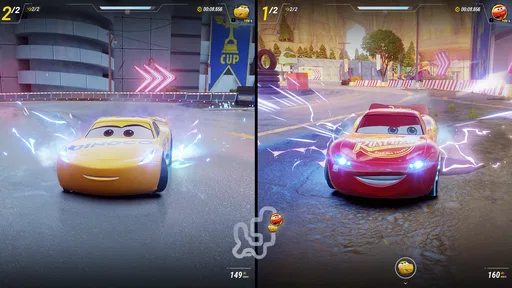
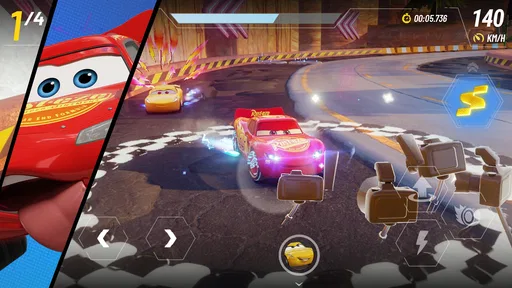
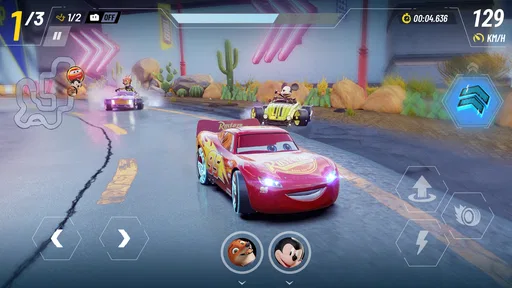
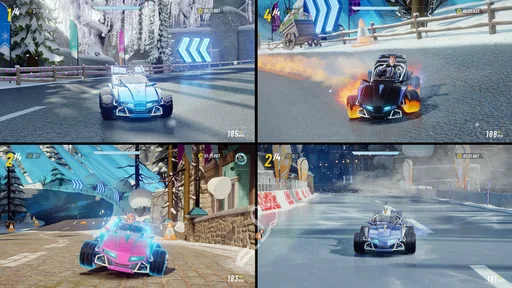
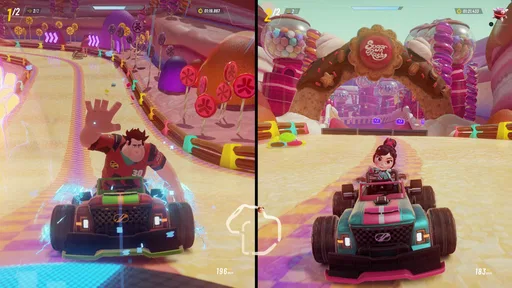
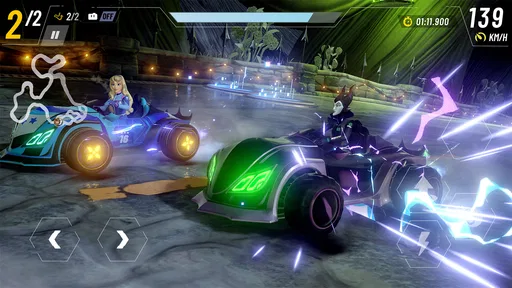
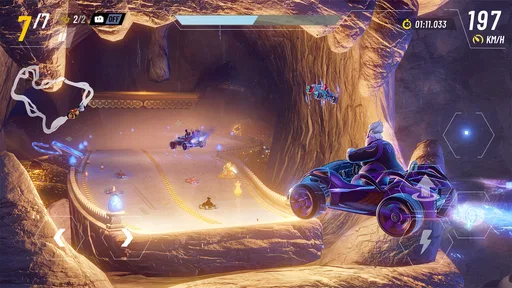
Analysis by Reviewed
I usually judge a racing game by what happens after the first flashy lap: does it give me a reason to learn its courses, and can I enjoy a short session without turning every race into a chore? Disney Speedstorm has a strong cast and colorful tracks, but its best moments come when I treat it as an arcade racer to practice rather than just a Disney-themed tour. It’s a free racing game from Gameloft SE, and that combination makes it easy to try if you want quick competition wrapped in familiar worlds.
A Good Fit for Short, Focused Sessions
The game works best for me when I approach each visit with one small goal: learn a bend, test a route, or get used to a racer’s ability. That makes it easier to enjoy even when I don’t have time to chase a long-term target. If I open it during a short break, I can concentrate on one practical improvement rather than expecting every race to deliver a new surprise.
That focused approach is also useful if you’re playing with a younger family member. The controls are easy to pick up, while the themed racers and courses give you things to talk about beyond who finished first. I’d still agree on spending expectations beforehand, since optional purchases are part of the game. For a household looking for a relaxed shared activity, that small conversation can keep the attention on racing rather than purchases.
How It Sits Beside Other Racers
Compared with a mobile racer built around realistic cars and careful handling, this is a more playful choice. Its appeal comes from recognizable Disney and Pixar characters, energetic presentation, and abilities that make racer selection part of the decision. That is a meaningful difference, not just a coat of themed paint: if character identity is what makes a race inviting, it has an advantage over a generic track-focused alternative.
The trade-off is that players who want a pure driving test may find the character and progression layers distracting. I’d choose a simulation-focused game when I want realistic vehicle behavior, and a simpler arcade racer when I want to jump straight into uncomplicated laps. Here, I’m more likely to enjoy myself if I’m willing to learn the tracks and engage with the roster as well as the steering.
Revving Up the Engines
From the moment I launched Disney Speedstorm, I was greeted with vibrant graphics that truly captured the magic of Disney. The game wastes no time in thrusting you into the action, offering a tutorial that’s both informative and fun. It’s designed to get you up to speed quickly, so you can join the race without any hiccups. The controls are intuitive, making it easy for both seasoned gamers and newcomers to enjoy the ride.
Finding a Repeatable Rhythm
For everyday play, I’d keep the first few races focused on learning the course rather than chasing a perfect result. Notice where a turn begins, which obstacles interrupt your line, and whether a shortcut is safe to take at your current speed. That small routine pays off: knowing when to steer and when to commit to a route is more useful than making frantic corrections at the last second. It also makes a brief session feel satisfying, even if I only have time for a couple of races.
More From Our News Desk

 Instagram
Instagram’s Power Comes From Its Place in Your Phone
A close look at how Instagram turns Meta’s reach, recommendation systems and everyday camera habits into durable platform power—and what that costs users.

 Gmail
GmailGmail in a Busy Inbox: Who Benefits Most?
From first account to crowded workday, Gmail earns its place through dependable search and flexible sorting—but its best fit depends on how much inbox maintenance you can tolerate.

 Prime Video
Switching to Prime Video: What Changes in Your Viewing Routine
Prime Video can make a compelling second home for streaming, but switching means learning a different catalog, rental layer, and route from browsing to playback.

 Universal TV Remote Control
Universal TV Remote Control Works Best as a Reliable Backup
A phone remote earns its place through quick setup and reliable habits. Here is how to get more from Universal TV Remote Control—and where its limits show.

 Weather - By Xiaomi
Weather by Xiaomi Review: Clear at a Glance, Less Clear Up Close
Xiaomi’s weather app makes everyday forecasts quick to scan, but its calm surface can leave useful details and recovery paths harder to find than they should be.

 X
XX Under Pressure: Can It Recover When Posting Goes Wrong?
A resilience-focused review of X, examining setup, mistaken posts, interruptions, weak connections, and the gaps that matter when recovery needs to be dependable.
Latest News



Before settling into longer sessions, I’d check the control and gameplay settings and choose the arrangement that feels comfortable on my device. I wouldn’t assume one setup suits everyone: a newcomer may prefer a forgiving, easy-to-read control style, while someone who enjoys making precise steering decisions may want more direct input. The practical tip is to change one setting at a time and run a familiar course again. That way, I can tell whether the adjustment actually helps instead of blaming a bad finish on several changes at once.
Characters and Tracks
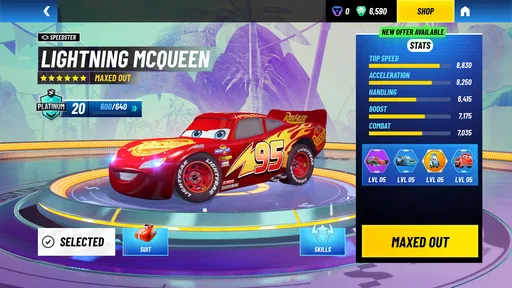
One of the standout features of Disney Speedstorm is its diverse roster of characters. Whether you’re a fan of Mickey, Sulley, or Jack Sparrow, there’s a character for everyone. Each character comes with unique abilities that can give you an edge on the track. As I raced through the enchanting settings, from the streets of Agrabah to the depths of Atlantica, I couldn’t help but feel a sense of nostalgia coupled with adrenaline.
The tracks are not only visually stunning but also cleverly designed. They offer a mix of challenges and shortcuts that keep you on your toes. It’s not just about speed; strategy plays a crucial role in ensuring your victory. Dodging obstacles, collecting power-ups, and making split-second decisions are all part of the fun.
Shortcuts, Practice, and Progress
A shortcut is only useful when I can reach it without losing control or colliding with an obstacle, so I treat unfamiliar routes as experiments rather than automatic wins. On a first pass, I focus on spotting the entrance; on the next, I try to approach it with a steadier line. This repeatable habit helps me learn the course without needing to memorize every detail at once. It also prevents a common arcade-racing mistake: taking a risky detour simply because it looks shorter.
When deciding which racer to use, I’d pick one I enjoy and get comfortable with its abilities before swapping constantly. Character-specific advantages can matter, but frequent changes make it harder to understand whether a result came from my route choices or a different racer. If I’m struggling, I’d first work on cleaner turns and obstacle awareness, then consider whether a character choice or upgrade is holding me back.
Customization and Upgrades
Customization is another aspect where this game shines. You can personalize your kart and character outfits, which adds a personal touch to the game. The upgrade system is well-balanced, allowing you to enhance your kart’s performance without feeling overwhelmed by options. As I progressed, I found myself eagerly collecting resources to unlock new upgrades and skins.
There is a trade-off to that progression, though: unlocking and improving things takes attention, and players who want every option immediately may find that less appealing. I’d focus upgrades on the racer I actually use rather than spreading resources across a large roster before I know my preferences. The game is free to start, but it includes in-app purchases priced from $0.99 to $99.99 per item, so I’d decide on a spending limit before browsing optional purchases. That keeps the fun centered on racing instead of turning each session into a shopping decision.
Multiplayer Mayhem
What’s a racing game without some friendly competition? Disney Speedstorm offers a robust multiplayer mode where you can race against friends or players from around the globe. The matchmaking is smooth, and the races are exhilarating. It’s a perfect way to test your skills and see how you stack up against others. Plus, the regular updates and events keep the game fresh and exciting.
Online races are most rewarding when I treat them as a chance to practice under pressure, not as the only measure of whether I’m improving. A crowded race can make a shortcut harder to judge, so I’d rather learn its approach in a less stressful run first. Once I know where the entrance sits and how the turn feels, I can decide whether the risk is worthwhile when other racers are nearby. This keeps a mistake useful: I can identify whether I misjudged the route, steered too late, or simply chose a poor moment to commit.
Who Will Enjoy the Ride?
I’d recommend it to Disney and Pixar fans who like arcade racing, families looking for an accessible game to explore together, and players who enjoy gradually refining their routes. The age rating is Everyone, and the quick-to-grasp controls help make a first race approachable. A realistic use case is a short evening break: I can launch the game, run a couple of races, and spend that time improving one corner or testing a safer shortcut instead of committing to a long play session.
On the other hand, I’d skip it if you dislike progression systems, optional purchases, or competition with other players. It is also not my first choice when I want a simulation racer focused on realistic handling; its appeal is colorful arcade action, not serious driving realism. The Android release requires version 9 or later, and the current version is 1.12.0e, details worth checking before installing. The game is rated 4.6 on average from around 29,000 ratings, with more than a million installs, so it has clearly found an audience without that being a guarantee it will fit your tastes.
One question I’d ask before downloading is whether it costs anything to begin: the game is free, though optional in-app purchases are available. Another is whether it suits a younger player; its Everyone rating makes that a reasonable fit, while household spending preferences are still worth considering. For me, the better question is whether I’ll enjoy repeating races to improve. If I’m happy learning routes and trying different racers, the game has more staying power than a quick nostalgia hit.
Where the Learning Curve Can Bite
The easy-to-grasp controls shouldn’t be confused with an instantly mastered racer. Recognizing a turn is one thing; arriving at it in a useful position while tracking obstacles and a possible shortcut takes practice. I’d give myself a few runs on the same course before deciding that a racer or control arrangement isn’t working. A single poor result can come from an awkward line rather than a problem with the setup.
There’s also a real difference between enjoying the game casually and wanting to keep pace with competitive players. If you only want a quick, relaxed race, the character collection and upgrades may feel like extra bookkeeping. If you enjoy gradual improvement, those systems give you another reason to return. I’d skip it if I know I get frustrated when progress is tied to repeated play or if I don’t want to think about optional spending at all.
Small Habits That Make Progress Clearer
I find it useful to keep a simple mental note after a race: one thing that worked and one thing to try differently. For example, if I reached a shortcut but lost control on the exit, I’d keep the same racer and change only my approach on the next attempt. That makes practice easier to evaluate than changing racer, settings, and route all at once. It’s a low-effort routine, but it turns repetition into a specific experiment.
Another sensible habit is to separate learning a course from judging a character. First, take a familiar racer through the track and pay attention to the layout. Then, once the route feels less surprising, try a different racer and see how its ability changes your choices. This avoids mistaking course unfamiliarity for a weakness in the character, and helps me make more deliberate use of the roster instead of switching just because a race went badly.
What to Expect Before Installing
The game was released on July 11, 2024, and its current version is 1.12.0e. It is free to begin, with optional in-app purchases ranging from $0.99 to $99.99 per item. Those details matter most if you’re deciding whether to try it with a child or prefer games without in-game purchase choices. I’d check the spending controls on the device as well as agree on a budget; that’s a more useful plan than assuming every player will handle purchase prompts the same way.
It has an average rating of 4.6 from around 29,000 ratings, and more than a million installs. I take that as evidence that plenty of people have been willing to try it, not as a substitute for working out whether its particular mix suits me. On Android, it needs version 9 or later. If you’re choosing between this and another racer, I’d base the decision on whether you want Disney and Pixar character abilities and a progression layer, or would rather have realistic driving or a more stripped-down racing loop.
Compared with a conventional kart racer, the familiar characters and themed courses make the game an easy recommendation for someone who wants a recognizable cast alongside the competition. But if what you value most is a clean race with no interest in collecting or upgrading, that same layer can feel like friction. I’d describe it as a better fit for someone who enjoys both racing and gradually getting to know a roster, rather than someone looking only for the shortest route from opening the game to a no-frills lap.
In conclusion, Disney Speedstorm is a delightful blend of nostalgia and modern gaming. It captures the essence of Disney while delivering a thrilling racing experience. Whether you’re a die-hard Disney fan or just someone looking for a fun racing game, this one’s a winner. So buckle up, hit the gas, and immerse yourself in the magical world of Disney Speedstorm.
Disney Speedstorm Frequently Asked Questions
Is Disney Speedstorm suitable for someone who has never played a racing game?
Yes. Disney Speedstorm is an arcade racing game, so its focus is on fast, lively races rather than realistic driving simulation. Its Disney and Pixar characters and familiar worlds give newcomers an inviting starting point, while drifting and dragging add some action to the races. If you enjoy colorful, character-led games, it may be a comfortable way to try mobile racing.
What kind of racing experience does Disney Speedstorm offer?
Disney Speedstorm centers on arcade-style racing with Disney and Pixar characters. The short version is captured in its tagline: drift and drag in a Disney and Pixar arcade racing game. That makes it a good fit for players seeking an energetic, character-focused racing experience rather than a driving simulator. The game is free to download, though optional in-app purchases are available.
Can my phone run Disney Speedstorm?
Disney Speedstorm is a racing game from Gameloft SE, and it is rated for Everyone. On Android, it requires Android 9 or later, so check your device’s operating system before downloading. The game brings together Disney and Pixar characters and fast arcade racing, making it a lively option for players looking for a mobile kart-racing experience.
What is Disney Speedstorm and what platforms is it available on?
Disney Speedstorm is an exhilarating, action-packed racing game featuring iconic Disney and Pixar characters. It offers high-speed kart racing that combines thrilling tracks with beloved characters. The game is available for both Android and iOS platforms, making it accessible for mobile users who enjoy racing games with a touch of Disney magic. Its store tagline sums up the core idea: drift and drag in a Disney and Pixar arcade racing game.
What are the main features of Disney Speedstorm?
Disney Speedstorm boasts a variety of features, including a diverse roster of Disney and Pixar characters to choose from, each with unique abilities. Players can race on a series of visually stunning tracks inspired by Disney and Pixar worlds. The game also offers multiplayer modes, allowing friends to join in on the racing fun. Regular updates ensure new content and challenges keep the gameplay fresh and exciting.
Pros
- High-quality graphics and animation
- Engaging multiplayer mode
- Varied tracks and characters
- Regular events and updates
- Fun for all ages
Cons
- Occasional in-app purchases required
- Requires stable internet connection
- Limited character customization
- Can be challenging for beginners
- Frequent updates needed