

Design Home™: House Makeover
- 203.55K
- 4.3
- Installs
- 50.00M
- Price
- Free

Screenshots




Analysis by Reviewed
I enjoy games that let me make something personal without turning a short break into a complicated project, and interior design is a natural fit for that. Design Home™: House Makeover puts room styling at the center of its simulation gameplay: I choose furnishings and decor, work within a design prompt, and see how my choices come together as a finished space. It is a relaxing creative loop, though its goals and rewards also give me reasons to think carefully about what I use.
Made by Crowdstar Inc, the free game is rated for Everyone and has reached over 50 million installs. Its 4.3 average from around 1.2 million ratings suggests broad appeal, but the experience is most satisfying when you enjoy making visual choices rather than expecting a traditional building simulator. The game has in-app purchases, so it is worth approaching its collection and reward loop with a little patience.
From first room to a personal design rhythm
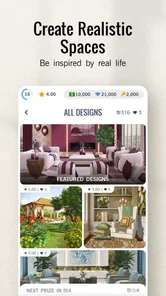
When you first open Design Home™: House Makeover, you're greeted with a sleek and intuitive interface. The app makes it super easy to jump straight into designing. You are presented with a variety of rooms, each with its own unique challenge. From cozy living rooms to luxurious bedrooms, the possibilities are endless. The goal is simple: create the best-looking space using the furniture and decor available to you.
The app offers a vast catalog of real-life furniture and decor from actual brands. This means you can experiment with items you might even consider buying for your own home. The attention to detail in the graphics is impressive, making each piece feel almost tangible.
Early goals: learn the brief before choosing furniture
The useful first habit is to treat every room prompt as a small design brief rather than immediately placing whichever item catches my eye. I look at what the challenge asks for, then decide which pieces can make the room feel coherent while still meeting its requirements. That makes the opening stages feel less like random decorating and more like learning a simple visual language: balance a focal point, avoid crowding the scene, and keep the main choices working together.
This approach also helps when the available catalog feels large. Instead of browsing every option, I narrow the search by the room’s mood and the pieces I already own or can reasonably use. A striking chair can be a good starting point, but it may not rescue a layout if its colors or style fight with everything around it. I get better results by building a small palette first and then filling the space.
Gameplay and Features
Design Home™ isn't just about placing pretty furniture. It encourages strategic thinking. Each design challenge has specific requirements, and you need to meet them to earn points and unlock more items. You'll need to consider the style, budget, and functionality of each room.
More From Our News Desk

 Gmail
GmailGmail in a Busy Inbox: Who Benefits Most?
From first account to crowded workday, Gmail earns its place through dependable search and flexible sorting—but its best fit depends on how much inbox maintenance you can tolerate.

 Prime Video
Switching to Prime Video: What Changes in Your Viewing Routine
Prime Video can make a compelling second home for streaming, but switching means learning a different catalog, rental layer, and route from browsing to playback.

 Universal TV Remote Control
Universal TV Remote Control Works Best as a Reliable Backup
A phone remote earns its place through quick setup and reliable habits. Here is how to get more from Universal TV Remote Control—and where its limits show.

 Weather - By Xiaomi
Weather by Xiaomi Review: Clear at a Glance, Less Clear Up Close
Xiaomi’s weather app makes everyday forecasts quick to scan, but its calm surface can leave useful details and recovery paths harder to find than they should be.

 X
XX Under Pressure: Can It Recover When Posting Goes Wrong?
A resilience-focused review of X, examining setup, mistaken posts, interruptions, weak connections, and the gaps that matter when recovery needs to be dependable.

 Clash of Clans
Clash of Clans Is Won Between the Battles
Its raids are quick; its community is a long-term project of coordination, teaching, rivalry, and shared responsibility—with all the friction that entails.
Latest News



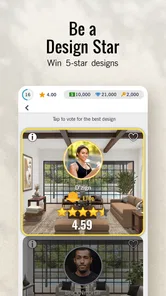
One of the standout features is the voting system. After submitting your design, it's put to a vote by other players. This community involvement adds a competitive edge and encourages you to put your best foot forward.
"Designing a room in Design Home™ feels like solving a beautiful puzzle."
To keep things fresh, the app offers daily challenges and limited-time events. These are perfect opportunities to showcase your skills and earn extra rewards. Plus, there's a leaderboard to see how you stack up against other designers worldwide.
Progress signals: rewards, unlocks, and useful restraint
Progress is easy to understand because the game ties completed designs to rewards and a growing choice of furnishings. The collection gives me a visible reason to return: a new piece can open up a different color scheme or help solve a later brief. Still, having more choices does not automatically make a room better. I try not to spend just because an item is new; I ask whether it fills a gap in my collection or suits a challenge I actually want to tackle.
A practical way to stretch the experience is to save scarce currency for pieces with broad styling uses, rather than spending it on a very specific accent that may only fit one room. When a design can be completed with what I already have, I can use the challenge as a low-pressure experiment. If I am short on a desired item, I can decide whether the reward is worth pursuing instead of treating every prompt as urgent.
Building Your Collection
As you play, you earn diamonds and cash, which are used to purchase more items. While you can buy currency with real money, the game is quite generous with its in-game rewards, allowing you to expand your collection without necessarily spending a dime.
The catalog is continually updated with new items, so there's always something new to try. Whether you're into modern minimalism or classic chic, there's something for everyone.
Difficulty curve: creativity is easier than collection management
The design decisions themselves are approachable, which makes this a comfortable game for someone who has never studied interior design. The tougher part is balancing a prompt with the items and currency currently available. A concept may be clear in my head, yet I may have to adapt it around the furnishings I can access. That limitation can be an invitation to improvise, but it can also make a tightly imagined look frustrating if I am unwilling to compromise.
I find it helps to submit a design that feels consistent rather than chase a perfect room at any cost. The voting element means other players’ tastes influence the outcome, so a result is not a pure measure of design skill. I treat scores as feedback on how a particular arrangement landed with the community, not a reason to copy the most popular look every time.
Social Interaction and Community
One of the coolest aspects of Design Home™ is its social features. You can connect with friends, share your designs, and get inspiration from others. The design community is vibrant and supportive, making it a great place to share creative ideas.
There's also an option to join "Design Councils," which are like clubs where you can collaborate and compete with other players. This adds a layer of camaraderie and competition, making the game even more engaging.
Retention pressure: decide what kind of daily habit you want
Daily challenges and limited-time events create a gentle nudge to check in, but I would not recommend treating every event as a task that must be completed. They work best as fresh prompts when I have a few minutes and feel like decorating. If I am busy, skipping one does not change what makes the core activity enjoyable: making a room that feels considered and seeing how other players respond.
The free entry point makes it easy to try, but purchases can change how quickly a collection grows. The listed in-app items range from $0.99 to $199.99, a broad spread that makes setting a personal spending limit sensible, especially for younger players. Since the age rating is Everyone, I would still use the device’s purchase controls if a child will be playing. Patient players can focus on earned rewards; people who dislike waiting or managing virtual currency may find the progression less comfortable.
Where it fits among design games
Compared with open-ended decorating games, this one gives more structure through room briefs, voting, and unlocks. That structure is helpful when I want a clear prompt rather than a blank canvas. It is less suited to someone who wants to build a house from the ground up, freely reshape architecture, or use a detailed floor-planning tool. For practical home renovation decisions, a measuring or room-planning app is a better companion; this is primarily a visual styling game, not a substitute for checking dimensions or buying advice.
It works especially well as a short evening activity. I might open a challenge after dinner, choose a room direction, compare a handful of pieces, and submit when the arrangement feels balanced. The session has a natural endpoint, so I can enjoy the creative decision-making without needing to commit to a long play session. Anyone who likes color coordination, furniture browsing, and light competition is likely to get more from it than someone who wants action, deep simulation, or complete control over every part of a property.
Technical Performance
On the technical side, the app runs smoothly on both Android and iOS. Load times are quick, and I didn't encounter any crashes during my time with the game. The developers clearly put effort into ensuring a seamless experience, and it shows.
Updates are frequent, addressing any bugs and adding new content, which is always a plus for maintaining player interest. The current version is 1.128.079, and it requires Android 7.0 or later. Those details matter if you are checking compatibility before installing, while the game’s free download gives you a chance to see whether its design loop suits you before deciding how much time or money to put into it.
Progression verdict: best for relaxed, prompt-led styling
Design Home™: House Makeover is more than just a game; it's a creative outlet. Whether you're a seasoned designer or just looking for a fun way to pass the time, this app has something to offer. The combination of stunning visuals, strategic gameplay, and community interaction makes it a standout in the crowded world of mobile games.
My recommendation comes with one condition: enjoy the challenge of making a room work with the options you have, and do not let votes or limited-time prompts turn a hobby into pressure. If you want a polished space to style, a reason to revisit your ideas, and a steady stream of design choices, it is an appealing pick. If you need unrestricted building tools or dislike collection-based progression, another kind of home design app will suit you better.
So, if you're ready to unleash your creativity and dive into the world of interior design, give Design Home™ a try. Who knows, you might just discover a hidden talent for decorating!
Design Home™: House Makeover Frequently Asked Questions
Does Design Home™: House Makeover focus on decorating a single room, or can I work on different spaces?
The game is not limited to one kind of interior. Its central promise is to let you remodel and decorate a dream house, garden, or room, so the experience can appeal whether you enjoy styling a compact space or imagining a broader home makeover. The focus is on arranging virtual spaces with furniture and décor and exploring different looks.
Can I use Design Home™ for real-life decorating inspiration?
It can be an enjoyable source of ideas if you like browsing furniture and décor arrangements. The game presents virtual rooms and design choices, which can help you notice styles or combinations you might want to explore in your own home. Treat the designs as inspiration rather than a substitute for checking real-world dimensions, materials, availability, or practical needs.
What kind of game is Design Home™: House Makeover?
Design Home™: House Makeover is a simulation game for people who enjoy interior design. Its central idea is to become an interior designer and remodel and decorate a dream house, garden, or room. You can arrange virtual spaces with furniture and décor, making the experience a relaxed way to explore different looks and express your design preferences.
What is Design Home™: House Makeover?
Design Home™: House Makeover is a mobile game available on Android and iOS that allows players to experience the world of interior design. Users can decorate virtual spaces with real-life furniture and décor items from various brands. The app provides a platform for creativity and design inspiration, making it ideal for home décor enthusiasts.
Is Design Home™ free to play?
Yes, Design Home™ is free to download and play. However, it offers in-app purchases that can enhance gameplay. These purchases include premium furniture and decorative items, as well as currency for quicker progression. While optional, these purchases can provide a more enriched design experience. In-app purchase amounts range from $0.99 to $199.99 per item, so review purchase choices carefully if you prefer to keep spending under control.
Pros
- User-friendly interface and intuitive controls.
- Extensive variety of decor options available.
- Realistic graphics enhance the design experience.
- Frequent updates with new items and challenges.
- In-game community and social interaction features.
Cons
- In-app purchases can be expensive.
- Energy system limits playtime.
- Requires constant internet connection.
- Some items locked behind payment walls.
- Limited customization for certain areas.










