Dead Trigger 2 FPS Zombie Game
- 142.50K
- 4.5
- Installs
- 100.00M
- Price
- Free
Screenshots
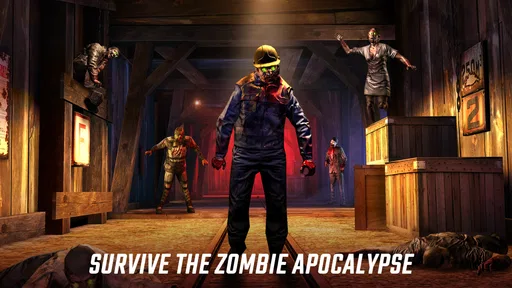
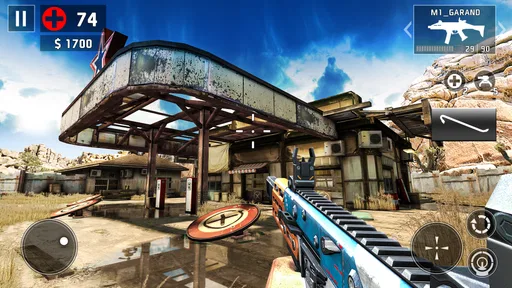
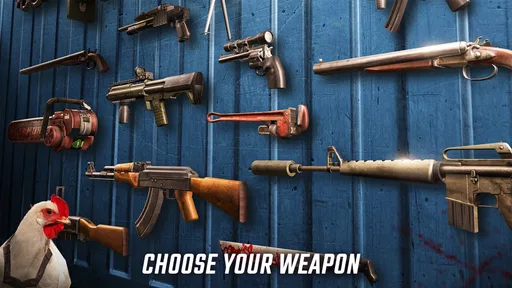
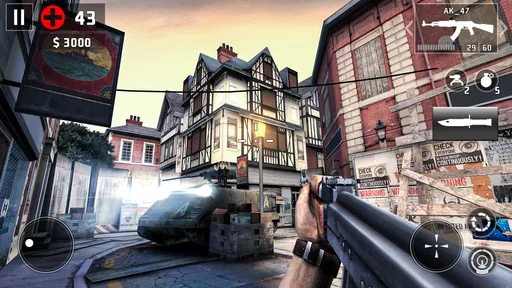
Analysis by Reviewed
I spent time with Dead Trigger 2 as a mobile action shooter, and my first impression was that it still understands what makes a quick zombie game satisfying: clear targets, loud weapons, constant pressure, and missions that are easy to start but harder to finish cleanly. It is free to play, built by Deca_Games, and aimed at mature players, so it is best approached as a fast, violent arcade-style shooter rather than a quiet survival simulator.
The game has the scale of a long-running mobile release rather than a small experiment. It has passed 100 million installs, carries a 4.5 average from around 3.2 million ratings, and remains on version 3.1.5. Those figures do not automatically make it right for everyone, but they do explain why it is still easy to recognize: this is a well-established zombie FPS with a large audience and a familiar pick-up-and-play structure.
How the basic mission loop feels in everyday play
My usual starting point was simple: choose a mission, move through a compact environment, deal with waves or groups of zombies, and keep enough attention for the objective rather than treating every encounter as a reason to fire wildly. That distinction matters. The game looks like a straightforward shooting gallery at first, but careless movement and poor ammunition habits can turn a comfortable run into a messy retreat.
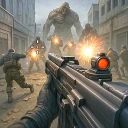
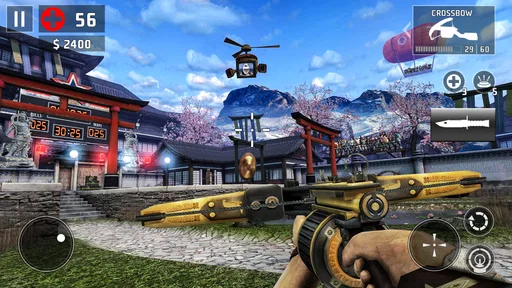
The three-dimensional presentation gives each encounter more shape than a flat target list. Corridors, open areas, corners, and approach routes affect how I positioned myself. I learned to glance ahead before crossing a space, especially when the objective encouraged movement instead of allowing me to stand in one safe spot. A few seconds spent checking the route often saved more health and ammunition than frantic shooting later.
Controls are designed for a touchscreen, so the experience depends heavily on how comfortable you are with mobile aiming. I found that short, deliberate swipes worked better than trying to make large corrections while surrounded. When a zombie is close, centering the view and firing quickly is usually more useful than chasing a perfect headshot. At longer distances, however, slowing down pays off because wasted shots can leave me exposed during the next group.
The basic workflow is therefore easy to learn but worth refining. I enter a mission with one immediate goal in mind, scan the first area, identify where enemies are likely to approach from, and avoid spending my strongest option on the first ordinary target. That habit becomes especially useful when a mission changes pace or introduces a tougher enemy that demands more attention.
Why the first few sessions can feel deceptively easy
Early missions do a good job of teaching the rhythm: move, aim, shoot, reload, and continue. That can create the impression that the entire game is only about holding down the attack button. In my experience, the real test begins when several threats compete for attention or when the environment makes retreat awkward.
More From Our News Desk

 Gmail
GmailGmail in a Busy Inbox: Who Benefits Most?
From first account to crowded workday, Gmail earns its place through dependable search and flexible sorting—but its best fit depends on how much inbox maintenance you can tolerate.

 Prime Video
Switching to Prime Video: What Changes in Your Viewing Routine
Prime Video can make a compelling second home for streaming, but switching means learning a different catalog, rental layer, and route from browsing to playback.

 Universal TV Remote Control
Universal TV Remote Control Works Best as a Reliable Backup
A phone remote earns its place through quick setup and reliable habits. Here is how to get more from Universal TV Remote Control—and where its limits show.

 Weather - By Xiaomi
Weather by Xiaomi Review: Clear at a Glance, Less Clear Up Close
Xiaomi’s weather app makes everyday forecasts quick to scan, but its calm surface can leave useful details and recovery paths harder to find than they should be.

 X
XX Under Pressure: Can It Recover When Posting Goes Wrong?
A resilience-focused review of X, examining setup, mistaken posts, interruptions, weak connections, and the gaps that matter when recovery needs to be dependable.

 Clash of Clans
Clash of Clans Is Won Between the Battles
Its raids are quick; its community is a long-term project of coordination, teaching, rivalry, and shared responsibility—with all the friction that entails.
Latest News



I recommend treating the opening hours as practice for control rather than simply a race through content. Experiment with turning while moving, learn how quickly your chosen weapon handles a close target, and notice how much screen movement is comfortable on your phone. The goal is to build a repeatable motion that still works when the screen becomes busy.
One useful everyday scenario is a short session during a commute break or while waiting for an appointment. I can complete a focused run without needing to settle into a long gaming setup, but I still get enough action to feel that my decisions mattered. The trade-off is that the game’s mature violence and shooting-heavy design may be unsuitable for shared spaces or younger players, even if the session itself is brief.
Settings that deserve attention before serious play
I would not begin by changing everything at once. The most useful approach is to adjust one control or display option, play a few missions, and keep the change only if it makes aiming or movement more natural. Mobile shooters are sensitive to personal habits, so a setting that feels comfortable on one phone may feel too fast or too slow on another.
Start by checking the control layout and sensitivity. If turning feels sluggish, a modest increase can make close-range encounters less frustrating. If the view overshoots targets, reduce it instead of trying to compensate with increasingly tiny finger movements. The best setting is not the fastest one; it is the one that lets you move from a nearby target to the next threat without losing orientation.
It is also worth checking audio and visual presentation before judging the game’s responsiveness. Sound can help me notice that an encounter is still active, while excessive visual intensity can make it harder to distinguish a target from the background. If your device offers a choice between smoother performance and higher visual quality, I would favor consistency during combat. A stable response is more valuable than a prettier frame when several zombies are closing in.
Because this is a free game with in-app purchases ranging from $2.99 to $99.99 per item, I recommend reviewing purchase controls before handing the phone to someone else. I also treat optional spending as a convenience decision, not a requirement for learning the game. Playing without immediately buying something makes it easier to see which weapons and upgrades actually fit your style instead of purchasing in reaction to one difficult mission.
The device requirement is another practical point: the game supports Android 8.0 and later. That makes it accessible to many users, but compatibility alone does not guarantee an equally pleasant experience on every handset. Storage space, heat, battery condition, and screen size can all affect how comfortable a touchscreen shooter feels over a longer session.
Small habits that make missions cleaner
My first repeatable habit is to reload with intention. I try not to begin a reload while moving into an unknown area, and I avoid emptying a magazine simply because a target is visible. Finishing a weak enemy with a controlled burst is often better than starting the next encounter with an awkwardly timed reload.
The second habit is to create distance before trying to be precise. When a group is close, I move through open space rather than backing into an obstacle. Once there is room to turn, I can aim with more confidence. This is particularly helpful for players who struggle with touchscreen controls, because distance gives the camera and fingers more time to recover.
Third, I separate ordinary targets from priority threats. I do not need to react to every zombie with the same urgency. A distant enemy can wait if a faster threat is already inside my comfortable range, while a dangerous approach route deserves attention even when another target is easier to hit. This simple priority system makes the action feel less chaotic without removing the pressure.
I also recommend learning the shape of a mission rather than memorizing every shot. On a repeat attempt, I pay attention to where I lost health, where I ran low on ammunition, and whether I moved too early. That turns failure into a practical adjustment. Instead of asking only which weapon is stronger, I ask whether my route, timing, or target order created the problem.
Choosing a faster pattern without becoming careless
Experienced play in this kind of game is less about constant speed and more about reducing wasted actions. I try to keep my view near the next likely threat, finish targets with as few unnecessary corrections as possible, and move immediately after an encounter is under control. These small savings add up during missions that repeatedly interrupt the player with new pressure.
A useful pattern is to clear the closest danger, reposition toward a safer angle, and then deal with distant targets. I avoid standing in the center of a room simply because it gives a wide view. A wide view can also expose me from several directions. Edges and corners are useful only when they leave a clear escape route, so I check where I can move before committing to them.
Sniper-style moments reward patience more than frantic tapping. I wait until the target is visible and the reticle is settled, then take the shot rather than firing during a rushed camera movement. The benefit is not only accuracy; it also preserves attention for the next threat. If the situation changes while I am aiming, I abandon the perfect shot and return to survival.
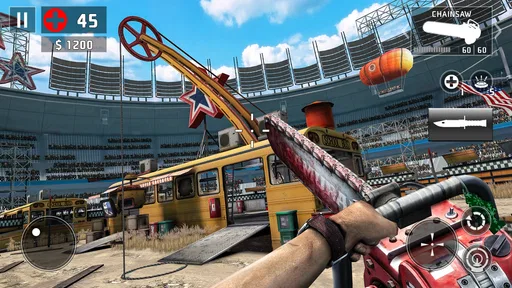
For close combat, I use a different rhythm. I keep movements short, turn toward the nearest threat, and avoid trying to track several targets with one long swipe. The screen can become visually crowded, so a consistent motion is easier to repeat than improvising every time. Players coming from console shooters may need a little patience here because touchscreen aiming rewards different muscle memory.
When upgrading or selecting equipment, I would judge it by the missions I actually struggle with. A weapon that feels powerful in a calm encounter may be inconvenient when targets arrive quickly. Conversely, a less dramatic option may be better if it lets me recover from mistakes and maintain control. I prefer improvements that solve a recurring problem rather than those that merely look impressive in a single successful run.
Where the free-to-play design changes the decision
The free entry point is a genuine advantage. I can test the shooting, movement, atmosphere, and mission rhythm without paying upfront. That makes it easy to recommend as a trial for someone who wants a zombie shooter but is unsure whether mobile controls will work for them.
At the same time, the purchase range means that progression should be approached with a budget in mind. The important question is not whether spending exists, but whether it changes how you want to play. If you enjoy planning, repeating missions, and improving through practice, the game can remain engaging without turning every setback into a purchase prompt. If you dislike any form of resource management or optional acceleration, the free structure may become irritating over time.
I also would not choose this game for a player seeking a deep narrative role-playing experience, a quiet exploration game, or a competitive multiplayer shooter built around human opponents. Its appeal is immediate action against zombies, with progression and equipment supporting that loop. A slower survival game is a better fit if you want crafting, shelter management, or long stretches of tension without continuous shooting.
Advanced limits and the points where skill stops solving everything
Practice can improve aiming and decision-making, but it cannot remove every source of friction. Touchscreen controls remain less precise than a physical controller for some players, especially during rapid turns. Small screens can also make distant targets and interface elements harder to read. If your hands cover part of the display or your phone becomes uncomfortable during longer sessions, that is a real limitation rather than a problem solved by better tactics.
The mature rating matters as well. The game’s subject and presentation are built around zombie violence and firearms, so I would not recommend it for children or for anyone who wants a gentler interpretation of the genre. It is also worth considering where you play: sound, imagery, and the intensity of the action may not suit every public setting.
Another limit is repetition. The core pleasure comes from improving a familiar action loop, but players who need constant mechanical variety may eventually find the structure predictable. I enjoy repeating a mission when I know I can execute it more cleanly, yet I understand why someone else might prefer a game that changes its rules more often.
There is also a difference between being good at individual encounters and managing a longer progression. A player may clear a difficult fight through quick reactions but still make poor choices about ammunition, upgrades, or when to retry. I found that the most reliable improvement came from reviewing the whole run, not just the moment where I was overwhelmed.
For users comparing it with other action games on Android or iOS, I would frame the choice this way: choose this one if you want a dedicated zombie FPS with short, energetic missions and a strong focus on shooting. Choose a conventional premium action game if you want a cleaner purchase model. Choose a slower survival title if resource gathering and exploration matter more to you than rapid target management.
Who should install it, and who should skip it
I think it is a good match for players who enjoy zombie fiction, quick missions, weapon-focused progression, and the satisfaction of improving a run through small adjustments. It also suits people who like having something substantial to play in short bursts without needing a multiplayer group or a complicated setup.
I would be more cautious if you have limited patience for repeated missions, dislike touchscreen aiming, or want a game that respects a completely hands-off spending environment. The free price is inviting, but the in-app purchase structure is part of the experience and should be considered before committing time to progression.
Deca_Games has kept the package accessible enough for a broad mobile audience, and the current version, 3.1.5, gives the game a clear modern reference point for anyone installing it now. Still, I would judge it on your device rather than on popularity alone. Try a few missions, adjust the controls, and see whether the movement feels predictable in your hands.
My final take after building a repeatable routine
Dead Trigger 2 works best when I treat it as a focused action game instead of an endless button-mashing exercise. The strongest results come from a simple routine: tune the controls, protect reload windows, create space before aiming, prioritize threats, and review why a mission went wrong. Those habits make the shooting feel more deliberate and reveal more depth than the first session suggests.
It is not the right choice for everyone. The mature presentation, free-to-play economy, touchscreen limitations, and potentially repetitive structure are meaningful considerations. Yet for a player who wants a free zombie FPS that can fill a short break while still rewarding better movement and target selection, I find it easy to recommend trying. My advice is to begin without rushing into purchases, spend time making the controls comfortable, and decide after several missions whether the core loop feels satisfying enough to keep mastering.
Dead Trigger 2 FPS Zombie Game Frequently Asked Questions
Can I play Dead Trigger 2 with one hand, or does it require precise controls?
Dead Trigger 2 is a first-person shooter, so aiming and moving are central to its moment-to-moment play. The controls are designed for touchscreens, but players who are new to mobile shooters may need a little time to get comfortable with aiming while navigating combat. If you prefer slower-paced games or find touchscreen aiming difficult, try a short session before committing to longer play.
What kind of gameplay can I expect from Dead Trigger 2?
Dead Trigger 2 is an action game built around first-person shooting and zombie combat. Its missions take you into infected locations, with different enemies and boss encounters adding variety to the fighting. The campaign gives the action a sense of progression, while weapons and upgrades provide ways to develop your approach as you play. Its focus is on combat rather than quiet exploration.
Will Dead Trigger 2 run on my older phone or tablet?
Compatibility depends on your device’s operating system, available storage, and hardware. The minimum operating system is Android 8.0, and the game is also available for iOS devices. As a visually detailed 3D shooter, it may feel less smooth on older or lower-powered hardware. Check the current requirements on Google Play or the App Store and make sure your device meets them before downloading.
Is Dead Trigger 2 suitable for children?
Dead Trigger 2 is a mature action game centered on shooting zombies, so its violence may not be appropriate for younger players. It carries a Mature 17+ age rating. Parents should consider that rating and the game’s combat-focused content before allowing a child to download or play it, and can use device-level purchase restrictions where needed.
What is Dead Trigger 2 FPS Zombie Game?
Dead Trigger 2 is a first-person zombie shooter for Android and iOS. It combines story-driven missions with fast arcade-style combat, letting you fight through infected locations using pistols, shotguns, assault rifles, explosives, and other weapons. The game also includes different zombie types, boss encounters, weapon upgrades, and a global campaign that makes progression feel more varied than a simple wave-survival shooter.
Pros
- Fast-paced shooting with responsive touch controls
- Wide range of weapons and upgrade options
- Regular missions keep the campaign feeling varied
- Detailed zombie animations and atmospheric environments
- Playable offline after the initial game data is downloaded
Cons
- Energy limits can interrupt longer play sessions
- Frequent rewards and offers may feel distracting
- Some upgrades require considerable grinding
- High graphics settings can drain battery quickly
- Online features and progress may depend on a stable connection