

Craft Explore: Block Builder
- 74.00
- 3.5
- Installs
- 10.00M
- Price
- Free

Screenshots
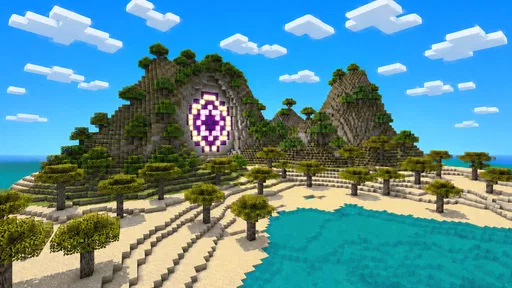
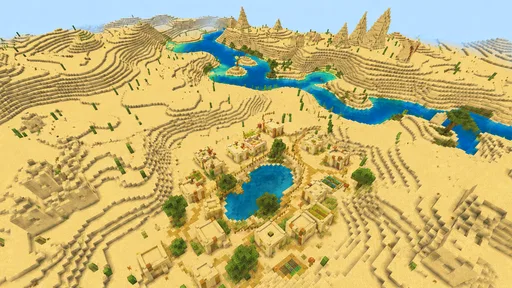
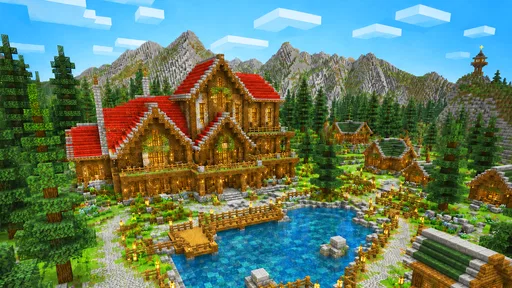
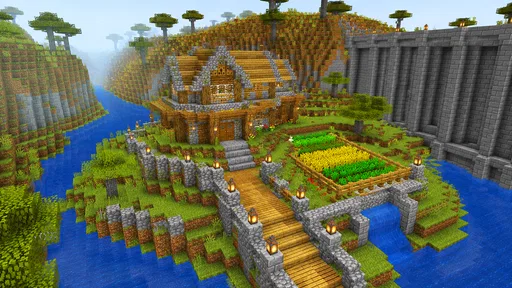
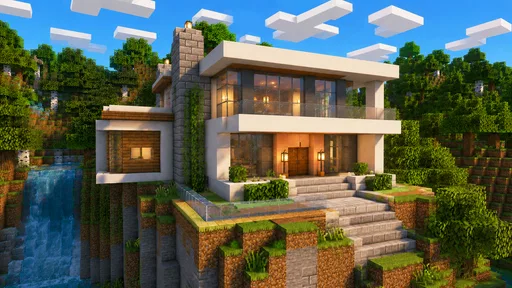
Analysis by Reviewed
I’d approach Craft Explore: Block Builder as a game for making small creative decisions, not as a challenge that tells me what to do next. The satisfying starting point is simple: look at an open area, choose a shape to attempt, and begin placing blocks. The idea only becomes interesting once I can see it in the three-dimensional world and decide whether it works. That first visible result is a better invitation than a long explanation of what I might build someday.
That hands-on start also makes it easy to picture using the game in an ordinary spare moment. If I have a short break, I can choose one part of a build to work on and leave when it looks better. If I have more time, I can stay with the same idea and make it more complete. The difference is that the game’s open-ended style asks me to provide the goal. I find that freeing when I already have an idea, but less helpful when I want the game to supply direction.
The core loop is a sequence of action, feedback, reward, and reset: I make a change, look at what it did, enjoy a successful improvement, then return later with another decision. It suits players who find the act of shaping a place rewarding in itself. If I’m after a campaign, intricate simulation systems, or regular new objectives, I’d choose something more structured instead.
From a blank space to a first build
The premise is easy to understand: shape and extend a three-dimensional block world. That simplicity is useful when I only have a few minutes and don’t want to learn a complicated set of systems before making progress. I can focus on what to build, then judge the result in the world instead of planning around a lengthy tutorial or story premise.
A practical way to begin is with a compact project rather than a grand dream build. A small shelter, a clear path, or a simple landmark gives each placement a purpose and makes it easier to see what is working. If I start with an enormous design, the early stages can feel like repeating the same action without much visible payoff. Smaller first projects create quicker feedback: I can notice proportion, revise the layout, and decide what deserves more space.
This is also where the block-based format helps. Individual pieces encourage experimentation because I can consider the overall structure in manageable parts. I don’t need to settle every detail before starting; I can establish a rough outline, check how it reads in the 3D space, and continue from there. For players who like improvising, that makes the opening less intimidating than a blank canvas with no obvious way in.
There is a trade-off, though. A build-focused game depends heavily on how satisfying its basic interactions feel. The idea of creating a world is compelling, but players who need a clear sequence of missions or regular narrative turns may find the open-ended premise too loose. I’d approach it as a creative sandbox first, not as a structured simulation with a strong external goal.
More From Our News Desk

 Gmail
GmailGmail in a Busy Inbox: Who Benefits Most?
From first account to crowded workday, Gmail earns its place through dependable search and flexible sorting—but its best fit depends on how much inbox maintenance you can tolerate.

 Prime Video
Switching to Prime Video: What Changes in Your Viewing Routine
Prime Video can make a compelling second home for streaming, but switching means learning a different catalog, rental layer, and route from browsing to playback.

 Universal TV Remote Control
Universal TV Remote Control Works Best as a Reliable Backup
A phone remote earns its place through quick setup and reliable habits. Here is how to get more from Universal TV Remote Control—and where its limits show.

 Weather - By Xiaomi
Weather by Xiaomi Review: Clear at a Glance, Less Clear Up Close
Xiaomi’s weather app makes everyday forecasts quick to scan, but its calm surface can leave useful details and recovery paths harder to find than they should be.

 X
XX Under Pressure: Can It Recover When Posting Goes Wrong?
A resilience-focused review of X, examining setup, mistaken posts, interruptions, weak connections, and the gaps that matter when recovery needs to be dependable.

 Clash of Clans
Clash of Clans Is Won Between the Battles
Its raids are quick; its community is a long-term project of coordination, teaching, rivalry, and shared responsibility—with all the friction that entails.
Latest News



Let the first project teach you what to build next
My most useful tip is to treat the first construction as a test rather than a masterpiece. Pick one recognizable feature and see how it looks from more than one angle. In a 3D environment, a design that seems neat from the front can feel bulky or unclear from the side. Checking the silhouette before adding detail is a simple way to avoid spending time decorating a shape that needs a bigger change.
It also helps to build in layers of intention: establish the outline, make the main shape readable, then add smaller touches only if they improve it. That workflow keeps a project from becoming a pile of blocks without a clear idea behind it. It is not a special feature or a hidden system; it is a practical approach to getting more satisfaction from a game whose central pleasure is making and revising things.
From LogicLabs Limited, this free simulation game has an Everyone 10+ content rating, making it an option for younger players as well as adults. I’d still think about whether the player enjoys inventing a project for themselves. An age rating is not a promise that every child will like an open-ended game; someone who prefers clear objectives and quick rewards may get more from a guided alternative.
The feedback that keeps a build moving
The satisfying part of a building loop is the connection between an action and a visible result. I place or change something, then decide whether the world looks closer to the picture in my head. When that connection is clear, a small adjustment can be rewarding on its own. It gives me a reason to continue without needing a dramatic event after every step.
That kind of feedback is especially useful when I’m playing casually. I might open the game after school or work, make one section of a build more coherent, and stop once I’m happy with the change. The session still feels complete because the result is visible. If I have more time, the same project can become a longer creative task; if I don’t, I can leave with a clear next step in mind.
For a more focused session, I’d choose a single goal before I start: improve the outline, extend one area, or make a feature easier to recognize. This prevents wandering between unrelated ideas and makes it easier to notice progress. It also gives the next session a natural starting point. Rather than returning to a vague intention to “build more,” I can pick up with one specific change.
The limitation of this loop is that the player has to supply much of the motivation. If you want the game itself to keep raising the stakes or handing out a steady stream of goals, a freer builder may feel quiet. The reward here is closely tied to whether you care about your own design. That makes the experience personal, but it also means a slow or uninspired day can make the same building actions feel repetitive.
Make the reward visible before adding more
A useful habit is to pause after a substantial change and look at the whole construction, not just the latest block. This gives me a chance to spot whether the new section strengthens the design or merely makes it larger. Expansion is not automatically progress: a compact build with a clear shape can be more satisfying than an oversized one that has lost its original idea.
I’d also keep a mental note of what I want to solve next. That small bit of planning turns a return visit into a continuation rather than a restart from indecision. It is a particularly good approach for players who enjoy creative projects but have limited time. You can leave the game mid-project without needing to finish everything in one sitting.
Players deciding between this and other games in the category should think about what they want from construction. Compared with a guided simulation, a block-world builder puts more weight on personal choices and less on following a prescribed sequence. Compared with a purely competitive game, its central appeal is making a space that feels like yours. If your favourite part of a building game is shaping an idea at your own pace, that distinction is a strength; if you prefer detailed management, firm objectives, or a constant challenge, a more structured alternative is likely a better match.
A useful way to choose between building games
I’d make the choice based on what I want to think about during play. Here, the useful question is often visual and personal: does this outline read clearly, and what should I change? A management-heavy simulation is a better pick if I want to balance resources or oversee a system, while a mission-led builder suits me when I want a clear sequence of tasks. This game makes more sense when the pleasure is in making a place rather than optimizing a set of rules.
That distinction also helps set expectations for a first session. I wouldn’t judge it by how many milestones I reach; I’d judge whether one small idea becomes more satisfying after I work on it. If that kind of progress feels too quiet, there is no need to force it—the more directed alternative will likely keep me engaged for longer.
When a session ends—and why another begins
A natural stopping point is when I’ve completed the small change I set out to make. That might be enough for a quick break: the area looks different, the design has moved forward, and I can decide what I want to tackle later. This is a healthier fit for an open-ended builder than expecting every session to end with a major milestone.
The reset is less about wiping the slate clean than about returning with a new decision. I may notice a proportion that needs work, decide to extend the world, or simply want to try a different idea. That is the loop’s most promising feature: a finished action leaves behind a result to react to, and that result can suggest the next action. The cycle works best when I keep each goal manageable and let curiosity—not an imagined checklist—pull me back.
There are occasions when I would skip it. If I’m looking for a quick burst of action, a competitive match, or a game that clearly tells me what success looks like, this is not the first choice I’d reach for. Likewise, players who want intricate construction rules may find the broad block-building premise too simple for their tastes. The game is at its best for someone who enjoys deciding what counts as progress.
For an everyday example, imagine having a spare stretch of time in the evening. I could start with a modest structure, spend the session making its shape more legible, then stop before the project becomes a chore. The next time I open the game, I already have a concrete question to answer: should I refine what is there or build outward? That’s a useful routine for casual creative play because it offers continuity without demanding a long uninterrupted session.
Who is likely to enjoy the loop
The game has passed ten million installs, and its average rating is 3.5 from around 9,900 ratings. Those figures suggest a sizeable audience alongside mixed reactions, which feels consistent with a game whose enjoyment depends so much on personal taste. The average is worth keeping in perspective: a sandbox can be a great fit for players who love making their own goals and a frustrating fit for people who expect the game to provide structure at every turn.
At the time of writing, the current version is 0.6.1, and Android support starts with version 9. I’d check that your device meets that requirement before planning to play. The game is free, so it is easy to try without committing to a purchase, but I would still go in with the right expectation: the main draw is the creative process, not a promise of a guided adventure.
That version number is also a reason to judge the experience by the building loop available now, rather than by assumptions about what it might become. The written feedback is a smaller pool than the overall ratings, so I wouldn’t treat a single score as a substitute for deciding whether the game’s style suits me. A short trial focused on one compact project is a more useful test: if I enjoy refining the shape, that tells me more than expecting a particular kind of progression.
What to expect before you settle in
If you’re wondering whether it works for a brief daily visit, I think the best approach is to choose a single visible task and stop when it is done. If you’re asking whether it will provide a guided adventure, I wouldn’t choose it on that expectation; its appeal is self-directed construction. And if you’re deciding whether the free price makes it worth a try, the low-commitment way to find out is to build something small and see whether the act of revising it feels rewarding.
My overall take is that Craft Explore: Block Builder is worth trying if you like turning a simple idea into a visible place and don’t mind setting your own targets. Its strongest loop is modest but appealing: make a change, inspect the result, enjoy the improvement, then come back with another small plan. I’d choose something more guided for missions and progression, or something more technical for deep simulation. But for relaxed, self-directed building, this has a clear reason to earn another session: there is always one more part of the world you can shape.
Craft Explore: Block Builder Frequently Asked Questions
What is Craft Explore: Block Builder?
Craft Explore: Block Builder is a sandbox-style building game centered on placing and breaking blocks to create structures and shape a world. It is aimed at players who enjoy open-ended construction rather than a fixed sequence of missions. Before downloading, check the store listing for the current game modes and features, since available content can vary by version and platform.
Is Craft Explore: Block Builder free to download, and does it include ads or in-app purchases?
The price, advertising, and optional purchases can depend on the version and app store in your region. Review the Google Play or Apple App Store listing before installing, paying particular attention to the sections covering in-app purchases and data or advertising disclosures. If you are downloading for a child, it is also sensible to check device purchase controls and parental settings in advance.
Can I play Craft Explore: Block Builder offline?
Whether the game works without an internet connection may depend on its current version and which features you want to use. Basic solo building games often allow local play, while online modes, account services, or advertisements may require connectivity. Check the app’s store description and test offline access after installation; do not assume multiplayer or every feature will be available without internet.
Is Craft Explore: Block Builder suitable for children?
A block-building game may appeal to younger players because its creative play is generally easy to understand, but suitability depends on the actual version’s content and online features. Before letting a child play, review the age rating, privacy information, and any chat, multiplayer, advertising, or purchase options shown in the store listing. Use parental controls where appropriate, especially for spending and online interactions.
What devices are compatible with Craft Explore: Block Builder, and what should I check before downloading?
Compatibility can change as the game is updated, so the most reliable source is the current listing for your Android or iOS device. Check the minimum operating-system requirement, available storage, and whether your particular device is supported. Download it only from an official app store, and make sure you select the correct title, since similarly named block-building games may have different developers and features.
Pros
- Creative mode lets you build without worrying about survival needs.
- A range of blocks makes it easy to create varied structures.
- Simple controls are approachable for younger or casual players.
- Exploration gives you space to gather ideas for new builds.
- Quick sessions make it easy to play in short bursts.
Cons
- The block-building formula may feel familiar to sandbox veterans.
- Large projects can take patience when placing blocks one by one.
- Open-ended play offers little direction for players who prefer goals.
- Touch controls may feel less precise than mouse-and-keyboard controls.
- Performance can vary depending on your device and world size.










