Blood Strike: 2.5 Anniversary
- 18.76K
- 4.3
- Installs
- 100.00M
- Price
- Free

Screenshots

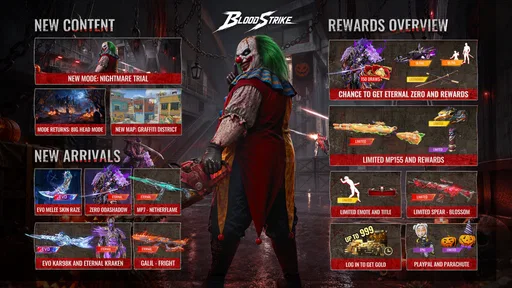


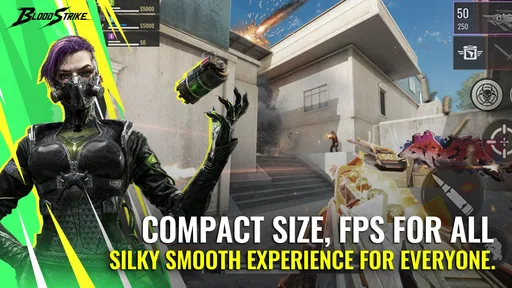
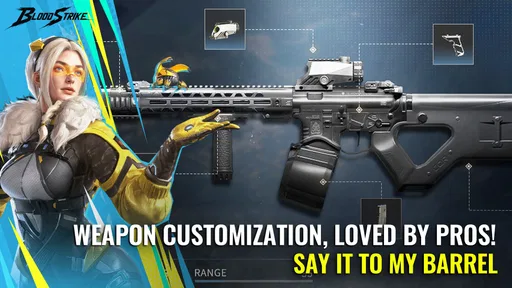
Analysis by Reviewed
My usual test for a mobile shooter is whether I can settle into a match without turning a spare moment into a complicated setup. That is the appeal of Blood Strike - FPS: it is a fast-paced action game from NetEase Games, built around mobile firefights and quick decisions. I would consider it if I wanted an FPS to play in short bursts, though its pace and touch controls won’t suit everyone.
A practical way to settle into a match
When I’m learning a shooter, I try not to change everything at once. I start with the default controls, play a few rounds, and pay attention to which actions feel awkward under pressure. That gives me a useful baseline before I adjust anything the game makes available. In a close fight, a layout that feels comfortable matters more than copying another player’s preferred setup.
A useful habit is to treat each match as a small lesson: notice whether I lost track of a target, reacted late, or pushed forward without enough support. Then I focus on one adjustment in the next round. This is more practical than changing several settings after every defeat, because I can tell whether a change actually helped.
Settings and habits that can make a difference
On a touchscreen, aiming and movement compete for attention. I recommend checking the control layout and sensitivity options, if available on your device, in a quiet moment rather than during a match. Make small changes and test them before making another. Too much sensitivity can make quick turns feel less controlled; too little can make it harder to follow a moving opponent.
I also like to keep my loadout decisions simple while learning. Instead of switching weapons constantly, I spend a few matches getting used to one choice and noticing where it works best. That makes it easier to separate a poor decision from a weapon I simply haven’t learned yet. If you play with a team, agree on a basic plan before rushing into fights; a little coordination can be more useful than everyone chasing separate encounters.
Getting into the Action
From the moment you launch Blood Strike - FPS, you’re thrust into a world of intense shootouts and tactical missions. The game doesn’t waste any time getting you into the thick of things. Whether you’re a newcomer to FPS games or a seasoned veteran, the controls are intuitive and smooth. I found myself ducking, dodging, and firing with ease. The graphics are pretty impressive too, especially for a mobile game. The attention to detail in the environments and character designs really stood out to me.
Gameplay and Features
What sets this game apart is its variety. There are multiple modes to choose from, including team battles and solo missions. I particularly enjoyed the team-based matches where strategy and cooperation are key. The matchmaking system is quite efficient, getting you into games without long wait times. There's also a wide range of weapons to unlock and upgrade, keeping things fresh and exciting. I mean, who doesn’t love wielding a high-powered sniper or a rapid-fire assault rifle?
More From Our News Desk

 Gmail
GmailGmail in a Busy Inbox: Who Benefits Most?
From first account to crowded workday, Gmail earns its place through dependable search and flexible sorting—but its best fit depends on how much inbox maintenance you can tolerate.

 Prime Video
Switching to Prime Video: What Changes in Your Viewing Routine
Prime Video can make a compelling second home for streaming, but switching means learning a different catalog, rental layer, and route from browsing to playback.

 Universal TV Remote Control
Universal TV Remote Control Works Best as a Reliable Backup
A phone remote earns its place through quick setup and reliable habits. Here is how to get more from Universal TV Remote Control—and where its limits show.

 Weather - By Xiaomi
Weather by Xiaomi Review: Clear at a Glance, Less Clear Up Close
Xiaomi’s weather app makes everyday forecasts quick to scan, but its calm surface can leave useful details and recovery paths harder to find than they should be.

 X
XX Under Pressure: Can It Recover When Posting Goes Wrong?
A resilience-focused review of X, examining setup, mistaken posts, interruptions, weak connections, and the gaps that matter when recovery needs to be dependable.

 Clash of Clans
Clash of Clans Is Won Between the Battles
Its raids are quick; its community is a long-term project of coordination, teaching, rivalry, and shared responsibility—with all the friction that entails.
Latest News



One feature that I found particularly cool was the customization options. You can tweak your character’s appearance and loadout to fit your style. Whether you want to go in guns blazing or take a more stealthy approach, the game accommodates all play styles. Plus, the regular updates mean new content is always around the corner, keeping the experience fresh.
Building a repeatable routine
Experienced players tend to benefit less from frantic experimentation than from a few repeatable habits. I’d settle on a familiar control arrangement, a weapon I can handle, and a simple rule for when to push or pause. That routine gives me a steadier way to judge a match: if an approach fails, I can identify the decision that caused trouble rather than blaming every part of my setup at once.
Before starting, I’d also take a moment to check that my phone is comfortable to hold and that I can reach the controls without shifting my grip. This sounds basic, but a small change in hand position can make a quick turn or movement input less reliable. If I’m playing with a team, I’d keep callouts short and useful: where the threat is, whether I’m moving, and whether I need help. Long conversations can pull attention away from the screen.
Short sessions work best when I give myself a clear stopping point. After a match, I can decide whether I want another round or whether I’m tired enough that my aim and judgement are slipping. This is a better way to enjoy a competitive shooter than queueing repeatedly out of frustration. It also makes the game easier to fit around a commute break or a few minutes at home without expecting every session to become a long grind.
Choosing the right kind of shooter
Compared with slower, more deliberate tactical shooters, this is a better fit when I want action without spending a long time planning each encounter. That pace is also a trade-off: if you prefer careful, patient matches or a campaign that unfolds at your own speed, a slower shooter may be more satisfying. Blood Strike’s mobile format makes it convenient for a quick session, but it still asks for attention and practice; it isn’t something I’d recommend playing while distracted.
For an everyday example, I might use a short break to play a match, then stop and think about one moment that went wrong rather than immediately queueing again. If I’m on a small screen or using touch controls for the first time, I’d give myself a few low-pressure rounds to get comfortable before judging my aim. A stable connection and enough battery are sensible preparations for any online shooter, especially when a match demands sustained focus.
It also helps to think about what you want from a mobile FPS before installing. If the appeal is immediate combat and the satisfaction of improving through repetition, this is closer to the right lane than a campaign-focused shooter. If what you want is a solo experience you can pause freely, a more narrative or offline game is the better choice. That distinction matters more than whether one title looks flashier in a screenshot: the moment-to-moment commitment is different.
The game is free to download, with in-app purchases ranging from $0.29 to $99.99 per item. I’d treat those purchases as optional and decide on a spending limit before browsing them; enjoying the basic loop shouldn’t depend on buying something impulsively. It is rated Teen, so parents should consider that age guidance and the game’s shooting action when deciding whether it is appropriate.
What to check before settling in
The first question many players have is whether it is approachable without prior FPS experience. I think it can be, provided you give yourself time to learn the touch controls instead of expecting instant precision. I’d begin by paying attention to movement and aiming separately, then combine them once each feels less awkward. If you already play shooters on a console or computer, remember that familiar instincts help, but a touchscreen changes how quickly and comfortably you can make those inputs.
Another practical question is whether a free game requires spending to be enjoyable. I’d try the core matches first and only consider purchases if I understand exactly what I want from them. The listed range runs from $0.29 to $99.99 per item, so browsing without a personal limit can make optional spending feel more tempting than it needs to be. For a younger player, I’d make that boundary explicit and keep the Teen age guidance in mind.
Players also often wonder whether to keep changing weapons and settings while they improve. My answer is no: change one thing at a time, and only when you can explain what problem you’re trying to solve. If a weapon feels unreliable, first consider whether the encounter suited it and whether your positioning helped. That small bit of diagnosis is more useful than swapping equipment after every loss.
A Few Words on the Community
One thing I didn’t expect was the vibrant community. The in-game chat and forums are buzzing with tips, tricks, and discussions. It’s nice to know you’re not alone in your quest for dominance. Engaging with other players adds another layer of enjoyment to the game, and you might even pick up a few strategies to improve your gameplay.
Moreover, the developers seem pretty active in listening to player feedback, which is a big plus. It’s reassuring to know they’re committed to making the game as enjoyable as possible.
Community advice is most useful when I treat it as a suggestion to test, rather than a rule I have to copy. A control preference or weapon approach that works for someone else may not fit my hands, screen, or way of moving. I’d borrow one specific idea, try it across a few matches, and keep it only if it solves a real problem for me. That keeps experimentation grounded and prevents a flood of conflicting tips from making the game harder to learn.
Who I’d recommend it to
Blood Strike has an average rating of 4.3 from around 793,000 ratings, and has passed 50 million installs. It launched on December 12, 2023; version 1.003.650004 lists Android 5.0 as its minimum operating system. Those figures suggest a well-established audience, but they don’t tell me whether the pace or controls will suit you personally. I’d recommend trying it if you enjoy competitive mobile action and are willing to learn through repeated matches.
I’d skip it if you dislike first-person shooting, want a quiet offline game, or find touch-based aiming frustrating. Likewise, players who prefer a long, story-led experience may be happier with a different kind of game. Blood Strike is at its best when I can focus on movement, aiming, and the immediate choices a firefight demands.
It is also not my first choice when I’m tired, distracted, or looking for something I can play with half my attention. Fast firefights reward focus, and that can turn a supposedly relaxing break into a frustrating one if I’m trying to answer messages or watch something else at the same time. For those moments, a slower puzzle or an offline game is simply a better fit. I’d save this for when I can give the screen my attention.
Performance expectations and practical limits
Even a game that runs on a broad range of Android versions can feel different from one phone to another. The minimum operating system is Android 5.0, but that is not a promise that every device will deliver the same comfort or visual smoothness. I’d try a short session before committing to a long one, especially on an older phone, and pay attention to heat, battery drain, and whether touch inputs remain dependable. If the phone becomes uncomfortable to hold, taking a break is more sensible than pushing through.
Network conditions are another part of the experience I would judge in practice. A stable connection helps any online firefight feel fairer, while a laggy session can make aiming and timing seem worse than they really are. If a match feels unusually inconsistent, I’d avoid changing my sensitivity immediately; first check whether the connection or the phone’s responsiveness may be the cause. Otherwise, I risk “fixing” controls that were working fine under better conditions.
There is also a trade-off between visual detail and sustained comfort on a mobile screen. I like attractive environments, but clarity during a close encounter matters more to me than admiring scenery. I’d choose settings that keep the image readable and the controls responsive on my own device rather than chasing the most demanding presentation. That is a personal judgement, not a universal best setup.
My verdict after getting comfortable
In conclusion, if you’re on the hunt for a thrilling FPS experience on mobile, Blood Strike - FPS is definitely worth checking out. Its engaging gameplay, stunning graphics, and active community make it a standout title in the mobile gaming arena. So, gear up, lock and load, and dive into the action! Trust me, you won’t regret it.
My recommendation comes with one condition: give the controls a fair try and judge the game after you’ve settled into a familiar routine, not after one awkward match. I like its immediate action and the option to approach fights with teammates, but its intensity won’t be relaxing for everyone. If that sounds like your kind of mobile session, it is an easy game to try; if you want a slower or less competitive experience, I’d look elsewhere.
For me, the strongest reason to give it a chance is the combination of quick access and room to improve. A newcomer can begin with a simple routine, while a more experienced player can refine decisions around positioning, control comfort, and teamwork without needing to treat every session like a major commitment. The game’s free entry makes trying that loop straightforward, though I’d still keep purchases and screen time intentional.
My final advice is practical: start with a few focused matches, make only one adjustment at a time, and stop when the controls or your attention begin to feel unreliable. If that process sounds satisfying, you may find a competitive mobile shooter you return to. If the process feels like work rather than fun, there is no reason to force it; another genre will suit your downtime better.
Blood Strike: 2.5 Anniversary Frequently Asked Questions
What is the current version of Blood Strike - FPS for all?
Blood Strike - FPS for all is currently version 1.003.650004. Checking the version before installing can help you make sure you are looking at the intended game, especially if you have played before and are returning after a break. The game is developed by NetEase Games and is an action-focused mobile FPS.
How much space should I leave for Blood Strike - FPS for all?
It is sensible to leave some free storage before downloading Blood Strike - FPS for all, since a mobile game may need room for installation and updates. Make sure your device has enough available space to complete the download and launch the game comfortably. Keeping extra room can also make it easier to manage future game updates.
What kind of game is Blood Strike - FPS for all?
Blood Strike - FPS for all is an action game built around first-person shooter combat. It focuses on fast-paced battles where players use weapons and tactics to take on opponents. Its action-packed style makes it a fit for players looking for an FPS experience on mobile, whether they prefer jumping into a quick match or spending more time refining their approach.
Who develops Blood Strike - FPS for all, and what is its age rating?
Blood Strike - FPS for all is developed by NetEase Games and is rated Teen. That rating is worth considering before downloading, particularly if the game will be played by a younger user. As a first-person shooter, its core experience centers on combat, so parents and players may want to review the age rating and decide whether the content suits them.
What is Blood Strike - FPS for all?
Blood Strike - FPS for all is an action-packed first-person shooter game available on both Android and iOS platforms. Players engage in thrilling combat scenarios with a variety of weapons and tactics. The game features multiple modes, including team battles and solo missions, catering to both casual players and FPS enthusiasts.
Pros
- Intuitive controls for easy gameplay
- High-quality graphics enhance experience
- Diverse weapon options available
- Multiplayer mode for competitive play
- Regular updates with new features
Cons
- Can be resource-heavy on devices
- Occasional in-game ads can disrupt play
- Requires stable internet connection
- Some features locked behind paywall
- Possible lag in multiplayer mode