Backyard Master
- 790.00
- 4.4
- Installs
- 5.00M
- Price
- Free

Screenshots
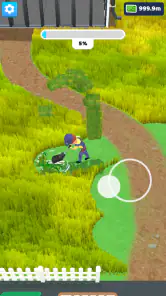
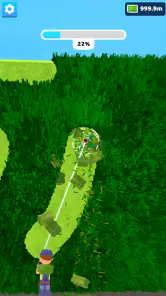
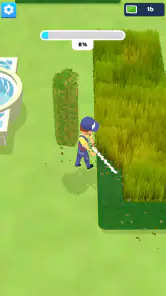
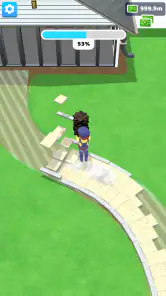
Analysis by Reviewed
I like how Backyard Master gives a small, familiar patch of land room to become something personal. The basic appeal is easy to grasp: shape an outdoor space, choose what belongs in it, and gradually make the scene feel like your own. As a simulation game from Supersonic Studios LTD, it leans on creative choices rather than a complicated premise. I found that inviting, especially when I wanted a gentle game to dip into without needing to learn a long set of rules first.
That easy entry point also makes it a natural fit for short breaks. I can imagine opening it while waiting for a meal to finish, making one small change to the layout, and leaving the larger design decisions for later. It is less suited to someone who wants a demanding management sim or a tightly directed story; the pleasure here is in making the space feel satisfying, not in chasing high-pressure goals. If you enjoy arranging a scene and watching it take shape, the idea has a clear pull.
A small yard with room to plan
One practical question for a new player is whether this works better as a quick distraction or a game to settle into. I see it fitting both, but in different ways: a brief visit is enough to adjust a corner, while a longer session makes more sense when I want to think through how the whole yard should feel. Before changing several areas, I would take a moment to decide what the central idea is—perhaps a garden with a small farm element—and then make choices that support it. That avoids the common decorating trap of treating every new object as an urgent addition.
It is also a useful game for people who enjoy visual creativity but do not want the pressure of designing a whole city. The compact backyard gives each choice a more noticeable effect, which can make a modest change feel worthwhile. If, on the other hand, you want a large map, intricate supply chains, or detailed economic planning, a city builder or more involved management sim is likely to hold your attention better. Backyard Master is at its best when the appeal is the scene itself.
A realistic routine might be to open the game after dinner, look at the yard with fresh eyes, and choose one small improvement instead of trying to finish a complete makeover. I might make room for a path, adjust the balance between flowers and crops, or leave an empty patch for something I have not unlocked yet. That last choice is more useful than it sounds: a little breathing room prevents the yard from feeling crowded and makes the next design decision easier.
Getting Started with Backyard Master
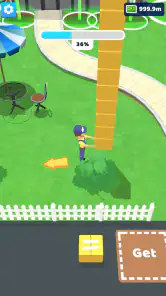
When you first open up Backyard Master, you're greeted with a delightful interface that makes you feel like you’re stepping into a world of endless possibilities. The app is super intuitive, so even if you're not tech-savvy, you’ll find it a breeze to navigate. You start with a basic patch of land, and it’s up to you to transform it into something spectacular.
The first task is to choose what kind of backyard you want. Are you into gardening, farming, or perhaps creating a space for wildlife? The options are plentiful, and each choice comes with its unique set of features and challenges. I personally went for a mix of a garden and a small farm. I mean, who wouldn’t want fresh veggies and a blooming flower garden right in their backyard?
More From Our News Desk

Weather by Xiaomi Review: Clear at a Glance, Less Clear Up Close

X Under Pressure: Can It Recover When Posting Goes Wrong?

Clash of Clans Is Won Between the Battles

Android Auto Makes the Case for Quieter Car Software

MobiOffice: Transforming Mobile Productivity with Seamless Integration

EA SPORTS FC™ Mobile Soccer: Redefining Mobile Sports Gaming
That mix also points to a useful way to approach the game: decide on a loose theme before filling the space. A garden and farm can feel like one coherent yard if you leave room for paths and give each area a purpose, rather than placing every attractive object wherever it first catches your eye. I found that thinking in small zones makes choices easier and gives the overall scene more shape. It is a simple planning habit, but it helps keep customization from turning into a jumble.
Design and Customize
One of the coolest things about the app is the level of customization it offers. You can pick from a variety of plants, structures, and even animals. Want a koi pond beside your vegetable patch? Sure thing! How about a gazebo in the middle of a flower meadow? You got it! The graphics are vibrant and detailed, making every design choice feel impactful and satisfying.
As you progress, you unlock new items and features. This kept me hooked as I was always eager to see what new elements I could add to my virtual paradise. Plus, the app has seasonal events, so there’s always something new to look forward to.
For me, the strongest design tip is to treat new unlocks as options, not obligations. It can be tempting to squeeze every fresh item into the yard as soon as it appears, but keeping an open area gives a design room to breathe and makes later changes less frustrating. If I were playing in a few brief sessions across the day, I would make one focused adjustment at a time—such as improving the garden corner—rather than trying to redesign everything at once.
That approach suits the game better than comparing it with a conventional builder that pushes you toward an optimized city grid or a big, escalating production chain. Backyard Master’s appeal is more intimate: the subject is one personal outdoor space, so visual balance matters as much as making progress. Players who love elaborate efficiency systems may prefer a deeper strategy or city-building game, while anyone who enjoys decorating a compact scene may find this gentler scale refreshing.
Finding a rhythm that feels right
The art direction and setting reinforce that smaller scale. The yard is familiar enough that I can quickly read it as a place rather than a collection of unrelated objects, and the bright visual treatment makes choosing plants, structures, and animals feel inviting. That helps the game feel cohesive even when I am experimenting. My best advice is to judge a new item not only by whether I like it, but by whether it belongs beside what is already there. A favorite object can still disrupt a layout if it has no clear place.
Sound and pacing matter in a decorating game because they influence whether I want to linger or rush through choices. Here, I would approach the experience as a calm sequence of small decisions, rather than expecting a dramatic soundtrack or an urgent action-game tempo. That slower feel is a strength when I want to unwind, but it also means the game may not provide the constant stimulation some players look for. If I am in the mood for fast rounds or a strong narrative hook, I would choose something else.
For everyday play, I would separate browsing from building. First, I would look over the current yard and decide which area needs attention; then I would make a few changes that serve that area instead of repeatedly switching between unrelated ideas. This keeps the session focused and makes it easier to see whether a change actually improves the overall composition. It is a simple habit, but it helps avoid spending a short break moving objects around without arriving at a design I like.
Challenges and Rewards
No game is complete without a bit of challenge, right? Backyard Master introduces various tasks and objectives that keep you on your toes. Whether it’s dealing with pests, managing resources, or optimizing the layout for maximum beauty and efficiency, there’s always something to do. Completing these tasks earns you rewards that you can use to further enhance your backyard.
The game does a great job of balancing relaxation with strategy. You can spend hours meticulously planning every detail, or you can take a more laid-back approach and just enjoy the process. Either way, it’s a rewarding experience.
The tasks give a useful reason to revisit the yard, though they can also pull attention away from free-form decorating if you prefer to create at your own pace. I would treat objectives as prompts rather than a checklist to clear immediately: when one fits the area I am already working on, it feels like a natural next step; when it does not, I would rather keep shaping the space I want. That distinction helps preserve the relaxed mood instead of making every session feel like work.
A realistic use for the game is a quiet evening pause: check what the current objective asks for, make one change that serves both the task and the design, then stop before the session becomes a chore. It gives the game a satisfying rhythm without requiring a long uninterrupted stretch. The trade-off is that players who want every session to deliver fast, obvious progress may find a creative simulation’s slower, personal goals less compelling.
Backyard Master is free to play, with optional in-app purchases ranging from $0.49 to $40.99 per item. I would start without buying anything and see whether the gradual unlocks and tasks provide enough momentum; spending is more relevant to someone who wants to move faster than to someone content to develop a yard over time. The game is rated Teen, has a 4.4 average from around 46,000 ratings, and has been installed over 5 million times. Its current version is 2.2.3, and it requires Android 6.0 or later.
Who will enjoy this backyard?
I would recommend it to players who like making a place feel personal, enjoy gradual unlocks, and are happy to measure progress by how a scene comes together. It can suit someone who wants a low-pressure game to revisit between other activities, or a player who enjoys testing different combinations of plants, structures, and animals. The Teen content rating is worth keeping in mind when choosing a game for a younger player, and the free entry point makes it possible to try the basic experience before deciding whether optional purchases matter to you.
I would skip it if I were looking for practical gardening instruction, realistic landscaping constraints, or a competitive objective that demands constant optimization. It is a game about shaping a virtual backyard, not a guide to maintaining a real one. I would also look elsewhere if repeated decorating feels tedious to me or if I need a clear story to carry each session. A deeper farming or management simulation is a better fit for someone who wants interacting systems to be the main attraction; a straightforward creative sandbox may be preferable for someone who wants to build without tasks nudging the pace.
One useful trade-off is how to respond when an objective does not match the design I have in mind. I would not rebuild a section just to satisfy a prompt if I already like how it looks. Instead, I would check whether the task can be handled in a neighboring area, keeping the established composition intact. That approach makes objectives feel like support for the creative process rather than instructions that take it over.
Another question a new player may have is whether to spend early or wait. I would wait until I understand how much I enjoy the regular cycle of customizing, completing tasks, and unlocking items. The optional purchases may appeal to someone who values quicker access, but spending is not the first thing I would use to judge the game. The more important test is whether the current choices are enough to make me want to return and refine the space.
Final Thoughts
In a world where we're often caught up in the hustle and bustle, Backyard Master offers a refreshing escape. It’s a perfect blend of creativity, strategy, and relaxation. Whether you’re a hardcore gamer or someone just looking for a fun way to unwind, this app has something to offer.
So, if you’re ready to embark on a journey to create the backyard of your dreams, I highly recommend giving this app a try. Happy landscaping!
My recommendation comes with one clear qualification: it is best for players who like gentle progress and visual tinkering, not for anyone seeking realistic gardening advice or a detailed, high-stakes simulation. The store summary calls it a backyard experience, and that compact setting is exactly where its mood works. Its release date was November 23, 2023, but what matters more in practice is whether the mix of customization and objectives matches how you like to play. I would try it when I want a calm creative diversion; if I wanted complex systems or a more demanding challenge, I would choose another kind of simulation instead.
Overall, the appeal is not that every session needs to produce a perfect design. I get more from treating the yard as a place I can revisit, making choices that suit my mood and stopping when the space feels settled. That modest ambition is also the main limitation: players who need extensive systems, high stakes, or a tightly plotted reason to continue may outgrow it quickly. For a relaxed creative break built around a small outdoor scene, though, its focused scale gives it a distinct and approachable mood.
Backyard Master Frequently Asked Questions
Is Backyard Master suitable for younger players?
Backyard Master has a Teen content rating, which is worth considering before installing it for a younger player. Parents and guardians can also review the game’s purchase settings, since optional in-app purchases are available. As with any game, checking the age rating and discussing spending controls can help decide whether it is a good fit for the person who will play.
How much does Backyard Master cost, and are there optional purchases?
Backyard Master is free to download, and optional in-app purchases range from $0.49 to $40.99 per item. You can start without paying, while purchases are available for players who want to spend on additional items or features. If a child may use the device, consider reviewing purchase settings before handing it over.
Who developed Backyard Master, and what kind of game is it?
Backyard Master is a simulation game developed by Supersonic Studios LTD. If you enjoy games centered on shaping an outdoor space, its backyard theme gives you a creative setting to explore. It is rated Teen, so it may be worth checking that age rating before downloading, especially if the game is intended for a younger player.
What is Backyard Master and what can I expect from this game?
Backyard Master is an engaging simulation game where players can design and manage their dream backyard. It offers a variety of tools and options to customize landscapes, plant gardens, and even host events. Players can expect a combination of creativity and strategy as they work to optimize their outdoor space, earning rewards and unlocking new features as they progress.
Is Backyard Master free to download and play?
Yes, Backyard Master is free to download and play, with optional in-app purchases available. While the core game experience can be enjoyed without spending money, players can choose to purchase additional items or features to enhance their gameplay. This allows for a more personalized experience but is not necessary to complete the game. Optional purchases range from $0.49 to $40.99 per item, so it is sensible to review purchase settings before handing the device to a child.
Pros
- User-friendly interface
- Diverse range of tools
- Interactive tutorials
- Offline mode available
- Customizable settings
Cons
- Requires regular updates
- Limited customer support
- Occasional bugs
- In-app purchases required
- High battery consumption
- Category
- Simulation
- Version
- 2.2.3