Angry Birds Match
- 128.00
- 4.7
- Installs
- 10.00K
- Price
- Free

Screenshots

Analysis by Reviewed
Angry Birds Match is an easy game to pick up, but it is also the sort of casual title where a small setup problem can make the whole experience feel worse than it should. I spent time with it as a short-session match-three game and found that its biggest strength is convenience: it fits naturally into a spare moment, without asking me to learn a complicated control scheme. The familiar Angry Birds setting gives the matching format more personality than a completely anonymous puzzle board.
It is published by Rovio Entertainment Oy and sits in the casual game category. The game is free to install, aimed at Everyone, and currently carries a 4.8 average from around 1.3 thousand ratings. That combination makes it appealing if you want a light puzzle game rather than a demanding strategy experience. Still, the free entry point should be viewed realistically because optional in-app purchases range from $0.99 to $99.99 for an item.
Getting started without unnecessary frustration
The first thing I would check before judging the game is compatibility. The current release is version 0.14.1 and requires Android 10 or newer. If a device is running an older system, the problem is not the puzzle itself; the installation may simply be unavailable or unreliable. Checking the operating system before trying repeated downloads is a small step, but it prevents a lot of wasted time.
Because the game is free, it is tempting to tap install immediately and assume everything will work automatically. I prefer to make sure the device has a stable connection and enough free storage first. A casual game does not need to be treated like a technical project, but interrupted downloads, a crowded device, or a weak connection can create symptoms that look like an app fault. Restarting the download after checking those basics is often more sensible than repeatedly opening and closing the game.
The store page identifies the title simply as Angry Birds Match, while the longer presentation places it in the Angry Birds flock. That distinction matters when searching for it: use the exact name and check that Rovio Entertainment Oy is shown as the developer. This avoids confusing it with other Angry Birds releases or unrelated matching games that use similar words in their titles.
Once installed, I would begin with a short session rather than trying to rush through a large amount of play. Match-three games are built around quick decisions, and the controls are generally easier to understand when the screen is not being handled hurriedly. Starting calmly also makes it easier to notice whether a problem is caused by touch response, connection quality, or the game itself.
Where players commonly get stuck
The most common point of friction in this kind of game is not understanding the basic matching idea; it is managing the rhythm of a level. A player may see an obvious group and tap quickly, only to discover that a different move would have created a better chain or opened more useful space. I found that slowing down for a moment before each move is more valuable than trying to play at maximum speed.
More From Our News Desk

Weather by Xiaomi Review: Clear at a Glance, Less Clear Up Close

X Under Pressure: Can It Recover When Posting Goes Wrong?

Clash of Clans Is Won Between the Battles

Android Auto Makes the Case for Quieter Car Software

MobiOffice: Transforming Mobile Productivity with Seamless Integration

EA SPORTS FC™ Mobile Soccer: Redefining Mobile Sports Gaming
This is especially important on a small phone screen. Finger placement can hide part of the board, and a rushed tap may land beside the intended piece. If a move appears not to register, I would first lift my finger completely, wait for the board to settle, and try again with a deliberate tap. Repeated tapping in frustration can make it harder to tell whether the issue is input accuracy or an ordinary game rule.
Another sticking point is the expectation that every level should be solved with the first attempt. Casual does not always mean effortless. The appeal of a match-three game comes partly from recognizing patterns, adjusting after a failed attempt, and deciding when a move is worth saving. I would treat an unsuccessful round as information: notice which area of the board remained blocked, which moves disappeared too quickly, and whether I spent useful opportunities early.
My most useful early habit was to scan the entire board before making the first move. Looking only at the nearest match encourages automatic play. A wider scan can reveal a larger combination, a better opening, or a move that changes several parts of the board at once. This costs only a few seconds and makes the game feel less dependent on luck.
What to check when the game will not behave normally
If the game stays on a loading screen, closes unexpectedly, or reacts slowly, I would work through simple checks in order. First, I would confirm that other apps can use the connection. Then I would close the game fully and open it again. If the whole phone feels sluggish, restarting the device is worth trying before changing anything inside the game.
I would also check whether the device is close to full storage and whether the operating system meets the Android 10 minimum. These checks are more useful than immediately uninstalling the game, particularly if the problem appeared after the device had been running for a long time or after several downloads. A stable connection is equally important during any part of the experience that needs to load content.
Updating to the current version can be a sensible maintenance step when an update is available through the normal app store. I would avoid downloading unofficial packages just to force an installation. The safest route is to use the official store listing, verify the developer name, and keep the device software in a normal supported state.
There is also a practical difference between a game that is frozen and a game that is simply waiting for a response. Before closing it, I would give the screen a moment, especially after a move has produced several effects. If the interface remains unresponsive, a full close and restart is reasonable. If the same issue returns repeatedly, noting when it happens—during startup, after a move, or while changing screens—creates a clearer description for support than saying only that it “does not work.”
Recovering a session and building a better routine
When I return to a puzzle game after an interruption, I avoid trying to recreate the exact move I had planned. The board may have changed, the session may have ended, or the game may simply need to reload. I start by checking the visible state and then play one careful move. This prevents a second mistake caused by assuming that the previous screen is still active.
A useful recovery workflow is simple: close other demanding apps, confirm the connection, reopen the game, and test one normal interaction before committing to a longer session. If the game behaves normally for that first interaction, the earlier problem may have been temporary device or connection friction. If it fails at the same point again, the pattern is more meaningful and worth recording.
I would be cautious about clearing app data or reinstalling as a first response. Those actions can remove local session information or force the game to start over, depending on how progress is handled. A safer order is to restart the app, restart the device, check compatibility and storage, and only then consider more disruptive steps. If you do reinstall, make sure you are comfortable with the possibility that locally stored progress may not return automatically.
The game works best for me when I use it in small, intentional sessions. A few levels during a commute, while waiting for an appointment, or during a short break is a natural fit. The key is to stop before rushed play turns into repeated failed moves. Since the title is designed for casual use, it does not need to become a long daily commitment to be worthwhile.
There is also a useful distinction between playing for relaxation and playing for completion. If I am relaxing, I accept that a slower move may be more enjoyable than chasing perfect efficiency. If I am trying to progress, I pay more attention to the opening layout and avoid spending strong opportunities on a small immediate match. That change in mindset makes the same board feel more strategic without pretending the game is a full strategy title.
Small decisions that improve the matching experience
My first practical tip is to prioritize moves that change the shape of the board, not merely those that remove the nearest group. A move that opens several possibilities can be more valuable than one that looks impressive but leaves the remaining pieces awkwardly arranged. This is a general playing principle, but it is particularly helpful here because the game invites quick matching and can encourage automatic taps.
Second, I save a promising move when the board gives me a choice. Using the first available match can remove the setup needed for a stronger combination. I look for opportunities that create follow-up matches, especially near areas that are difficult to reach. This is not about memorizing a fixed solution; it is about delaying a low-value move until I understand what the board is offering.
Third, I treat the bottom and edges of the board with extra attention. Matches in those areas can alter more pieces above them, while a move in the center may produce less useful movement. I do not follow this rule blindly, because the best move depends on the layout, but it gives me a better starting point when several ordinary matches are available.
These habits also explain one of the game’s trade-offs. The straightforward controls make it friendly for younger players and people who rarely play games, but the same simplicity can make the experience feel repetitive if you want deep planning. The challenge comes from board reading and timing rather than from a large control system or a complicated set of commands.
When the app is not the real problem
Not every poor session points to a technical defect. A weak mobile signal can make loading feel slow, while an older or heavily occupied device can make any game less responsive. If other apps are also lagging, I would look at the phone first. Closing background apps, freeing some storage, and restarting the device are sensible general steps before blaming this particular title.
Touch problems can also be caused by the screen rather than the game. A dirty display, a thick protector, moisture, or using the phone while it is awkwardly held may lead to missed taps. I would test a few normal touches in another app and clean the screen before concluding that the matching board is ignoring input.
Battery-saving settings may change how smoothly a game runs, especially when the phone is already warm or low on power. I would not disable safety features casually, but I would compare the experience when the device is cool and adequately charged. This kind of comparison helps separate an app-specific issue from a broader performance limitation.
Purchases deserve similar caution. The game can be installed for free, but optional items are priced from $0.99 to $99.99 each. I would treat any purchase as a deliberate choice rather than part of the basic installation process. If a younger player will use the device, reviewing the phone’s purchase controls beforehand is a practical safeguard. The free starting point is attractive, but it should not be confused with every part of the experience being cost-free.
Who will enjoy it, and who should choose something else
I would recommend this game to someone who wants recognizable characters, short puzzle sessions, and controls that can be understood quickly. It is a good companion for brief breaks because matching does not require a long tutorial or a large time investment before the basic appeal becomes clear. The Everyone age rating also makes it a reasonable choice for a broad household audience, provided adults handle purchase settings responsibly.
It is less suitable for someone looking for a quiet, minimalist puzzle with no character framing, or for a player who wants deep strategic systems and long-form progression. A traditional standalone puzzle game may be better if you want a more focused board and fewer distractions. A competitive multiplayer title would also be a stronger choice if your main motivation is direct competition rather than personal progression through casual rounds.
Compared with generic match-three alternatives, the Angry Birds identity gives this release a clearer personality. That can make repeated sessions more inviting, especially for players who already like the flock. The trade-off is that the familiar presentation may not be enough to hold the attention of someone who quickly tires of matching mechanics. I would choose it for approachable character-led play, not because it replaces every other puzzle format.
The game has attracted over 10 thousand installs, which suggests that it has found an audience without being something I would describe as a universal fit. Its current average rating is strong, but ratings cannot predict whether you personally enjoy the pace, visual style, or optional purchase structure. I would use the free installation as a low-risk way to test those points rather than assuming the rating settles the decision.
My practical verdict after using it
Angry Birds Match works best as a friendly, low-commitment matching game with a recognizable setting. I like that I can open it for a short break, make a few thoughtful moves, and put it down without needing to master a complicated system. The strongest experience comes from scanning the board, resisting automatic taps, and treating each move as part of a chain rather than grabbing the first match I see.
The main friction is not the basic idea; it is the combination of ordinary mobile issues and the expectations created by a free game. Compatibility, connection quality, storage, touch accuracy, and purchase awareness all matter more than a store summary suggests. If the game misbehaves, I would troubleshoot those areas in a calm order before assuming the title is broken.
Rovio Entertainment Oy has positioned this as a casual Angry Birds puzzle rather than a demanding strategy game, and that is exactly how I would approach it. Install it if you want approachable matching with character flavor and short sessions. Skip it if you need a completely distraction-free puzzle, dislike optional purchases, or expect every round to offer substantial strategic depth. For the right player, it is an enjoyable little time-filler; for everyone else, the familiar theme alone may not overcome the limits of the format.
Angry Birds Match Frequently Asked Questions
Who developed Angry Birds Match, and what kind of game is it?
Angry Birds Match is a casual puzzle game from Rovio Entertainment Oy, built around the familiar Angry Birds characters. Its colorful presentation and match-3 format make it approachable for players looking for short puzzle sessions, while level objectives add a sense of progression. The store describes it as a match-3 and matching game that invites players to join the Angry Birds flock.
What is Angry Birds Match, and how does the gameplay work?
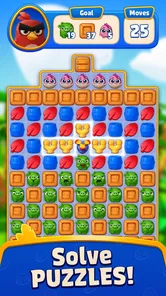
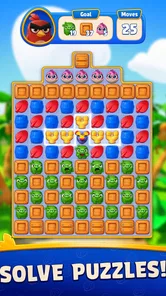
Angry Birds Match is a casual match-3 puzzle game featuring characters and locations from the Angry Birds universe. You swap colorful tiles to create matches, complete level objectives, and earn rewards. As you progress, you unlock new hatchlings, outfits, and island areas. The game is easy to understand at first, although later stages introduce more complicated layouts, obstacles, and limited-move challenges.
Is Angry Birds Match free to download and play?
Yes, Angry Birds Match is free to download and play on supported Android and iOS devices. However, it includes optional in-app purchases, with items priced from $0.99 to $99.99. The game can be enjoyed without spending money, but progress may feel slower when you run out of lives or encounter particularly difficult levels. Parental controls are recommended for younger players.
Does Angry Birds Match require an internet connection?
An internet connection may be needed for downloading the game, receiving updates, synchronizing progress, displaying certain advertisements, and accessing limited-time events or online features. Some previously loaded levels may remain playable offline, but the experience can vary depending on the device and game version. For the most reliable access to events, rewards, and saved progress, it is best to play while connected to Wi-Fi or mobile data.
Are there advertisements or in-app purchases in Angry Birds Match?
Yes, Angry Birds Match may contain advertisements and optional in-app purchases. Ads can appear between gameplay sessions or when you choose to claim certain bonuses, while purchases can provide boosters, extra moves, currency, or additional attempts. These features are not always necessary to complete levels, but they can make difficult sections more convenient. Check your device’s purchase restrictions if children will be using the app.
Pros
- Bright
- polished graphics and expressive character animations.
- Easy to learn
- with short levels suited to quick play sessions.
- Frequent events and challenges add variety beyond the main stages.
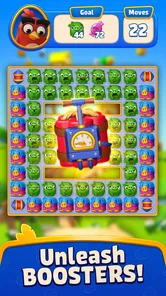
- Powerful boosters can clear difficult board layouts effectively.
- Collectible hatchlings provide a rewarding sense of progression.
Cons
- Some later levels rely heavily on luck and may require repeated attempts.
- Lives take time to refill
- which can interrupt longer play sessions.
- Boosters and extra moves can become expensive through in-app purchases.
- The game requires an internet connection for many features.
- Repeated match-three objectives may feel familiar after extended play.













