Ultimate Clash Soccer
- 1.74K
- 4.4
- Installs
- 10.00M
- Price
- Free

Screenshots




Analysis by Reviewed
When a mobile soccer game stalls before a match, it is easy to blame the game immediately. In my experience, the first useful step is to work out whether the snag is in the setup, the connection, or the way the game is being used. Ultimate Clash Soccer is built around multiplayer soccer, so a smooth start matters: a brief pause in an online session can feel more disruptive than a small delay in a game played alone. I would approach it as a quick, focused football game rather than something to open while expecting every match to work offline or without interruption.
Where players can get stuck
The first point to keep in mind is that the multiplayer focus changes what “ready to play” means. A game that depends on a live match may be affected by a weak or changing connection, even if other apps still appear to work. If a session takes longer than expected, I would avoid repeatedly tapping through menus or restarting in a hurry. Give the screen a moment, check whether the connection is stable, and then try again once rather than stacking up actions that make it harder to tell what happened.
There can also be a mismatch between what a player expects from a soccer game and what this one is designed to deliver. Someone looking for a deep offline career, a long sequence of solo tournaments, or a training simulator may find the multiplayer emphasis a limitation. The store summary identifies it as a FIFPRO multiplayer soccer game, so I would choose it for head-to-head football sessions, not on the assumption that it is a complete substitute for every kind of soccer title.
That distinction is useful before installing, not just after a problem appears. If I have only a few minutes, I want to know whether I can comfortably start a match and finish it in that window. If I want a longer solo session with a fixed progression path, I would compare it with games built specifically around single-player seasons. For quick competition against other players, this game is the more natural fit.
Getting Started with Ultimate Clash Soccer
So, diving into Ultimate Clash Soccer was as easy as pie. The download was quick, and the installation didn’t take much time either. The app is available on both Android and iOS, so you can kick off the action regardless of your device preference.
Setup checks before a match
The game is free to download, and the listed age rating is Everyone. It was released on August 9, 2023, and its current version is 1.500. On Android, the minimum operating-system requirement is Android 6.0. Those details make it straightforward to judge basic compatibility, but I would still leave some breathing room on a device that is nearly full and close other demanding apps if the phone feels sluggish. That is sensible preparation for a sports game with live play, rather than a promise that any particular device will run it identically.
For an online match, I would check the connection before opening the game, especially if I am switching between Wi-Fi and mobile data. A connection that keeps dropping can make a match feel unresponsive and can be mistaken for poor controls. If the game opens but the match experience is inconsistent, try a stable network and avoid moving between networks mid-session. This simple check is more useful than changing several settings at once, because it helps isolate whether the issue follows the connection.
More From Our News Desk

 Gmail
Gmail in a Busy Inbox: Who Benefits Most?
From first account to crowded workday, Gmail earns its place through dependable search and flexible sorting—but its best fit depends on how much inbox maintenance you can tolerate.

 Prime Video
Switching to Prime Video: What Changes in Your Viewing Routine
Prime Video can make a compelling second home for streaming, but switching means learning a different catalog, rental layer, and route from browsing to playback.

 Universal TV Remote Control
 Works Best as a Reliable Backup
A phone remote earns its place through quick setup and reliable habits. Here is how to get more from Universal TV Remote Control—and where its limits show.

 Weather - By Xiaomi
Weather by Xiaomi Review: Clear at a Glance, Less Clear Up Close
Xiaomi’s weather app makes everyday forecasts quick to scan, but its calm surface can leave useful details and recovery paths harder to find than they should be.

 X
X Under Pressure: Can It Recover When Posting Goes Wrong?
A resilience-focused review of X, examining setup, mistaken posts, interruptions, weak connections, and the gaps that matter when recovery needs to be dependable.

 Clash of Clans
 Is Won Between the Battles
Its raids are quick; its community is a long-term project of coordination, teaching, rivalry, and shared responsibility—with all the friction that entails.
Latest News



It is also worth thinking about purchases before settling into play. The game is free, with in-app purchases priced from $0.99 to $99.99 per item. I would treat spending as optional and check each purchase carefully before confirming it, particularly if a child uses the device. The presence of paid items does not mean a player has to buy something to decide whether the football itself is enjoyable; I would first play enough to understand the pace and whether the multiplayer format suits me.
Once you fire up the app, you’re greeted with a vibrant and intuitive interface. It’s clear that the developers put a lot of thought into making it user-friendly. You can easily navigate through the menus to select different modes like quick match, tournaments, or even the skill challenges.
Gameplay and Features
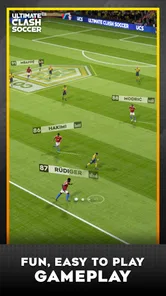
Now, let’s talk about the gameplay because, honestly, that’s where Ultimate Clash Soccer really shines. The controls are smooth and responsive, which is crucial for any soccer game. Whether you’re dribbling down the field, making a pass, or going for that epic goal, the controls feel just right. It’s almost as if you’re playing with a console controller.
The game offers a variety of modes to keep things fresh. The quick match is perfect for when you just want to dive straight into the action without any fuss. But if you’re feeling competitive, the tournament mode is where it’s at. You get to compete against AI teams and gradually increase the difficulty level as you progress. It’s a real test of your skills and strategy.
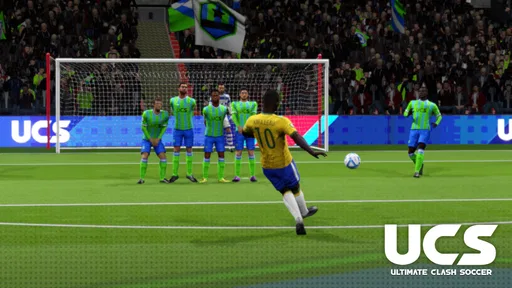
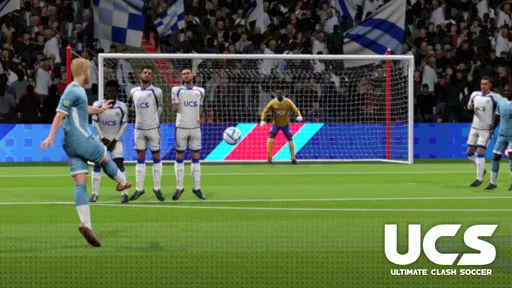
One feature I particularly enjoyed is the skill challenge mode. It’s a great way to practice and hone specific skills like free kicks, penalty shots, and dribbling. Plus, it breaks the monotony of regular matches and offers a fun diversion.
Choosing a mode for the time you have
For a short break, I would start with a quick match rather than begin a longer competitive session when I am likely to be interrupted. That is not just a convenience: multiplayer games are more enjoyable when I can give the match my attention instead of pausing to answer a call or switch apps. If I have a quieter stretch of time, I can use a more competitive session to focus on decision-making and learn how the match unfolds against other players.
The skill challenges are useful as a warm-up, too. Rather than entering a competitive match cold, I would spend a little time on a specific action that feels unreliable, such as a set piece or dribbling. Practising one thing at a time gives me a clearer sense of whether I am improving than repeatedly playing full matches and hoping the same mistake disappears. It also makes the practice mode valuable even when I do not have enough time for a complete game.
The AI tournament option described in the game gives players a different kind of session from multiplayer. I would use it when I want to work on the basics at my own pace, then switch to multiplayer when I am ready for the unpredictability of another person. That contrast is a practical strength: the same game can serve a relaxed practice period and a more demanding contest, although players primarily seeking a substantial solo campaign may still prefer a game designed around that structure.
Recovering a disrupted session
If a match freezes, disconnects, or behaves unexpectedly, I would first pause and check whether the device still has a working internet connection. If other apps also struggle, the phone or network is a more likely place to investigate than the match controls. If everything else works, close and reopen the game once, then try a fresh session. Avoid repeatedly switching networks or changing multiple device settings in the middle of troubleshooting; changing one thing at a time makes the result easier to interpret.
If the problem appears after an update or a device restart, I would confirm that the game has finished installing and that the phone itself is operating normally before trying again. On Android, checking that the device meets the Android 6.0 minimum is a useful first screen, though meeting a minimum requirement does not guarantee the same performance on every handset. If the problem continues only in multiplayer, a connection check is more informative than spending time practising controls that are not actually at fault.
There is a practical difference between an isolated hiccup and a repeatable problem. A single interrupted match may simply be an unlucky moment; repeated interruptions on one network suggest trying a more stable connection, while trouble across apps suggests checking the device or network more broadly. If the game remains unusable after those basic checks, I would stop troubleshooting rather than risk losing more time to repeated attempts, and look for the developer’s current support route through the relevant app store.
Graphics and Sound
On the aesthetics front, the game doesn’t disappoint. The graphics are crisp and vibrant, making every match a visual treat. From the detailed stadiums to the player animations, everything is designed to bring out the best in mobile gaming. The sound effects and background music add to the immersive experience, pumping up the excitement as you play.
How it fits beside other soccer games
Compared with the usual mobile soccer choices, the key question is whether I want to compete with people or spend most of my time building a solo routine. A multiplayer-first game makes the contest itself the attraction: reading an opponent and responding in the moment can feel more alive than repeatedly facing predictable computer play. The trade-off is that live competition is less convenient when the connection is unreliable or I only want a completely interruption-proof session.
By contrast, a soccer game centered on offline play is often the safer choice for travel, patchy reception, or a player who prefers a self-paced career. A management-focused title is better for someone who enjoys line-ups and long-term club decisions more than controlling action on the pitch. I would pick this one when I want direct football play and human opposition; I would look elsewhere if those other priorities matter more than the match itself.
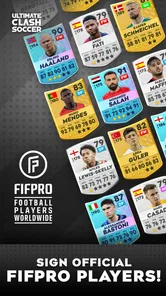
Its FIFPRO association is part of the game’s identity, but I would not choose it solely on that basis. The more important question for a new player is whether the controls, session length, and multiplayer rhythm feel right. The 4.5 average from around 190,000 ratings and more than 10 million installs show that it has reached a large audience, but those figures cannot tell me whether a particular person will enjoy online competition. A few sessions are a better test than assuming broad popularity guarantees a personal fit.
Who will enjoy it—and who may not
I would recommend it to soccer fans who like short, active matches and are happy to face competition rather than only follow a scripted solo progression. It is also a good fit for someone who enjoys practising individual skills and wants a quick way to move from a focused drill into match play. First Touch Games Ltd. develops the game, and its sports focus is clear in the emphasis on playing football rather than managing a club from the sidelines.
I would be more cautious about recommending it to a player who needs reliable offline access, dislikes competitive pressure, or wants every session to be easy to pause and resume. It may also be a poor fit for someone who is sensitive to optional in-app purchases or prefers to avoid games with spending choices altogether. Since the game is free to start, trying it can be a low-commitment way to see whether its style suits you, but I would set a spending boundary before exploring paid items.
A realistic use case is a short break at home when I have a stable connection and enough time to finish a match. I might warm up with a skill challenge, play one quick game, and stop rather than start a longer session right before leaving. On a commute with unreliable reception, I would not count on multiplayer being a dependable distraction; I would bring an offline game or another activity instead. That small distinction can save frustration and makes the game easier to fit into everyday life.
Final Thoughts
Is Ultimate Clash Soccer worth your time? Absolutely! It’s a gem for soccer fans looking for a mobile game that combines great graphics, smooth gameplay, and a variety of modes to keep you entertained. Whether you’re looking to kill some time or engage in competitive play, this app has got you covered.
So, what are you waiting for? Lace up those virtual boots and hit the field with Ultimate Clash Soccer. Trust me, once you start playing, you’ll find it hard to put your phone down. Happy gaming!
My practical advice is to begin with a brief session, see how the connection and controls feel on your own phone, and use the skill challenges to find out whether the on-field actions click for you. If they do, the multiplayer focus can make a quick soccer break genuinely engaging. If you mainly want offline matches, a long solo campaign, or a game built around club management, another sports title will probably suit you better. For players who want mobile football with direct competition and are comfortable with the online nature of the experience, this is an easy one to try.
Ultimate Clash Soccer Frequently Asked Questions
What is Ultimate Clash Soccer, and what kind of game should I expect?
Ultimate Clash Soccer is a sports game built around soccer, with a multiplayer focus highlighted by its description as a FIFPRO multiplayer soccer game. It is developed by First Touch Games Ltd. and is free to download, though optional in-app purchases are available. If you enjoy soccer games and competing against other players, its multiplayer emphasis may make it worth exploring.
Is Ultimate Clash Soccer suitable for younger players?
The game has an Everyone content rating, making it broadly suitable for players of different ages. As with any game that includes online multiplayer, parents may want to consider whether they are comfortable with a younger player competing and interacting in online matches. The game is free to download, while optional in-app purchases are available, so it is also useful to review purchase settings on a child’s device.
What are the system requirements for Ultimate Clash Soccer?
Ultimate Clash Soccer requires a device running at least Android 8.0 or iOS 12.0. It is optimized for devices with a minimum of 2GB RAM to ensure smooth gameplay. Additionally, the game requires approximately 500MB of free storage space for installation. Make sure your device meets these specifications to enjoy an optimal gaming experience.
Is Ultimate Clash Soccer free to play?
Yes, Ultimate Clash Soccer is free to download and play. However, it does offer in-app purchases for players who wish to enhance their gaming experience. These purchases can include special items, cosmetic upgrades, and other features that can give players an edge or personalize their gameplay.
Does Ultimate Clash Soccer require an internet connection?
While Ultimate Clash Soccer can be played offline, certain features, such as multiplayer mode and real-time updates, require an internet connection. To fully enjoy all aspects of the game, including new content and competitive matches, it's recommended to have a stable internet connection.
Pros
- Intuitive controls for easy gameplay.
- Realistic graphics enhance experience.
- Wide range of teams and leagues.
- Regular updates with new features.
- Engaging multiplayer mode.
Cons
- Requires constant internet connection.
- Large app size may affect storage.
- Ads can be intrusive at times.
- In-app purchases can be pricey.
- Some bugs in older devices.