Townscaper
- 308.00
- 4.0
- Installs
- 100.00K
- Price
- $4.99

Screenshots
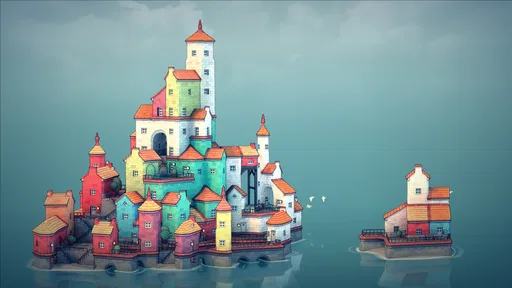
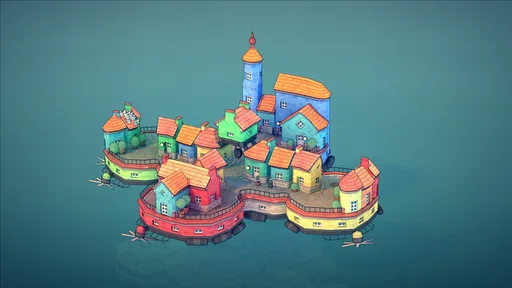
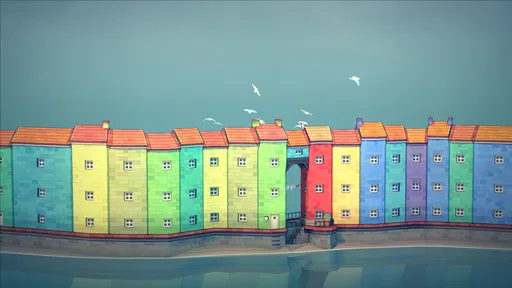
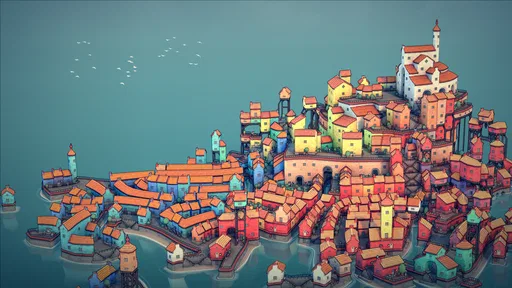
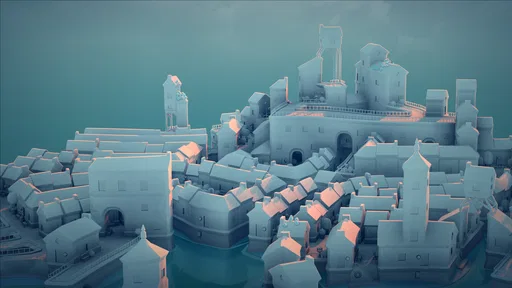
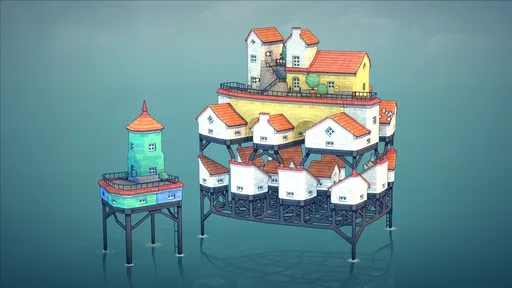
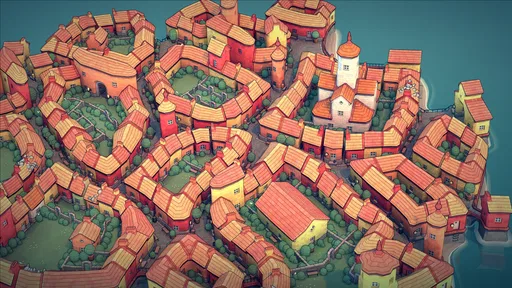
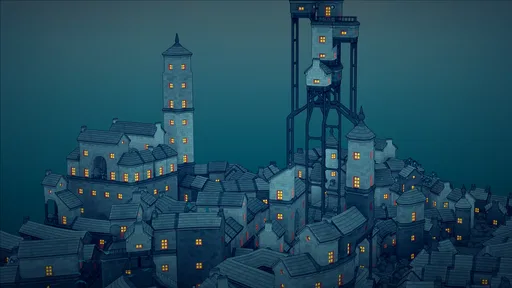
Analysis by Reviewed
I approach Townscaper less as a conventional game and more as a quiet place to arrange ideas. There is no campaign waiting to be finished or score to chase; the pleasure comes from placing pieces and seeing a small coastal-looking settlement take shape. Raw Fury’s casual game has a 4.6 average from around 3,000 ratings, and that response makes sense if you enjoy open-ended play. It costs $4.99, is rated Everyone, and has reached over 100,000 installs. Those details give you a quick sense of its audience, but the real question is whether its gentle, hands-on style suits the way you like to play.
Who will enjoy this kind of building?
I would put this on the shortlist for someone who likes arranging objects, sketching layouts, or shaping a scene without needing to manage a whole virtual economy. It works especially well if you enjoy the moment when a few simple placements turn into something with an identity of its own. You can aim for a close-packed harbor, a stepped hillside, or just an appealing patchwork of rooftops; the satisfaction is in noticing how the place comes together rather than ticking off a checklist.
That also makes it easy to share the activity with someone who is curious but not a regular player. I can imagine passing a phone back and forth at home, with one person choosing where to add the next cluster and the other suggesting a color or shape. It is a low-pressure way to make something together, though the person holding the device still needs to manage the touch interaction. If your idea of a good building game involves planning supply chains, balancing costs, or keeping citizens happy, this is not a smaller version of that experience; it is a different, more visual pastime.
A practical way to approach a new town
When I start from a blank scene, I find it more useful to choose a rough mood than to draft a complete plan. A tight grouping can suggest a busy center, while leaving breathing room between clusters gives the scene a more open feel. I add a few pieces, turn the view to inspect the outline, and then decide where the next addition belongs. This is a useful way to avoid building a large mass that looks less interesting than the small shape I first had in mind.
One trade-off is that the automatic connections can be both collaborator and surprise. Rather than trying to force every placement to match a precise picture, I would treat an unexpected arch, garden, or stairway as a design cue and build around it. That approach works best when I am experimenting. If I am trying to reproduce a particular structure exactly, the same improvisational quality can feel like a lack of control. The game rewards adapting to what appears more than following a rigid blueprint.
How it differs from a conventional city builder
Compared with management-focused builders, this casual game gives up long-term systems in favor of a quick visual response. There is no need to learn a chain of menus before a town starts to look like a town, and I do not have to protect a growing settlement from a failed budget or neglected service. That makes it a gentler choice for a short creative pause, but it also means there is less reason to return if what you want is a campaign that steadily introduces new problems.
A block-based editor may suit someone who wants precise control over every element, while a strategy builder is the better fit for players who enjoy optimization and consequences. Here, the reward is closer to making a small illustration than running a city. I would choose it when I want to see a pleasing composition emerge quickly, not when I want a detailed simulation to occupy an evening. That distinction is worth keeping in mind before paying: the modest scope is central to the experience, not a tutorial stage on the way to a larger game.
More From Our News Desk

Weather by Xiaomi Review: Clear at a Glance, Less Clear Up Close

X Under Pressure: Can It Recover When Posting Goes Wrong?

Clash of Clans Is Won Between the Battles

Android Auto Makes the Case for Quieter Car Software

MobiOffice: Transforming Mobile Productivity with Seamless Integration

EA SPORTS FC™ Mobile Soccer: Redefining Mobile Sports Gaming
Building and finding your way around
At the heart of Townscaper is simplicity. You won't find complicated menus or overwhelming options here. Instead, the app offers a canvas and a palette of vibrant colors to start building your dream town. With just a tap, you can place a house, and watch as it seamlessly integrates into the landscape. The way the structures automatically adapt to the environment is nothing short of magical.
Readability and relaxed navigation
What I love about this app is its intuitive design. It feels like a digital sketchbook where you can doodle to your heart's content. The controls are straightforward, allowing you to focus on creativity rather than technicalities. Plus, there’s something incredibly relaxing about watching your town come to life. It’s like meditative therapy wrapped in a digital format.
The lack of objectives also makes it easy to pick up for a short session: I can add a few buildings, admire the result, and stop without feeling that I have left a task unfinished. That makes it a nice fit for a quiet break between errands or a few minutes before bed. If you want goals, unlocks, or a clear sense of progression, though, this may feel more like a toy than a game.
Motor and sensory considerations
Another aspect that stands out is the absence of objectives. You’re free to build at your own pace, without the pressure of tasks or missions. It’s a sandbox in the truest sense, and this freedom is quite liberating. Whether you’re crafting a sprawling metropolis or a quaint seaside village, the possibilities are endless.
The interaction is direct and visual, which can make experimentation feel approachable: a tap adds to the scene, and the changing shape of the town provides immediate feedback. I find that rewarding when I want to create without juggling a long command list. At the same time, the central activity still depends on tapping and viewing a detailed image, so it may not suit someone who finds touch controls tiring or prefers audio-led play. The gentle waves and wind support the mood, but they are atmosphere rather than instructions; I would not rely on sound alone to understand what I have built.
Visual appeal and situational access
The visuals in Townscaper are simply stunning. Each building block is rendered in charming detail, and the colors are vibrant and inviting. It’s almost like watching a watercolor painting come to life. This visual appeal is complemented by the gentle sounds of waves and wind, which add to the serene atmosphere.
The design is not only aesthetically pleasing but also functional. The buildings automatically adjust and connect as you build, creating arches, gardens, and stairways that give your town character and depth. It's a joy to see how each element interacts with the next, making every creation unique.
That visual feedback is especially useful when I’m building in small bursts: I can make one change, rotate my attention to the emerging shape, then decide whether to continue. I would use it during a calm commute only if I could keep the screen comfortably steady and focus on it; busy surroundings make it easier to lose the relaxed feeling. On a larger screen, fine details may be easier to study, while a phone is convenient for quick sessions. Either way, I’d treat it as a focused visual activity rather than something to play while multitasking.
Small experiments, different results
A useful habit is to build outward in small clusters rather than trying to plan an entire town in your head. The automatic connections are part of the appeal, but they also mean a placement can change the surrounding shape in ways you did not intend. I like to pause after a few taps, look at the silhouette, and then add another row or leave a gap. That simple rhythm helps me keep a design coherent without turning the experience into careful engineering.
It also changes what “progress” means here. In a strategy builder, I might judge a session by resources gathered or districts completed; in this one, I judge it by whether a corner, bridge-like passage, or compact cluster has the mood I wanted. If you enjoy making little visual studies, that is a strength. If you want a city simulator with budgets, traffic, or residents to manage, the same simplicity will feel like a major omission. A conventional building game gives more systems to master, while this one favors immediate shape and color.
Where it fits—and where it may not
While Townscaper may seem simple at first glance, the depth of creativity it offers is profound. There are no rules, no limitations—just pure artistic expression. Whether you’re a seasoned gamer or someone looking for a new hobby, this app offers a delightful escape from the mundane.
For me, the best everyday use is a short reset after work: I open it, add a few pieces to a half-formed waterfront idea, and stop when the scene feels pleasing. It asks for no commitment to a long session, and that makes it easier to return to than a builder that expects regular planning. It is also a friendly option for someone who wants to make something without learning a complicated interface. I would steer a player who needs explicit objectives, a strong challenge, or detailed management toward a more traditional city-building game instead.
Practical details and remaining barriers
The game is version 1.20 and supports Android 4.4 and later. Its Everyone age rating makes it suitable for a broad audience, though that does not mean the visual, touch-based format will work equally well for every player. Since the play depends on seeing how pieces fit and choosing where to place them, screen comfort and reliable touch input matter more than gaming experience. I would also keep expectations aligned with the one-time creative loop: the appeal is making and viewing a town, not completing a sequence of missions.
There is a small but meaningful trade-off in its automatic building behavior. It saves you from managing lots of construction rules, yet it can make the result less predictable than placing fixed blocks in a conventional editor. When a shape turns out differently from what I pictured, I can treat that as a prompt to adapt; if I need exact architectural control, it may frustrate me. Trying a few small additions before committing to a larger outline is the approach I find most forgiving.
A calm creative choice, with a clear audience
In conclusion, Townscaper is more than just an app; it’s a canvas for your imagination. With its intuitive interface and captivating visuals, it provides a unique experience that both relaxes and inspires. If you’re looking to unwind and unleash your creativity, give Townscaper a try. It might just become your new favorite escape.
I’d recommend it most to people who enjoy shaping scenes for their own sake and want a gentle activity they can leave and revisit without losing track of a plot. I would skip it if you expect deep city-management systems, lengthy goals, or a primarily audio-based experience. For a compact creative break, though, its limited scope is also its point: there is little to learn before you can start making a place that feels like yours.
Townscaper Frequently Asked Questions
Is Townscaper suitable for children and casual players?
Townscaper is a casual game with an Everyone age rating, making it suitable for a broad audience. Its straightforward building interactions are easy to approach, while the open-ended creative activity gives players room to experiment at their own pace. It is a gentle choice for someone seeking a visual toy rather than a demanding game built around competition or complex management.
What kind of experience should I expect from Townscaper?
Townscaper is best approached as a creative building toy, not a conventional game with missions or a campaign. You place structures and watch the town take shape, enjoying the colors and changing architecture as you experiment. Its appeal lies in the process of making and viewing a place of your own, so it suits short, relaxed sessions as well as longer creative play.
What is Townscaper and how does it work?
Townscaper is a unique city-building app that allows users to effortlessly create colorful towns and cities with just a few taps. Unlike traditional city builders, Townscaper focuses on creativity and visual appeal rather than resource management or strategy. Users simply select colors and click on a grid to add buildings, streets, and other structures. The app's algorithm automatically generates pleasing architecture, making it accessible for users of all ages and skill levels.
Is Townscaper available on both Android and iOS platforms?
Yes, Townscaper is available for download on both Android and iOS devices. This cross-platform availability ensures that users can enjoy the app's delightful city-building experience on their preferred device. Whether you're using a smartphone or a tablet, Townscaper provides a seamless and engaging experience that allows you to unleash your creativity without any platform restrictions.
Does Townscaper require an internet connection to function?
No, Townscaper does not require an internet connection to function. Once downloaded, users can enjoy building their townscapes offline, making it a great option for entertainment on the go. This feature is particularly useful for users who may not have consistent access to the internet but still want to engage in creative exploration and city-building.
Pros
- Intuitive interface for easy building
- Beautiful
- vibrant graphics
- No ads to interrupt gameplay
- Relaxing and stress-free experience
- Offline mode available
Cons
- Limited building options
- No specific goals or missions
- Lacks multiplayer features
- Not suitable for action game lovers
- Occasional performance issues on older devices












