Pixel Car Racer
- 25.13K
- 4.5
- Installs
- 10.00M
- Price
- Free

Screenshots




Analysis by Reviewed
When Pixel Car Racer clicks, it is because a race feels connected to what I have been doing in the garage: trying a setup, seeing how it behaves, and deciding what to change. That loop makes this retro-style racing game appealing to players who enjoy tinkering as much as winning. It is free to play, though optional in-app purchases range from $0.99 to $9.99 per item, so I would treat spending as a choice rather than a requirement.
Where the early friction tends to be
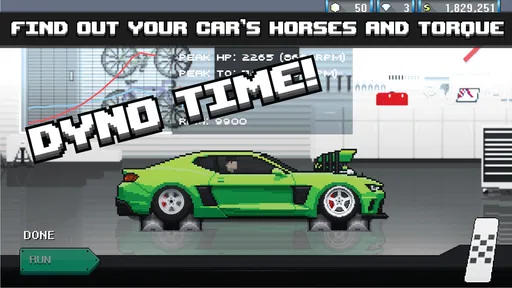
The main adjustment is learning that progress is not only about tapping into a race. The garage invites experimentation, but a large set of parts can make it hard to know where to begin. I recommend changing one thing at a time and taking a race afterward to judge the result; changing several parts together makes it difficult to tell which choice helped. That small habit makes customization feel like a satisfying process instead of guesswork.
Shifting is another place where a new player may stumble. Drag races reward timing, and the right rhythm takes practice rather than instant mastery. I would use early runs to get comfortable with the controls instead of expecting every race to be a clean win. If you want a racer that immediately delivers effortless, high-speed action, this learning curve may feel like friction rather than depth.
A calmer way to get started
Before spending time chasing a perfect build, I would settle on one car and learn how it responds. Keep a mental note of the parts you change and the effect you notice, then avoid buying or fitting something simply because it looks like an upgrade. The useful question is whether the change suits the way you race. This approach is especially helpful when you are still learning the shift timing and do not yet have a reliable baseline.
The game is rated Everyone, and it comes from Studio Furukawa. It first arrived on Jul 22, 2016; the current version is 1.2.5 and the stated minimum operating system is Android 4.1. It has a 4.5 average from around 365,000 ratings, with over 10 million installs. Those figures suggest a well-established audience, but they do not tell you whether its hands-on garage focus is your kind of fun.
Making progress without losing your place
If a session gets interrupted, I would return by checking the car and parts you were working on before making another change. That gives you a sensible starting point and helps avoid turning a half-finished experiment into a confusing new setup. For a short break, one focused goal—practising shifts or testing a single adjustment—is more manageable than trying to rebuild the whole car at once.
When something feels off, first separate a driving mistake from a setup question. Repeat a similar run and pay attention to whether the same issue happens again. If it does, reconsider the change you just made; if not, keep practising before rewriting the build. This is not a guarantee that every hiccup has a simple fix, but it is a practical way to avoid blaming the car for inconsistent timing.
More From Our News Desk

 Gmail
GmailGmail in a Busy Inbox: Who Benefits Most?
From first account to crowded workday, Gmail earns its place through dependable search and flexible sorting—but its best fit depends on how much inbox maintenance you can tolerate.

 Prime Video
Switching to Prime Video: What Changes in Your Viewing Routine
Prime Video can make a compelling second home for streaming, but switching means learning a different catalog, rental layer, and route from browsing to playback.

 Universal TV Remote Control
Universal TV Remote Control Works Best as a Reliable Backup
A phone remote earns its place through quick setup and reliable habits. Here is how to get more from Universal TV Remote Control—and where its limits show.

 Weather - By Xiaomi
Weather by Xiaomi Review: Clear at a Glance, Less Clear Up Close
Xiaomi’s weather app makes everyday forecasts quick to scan, but its calm surface can leave useful details and recovery paths harder to find than they should be.

 X
XX Under Pressure: Can It Recover When Posting Goes Wrong?
A resilience-focused review of X, examining setup, mistaken posts, interruptions, weak connections, and the gaps that matter when recovery needs to be dependable.

 Clash of Clans
Clash of Clans Is Won Between the Battles
Its raids are quick; its community is a long-term project of coordination, teaching, rivalry, and shared responsibility—with all the friction that entails.
Latest News



The Concept of Pixel Car Racer
Imagine a game that combines the thrill of racing with the depth of customization, and you have Pixel Car Racer. This app isn’t just about getting from point A to point B in the fastest time possible. It’s about building your dream car, one part at a time. The game allows you to delve into the nitty-gritty of car mechanics, offering an experience that’s both educational and entertaining.
Customization at Its Best
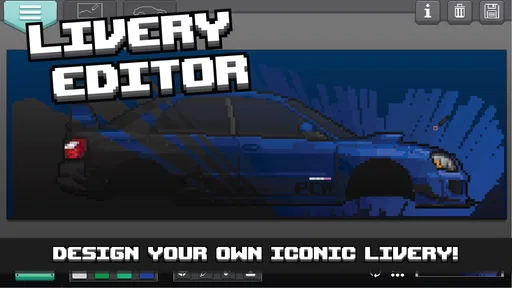
One of the standout features of Pixel Car Racer is its extensive customization options. You can tweak nearly every aspect of your vehicle, from the engine to the exhaust. Want to roll down the street in a neon green muscle car with flame decals? You got it! The game offers an impressive range of parts and colors, letting your creativity run wild.
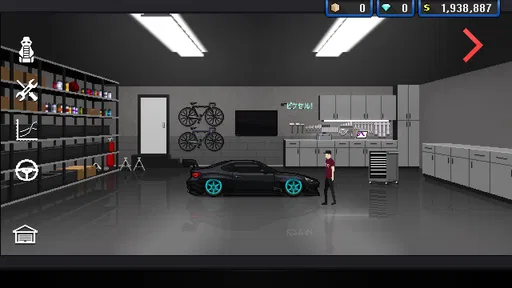
The garage is where the magic happens. It’s your personal space to experiment and create. The parts catalog is vast, enabling you to build a car that’s truly unique. Whether you’re a gearhead or a casual player, the customization options will keep you engaged for hours.
Racing Modes and Gameplay
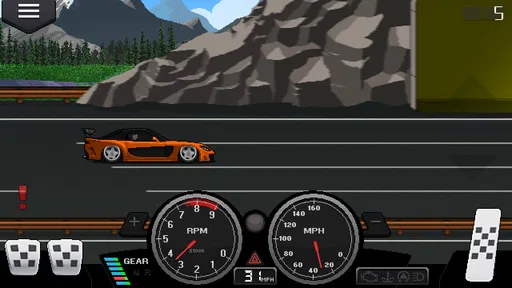
Pixel Car Racer offers two main racing modes: drag racing and street racing. Drag racing is all about timing. You need to hit the perfect shift to beat your opponents. Street racing, on the other hand, requires strategic maneuvers to dodge traffic and obstacles.
The controls are intuitive, making it easy for anyone to pick up and play. However, mastering the perfect shift or drift takes practice, adding a layer of challenge for those who crave it. The retro graphics and catchy soundtrack add to the nostalgic feel, making it a delightful experience for fans of classic racing games.
The RPG Element
What truly sets Pixel Car Racer apart is its RPG element. As you progress, you earn experience points that can be used to unlock new parts and cars. This system adds depth to the game, encouraging you to keep racing and improving your skills.
Leveling up feels rewarding, as each milestone brings new possibilities for your garage. The RPG mechanics blend seamlessly with the racing aspect, ensuring that the gameplay remains fresh and exciting.
Who will enjoy this particular mix?
I would recommend it most to players who like treating a car as a project: choose a look, adjust parts, then head out and see how the result feels. It also suits short sessions between other tasks, since you can focus on one small experiment or a few practice runs instead of needing to settle in for a long event. A realistic use is opening it during a quiet break, practising shifts for a few races, and leaving the next garage decision until you have time to think it through.
Compared with racing games built mainly around immediate action or realistic driving presentation, this one puts more attention on the pixel-art garage and the satisfaction of shaping a build. That is a meaningful distinction, not an automatic advantage. If you want visual realism, broad track variety, or a simulation-first feel, another racing game may suit you better. Here, the draw is the compact arcade style and the connection between tinkering and racing.
Trade-offs to keep in mind
The generous customization can also become the game’s biggest time sink. A player who enjoys comparing parts may find that choice absorbing; someone who wants a clear, guided route through a campaign may find it less focused. The retro presentation is part of its identity, but it will not appeal to everyone, and the emphasis on tuning means the racing itself may feel secondary during stretches when you are busy adjusting the garage.
I would also keep purchases deliberate. The game is free, with optional items priced from $0.99 to $9.99 each, but spending does not replace learning how your car behaves or improving your timing. I would first decide what I actually want to change, then consider whether a purchase serves that goal. Players who prefer a fully hands-off experience or dislike optional spending prompts should be cautious and check the purchase flow before playing.
Is it the right racer for you?
Studio Furukawa’s game has been around since Jul 22, 2016, and its current version is 1.2.5. It is rated Everyone and lists Android 4.1 as its minimum operating-system requirement. Those details make it easy to judge basic fit, while the larger decision is personal: do you enjoy repeating races to improve a setup, or would you rather jump between varied events without much garage work?
The audience response is strong, with a 4.5 average across around 365,000 ratings and over 10 million installs. I see that as a sign that its particular blend has found plenty of fans, not proof that every racing fan will enjoy it. If you like experimentation, old-school visuals, and skill-based shifting, it is an easy one to try. If your priority is polished realism or a straightforward race-and-unlock routine, I would look elsewhere.
Small experiments that make the garage easier to read
One practical way to avoid losing track of your own decisions is to treat each session like a tiny test rather than a full rebuild. Pick a single question before you enter the garage: does this change make the car feel more suitable for the way I shift, or am I only choosing it because it looks appealing? Then run a comparable race and pay attention to the same part of the experience. Keeping the question narrow makes the result easier to interpret, even when the race itself is not perfect.
I would also separate appearance choices from performance experiments. If you are changing colors or decals because you want a car that feels personal, enjoy that as its own goal; there is no need to pretend every visual choice is a tuning decision. When you want to judge how a part affects a run, leave the look alone for that test. This simple separation gives customization two satisfying purposes without confusing style with results.
Choosing a mode for the time you have
Drag racing is the more natural choice when your goal is focused timing practice. A short session can have a clear point: learn the rhythm, notice where you hesitate, and try again. Street racing asks for a different kind of attention because traffic and obstacles make the run less like a pure timing exercise. I would choose between them based on what I feel like practising, rather than assuming one mode is always the best route to progress.
That distinction also helps if you are playing while tired or distracted. A demanding run is not especially useful when you are only half watching the screen, so I would use an unfocused moment for a low-stakes garage decision or stop and return when I can give the race proper attention. Conversely, if I have only a few minutes and want a definite challenge, practising a shift sequence is more satisfying than opening the parts catalog without knowing what I want to do.
When the game seems to be the problem
If a race suddenly feels inconsistent, I would first check whether I changed more than one thing since the last run and whether I am using the same approach to shifting. A quick return to the previous familiar setup, if you know what it was, can help distinguish an experiment that did not suit you from a moment of poor timing. Avoid making several corrective changes at once; that may make the next run different, but it will not tell you why.
For ordinary setup trouble, the safest checks are simple: make sure the game is installed from a trusted store, confirm that your device meets the stated Android requirement, and close and reopen the game if it stops responding. If a problem continues, avoid deleting saved information or reinstalling impulsively unless you understand what may be lost. That is sensible general care for a game with ongoing garage projects, not a special fix or a promise that every issue has the same cause.
When the device or the player is the cause
Not every disappointing run points to a fault in the game. A missed shift can come from unfamiliar timing, while a device that is busy with other tasks may make play feel less smooth. I would close other demanding apps, give the controls my full attention, and retry before changing a build that previously felt consistent. If the issue happens across different runs and after a fresh start, then it is more reasonable to look beyond your driving and consider ordinary device or installation troubleshooting.
There is also a personal-fit issue that can look like a technical problem. If you repeatedly open the game and spend longer deciding what to modify than enjoying the races, the garage may simply be asking for more patience than you want to give. A player seeking a quick spectacle can reasonably prefer a racer with more immediate action, while someone who likes patient trial and error may regard the same pause as the point. Recognizing that difference can save you from trying to force the wrong kind of game to work for you.
Questions worth settling before a long garage session
Can a newcomer enjoy it without understanding real car mechanics? In my view, yes: the appeal is experimenting and learning how choices feel in play, not arriving with engineering knowledge. Still, I would not expect every part name or adjustment to explain itself instantly. If that uncertainty bothers you, keep the first experiments modest and judge them by what happens in the next race instead of trying to master the entire catalog at once.
Is it suitable for a quick daily visit? It can be, provided you give the session one small purpose. A few practice runs or a single focused garage choice fit a spare moment better than an open-ended attempt to optimize everything. Does the retro look mean the game is only for nostalgia? I do not think so; the style is distinctive, but the more important question is whether you enjoy a compact arcade presentation and hands-on tuning. Players who need realistic visuals are likely to be happier elsewhere.
Should you spend money early? I would wait until you understand what you want from the game. Optional purchases can be considered on their own merits, but paying is not a substitute for improving shift timing or learning which changes suit your preferred racing. And if you want a race game with no garage decisions, little repetition, or a strong simulation focus, I would skip this one rather than hope that those parts of its design disappear later.
Final Thoughts
Pixel Car Racer is a fantastic choice for anyone looking to mix racing with creativity. Its combination of customization, racing, and RPG elements offers something for everyone. Whether you’re a fan of classic arcade games or a racing enthusiast, this app is bound to keep you entertained for hours on end.
The game’s charm lies in its attention to detail and the freedom it gives players to express themselves. So, if you’re ready to hit the streets with your custom ride, Pixel Car Racer is the perfect app to rev up your engines!
Pixel Car Racer Frequently Asked Questions
Does Pixel Car Racer work on older Android devices?
Pixel Car Racer supports Android devices running Android 4.1 or later, so it may suit players using an older phone or tablet that meets this requirement. Before downloading, check the Android version on your device. The game is a racing title with a retro arcade style and a strong focus on building and customizing cars.
Who developed Pixel Car Racer, and when was it released?
Pixel Car Racer was developed by Studio Furukawa and released on July 22, 2016. It is a retro-style arcade racing game centered on car customization, giving it a distinctive pixel-art presentation. If you enjoy racing games with a classic visual style and vehicle-tuning appeal, its approach may be worth exploring.
How much storage space does Pixel Car Racer need?
It is sensible to check your device’s available storage before downloading Pixel Car Racer, as games need room to install and operate. The game’s appeal lies in its retro arcade racing and car customization, rather than a complicated setup. Keeping some free space on your device can also help avoid installation interruptions and leave room for other apps.
Does Pixel Car Racer have in-app purchases?
Yes. Pixel Car Racer is free to download and play, but it includes optional in-app purchases priced from $0.99 to $9.99 per item. These purchases can provide additional in-game currency and items, but they are not essential to enjoying the game. Parents may want to review purchase settings if younger players use the device.
Is Pixel Car Racer suitable for younger players?
Pixel Car Racer is a racing game with an Everyone content rating, making it suitable for a broad audience. Its focus is on arcade-style car racing and customization. Parents may still want to review the game and its purchase options with younger players, particularly if they share a device or have access to payment methods.
Pros
- Stunning pixel graphics and retro design.
- Highly customizable cars and parts.
- Engaging drag racing experience.
- Frequent updates and new content.
- Offline play available.
Cons
- In-app purchases can be costly.
- Occasional game crashes.
- Limited variety in race tracks.
- Requires strategic tuning knowledge.
- No multiplayer racing option.