House Flipper: Home Design
- 47.28K
- 4.6
- Installs
- 50.00M
- Price
- Free

Screenshots



Analysis by Reviewed
If you’re opening House Flipper: Home Design for the first time, the appeal is easy to understand: you get to make a home feel better through a series of renovation and decorating decisions. I’d approach it as a relaxed creative game, not as a realistic guide to property investment. The satisfying part is seeing a room change under your choices, while the main challenge is deciding what to do next without losing the look you had in mind.
What the first session feels like
This is a simulation game from PlayWay SA, released in 2020 and available for free. Its broad idea is straightforward: take on home-related tasks, work through changes, and shape the result with furniture and decoration. The game is rated for Everyone, so its renovation theme is presented in an accessible way. If you enjoy arranging rooms more than competing for a high score, that emphasis should suit you.
For a new player, I recommend treating the first project as a small design exercise rather than trying to make every choice perfect. Pick a clear direction—bright and simple, warm and cozy, or another style you like—and use it to guide your decisions. A consistent room often feels more finished than one filled with individually appealing items that do not work together.
From opening the game to a first satisfying result
When you launch it, take a moment to understand the task in front of you before changing the room. I find it helpful to work in stages: deal with the visible renovation work first, then decide on the overall color and furnishing approach, and leave small decorative touches until the larger choices feel settled. That order makes it easier to judge whether an item belongs instead of repeatedly undoing decisions.
A realistic short session might be a few minutes after dinner: open a project, make progress on one room, and stop once you have a coherent result. You do not need to turn every visit into a long decorating marathon. If you enjoy tweaking, you can spend more time refining the arrangement; if you just want a quick creative break, set yourself one modest goal and call it done.
Small choices that make decorating easier
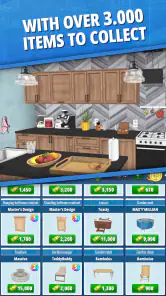
The wide selection of furniture and decor is part of the fun, but it can also make choosing harder. I’d settle on a color direction before browsing for individual pieces, then avoid adding something just because it looks appealing on its own. Think about how the furniture, wall finish, and flooring will read together. This simple habit is especially useful when you are tempted to keep changing the room after it already feels complete.
Another useful approach is to pause between major changes and look at the room as a whole. A single item can seem perfect up close yet feel out of place in the finished space. The drag-and-drop controls make experimenting approachable, but experimentation still takes attention; a deliberate pass through the room can save you from making lots of small adjustments that do not improve the overall design.
More From Our News Desk

Weather by Xiaomi Review: Clear at a Glance, Less Clear Up Close

X Under Pressure: Can It Recover When Posting Goes Wrong?

Clash of Clans Is Won Between the Battles

Android Auto Makes the Case for Quieter Car Software

MobiOffice: Transforming Mobile Productivity with Seamless Integration

EA SPORTS FC™ Mobile Soccer: Redefining Mobile Sports Gaming
Embark on Your Renovation Adventure
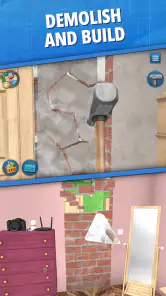
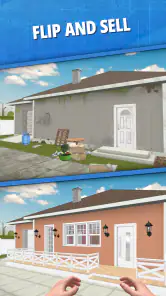
The moment you launch House Flipper: Home Design, you're greeted by a colorful interface that screams creativity. You're not just playing a game; you're embarking on a journey to turn shabby houses into dream homes. The app provides you with a variety of tasks, from cleaning and decorating to complete overhauls. Each project is unique, requiring you to think on your feet and make design choices that reflect your style.
Tools and Features Galore
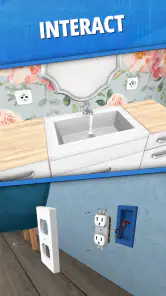
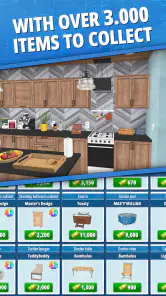
One of the coolest features of this app is the wide array of tools at your disposal. Whether you're painting walls, installing new flooring, or fixing up the garden, the app offers a realistic experience that feels incredibly satisfying. The drag-and-drop interface makes it easy to experiment with different looks, ensuring you get the perfect finish every time.
The app also boasts an extensive selection of furniture and decor items. From chic modern pieces to cozy vintage finds, there's something for every taste. Plus, the regular updates mean there's always something new to try out, keeping the experience fresh and engaging.
How it compares and where it may frustrate
Compared with home-decorating games that focus mainly on arranging objects, this one gives renovation tasks a larger role, so it can feel more like working through a home project than decorating a single display room. That mix is a good fit if you want a sense of progress alongside creative choices. If you prefer unrestricted building, detailed architectural planning, or a fast puzzle with a clear win-or-lose outcome, a different kind of game may be a better match.
There is a trade-off to that project-based approach: tasks can steer your attention, and the breadth of furniture choices may leave you browsing when you would rather be making visible progress. I would focus on the requested work first and save optional styling decisions for afterward. That keeps each session purposeful and helps prevent the common feeling of having too many possibilities at once.
Costs, access, and who will enjoy it
The game is free to start, with optional in-app purchases priced from $0.99 to $29.99 per item. I’d try the core experience before spending anything and treat purchases as optional rather than necessary to enjoy the design side. It has a 4.6 average from around 2.7 million ratings and more than 50 million installs, which suggests it has found a broad audience, though popularity alone cannot tell you whether its pace is right for you. The current version is 1.502, and it requires Android 7.0 or later on Android devices.
I’d recommend it to someone who likes visual tinkering, room makeovers, and low-pressure simulation, especially if they enjoy making a space feel cohesive. It is less suitable if you want a purely realistic renovation simulator, need complete creative freedom, or dislike working through assigned tasks. On iOS, the same general decorating premise may appeal, but device-specific requirements are worth checking before installing.
The Joy of Personalization
What truly sets House Flipper apart is the level of personalization it offers. You can customize everything from the color of the walls to the style of the furniture, giving each home a unique feel. It's like having a blank canvas where you can unleash your creativity and see your ideas come to life. This aspect of the game is not only enjoyable but also incredibly addictive. I often find myself spending hours perfecting every little detail!
Keeping a project manageable
One question new players often have is whether they need design experience to get started. I don’t think so: choosing a simple palette and making one decision at a time is enough to produce a room that feels intentional. Another is how to avoid getting stuck between options. My practical answer is to give yourself a limit—choose a main color, a furniture direction, and a stopping point—then revisit only if the result genuinely feels unfinished.
For players who enjoy sharing and comparing ideas, the social and challenge elements can add a reason to return after a project is complete. They are not essential to the basic pleasure of improving a room, though, and players who prefer to create privately can focus on the renovation itself. I would treat challenges as a change of pace rather than a test of whether your personal style is “right.”
Engaging Community and Challenges
Another highlight is the thriving community of players that the app has fostered. You can share your designs with others, participate in challenges, and even get inspired by the work of fellow renovators. The competitive aspect adds an extra layer of fun, as you strive to outdo others with your innovative designs.
Moreover, the app's challenges are a fantastic way to test your skills and push your creativity to the limits. These challenges often come with specific themes or constraints, making them both exciting and rewarding when you manage to meet the criteria.
A practical routine for new renovators
If I were guiding a friend through a first project, I’d suggest a simple loop: read the task, identify the changes it asks for, complete those before decorating freely, and then take a final look from the room’s overall perspective. This keeps the required work separate from personal styling. It also gives you a clear point to pause, which matters in a game where a new furniture choice can easily turn into another round of browsing.
When a room feels cluttered, I would not immediately add another accent or swap every piece. First, check whether the main furniture choices support the same mood and whether a decorative item is competing for attention. Removing or changing one distracting choice can improve the whole arrangement more than adding several new details. It is a useful way to make design decisions feel deliberate rather than endless.
Choosing it for the right kind of play
This is a particularly good fit for someone who enjoys visual creativity but wants a task to get started. A blank canvas can be inspiring, but it can also make it hard to begin; the renovation assignments give you a reason to make the first move, while the decorating lets you add a personal touch. It can also work well as a shared conversation starter: you can show a finished room to a friend and talk about what you would change, even if you play separately.
I would skip it if your main interest is learning how real renovations are planned, estimating materials, or making precise architectural layouts. The game is about an approachable home makeover experience, not professional instruction. It may also frustrate players who want every choice to be entirely self-directed, since a task-based structure naturally gives some decisions priority over free styling. If you want a pure decorating sandbox, look for a game built around open-ended placement instead.
My Final Thoughts
In conclusion, House Flipper: Home Design is a delightful app that offers a satisfying creative outlet for anyone interested in design and renovation. Its accessible approach, varied tasks, and customization give me a reason to recommend it to friends who like shaping rooms at their own pace. I would start with a small project, settle on a direction before browsing, and see whether the task-led rhythm works for you. If that combination sounds enjoyable, it is an easy game to try; if you want a detailed building tool or a fast competitive challenge, I’d look elsewhere.
House Flipper: Home Design Frequently Asked Questions
Is House Flipper: Home Design free to download?
Yes. House Flipper: Home Design is free to download, so you can try its home renovation and decorating gameplay without paying upfront. The game also offers optional in-app purchases, which are separate from the initial download. If you prefer to avoid extra spending, review purchase options and device settings before playing, particularly if children will use the app.
Who develops House Flipper: Home Design, and what kind of game is it?
House Flipper: Home Design is a simulation game developed by PlayWay SA. Its focus is on transforming homes through renovation and interior design, giving players a chance to work with rooms and furnishings. The store summary describes designing a home and decorating it with real furniture, making this a natural fit for players who enjoy creative makeovers and home-design themes.
Is House Flipper: Home Design suitable for children?
House Flipper: Home Design is rated Everyone, so it is presented as suitable for a broad audience. Its focus is on home renovation, decorating, and design rather than mature themes. It is a simulation game, and younger players may enjoy choosing furniture and changing rooms, while parents can decide whether the gameplay and optional in-app purchases suit their family.
Can I play House Flipper: Home Design offline?
The game centers on renovating and decorating homes, so its main appeal is the hands-on design experience. Whether you can access every feature without an internet connection may depend on the device and the game’s current requirements. If offline play is important to you, check the app’s behavior after installation before relying on it while traveling or away from a connection.
Does House Flipper: Home Design work on older phones and tablets?
House Flipper: Home Design requires Android 7.0 or later on Android devices. As with other detailed simulation games, performance can vary depending on a device’s hardware and available storage, so meeting the minimum operating-system requirement does not guarantee the same experience on every phone or tablet. Check your device’s compatibility before downloading, especially if it is an older model.
Pros
- Intuitive design tools enhance creativity.
- Wide variety of furniture and decor items.
- Regular updates add new content.
- Realistic renovation experience.
- Engaging challenges and tasks.
Cons
- In-app purchases can be pricey.
- Requires significant storage space.
- Occasional performance lags.
- Limited offline functionality.
- Tutorials could be more detailed.
- Category
- Simulation
- Version
- 1.502