Diner DASH Adventures
- 15.07K
- 3.8
- Installs
- 5.00M
- Price
- Free

Screenshots
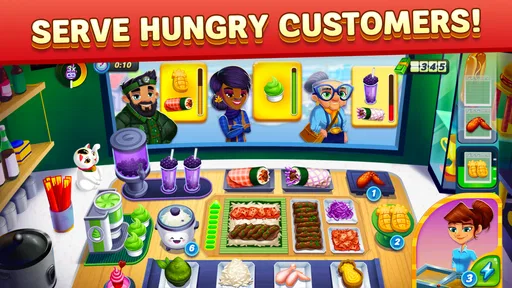
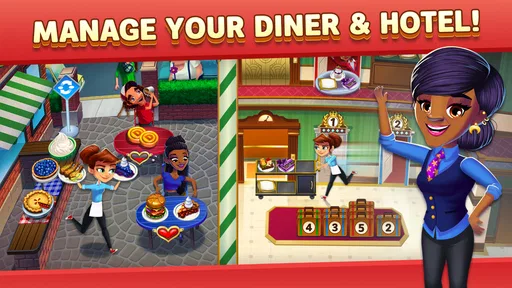
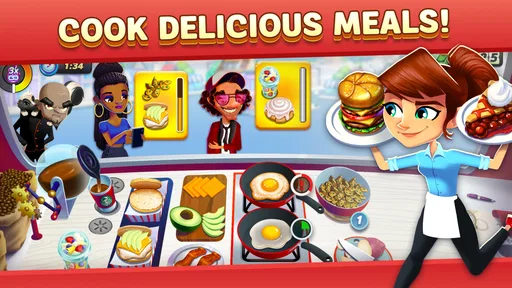





Analysis by Reviewed
I spent time with Diner DASH Adventures as a casual restaurant-management game, paying particular attention to how comfortably it works in different situations and for different kinds of players. The basic appeal is easy to understand: you help manage a busy diner, react to customers, and keep the service moving. What matters in practice is how much attention the game demands, how clearly its busy scenes communicate priorities, and whether its free-to-play structure gets in the way of a relaxed session.
My overall impression is that this is best enjoyed in short, focused bursts rather than as a completely hands-off time filler. It has the familiar quick-decision rhythm associated with the Diner DASH name, but the restaurant setting gives each round a useful sense of urgency. I found myself constantly choosing what to handle first, which customer could wait, and when it was worth taking a risk to keep the line under control.
How Diner DASH Adventures works in everyday play
The game comes from Glu and sits firmly in the casual category. It is free to download, with optional purchases ranging from $0.99 to $99.99 per item, and the store warns that it includes in-game purchases and random items. That combination is important: you can try the core experience without paying, but players who dislike chance-based rewards or repeated prompts should approach it with some caution.
At its best, the game turns simple restaurant tasks into a small prioritization puzzle. Customers arrive, needs build up, and the player has to keep the service chain moving. I like that the challenge is not only about tapping quickly. It is also about reading the room, remembering what is waiting, and avoiding the tempting mistake of serving the easiest customer while a more impatient one is close to losing patience.
A realistic use case is a short break between errands. I can play a round while waiting for a bus or during a coffee break, stop after a few minutes, and return later without needing to commit to a long story sequence. That makes it more practical than a deeper restaurant simulator when I want immediate interaction rather than planning menus, managing staff schedules, or studying spreadsheets of resources.
Readability and navigation during a rush
The most important accessibility question here is whether the player can understand what needs attention before the screen becomes overwhelming. In my experience, the restaurant layout communicates the basic flow reasonably well: customers, service points, and pending actions are presented as parts of one busy scene. Once I learned the visual rhythm, I could scan for the next urgent task instead of examining every corner of the screen.
That learning period still matters. New players may initially spend too much time looking for the correct object or action, especially when several demands appear close together. The game is more comfortable after the visual language becomes familiar, but it does not feel like a slow tutorial experience designed for someone who wants to absorb every system at their own pace.
More From Our News Desk

Weather by Xiaomi Review: Clear at a Glance, Less Clear Up Close

X Under Pressure: Can It Recover When Posting Goes Wrong?

Clash of Clans Is Won Between the Battles

Android Auto Makes the Case for Quieter Car Software

MobiOffice: Transforming Mobile Productivity with Seamless Integration

EA SPORTS FC™ Mobile Soccer: Redefining Mobile Sports Gaming
I recommend beginning with deliberate movements instead of trying to play at maximum speed immediately. Watch how a customer’s state changes, identify where completed actions appear, and notice which parts of the restaurant remain active while you are handling another task. This approach reduces visual clutter and helps reveal the order in which the game expects actions to happen.
Text size and contrast can be personal issues on a phone. I would not choose this game assuming that every label will be comfortable for every player, particularly on a smaller display or under strong sunlight. The practical test is simple: play the opening sessions at the brightness and text scale you normally use. If you have to hold the device unusually close to distinguish a customer request from a decorative element, the fast pace will become tiring quickly.
Navigation is also affected by the game’s layered nature. The restaurant action is only one part of the experience; menus, rewards, upgrades, and other progression screens can interrupt the direct service loop. I found that these screens are manageable once I knew where to look, but players who prefer extremely minimal interfaces may find the broader structure busier than a one-screen arcade game.
Motor demands and sensory comfort
The central motor demand is repeated touch interaction under time pressure. You are not using complex controls, but the game does ask for accurate, timely taps and quick movement between areas of the screen. That makes it approachable for someone who dislikes virtual joysticks, yet it may be uncomfortable for players who experience hand fatigue, tremors, or difficulty with rapid repeated gestures.
One useful habit is to play with the phone resting on a table rather than holding it in one hand throughout a hectic session. This gives the tapping hand more stability and makes it easier to pause between actions. It also reduces the temptation to make hurried swipes when a controlled tap would be enough.
The game’s pressure comes from visual activity and time-sensitive decisions rather than from complicated physical controls. Players who enjoy busy screens may find that energy motivating. For me, the same energy becomes tiring after several consecutive rounds, especially when I am already in a noisy environment. I get more enjoyment by treating it as a short challenge and taking a break before the restaurant starts to feel like work.
Sound can influence that experience too. In a quiet room, audio feedback can make the diner feel lively and can help confirm that an action registered. In public spaces, on public transport, or around sleeping family members, I prefer playing with the device muted or at a low level. The game remains understandable through its visual presentation, although losing audio may remove some of the immediate feedback that makes the service loop feel responsive.
Players sensitive to constant motion, bright effects, or crowded animated scenes should test a brief session before deciding whether the presentation feels comfortable. I would not describe the game as visually harsh by default, but its appeal depends on a lively restaurant atmosphere, so it is not the best match for someone seeking a quiet, low-stimulation interface.
Playing in different places and routines
This is a particularly natural game for interrupted routines. A short session can fit into a waiting room, a lunch break, or a few minutes at home when I do not want to start a larger game. The downside is that a round still expects attention. If I am walking, talking to someone, or frequently looking away from the screen, I am likely to miss a customer need and lose the satisfying rhythm of the level.
That makes it less suitable for background play than a simple idle game. I would not start a busy restaurant round while cooking, caring for a child, or doing any task that requires regular visual attention elsewhere. The game rewards being present, even though it is casual and easy to launch.
Screen size changes the experience. On a larger phone, the restaurant scene gives my fingers more room to land accurately. On a compact device, the same concentration of characters and actions feels more demanding. A tablet-sized display could make scanning easier, but I would still judge the game by the device I actually plan to use rather than assuming a bigger screen will solve every issue.
Battery and connection habits may also affect whether it fits your routine. Because the game is built around ongoing progression and store-style systems, I prefer opening it when I have a stable connection and enough battery for a complete session. I would not make it my only travel game if I expected to spend a long time somewhere without reliable access to the services it uses.
It is rated Everyone 10+, which matches my sense that the tone is broadly approachable while still being more involved than a preschool game. Younger players may understand the restaurant theme quickly, but the time pressure and purchase prompts are reasons for adults to decide whether the game fits a child’s device and play habits.
Where it stands beside other casual games
Compared with a very simple match-three game, this offers more active decision-making. I am not only waiting for a board to resolve; I am choosing a service order and reacting to changing demands. That makes it more engaging when I want a game that rewards attention, but less relaxing when I am looking for something I can play almost automatically.
Compared with a full restaurant simulator, it is much easier to pick up. I do not need to learn a large management model before enjoying the first interactions. The trade-off is that players who want detailed control over staffing, recipes, finances, or long-term business strategy may find the experience too focused on moment-to-moment service.
It also differs from a purely premium casual game because the free-to-play structure is part of the experience. The presence of random items means progression and rewards may not always feel as predictable as they would in a straightforward paid game. If I want a fixed-price experience with no purchase decisions competing for my attention, I would look elsewhere. If I prefer trying a game first and deciding later whether it earns more of my time, the free entry is useful.
The game has attracted over 5 million installs, with a 3.8 average from around 89 thousand ratings and about 15 thousand written reviews. Those figures suggest a substantial audience, but they do not remove the personal questions about pace, screen comfort, and monetization. I would treat its popularity as a reason to try it, not as proof that its particular style will suit everyone.
Practical strategies for a more comfortable experience
My first tip is to separate learning from speed. During an early session, I deliberately watch the sequence of requests instead of chasing a perfect result. This reveals which actions can be grouped, which customers are most urgent, and where my fingers naturally land. Once that map is familiar, I can play faster with less frantic movement.
My second tip is to avoid spending simply because a reward feels urgent. The game’s purchase range and random-item notice make it sensible to pause before confirming anything. I would first play enough to decide whether the service loop itself is enjoyable. If the basic interaction is not fun without extra items, purchases are unlikely to fix that problem.
A third useful adjustment is to create a consistent physical setup. I use the same orientation, keep the phone supported, and play with notifications reduced when I want to concentrate. This sounds minor, but consistency makes the restaurant layout easier to scan and reduces accidental taps caused by shifting the device between hands.
For players with limited stamina, I would set a personal stopping point before beginning a session. The game’s quick rounds can encourage “one more attempt,” especially after a near miss. Stopping after a small number of rounds keeps the experience entertaining and avoids turning a casual break into a long period of repetitive tapping.
For players who find fast visual scenes difficult, focusing on one service area at a time can help. Instead of trying to monitor the entire diner continuously, I check the nearest active request, complete it, and then scan outward. This is not always the fastest possible method, but it is easier to control and gives the game a calmer rhythm.
Remaining barriers and who should skip it
The biggest barrier is the combination of speed and visual density. A player may understand the rules perfectly and still find the execution uncomfortable because several actions compete for attention. The game does not become a slow puzzle simply because someone needs more time, so players looking for adjustable pacing should be cautious.
The second barrier is the free-to-play environment. In-app purchases are optional, but their presence can change how relaxed the experience feels. Random rewards are especially relevant for anyone who wants to know exactly what every payment provides. I would skip this game if purchase prompts, chance-based items, or progression pressure tend to distract me from the actual gameplay.
I would also skip it if I want a game for multitasking. A farming idle game or a turn-based title would be a better choice when I need to put the phone down frequently. Diner DASH Adventures works best when I can look at the screen, make a decision, and follow through without interruption.
Players with motor difficulties may still enjoy it in short sessions if tapping and visual tracking are comfortable, but I would not assume that simple controls automatically mean low physical demand. Repeated accurate taps can be more tiring than a slower game with fewer interactions. A brief personal trial is more useful than judging the controls from screenshots.
The current version is 1.74.0 and supports Android 8.0 or later. That makes checking the device requirement worthwhile before attempting installation, particularly on an older phone. The game is free, but storage, connection habits, and the way the device handles a busy animated scene can still affect whether it feels pleasant in daily use.
My inclusive verdict
I see Diner DASH Adventures as a lively, approachable casual game with a clear strength: it turns a familiar diner setting into an active prioritization challenge that fits naturally into short breaks. I enjoy it most when I want a few minutes of focused interaction and do not mind responding to a crowded, time-sensitive scene.
Its support for different abilities and contexts is mixed. The controls are simpler than those of many action games, and the restaurant theme is easy to understand, but the speed, repeated tapping, visual activity, and purchase structure create real limits. There is no reason to assume that a player who can understand the game will automatically find it comfortable to operate.
My recommendation is therefore conditional. Try it if you like quick service puzzles, can comfortably scan a busy phone screen, and are happy to treat purchases as optional rather than necessary. Choose a slower or more predictable alternative if you need generous reaction time, minimal stimulation, hands-off progress, or a fixed-cost experience.
For me, the game succeeds when I approach it as a compact challenge rather than an endlessly relaxing pastime. I would keep it installed for short waiting periods, play with a stable grip, mute it when the surroundings call for quiet, and decide early whether the free progression feels fair to me. That combination makes its strengths easy to enjoy while keeping its accessibility and monetization limitations in view.
Diner DASH Adventures Frequently Asked Questions
What kind of gameplay should I expect from Diner DASH Adventures?
Diner DASH Adventures blends quick restaurant service with a larger town-rebuilding adventure. You help Flo serve customers, prepare meals, improve restaurants, and work through story-driven challenges. The pace can call for quick decisions during serving levels, while the broader progression adds decorating and character interactions. It may appeal if you enjoy casual games that mix short action-focused tasks with ongoing goals.
Can I play Diner DASH Adventures without spending money?
Diner DASH Adventures is free to download and play, with optional purchases available inside the game. You can make progress without paying, though waiting periods, limited energy, or tougher levels may make optional purchases tempting. The game also includes random items, so it is worth checking purchase settings before playing, particularly if children use a device with payment details saved.
What devices and operating systems can run Diner DASH Adventures?
Diner DASH Adventures is a mobile casual game available for Android and iOS. On Android, it requires version 8.0 or later, so checking your device’s operating system before downloading can help avoid compatibility problems. As with other mobile games, performance may vary between devices, and keeping the game and operating system updated can help provide a smoother experience.
What is Diner DASH Adventures?
Diner DASH Adventures is a fast-paced time-management and restaurant simulation game for mobile devices. You help Flo rebuild and manage a run-down town by serving customers, preparing meals, upgrading restaurants, and completing story-driven challenges. The game combines classic Diner DASH-style serving mechanics with decoration, character interactions, and a broader adventure setting.
Is Diner DASH Adventures free to download and play?
Yes, Diner DASH Adventures is free to download and play on supported Android and iOS devices. It also offers optional in-app purchases, priced from $0.99 to $99.99 per item. Progress is possible without spending money, although players may encounter waiting periods, limited energy, or more demanding levels that encourage optional purchases.
Pros
- Fast-paced levels keep gameplay engaging and varied.
- Restaurant customization gives progression a personal touch.
- Short stages work well for quick mobile gaming sessions.
- Bright visuals and cheerful characters create a friendly atmosphere.
- Regular objectives provide clear goals beyond serving customers.
Cons
- Energy limits can interrupt play during longer sessions.
- Some upgrades and boosts may require substantial grinding.
- Later levels become demanding without careful timing and planning.
- Frequent events and tasks can make the interface feel busy.
- Progress may feel slower for players avoiding in-app purchases.












