Cryptomania —Trading Simulator
- 3.97K
- 4.5
- Installs
- 50.00M
- Price
- Free

Screenshots

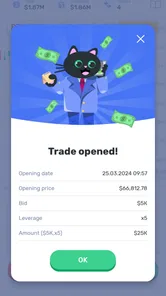
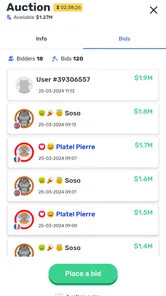
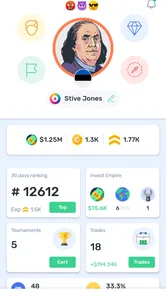
Analysis by Reviewed
I judge a trading simulator by whether it helps me think before acting, not by whether it makes pretend profits feel exciting. Cryptomania — Trading Simulator is a free simulation game from Edusystems OU built around learning cryptocurrency trading without putting real money on the line. That makes it appealing if you want a low-stakes place to get familiar with the subject, though I’d treat it as practice rather than a shortcut to investing confidently.
Reading the screens and finding your way
When I use a market simulator, clear labels and a sensible flow matter: a beginner can feel lost if prices, decisions, and results are presented as one blur. The published experience describes an onboarding path and interactive lessons, which gives newcomers a route into the basics instead of expecting them to arrive already knowing trading language. The game has a 4.5 average from around 927,000 ratings, and its reach—over 50 million installs—suggests that the format has attracted a broad audience.
My practical tip is to treat each lesson as a prompt to explain a choice in your own words. Before making a simulated trade, ask what you think the market is doing and what would change your mind. That small pause turns a tap-through exercise into a more useful learning routine. Progress tracking can also help you notice whether your decisions are becoming more consistent, rather than judging yourself by a single good result.
Making the lessons work for different learners
A lesson-led format can help when you are new to crypto vocabulary, but I would not assume that simply completing a tutorial means you have understood it. I get more from stopping after a concept and restating it without looking at the screen. If I cannot describe the choice I am about to make in plain language, I take that as a sign to revisit the idea instead of moving quickly to the next simulated trade.
This also gives the game a useful role for people who learn by doing. A video or article can explain a market term, while a simulator lets you connect that idea to a decision and its result. I would use the two together: read or watch a short explanation, then try to apply it in practice. That is more grounded than treating an entertaining challenge as a complete course.
Trying the simulator in everyday life
Hey there, fellow trading enthusiasts! Today, I’m diving into the world of virtual trading with the app Cryptomania — Trading Simulator. If you’re someone who’s always wanted to try their hand at trading cryptocurrencies without the risk of losing your hard-earned cash, then this app might just be your new best friend. Let’s break down what makes this app tick, shall we?
Getting Started with Cryptomania
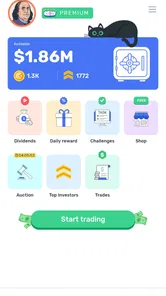
First things first, let’s talk about what you’re going to experience once you download Cryptomania — Trading Simulator. The app is available for both Android and iOS, so no worries there. Upon launching, you’re greeted with an intuitive and user-friendly interface that even a complete novice can navigate without a hitch. The app provides a seamless onboarding process that guides you through the basics of cryptocurrency trading. It’s like having a friendly tour guide showing you the ropes of the trading world.
More From Our News Desk

 Gmail
Gmail in a Busy Inbox: Who Benefits Most?
From first account to crowded workday, Gmail earns its place through dependable search and flexible sorting—but its best fit depends on how much inbox maintenance you can tolerate.

 Prime Video
Switching to Prime Video: What Changes in Your Viewing Routine
Prime Video can make a compelling second home for streaming, but switching means learning a different catalog, rental layer, and route from browsing to playback.

 Universal TV Remote Control
 Works Best as a Reliable Backup
A phone remote earns its place through quick setup and reliable habits. Here is how to get more from Universal TV Remote Control—and where its limits show.

 Weather - By Xiaomi
Weather by Xiaomi Review: Clear at a Glance, Less Clear Up Close
Xiaomi’s weather app makes everyday forecasts quick to scan, but its calm surface can leave useful details and recovery paths harder to find than they should be.

 X
X Under Pressure: Can It Recover When Posting Goes Wrong?
A resilience-focused review of X, examining setup, mistaken posts, interruptions, weak connections, and the gaps that matter when recovery needs to be dependable.

 Clash of Clans
 Is Won Between the Battles
Its raids are quick; its community is a long-term project of coordination, teaching, rivalry, and shared responsibility—with all the friction that entails.
Latest News



A realistic use case is a short session during a commute or lunch break: work through a lesson, make a practice decision, then leave the app before you feel tempted to treat a changing market as a constant stream of urgent signals. The benefit is the chance to rehearse a decision without risking cash; the trade-off is that a simulated win does not reproduce the pressure of having your own money at stake. I would use it to build vocabulary and test a thought process, not to decide what to buy in a real account.
Building a routine instead of chasing every move
For a more useful everyday routine, I’d pick one question before opening the game. For example, I might focus on whether I can explain why a market movement changed my view, rather than trying to make the biggest simulated gain. After a session, I would note the reasoning behind one decision and what information would have changed it. This turns brief play into a small reflection exercise, without requiring a long study block or pretending that every market fluctuation needs a response.
That approach is especially helpful if you tend to check financial apps whenever you have a spare moment. A simulator can make the subject feel approachable, but repeated checking can also blur the line between learning and reacting. I would set a simple stopping point—one lesson or one practice exercise—then close the app. The point is not to imitate the pace of a live trading screen; it is to learn to pause and make a decision deliberately.
The Basics of Trading
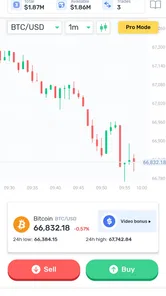
One of the things I love about this app is how it breaks down complex trading concepts into bite-sized lessons. You’ll find interactive tutorials that walk you through the fundamentals of trading, including how to read market trends and make informed decisions. It’s almost like having a mini trading course right in your pocket! Plus, the app uses real-time data, which means you’re getting a realistic experience without any financial risk.
That real-time element is useful for seeing how quickly market conditions can change, but it also calls for a little discipline. I’d avoid judging a strategy from one brief session: revisit the reasoning behind a choice and look for patterns across several attempts. This is one way to make the simulator more than a score-chasing game. If you want detailed financial instruction or personalized investment guidance, a simulator is not a substitute for those resources.
What practice can—and cannot—tell you
One non-obvious trade-off is that real-time movement can make practice feel more lifelike while also making it easier to overvalue short-term results. A good outcome may come from a sound decision, but it may also be luck; a poor outcome does not automatically prove that the reasoning was careless. I’d judge a session by whether the decision followed a clear rule and whether I can explain that rule afterward, rather than by whether the practice result looks impressive.
If you are wondering whether this can prepare you to place a first real trade, my answer is only in a limited sense. It can help you get comfortable with basic language and rehearse a decision process, but it cannot recreate the stress of risking money or tell you what is appropriate for your financial situation. Before moving from practice to a real account, you would need to learn about the risks and make that decision independently; success in a game should not be treated as a signal to invest.
Features That Stand Out
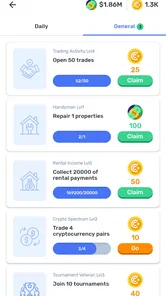
What sets Cryptomania apart is its wide array of features designed to enhance your trading experience. You can simulate trades with a variety of cryptocurrencies, track your progress, and even compete with others in trading challenges. This competitive element adds a layer of excitement that keeps you engaged and motivated to improve your trading skills.
- Real-time market data
- Interactive tutorials
- Trading challenges
- Progress tracking
Challenges can make practice feel lively, but I’d keep them separate from serious learning. Competition can reward bold choices or quick reactions, while a beginner may benefit more from slowing down and recording why a decision seemed sensible. A useful workflow is to try a challenge for engagement, then return to ordinary practice and check whether you can explain the decisions without the pressure of competing.
Choosing between a simulator and other ways to learn
Compared with a conventional trading game that focuses mainly on competition, the lessons and progress tracking give this one a clearer beginner-learning angle. Compared with a book, article, or video course, its advantage is the chance to make a practice decision rather than only read about one. The trade-off is that those reading-first options may be calmer and easier to revisit at your own pace, especially if moving market displays distract you or you want a structured explanation before trying anything interactive.
It is also different from a brokerage or cryptocurrency exchange, which is designed for real transactions and carries real financial consequences. I would not choose a live platform merely because I had become comfortable in a simulator. If your goal is to understand the mechanics and test your thinking without exposure to losses, practice is the better starting point. If your goal is to manage actual investments, you need tools and information suited to that separate task.
Motor and sensory considerations
For someone who prefers brief, self-paced sessions, lesson-based practice can be easier to fit around daily routines than a long course. I would still pay attention to how comfortable the screen feels and whether the pace suits you; market-style displays and frequent decisions can be tiring for some people. If small controls, dense screens, or fast visual changes are difficult for you, take breaks and use the operating-system display or input options that work for your device. I can’t assume those adjustments will solve every interface barrier, so personal comfort is worth checking early.
There is a practical distinction between being able to open an app and being able to use it comfortably for more than a few minutes. Someone who benefits from larger text, reduced visual clutter, or slower interaction should test the first lesson and a practice decision before settling into a routine. If the screen asks for more attention than you can comfortably give, a written guide may be a better way to learn the same vocabulary. I would treat that as a sensible choice, not a failure to use the game correctly.
Situations where it fits—and where it does not
I’d recommend this game most to curious beginners who want a hands-on introduction without using real funds, and to experienced hobbyists who want a place to rehearse an idea. It is less suitable for anyone seeking guaranteed returns, professional trading tools, or a realistic substitute for the emotional stakes of live investing. Compared with watching videos or reading guides, a simulator gives you a chance to make decisions and see a practice outcome; compared with a real exchange, it avoids financial exposure but cannot reproduce the consequences of a real loss.
For a parent considering it for a younger user, the Everyone age rating is a useful starting point, but I would still discuss that optional purchases are separate from learning. The game is free to start, while in-app purchases range from $1.99 to $109.99 per item. I would review purchase settings on the device and agree on expectations before handing it over. That small bit of preparation can prevent a learning activity from becoming a surprise spending decision.
One detail to consider before installing is the business model: the game is free, with optional in-app purchases ranging from $1.99 to $109.99 per item. I’d check purchase prompts carefully, especially if a child is using it, and keep practice goals clear so optional spending does not become confused with learning progress. It is rated Everyone, runs on Android 5.1 or later, and version 3.3.34 is the current release. Those details make it straightforward to assess basic fit, but the best test is whether the lessons and screen flow feel comfortable on your own device.
Remaining barriers and a grounded verdict
There is a limit to what any simulated trade can teach: a practice balance removes the financial consequences that shape real decisions. A challenge can also encourage speed or comparison, which is not always the habit a new learner needs. I’d skip this if you already know you need comprehensive market analysis, a quiet reading-first learning format, or guidance tailored to your finances; a dedicated course or qualified adviser would be a better fit for those goals.
Another barrier is the expectation that practice should feel like a game at all. If you find competition distracting, or if watching prices change makes you anxious rather than curious, the same features that keep other learners engaged may work against you. I would try a short, lesson-focused session first and judge it by how you feel afterward. If you come away with one clearer concept, that is a reasonable benefit; if you feel pressured to keep checking or competing, stepping away is the better choice.
In conclusion, Cryptomania — Trading Simulator is a fantastic tool for anyone interested in the world of cryptocurrency trading. Whether you’re a newbie or a pro, this app offers a safe and engaging platform to hone your trading skills. So, what are you waiting for? Give it a try and embark on your virtual trading adventure today!
My more measured recommendation is to use it as a practice space, not as proof that you are ready to trade real cryptocurrency. If you can explain why you made a simulated choice, spot when a challenge is pushing you toward rushed decisions, and enjoy learning at your own pace, it may be a useful fit. If the interface or competitive framing feels uncomfortable, reading-based resources may serve you better. For a free simulation game, that distinction is the key to getting value from it.
Cryptomania —Trading Simulator Frequently Asked Questions
Is Cryptomania — Trading Simulator free to download, and does it include in-app purchases?
Cryptomania — Trading Simulator is free to download, so you can try its virtual trading experience without paying upfront. It also offers in-app purchases, with individual items priced from $1.99 to $109.99. Consider those optional costs before installing, particularly if you prefer to keep all spending within an app to a minimum.
What age group is Cryptomania — Trading Simulator intended for?
Cryptomania — Trading Simulator has an Everyone content rating, making it suitable for a general audience. It is a simulation game focused on practicing cryptocurrency trading with virtual money, rather than making real investments through the app. Younger players may still benefit from guidance when learning about market behavior and the difference between a simulation and actual financial trading.
What is Cryptomania — Trading Simulator?
Cryptomania — Trading Simulator is a mobile application designed to provide users with a virtual trading experience without any financial risk. It allows users to simulate real-life cryptocurrency trading using fake money, making it ideal for beginners who want to learn and practice trading strategies in a risk-free environment.
How does Cryptomania — Trading Simulator work?
Cryptomania works by offering users a simulated trading environment where they can buy and sell cryptocurrencies using virtual money. The app provides real-time market data and a variety of trading tools to help users understand market trends and develop their trading skills without the fear of losing real money.
Is Cryptomania — Trading Simulator suitable for beginners?
Yes, Cryptomania is particularly suitable for beginners. The app is designed to be user-friendly and provides educational resources to help new traders learn the basics of cryptocurrency trading. Users can experiment with different trading strategies in a safe environment, making it a great starting point for anyone new to trading.
Pros
- Realistic trading simulation experience.
- Includes diverse range of cryptocurrencies.
- User-friendly interface for beginners.
- No real money required to trade.
- Regular updates with new features.
Cons
- No real financial gains possible.
- Limited to cryptocurrency trading only.
- Requires constant internet connection.
- In-app ads can be distracting.
- Some features require in-app purchases.