Build Block Craft
- 150.00
- 3.5
- Installs
- 10.00M
- Price
- Free
Screenshots
Analysis by Reviewed
I like the appeal of a building game that lets me focus on making something rather than learning a complicated set of rules. Build Block Craft is a free adventure game from SENSPARK, and its central draw is straightforward: use blocks to shape a world of your own. It’s aimed at Everyone, and the simple premise makes sense for short creative sessions as well as longer projects. I’d approach it as a relaxed sandbox, not as a tightly guided adventure with a fixed finish line.
Unleashing Your Inner Architect
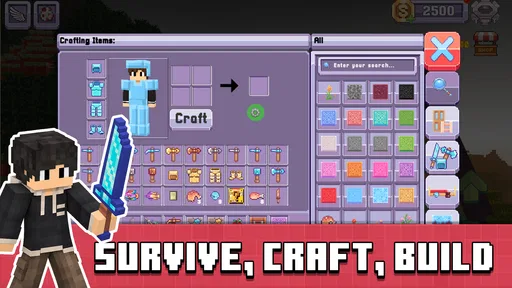
First off, Build Block Craft is all about letting your imagination run wild. You start with a simple plot of land, and from there, the world is your oyster. Whether you want to build a quaint little village, a towering skyscraper, or a massive castle, the choice is all yours. The game provides a plethora of blocks and materials to choose from, so you’ll never run out of options.
The Building Experience
The building mechanics are pretty intuitive. Even if you’re new to sandbox games, you’ll find it easy to pick up. The controls are smooth, and placing blocks is as simple as a tap. One thing I really appreciated is the ability to fly and hover while building, making those hard-to-reach spots a breeze to work with.
That flying and hovering is more than a convenience: it changes how I’d plan a build on a small screen. I can step back from a wall, check its shape, then reach the roof without awkwardly stacking temporary blocks just to get there. A useful habit is to settle the broad outline before adding decorative details. It makes proportion problems easier to spot while changes are still simple, and saves me from polishing a structure I later want to reshape.
Oh, and did I mention the graphics? They’re not ultra-realistic, but they have a charming, pixelated style that’s both nostalgic and visually appealing. It’s like stepping into a blocky wonderland where everything looks delightfully simple yet detailed.
Building with a Plan on a Small Screen
For a longer project, I find it helps to choose one clear purpose before I start placing blocks. A house with a front entrance, a path leading to it, and one recognizable feature—perhaps a tower or a porch—gives me enough direction to make decisions without needing a formal blueprint. I can then use the flying view to check whether the structure reads clearly from above and from the ground. That quick change of perspective can reveal that a roof is too wide or an entrance is hidden, even when each individual wall looked fine up close.
I’d also break a large idea into visible stages: footprint, walls, roof, then decoration. This is not a game-specific construction rule, but a practical way to keep a mobile building session satisfying. If I only have a few minutes, completing one stage still feels like progress. It also limits the frustration of repeatedly changing small details before the overall shape is settled. The main benefit of the controls is not just reaching high places; it is being able to inspect and revise a design without turning every adjustment into a climbing task.
More From Our News Desk

 Gmail
Gmail in a Busy Inbox: Who Benefits Most?
From first account to crowded workday, Gmail earns its place through dependable search and flexible sorting—but its best fit depends on how much inbox maintenance you can tolerate.

 Prime Video
Switching to Prime Video: What Changes in Your Viewing Routine
Prime Video can make a compelling second home for streaming, but switching means learning a different catalog, rental layer, and route from browsing to playback.

 Universal TV Remote Control
 Works Best as a Reliable Backup
A phone remote earns its place through quick setup and reliable habits. Here is how to get more from Universal TV Remote Control—and where its limits show.

 Weather - By Xiaomi
Weather by Xiaomi Review: Clear at a Glance, Less Clear Up Close
Xiaomi’s weather app makes everyday forecasts quick to scan, but its calm surface can leave useful details and recovery paths harder to find than they should be.

 X
X Under Pressure: Can It Recover When Posting Goes Wrong?
A resilience-focused review of X, examining setup, mistaken posts, interruptions, weak connections, and the gaps that matter when recovery needs to be dependable.

 Clash of Clans
 Is Won Between the Battles
Its raids are quick; its community is a long-term project of coordination, teaching, rivalry, and shared responsibility—with all the friction that entails.
Latest News



There is a trade-off to that freedom. With a broad creative premise, I have to supply much of the project’s structure myself. A player who enjoys sketching a rough idea mentally and adjusting it as they go will likely find that liberating. Someone who wants the game to teach construction techniques step by step may find the same openness less helpful. I’d treat it as a place to experiment, not as a guided architecture course.
Exploring the World
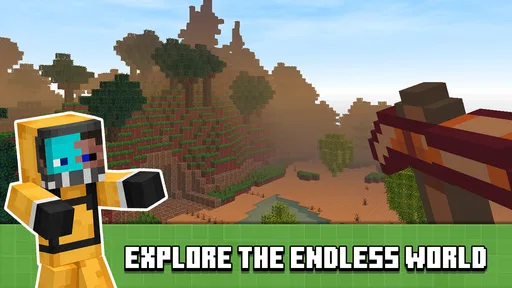
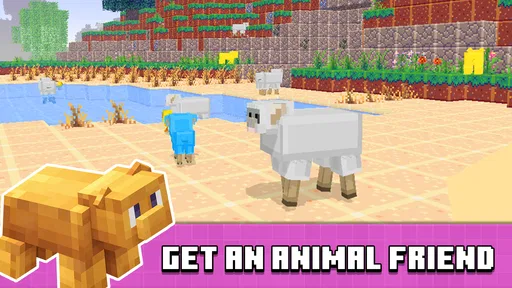
Once you’ve built your masterpiece, it’s time to explore! The game offers a vast world with different terrains and environments. You can wander through lush forests, barren deserts, and even snowy mountains. Each area has its own unique resources and wildlife, adding an extra layer of depth to your adventure.
For a practical everyday session, I’d use exploration as a change of pace rather than try to complete a huge project in one sitting. After a busy day, I could spend a few minutes placing the main shape of a house, then wander into a different environment when I want a break from careful construction. That rhythm suits players who enjoy alternating between making and looking around. If your idea of fun is a clearly marked quest, constant action, or a campaign that tells you exactly what to do next, this open-ended approach may feel too loose.
There’s also a multiplayer mode, which is a blast if you want to team up with friends or meet new people. You can visit each other’s creations, collaborate on projects, or even engage in friendly competitions. It’s a great way to show off your architectural skills and get inspired by others.
A Good Fit for Short, Shared Sessions
A realistic way I’d use the game is to open it during a quiet break, decide on one small addition to a build, and leave the larger plan for another time. I might add a path between two structures, finish a roof, or simply explore a new stretch of terrain. Those bite-sized aims make the freedom manageable and help me avoid treating every session as a demand to produce an impressive finished world. The game’s open format works best when I bring a small intention of my own.
With friends, I’d keep collaboration equally focused. Before building together, it is worth agreeing on a shared theme and dividing the broad task—for example, one person shapes the central building while another works on the surrounding layout. That gives everyone room to contribute while reducing the chance that several people make unrelated changes to the same area. If the group would rather compete, a simple shared prompt can make the session more engaging than trying to judge who built the biggest structure.
For a parent considering it for a child, the Everyone age rating is a useful starting point, but I’d still look at the device and purchase settings together. The game is free to download, yet optional purchases are available. I would explain that before handing over a phone or tablet, especially if the child can make purchases on the device. That is a practical precaution, not a reason to avoid the game; it simply makes the spending side clear from the start.
Where the Sandbox Fits
Compared with the usual alternatives in block-building games, this is best treated as a casual creative space: its appeal is the freedom to build and explore, rather than a promise of deep management or a demanding survival challenge. That distinction matters when choosing what to play. I’d pick it when I want to experiment with a design and enjoy the process; I’d look elsewhere if I needed a structured set of goals or more involved systems to keep a long session moving.
Multiplayer can make a build feel more social, but it also changes the way I’d approach a project. If I’m collaborating, I’d agree on a simple shared plan first—where a path goes or which part each person is shaping—so the result feels intentional rather than crowded. For a solo player, a small theme such as a village street or a single landmark gives exploration a purpose without turning the game into a checklist.
The comparison with more goal-driven building games comes down to what I want from the time I spend playing. If I want a series of tasks, clear unlocks, or pressure to keep moving, a more structured option will probably hold my attention better. If I want to try out a visual idea at my own pace, a looser block-based sandbox is more appealing. Build Block Craft sits on that relaxed side of the choice, so I would not judge it by whether it provides the same kind of momentum as a campaign or a survival-focused game.
It also suits a different mood from a purely decorative editor. Exploring gives me a reason to leave a build and look around, which can make a session feel less like staring at one unfinished structure. The exchange is that exploration may not provide the firm direction some players expect from an adventure game. I’d choose it when open-ended making is the point, not when I want every trip across the world to advance a story or objective.
Who Will Get the Most from It
The game has a 3.5 average from around 4,300 ratings, and it has passed 5 million installs. Those figures suggest a sizable audience, though they don’t guarantee that every player will enjoy its pace. I’d recommend it most to people who like visual creativity, want an approachable block-based activity, and are happy setting their own goals. It’s less suitable for someone who wants a polished, step-by-step building tutorial or a strong narrative to lead every session.
It’s free to start, with optional in-app purchases ranging from ten cents to just under one hundred dollars per item, so I’d check the purchase prompts carefully and decide on a spending limit before playing. The current version is 2.0.5, and the game requires Android 7.0 or later. It was released on April 15, 2021; those details are useful if you’re checking whether it fits your device, while the Everyone age rating makes its intended audience clear.
What to Consider Before You Start
If you are deciding whether the game is right for you, I’d ask one simple question: do you enjoy making your own goals? If the answer is yes, the building and exploration can fill a spare moment without requiring a complicated plan. If the answer is no, the lack of a strong guided path may leave you wondering what to do next. That difference is more important than whether you have experience with block games; the intuitive placement makes the basic idea approachable, but it cannot replace a desire to create.
I’d also think about how you prefer to play with others. The multiplayer option can make sharing a creation and working together part of the appeal, but a social session is easiest when everyone agrees on what they are trying to build. If you would rather make careful changes alone, solo play gives you more control over the pace and design. Neither approach is automatically better; it depends on whether company or uninterrupted focus makes building more enjoyable for you.
On Android, the minimum requirement is version 7.0, so checking that before installing is a straightforward first step. The game is free to begin, but the range of optional purchases makes it sensible to review purchase controls before a child or anyone sharing the device plays. I would not assume that spending is necessary to enjoy the core idea; I’d simply make a deliberate decision if a purchase prompt appears rather than tapping through without thinking.
Final Thoughts
In conclusion, Build Block Craft is a fantastic game for anyone who loves to build and explore. It’s got a simple yet addictive gameplay loop that keeps you coming back for more. Whether you’re playing solo or with friends, there’s always something new to discover and create. So, if you’re looking for a game that’s both relaxing and engaging, give this one a try. Happy building!
My main advice is to start with a modest build and use the freedom to test ideas rather than expecting the game to provide a ready-made plan. That lets the intuitive placement and aerial viewpoint do their best work. If that kind of self-directed creativity sounds appealing, this is an easy game to try; if you need clear progression or more demanding challenges, another adventure game may suit you better.
Build Block Craft Frequently Asked Questions
What devices can I use to play Build Block Craft?
Build Block Craft is an adventure game for Android, and it requires Android 7.0 or later. Before downloading, check your device’s operating system so you know it meets that requirement. The game is free to install, though optional in-app purchases are available. Its store summary describes it as “Block Architect: Master Building Game,” while the short description is “Build Block Craft.”
What is Build Block Craft and how does it work?
Build Block Craft is a sandbox-style construction game that allows players to unleash their creativity by building, exploring, and crafting within a virtual world. Using a variety of blocks and tools, players can create structures ranging from simple houses to elaborate castles. The game operates on a user-friendly interface, making it accessible for all age groups. It is developed by SENSPARK and is presented as an adventure game centered on building and creativity.
Is Build Block Craft free to play?
Yes, Build Block Craft is free to download and play. However, it includes optional in-app purchases that can enhance gameplay by providing additional resources or removing ads. Players can enjoy the full experience without spending money, but purchases can offer a more seamless gaming experience. Individual purchase options range from ten cents to just under one hundred dollars, so it is worth checking purchase settings if you share your device with children.
What are the system requirements for Build Block Craft?
Build Block Craft requires a device running Android 7.0 or above. It is designed for Android devices, including smartphones and tablets. Ensure your device has sufficient storage and RAM to handle the game’s graphics and features for optimal performance.
Can I play Build Block Craft offline?
Yes, Build Block Craft can be played offline, allowing users to enjoy the game without an internet connection. This is particularly advantageous for players who want to play on-the-go without relying on data. However, certain features, like online multiplayer modes, will only be accessible when connected to the internet.
Pros
- Easy to use interface for all ages.
- Offers creative freedom and building options.
- Regular updates with new features.
- Multiplayer mode enhances social interaction.
- Offline play available for uninterrupted fun.
Cons
- Graphics may feel outdated for some users.
- In-app purchases can be expensive.
- Limited tutorial for beginners.
- Occasional lag in multiplayer mode.
- Ads can be intrusive at times.