Block Craft 3D: Planet Craft
- 8.95K
- 4.1
- Installs
- 50.00M
- Price
- Free
Screenshots

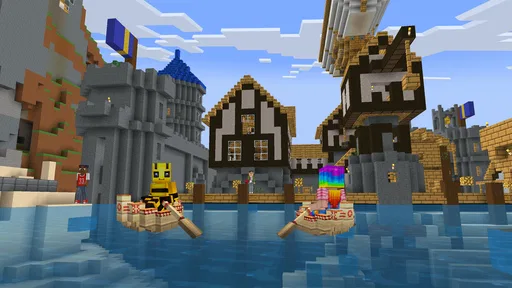
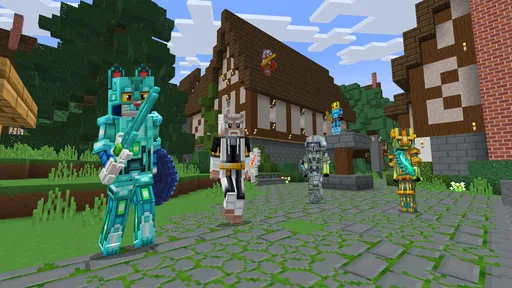
Analysis by Reviewed
I spent time with Block Craft 3D: Planet Craft as an adventure game that works especially well when a household wants a relaxed building activity rather than a demanding competitive challenge. Its basic appeal is easy to understand: you move through a block-based world, gather materials, and turn simple pieces into something of your own. What makes it worth considering is not just the familiar crafting idea, but the way its open-ended play can fit short sessions, creative experiments, and shared-device use.
Playlabs LLC developed the game, which is free to install and aimed at Everyone. It has reached over 50 million installs and holds a 4.1 average from around 209 thousand ratings, so it is clearly a well-established choice in the mobile building space. That popularity does not make it perfect, though. I found that its best qualities appear when I treat it as a flexible creative sandbox, while its weaker points become more noticeable when I expect the depth, precision, and long-term progression of a full desktop survival game.
How it works on a shared household device
A realistic use case is a tablet left in a common room. One person may open the game for ten minutes to add a roof, another may explore the surrounding world, and someone else may simply enjoy placing blocks without worrying about winning. That makes the game easier to share than an adventure title built around strict turns or a single complicated objective. A child can focus on visual creation, while an older player can help plan a larger structure or explain how to use materials efficiently.
The important household distinction is that shared play is not automatically the same as coordinated multiplayer. I would not hand the device to several people and assume the game will organize everyone’s contributions for them. Instead, it works best when the household agrees on a simple routine: decide whose project is being edited, avoid changing another person’s build without asking, and leave the world in a recognizable state before passing the device along.
That small agreement prevents a common problem with creative games. A player who sees an unfinished house may think adding a tower is helpful, while the original builder may see it as unwanted interference. For a family or group of friends, the game can become a pleasant collaborative activity if everyone treats the world as a shared sketchbook. Without that understanding, the same open freedom can create arguments over lost work or altered designs.
I also like the fact that the game does not require every session to be productive. A player can test a color combination, make a small shelter, wander around, or rebuild an idea that did not work. This is useful for a shared device because different people can bring different levels of patience. Someone looking for a quick creative break is not forced to complete a long quest before enjoying the game.
What to decide before handing over the device
My first practical tip is to set a clear project boundary. Decide whether the current world is a communal construction site or somebody’s personal build. If it is communal, choose a theme such as a village, a park, or a collection of unusual houses. If it belongs to one player, everyone else should explore without modifying the main structure. This simple rule is more useful than trying to impose a complicated schedule.
More From Our News Desk

 Gmail
GmailGmail in a Busy Inbox: Who Benefits Most?
From first account to crowded workday, Gmail earns its place through dependable search and flexible sorting—but its best fit depends on how much inbox maintenance you can tolerate.

 Prime Video
Switching to Prime Video: What Changes in Your Viewing Routine
Prime Video can make a compelling second home for streaming, but switching means learning a different catalog, rental layer, and route from browsing to playback.

 Universal TV Remote Control
Universal TV Remote Control Works Best as a Reliable Backup
A phone remote earns its place through quick setup and reliable habits. Here is how to get more from Universal TV Remote Control—and where its limits show.

 Weather - By Xiaomi
Weather by Xiaomi Review: Clear at a Glance, Less Clear Up Close
Xiaomi’s weather app makes everyday forecasts quick to scan, but its calm surface can leave useful details and recovery paths harder to find than they should be.

 X
XX Under Pressure: Can It Recover When Posting Goes Wrong?
A resilience-focused review of X, examining setup, mistaken posts, interruptions, weak connections, and the gaps that matter when recovery needs to be dependable.

 Clash of Clans
Clash of Clans Is Won Between the Battles
Its raids are quick; its community is a long-term project of coordination, teaching, rivalry, and shared responsibility—with all the friction that entails.
Latest News



A second helpful habit is to leave a visible marker near an unfinished project. A distinctive entrance, sign-like arrangement, or separate area can show where a build begins and ends. I found this more reliable than expecting the next player to remember every plan from a previous session. It also gives younger players a concrete way to explain what they are working on without needing a long conversation.
Short sessions benefit from a small target. “Improve the entrance” is better than “finish the whole town.” The game’s block-based format encourages constant additions, so an enormous project can easily become tiring if nobody defines a stopping point. A short goal also makes the device easier to share: one person can complete a task, explain what changed, and pass it on without leaving the world confusing for the next player.
There is another trade-off here. A shared world can teach planning and cooperation, but it can also expose differences in building style. One player may prefer neat symmetry, while another enjoys random towers and unusual shapes. I would not try to eliminate that contrast. Instead, I would reserve one area for experiments and another for agreed designs. That arrangement keeps creativity open while protecting the parts of the world that require coordination.
Keeping accounts and progress mentally separate
On a household device, account boundaries matter even when the gameplay itself feels casual. Before several people use the same installation, I would decide whose progress is being treated as the main one and avoid assuming that the game will automatically separate every person’s creations. If each player needs a distinct personal experience, a shared device may be less convenient than separate devices or a clearly assigned play schedule.
This is especially important when one person is building something over several days. A younger player may not understand why opening, changing, or restarting a world affects someone else’s work. I would explain that the game is free to install, but free access does not remove the need to pay attention to progress and purchases. The game includes in-app purchases ranging from $0.99 to $99.99 per item, so I would make the purchasing boundary explicit before letting a child explore independently.
That does not mean the game is unsuitable for children. Its Everyone age rating and approachable visual style make it easy to introduce in a family setting. My point is that an age rating is not a substitute for household rules. I would still keep purchasing decisions with the adult responsible for the device and explain that decorative or gameplay-related spending is not part of the basic permission to play.
For younger users, the best arrangement is a short demonstration followed by a limited creative task. Show how to move, place blocks, and return to the main project area, then let the child make a small change. This gives them ownership without immediately placing the entire shared world at risk. Older children can usually take on larger projects, but I would still encourage them to describe their plan before changing a build that belongs to somebody else.
Coordinating projects without turning play into homework
Coordination works best when it stays visual and simple. A household could divide a larger world into districts, with one player handling homes, another designing paths, and another creating decorative landmarks. The value of this approach is not strict organization; it is that every person has a recognizable contribution. When the device changes hands, the next player can see where their work fits.
I would avoid assigning tasks that depend on perfect timing. A plan such as “collect materials while I build” may be difficult if players use the device at different times or if one person changes the environment unexpectedly. A better plan is sequential: first prepare an area, then build the structure, then decorate it. This workflow reduces conflict and makes progress easy to understand even when people are not playing together.
One of the more useful ways to play is to treat each build as a design exercise. Before placing blocks, decide on the building’s purpose and silhouette. A small shelter, market, lookout, or bridge needs a different shape, and thinking about that first prevents the common habit of placing random walls until the structure becomes too large. The game is more satisfying when the player has a reason for each section rather than merely filling empty space.
I also recommend using a “prototype first” approach. Build a small version of an idea before committing to a large one. Test the entrance, roof, and interior in a compact footprint, then expand only if the design feels comfortable. This saves time and materials, and it is particularly useful on a shared device because another player is less likely to inherit a half-finished oversized project.
Another non-obvious advantage is that rebuilding can be part of the fun rather than a sign of failure. A first attempt often reveals that a room is too narrow or that an exterior shape looks unbalanced. Instead of endlessly decorating a weak foundation, I prefer to remove the least successful section and try again. That habit gives the game a gentle creative rhythm: sketch, inspect, revise, and continue.
Where the game suits different ages
For children, the strongest attraction is immediate visual feedback. A block placed on screen becomes part of a recognizable object, so the connection between action and result is clear. This can make the game feel more approachable than adventure titles with dense menus, complicated combat systems, or long written explanations. A child who enjoys drawing, arranging toys, or constructing with physical blocks may understand the appeal quickly.
For teenagers and adults, the experience depends more on expectations. If you want a calm place to design structures and explore, it can be enjoyable. If you want a deep survival simulation with elaborate automation, demanding enemies, or a highly detailed progression system, this may feel limited compared with larger alternatives in the same broad genre. I would choose it for accessible creativity, not for maximum technical depth.
The game is also a reasonable introduction to block-based crafting for someone who has never played this kind of title. It presents the central pleasure—turning simple pieces into a personal environment—without requiring the player to begin with an ambitious master plan. That said, beginners may still need help understanding what to do next once the novelty of placing blocks wears off. A parent or friend can improve the experience by suggesting a concrete challenge rather than simply saying, “Build something.”
Trust is part of the age discussion. I would be comfortable presenting the game as a creative activity for a child, but I would not treat the Everyone rating as proof that every household can leave a child entirely unsupervised. The relevant questions are practical: who controls purchases, who owns the current progress, and what should happen if another person wants to use the device? Clear answers to those questions make the game much easier to enjoy.
How it compares with familiar alternatives
Compared with a traditional adventure game, this one places less pressure on combat, timed objectives, or reaching a final ending. That makes it better for relaxed construction and worse for players who need a strong narrative to keep them moving. Compared with a full-scale crafting survival game, it feels more suitable for casual mobile sessions, but it may not satisfy someone looking for complex systems and a large learning curve.
It also differs from a pure creative drawing app. Here, the player is not working on a flat canvas; the environment has space, movement, and a sense of place. That extra dimension makes a house or landscape feel more like a location than a picture. The trade-off is that building takes more planning, and a shared world can be altered in ways that are harder to undo than a simple drawing.
Against competitive mobile games, its main strength is the absence of pressure to outperform another player in every session. It is a better choice for a child who becomes frustrated by losing or for a family that wants an activity where different skill levels can coexist. On the other hand, players who enjoy rankings, fast matches, or constant rewards may find the pace too quiet.
The free entry point is helpful for testing that fit. I can try the core experience without committing money at the start, then decide whether the building style is engaging enough to continue. The presence of optional purchases means I would still review the spending setup before sharing the game with children. For an adult using the game alone, that may be a minor consideration; for a family device, it should be part of the initial setup conversation.
Device expectations and a sensible starting routine
The listed minimum operating system is Android 6.0, which gives the game a broad compatibility range on Android devices that meet that requirement. I would still begin with a modest build rather than immediately attempting a huge city. A smaller project makes it easier to judge how comfortable the controls feel on a particular screen and whether the device is a good fit for longer sessions.
The current version is 6.4.5, so I would use the latest available version on the device rather than relying on an old installation. My first session would be a private test: move around, place a few blocks, inspect the surroundings, and learn how the building area is organized. After that, I would create a household plan for projects and purchases before inviting a child or another family member to take over.
Touch controls can feel natural for broad construction, but precision is still important when aligning details. I would zoom out mentally by stepping back from a build regularly instead of judging every block from close range. A doorway that looks fine up close may be misplaced when viewed as part of the whole structure. This habit is one of the easiest ways to improve results without needing advanced knowledge.
Another useful routine is to finish each session with a cleanup pass. Remove accidental blocks, check that entrances remain usable, and leave the next task obvious. In a shared household, this is more than tidiness: it reduces the time the next player spends figuring out what happened. It also makes the world feel intentionally maintained rather than like a pile of disconnected experiments.
Who should choose it, and who should skip it
I would recommend it to families looking for a low-pressure building game, to children who enjoy constructing rather than competing, and to adults who want a simple creative diversion on a mobile device. It is particularly appealing when several people share one tablet and are willing to coordinate informally. The game’s broad age rating, free starting price, and accessible block-based concept make it easy to try without turning the first session into a major commitment.
I would be more cautious about recommending it to players who expect a deep, carefully balanced survival adventure. If your priority is a powerful story, sophisticated character development, or highly technical crafting, a more specialized alternative will probably serve you better. I would also skip it for a household that does not want to discuss shared progress or optional spending, because those practical issues can matter more than the building itself.
Players who dislike open-ended games should think carefully before installing. The freedom is the point, but freedom can feel like a lack of direction if you need constant objectives. I found that the experience improves when I bring my own challenge—design a compact home, create a themed district, or rebuild an awkward structure—instead of waiting for the game to tell me exactly what to do.
My household verdict
After using it as both a solo creative game and a shared-device activity, I see Block Craft 3D: Planet Craft as a friendly entry point into mobile block building. Its strongest quality is flexibility: a child can make a simple structure, an adult can refine a larger project, and a household can pass the device around without turning every session into a contest. The experience becomes noticeably better when players define ownership, protect unfinished builds, and keep purchases under adult control.
It is not the deepest option in the adventure and crafting space, and its open format will not satisfy everyone. Still, the combination of free access, an Everyone rating, a large existing player base, and an easy-to-understand creative loop gives it a clear place on a family device. My honest recommendation is to start with one small shared project, agree on who may edit it, and see whether the freedom feels inviting rather than empty. If that approach clicks, the game can provide many relaxed sessions without demanding that every player enjoy the same style of play.
Block Craft 3D: Planet Craft Frequently Asked Questions
What does the game’s age rating mean for families considering a download?
Block Craft 3D: Planet Craft is rated Everyone, making it suitable for a broad audience. Its focus is on building and exploring rather than combat-heavy play. Families should still consider the game’s optional in-app purchases and online or community-related features. Reviewing device purchase controls and parental settings can help parents choose an appropriate setup for younger players.
How much storage should I have available before installing the game?
It is sensible to make sure your device has free storage before downloading Block Craft 3D: Planet Craft and installing updates. The space needed can vary by device and version, so check the app store’s current requirements before proceeding. Keeping some additional room available can also help avoid problems when the game needs to download updated content.
What kind of building experience can I expect from Block Craft 3D: Planet Craft?
Block Craft 3D: Planet Craft centers on making and exploring block-built creations. Its sandbox approach suits players who like choosing their own projects, whether that means starting with a simple house or trying a larger structure. Rather than following a traditional story campaign, the game gives you room to focus on construction at your own pace.
Who developed Block Craft 3D: Planet Craft, and what type of game is it?
Block Craft 3D: Planet Craft is an adventure game developed by Playlabs LLC. Its main appeal is creative construction in a pixel-style world, with exploration alongside building. That combination makes it a fit for players who want an open-ended activity rather than a tightly directed adventure with a fixed sequence of missions.
What is Block Craft 3D: Planet Craft?
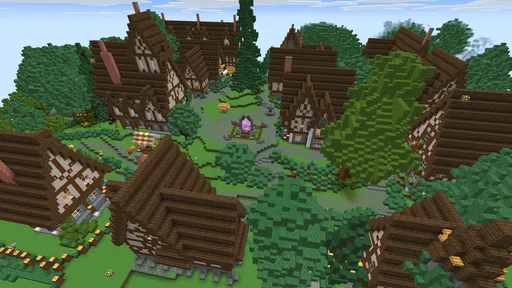
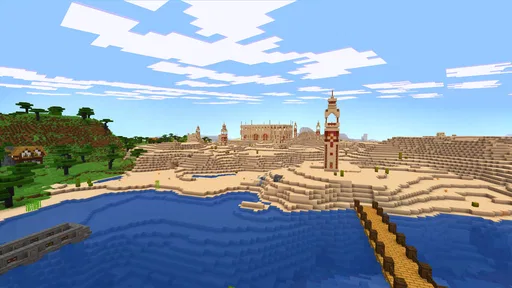
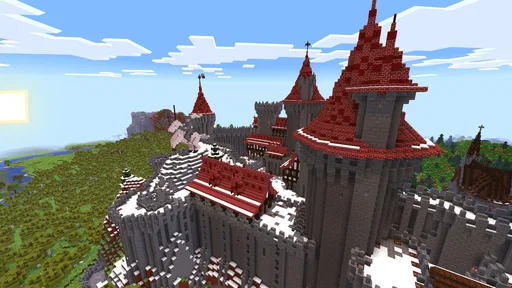
Block Craft 3D: Planet Craft is a creative sandbox game for Android and iOS where players build structures using colorful blocks in a pixel-style world. You can design houses, castles, villages, and other creations, then explore your surroundings and view builds made by other players. It focuses mainly on relaxed construction rather than combat or a traditional story campaign.
Pros
- Easy building controls make it accessible for younger players.
- Large open worlds encourage creativity and free-form exploration.
- Many community creations provide inspiration for new projects.
- Runs well on most modern Android and iOS devices.
- Simple block-based visuals are colorful and easy to understand.
Cons
- Some features and items are restricted behind in-app purchases.
- Ads may interrupt play
- especially during frequent menu transitions.
- Online worlds can expose younger players to unpredictable content.
- Large builds may cause lag on older phones and tablets.
- Progress can feel repetitive after the initial building phase.