Scary Prank Call & Fake Chat
- 124.00
- 3.7
- Installs
- 10.00M
- Price
- Free

Screenshots
Analysis by Reviewed
Ever had those moments when you just wanted to have a laugh and prank your friends? Well, I stumbled upon this quirky app called Scary Prank Call & Fake Chat, and let me tell you, it's a riot! It’s like having your very own prank kit right in your pocket. Let’s dive into what makes this app tick and why it could be your next favorite go-to for some harmless fun!
A prank kit that works best with the right audience
My main takeaway is that this is a deliberately silly tool for setting up a spooky surprise, not a general-purpose messaging or calling app. Its appeal comes from the gap between an ordinary moment and an unexpected horror-themed interruption. That can be funny when everyone involved enjoys the joke; it can fall flat, or feel unpleasant, when the target is genuinely anxious about strange calls or frightening stories.
The game is free, and Era Games Studio is the developer. It sits in the casual game space, with a Teen content rating, so I would treat the horror angle as a cue to think about who is nearby before starting a prank. The current version is 3.5, and the game requires Android 7.0 or later. Its average rating is 3.8 from around 3,100 ratings, with more than five million installs. Those figures suggest that plenty of people have tried it, but they do not tell me whether a particular friend will enjoy being surprised.
Make the setup part of the joke
The best use is usually a brief, planned moment among friends who already like playful scares. At a sleepover, for instance, I would first make sure the group is in a relaxed mood, then choose a moment when nobody is trying to sleep, study, or handle something important. A staged call or chat works better as a quick bit of theatre than as an attempt to convince someone for a long time. The reveal should come before the joke becomes stressful.
That timing is more important than making the setup elaborate. If a friend is busy, alone, or likely to mistake a fictional scare for a real emergency, I would save the prank for another day. I would also avoid using it to impersonate someone in a way that could damage trust. A horror gag should end with everyone laughing, not with someone worrying that a real person is in danger.
Unleashing the Prankster in You
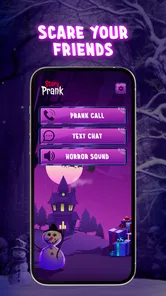
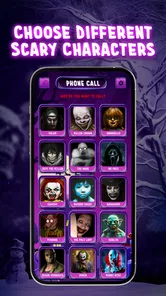
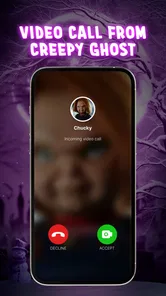
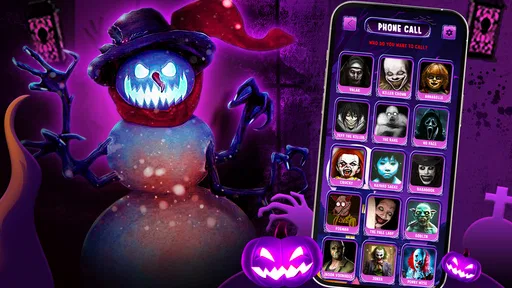
The Scary Prank Call & Fake Chat app is designed to create hilarious and spooky fake calls and chats. Imagine watching your friend's face as they receive a call from a creepy ghost or an alien! It’s as simple as setting up the scenario, selecting the character, and letting the app do its magic. The app features a variety of spooky characters and scenarios that you can customize to suit your prankster needs.
Features That Stand Out
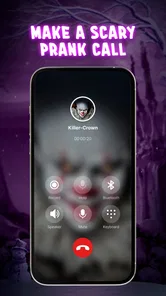
One of the standout features of this app is its user-friendly interface. Even if you’re not the most tech-savvy person, you’ll find it easy to navigate. The app offers a variety of options to choose from, whether you want to simulate a call from a ghost, a vampire, or even a celebrity. The realism of the calls is what really sells the prank. The voice effects are top-notch, making it almost impossible for your friends to tell if it’s real or not!
More From Our News Desk

Weather by Xiaomi Review: Clear at a Glance, Less Clear Up Close

X Under Pressure: Can It Recover When Posting Goes Wrong?

Clash of Clans Is Won Between the Battles

Android Auto Makes the Case for Quieter Car Software

MobiOffice: Transforming Mobile Productivity with Seamless Integration

EA SPORTS FC™ Mobile Soccer: Redefining Mobile Sports Gaming
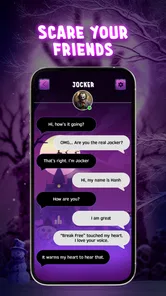
Another cool feature is the fake chat option. You can create fake conversations that look completely real, perfect for pulling off those text-based pranks. The app allows you to customize the chat interface to mimic popular messaging apps, adding another layer of believability.
Calls, chats, and the trade-off between them
Calls and fake chats suit different kinds of humor. A call creates a live reaction, which is part of the fun but also means the other person has less time to decide how to respond. A chat is easier to stage at a slower pace, so I would choose it for a joke that depends on a short exchange rather than a sudden interruption. Either way, the aim should be a clearly playful reveal, not an extended attempt to pass fiction off as real.
Compared with a simple soundboard, the call-and-chat concept gives you more of a setup and a character for the joke. Compared with making a fake conversation by hand, a dedicated prank game is meant to keep the activity focused on spooky scenarios. The trade-off is that neither format replaces a real conversation: a staged exchange is entertainment, not a reliable way to communicate or prove that someone said something. I would never share a fake chat as evidence or use it to embarrass someone outside the group.
Getting the Most Out of It
To get the best out of this app, it’s all about timing and creativity. Use it during Halloween or at a sleepover to maximize the spooky factor. The app even allows you to schedule calls, so you can surprise your friends at the perfect moment. The laughter and reactions you’ll get are absolutely priceless!
For a smoother session, I would decide on the joke before handing the phone around: who is meant to see or hear it, what the reveal will be, and when to stop if the person looks uncomfortable. That little bit of planning keeps the prank from turning into an awkward scramble. It also helps to keep the audience small. A gag among close friends is easier to explain and repair than a scare played in front of strangers who may not understand the context.
There is a useful distinction between a surprising moment and a convincing deception. The first can be harmless fun; the second can create unnecessary worry. I would keep the scenario obviously playful in its context, avoid real-world threats, and end the act promptly if the target asks whether it is real. The app’s horror theme gives the joke its flavor, but it does not make every situation suitable for a scare.
When another option makes more sense
If the group wants a shared laugh without singling anyone out, a horror video, a party game, or a sound effect played openly may be a better choice. Those options make the performance clear to everyone and avoid putting one person on the spot. If your goal is to send a genuine message, use an ordinary messaging app instead; a fake chat is designed for a prank, not for keeping an accurate record of a conversation.
I would also skip this game if you dislike horror themes, want a serious simulation, or need an app for everyday calls and messaging. Its appeal is narrow by design: it is for casual, theatrical mischief. That focus is a strength when friends are in on the spirit of the joke, but it makes the game a poor fit for people who prefer calm, straightforward communication.
Keep the prank kind
One tip I’d give is to use the app responsibly. While it’s all in good fun, make sure your friends are okay with being pranked. No one wants to give someone a real scare that they’re not prepared for. Always ensure that the prank is lighthearted and in good spirits.
That advice matters even when a prank seems harmless to the person setting it up. People have different comfort levels with horror, unexpected calls, and fabricated messages. I would not use a scare to test a relationship, pressure someone into replying, or make a person believe they are in trouble. If the reaction is uncertain, explain the joke rather than doubling down. A good prank leaves the friendship intact and gives the target room to laugh along—or to say it was not for them.
Final Thoughts
In a world where we all need a bit of laughter and joy, Scary Prank Call & Fake Chat provides just that. It’s a great way to break the ice at parties or to just have a good giggle with your buddies. The app is available for both Android and iOS, making it accessible to everyone looking to unleash their inner prankster.
So, if you’re in the mood for some mischief and want to spice up your gatherings, give this app a whirl. Just remember, it’s all in good fun, and who knows, you might end up being the one getting pranked next!
Who I would recommend it to
I would recommend it to friends who already enjoy spooky jokes and want a light activity to liven up a gathering. It is most at home in a relaxed setting where the people involved know each other well and can tell when a bit has gone too far. The Teen rating is another reason to be thoughtful about the group and the setting rather than assuming every audience will welcome the same kind of scare.
For someone deciding whether to try it, the key question is not simply whether fake calls and chats sound amusing. It is whether you have a willing audience and a clear way to keep the joke friendly. If you do, the game offers a focused, casual way to set up that kind of moment. If you want an app for practical communication, or if your friends dislike being startled, I would choose something else.
Scary Prank Call & Fake Chat Frequently Asked Questions
What age rating does Scary Prank Call & Fake Chat have?
Scary Prank Call & Fake Chat is rated Teen, so it is intended for older children and adults rather than very young users. Its horror-themed calls, images, and sounds are meant to create a scare, which may not suit everyone. Consider your own comfort with spooky content before downloading, and use parental guidance when deciding whether it is appropriate for a teenager.
Which devices can run Scary Prank Call & Fake Chat?
The game runs on Android devices with Android 7.0 or later. Before downloading, check the operating system version on your phone or tablet to make sure it meets that requirement. Scary Prank Call & Fake Chat is a casual game by Era Games Studio, centered on staged horror calls and fake chats for lighthearted pranks.
What is Scary Prank Call & Fake Chat app about?
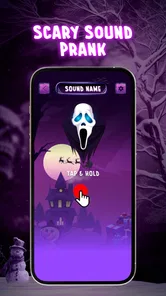
Scary Prank Call & Fake Chat is an entertaining application designed to prank your friends and family by simulating incoming calls and messages from spooky characters. The app allows users to set up fake calls or chats with creepy voices and images, creating an eerie experience that can catch unsuspecting individuals off guard. It is a fun way to add a scare to any gathering or simply amuse yourself. Its store summary also highlights video calls with favorite horror characters and scary sounds, giving the pranks a more dramatic feel.
How do I set up a fake call using the app?
Setting up a fake call in the Scary Prank Call & Fake Chat app is straightforward. After opening the app, you can choose from a variety of creepy characters and scenarios. You can schedule the fake call to occur at a specific time or trigger it manually. Customize the caller’s name and number, then simply wait for the call to startle your unsuspecting friend or family member. Keep the prank friendly and make sure the person you surprise is comfortable with this kind of scare.
Is Scary Prank Call & Fake Chat free to download and use?
Scary Prank Call & Fake Chat is free to download. The game has an average rating of 3.8 from around 3,100 ratings, and its listed price is free. A free download can still include advertising or optional purchases, so check the app’s store page and the purchase prompts you see in the app before spending money.
Pros
- Realistic prank call experience
- Customizable caller ID
- Easy to use interface
- Variety of prank scenarios
- Option to schedule prank calls
Cons
- Contains ads
- Limited free features
- Requires internet connection
- Not suitable for all ages
- Can be repetitive over time












