Santa Claus Call: Prank Video
- 5.00
- 4.7
- Installs
- 500.00K
- Price
- Free

Screenshots


Analysis by Reviewed
I treat a Santa call as a small bit of theatre: it works best when the person watching is in on the fun, not when the joke depends on making someone genuinely anxious. That makes this kind of casual game a better fit for a relaxed family moment or a silly seasonal surprise than for a serious attempt to convince anyone that Santa is really on the line. Santa Claus Call: Prank Video has a clear, narrow appeal, and that simplicity is both its charm and its limit.
What the first few minutes are for
The opening goal is easy to understand: set up a playful Santa-themed moment and enjoy the reaction. There is no need to learn a complicated control scheme or settle in for a long session. I’d use it when children are already talking about Christmas, or when friends are sharing holiday jokes, rather than bringing it out without context and expecting it to hold everyone’s attention on its own.
A practical tip is to decide who will see the call before you start. A child who enjoys pretend play may find the surprise delightful; another may be startled or take it too seriously. I’d frame it as make-believe and let the child opt out. That small bit of preparation keeps the prank playful, especially with younger viewers, and helps the app serve as a shared joke instead of a test of whether someone believes it.
How its progress and pacing feel
This is a casual game from HIGAME Jsc, but its appeal is closer to a quick entertainment gag than to a progression-heavy game. I wouldn’t choose it expecting a long chain of goals, demanding challenges, or a deep skill curve. Its useful signal of progress is simply whether the setup leads to the reaction you wanted. That can be enough for a short family interaction, but it also means there may be little reason to keep returning once the surprise has worn off.
That distinction matters if you are choosing between this and a conventional casual game. A puzzle or arcade title usually gives you repeatable tasks to master; a Santa-call prank is better understood as a holiday prop for a brief shared moment. I’d keep expectations modest and treat each use as a little performance, not as a game you need to grind through. That is a strength when you only have a few minutes, and a weakness if you want ongoing challenges or a clear sense of unlocks.
Choosing the moment before the joke
One useful way to decide whether to open the app is to look at the mood in the room, not just the calendar. A child who is relaxed and already enjoying make-believe is more likely to welcome a pretend call than someone who is tired, overwhelmed, or focused on something else. I’d also avoid using it to pressure a child into behaving. A playful scene works better when the child can laugh along, rather than feeling that Santa is being used to monitor or judge them.
For a family gathering, I’d treat the call as a short interlude rather than the main event. Let one person introduce it, keep the rest of the group from crowding around, and leave room for the child to respond in their own way. A shy child may prefer to watch from beside a parent instead of speaking to the phone. That small adjustment makes the activity easier to share without turning the reaction into a performance.
More From Our News Desk

Weather by Xiaomi Review: Clear at a Glance, Less Clear Up Close

X Under Pressure: Can It Recover When Posting Goes Wrong?

Clash of Clans Is Won Between the Battles

Android Auto Makes the Case for Quieter Car Software

MobiOffice: Transforming Mobile Productivity with Seamless Integration

EA SPORTS FC™ Mobile Soccer: Redefining Mobile Sports Gaming
Getting to Know Santa Claus Call: Prank Video
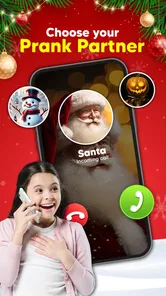
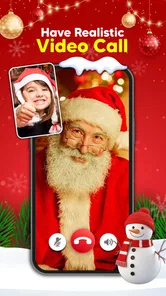
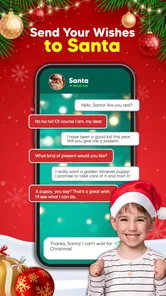
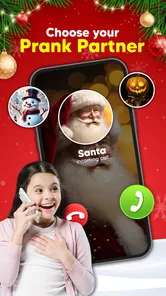
First off, let’s talk about what this app is all about. Santa Claus Call: Prank Video is designed to bring smiles to the faces of both kids and adults. The app allows you to simulate a phone call or video chat with Santa Claus himself. Whether you’re trying to keep the kids on their best behavior or just want to surprise someone with a giggle, this app is your go-to for holiday-themed fun.
The Nuts and Bolts
Downloading and setting up the app is a breeze. Available on both Android and iOS, it’s free to install, with optional in-app purchases if you want to unlock additional features. Once you’ve got it up and running, you’ll find that the interface is user-friendly and intuitive. Just a few taps, and you’re ready to receive a call from the big man in red.
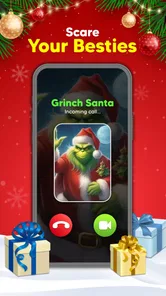
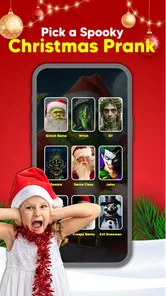
One of the things I found particularly charming is the variety of options you have. You can choose from different scenarios, whether you’re looking for a quick shoutout or a more elaborate conversation. The video quality is surprisingly good, and the voice of Santa is jolly and convincing enough to maintain the illusion.
Why It’s Worth Your Time
So, why bother downloading this app? For starters, it’s a fantastic way to entertain kids. Imagine their faces lighting up when they see Santa calling! It’s also a unique way to spread some festive cheer among friends and family. Plus, it’s a perfect tool for creating holiday-themed content for your social media.
Moreover, it’s not just for the little ones. Adults can get a kick out of it too. Whether you’re planning a party or just want to prank your friends, this app delivers laughs and smiles in abundance. It’s a light-hearted way to break the ice and add a sprinkle of joy to any gathering.
Keeping the setup low-pressure
Before handing over the phone, I’d check that the screen is ready and the volume is comfortable, then hold the device myself if the child is very young. That avoids fumbling in the middle of the moment and lets me end the interaction promptly if the reaction turns from amused to uneasy. It’s a small practical step, but it matters more here than it would in a game where a child can simply put down a controller.
I’d also think twice before recording or posting someone’s reaction. The joke can be enjoyable without an audience beyond the people in the room, and a child may not want a surprised face shared later. If the moment is being captured, asking first and accepting a no keeps the fun respectful. For me, that is part of using a prank app well: the person on the receiving end should still have some say in what happens next.
The Final Verdict
All in all, Santa Claus Call: Prank Video is a delightful app that serves its purpose well. It’s user-friendly, versatile, and most importantly, fun! Sure, it might not be the most sophisticated app out there, but it doesn’t need to be. It does what it says on the tin, and sometimes, that’s exactly what we need.
If you’re looking to bring a smile to someone’s face or just want to experience a bit of holiday magic, give this app a try. It’s a playful reminder of the joy and wonder that the holiday season brings, and who wouldn’t want a bit of that all year round?
Who will get the most from it
I’d recommend it to parents, relatives, or hosts who want a quick Christmas-themed activity and can keep the mood light. For example, during a family visit, an adult could introduce the pretend call after dessert, then let the child decide whether to join in. It can also work as a quick party icebreaker among adults who already enjoy silly pranks. I would skip it for someone looking for a full game, a realistic conversation tool, or entertainment that stays fresh through repeated sessions.
Compared with ordinary casual games, its payoff is social rather than skill-based: the fun comes from sharing a reaction, not improving a score. Compared with a plain holiday video, the call framing can make the moment feel more personal, but it still depends on the audience enjoying the Santa joke. If the group would rather watch a story or play together, a seasonal video or a multiplayer game is likely the better pick.
A realistic use for a short visit
Picture a relative visiting after school on a December afternoon. The child has already been chatting about holiday plans, and there are a few quiet minutes before everyone sits down to eat. I’d introduce the app as a pretend Santa moment, keep the phone with the adult, and let the child decide whether to answer or simply watch. If the child laughs, the interaction has done its job; if they lose interest, I’d close it and move on rather than trying to force a second round.
That example also shows where this game fits better than a conventional activity. It needs little explanation and can create a brief shared moment, while a board game or a longer mobile game asks for more time and attention. The trade-off is that the call is mostly a one-note joke: a puzzle can be replayed for a new challenge, but this gag depends on the audience and the surprise still feeling fresh. I’d choose it for a quick seasonal pause, not to fill an entire visit.
Choosing the moment and managing expectations
For an everyday use, I’d save it for a quiet moment when there’s time to explain the joke afterward, rather than springing it on a child who is tired, upset, or uncomfortable with surprises. Keep the phone in your hand, stay nearby, and stop if the person seems uneasy. That approach makes the prank easier to manage and avoids turning a light gag into pressure to perform for a camera or an audience.
It is also worth keeping the session short. A Santa call has a natural endpoint once the surprise and laughter have passed; trying to stretch it into a longer activity can make the premise feel repetitive. If you want to record or share a reaction, ask first and respect a child’s choice not to be filmed. The app is most useful as a prompt for a moment together, not as a substitute for spending time with the person who is watching.
What to know before installing
The game is free, has an Everyone age rating, and its current version is 0.1. It has a 4.7 average from around 1,200 ratings and more than 500,000 installs, which suggests that the simple holiday premise has found an audience. I’d still judge it by whether this specific kind of prank suits your household: popularity cannot make a staged call appealing to someone who dislikes surprises, and a free download does not guarantee that every option will be available without conditions.
Santa Claus Call: Prank Video was released on November 13, 2024, and requires Android 7.0 or later. The developer is HIGAME Jsc. If you are deciding whether to keep it installed, ask whether you have a likely occasion for a Santa-themed gag; if not, it may be more sensible to use it only when the season or a family gathering makes the joke feel natural. I see it as an occasional prop, not something that needs daily attention.
Questions worth settling before you start
Does it make sense outside the Christmas season? I think it can, especially among friends who enjoy seasonal jokes, but its central idea is strongly tied to Santa, so the gag may feel less natural in an ordinary month. Is it meant to replace a game night or a full children’s activity? I wouldn’t use it that way; it is better as a brief shared novelty than as the thing everyone is expected to keep playing.
Is it suitable for every child because it carries an Everyone rating? The rating makes it broadly accessible, but it cannot tell you whether a particular child likes surprises or pretend calls. I’d make that call as the adult who knows the child. And if you are wondering whether to install it for frequent replay, I’d be cautious: its appeal rests on the moment and the audience, not on a deep series of goals that keeps building over time.
My progression verdict
As a progression experience, this is intentionally slight: the early goal is clear, the payoff arrives quickly, and the challenge is mostly choosing the right person and moment. I wouldn’t expect a traditional difficulty curve or a reason to chase long-term unlocks. That makes it easy to pick up for a brief laugh, but it also limits its staying power once the call has done its job.
For me, that trade-off is acceptable because the app is aimed at a specific kind of seasonal fun, not a deep casual-game loop. If you want a short, supervised Santa-themed prank, it can earn a place on your phone for the right occasion. If you want lasting goals, repeatable challenges, or a game that entertains independently of the people around you, I’d choose a different casual title instead.
Santa Claus Call: Prank Video Frequently Asked Questions
Is Santa Claus Call: Prank Video free to download?
Yes. Santa Claus Call: Prank Video is free to download, so families can try its holiday-themed prank-call experience without paying upfront. It is a casual game from HIGAME Jsc, and its lighthearted premise is focused on enjoying a playful Santa interaction. As with any app, check the purchase details shown on your device before confirming any optional transaction.
What age group is Santa Claus Call: Prank Video suitable for?
Santa Claus Call: Prank Video is rated Everyone, making it suitable for a broad audience, including children and families looking for a festive activity. Its central idea is a humorous call from Santa, which can add a bit of holiday fun. Parents may still want to try the app themselves first and decide whether its prank-call style suits their child.
What is Santa Claus Call: Prank Video app about?
Santa Claus Call: Prank Video is a fun and entertaining app designed to bring the magic of Christmas to life by allowing users to simulate a call or video chat with Santa Claus himself. The app is aimed at spreading joy and excitement to children and families during the holiday season through interactive and personalized experiences.
How does the Santa Claus Call: Prank Video app work?
The app allows users to schedule a call or video chat with a realistic Santa Claus character. Users can customize the experience by entering names and wish lists, making the interaction feel personal. When the scheduled time arrives, the app simulates an incoming call or video, creating an authentic experience as if Santa is really calling.
Is Santa Claus Call: Prank Video safe for children to use?
Yes, Santa Claus Call: Prank Video is designed with family-friendly content and is safe for children. There are no inappropriate ads or content, and the app focuses solely on creating a joyful and magical experience for kids. Parents can feel secure knowing that the app prioritizes the safety and privacy of its users.
Pros
- Fun for holiday gatherings
- Easy to use interface
- Customizable call settings
- Realistic Santa voice
- No ads in free version
Cons
- Limited call scenarios
- Requires internet connection
- App size is large
- Occasional voice lag
- Limited to Christmas theme











