Redecor - Home Design Game
- 43.03K
- 4.5
- Installs
- 10.00M
- Price
- Free
Screenshots
Analysis by Reviewed
On a quiet evening, I might open Redecor - Home Design Game for one small creative task: take a room prompt, decide on a mood, and see whether a few color and material choices can make it feel convincing. That kind of low-pressure visual play is the game’s appeal. It gives me a place to experiment without turning a real room into a costly trial-and-error project. The important distinction is that it is a design game, not a practical renovation planner; I enjoy it most when I treat the result as inspiration rather than a blueprint.
A quick reality check on cost and access
Redecor is a free simulation game from Reworks Ltd., rated for Everyone, and it has reached over 10 million installs. Its average rating is 4.5 from around 315,000 ratings, so there is clearly a sizeable audience for its home-design format. The game was released on April 10, 2020, and version 3.59.3 requires Android 7.0 or later. It is also available on iOS.
Free entry does not mean every option is free: in-app purchases range from $0.49 to $149.99 per item. That spread is worth noticing before you start, especially if you are prone to buying small extras and losing track of their combined cost. I would treat spending as optional entertainment, not as a shortcut to a better design, and decide on a personal limit before browsing purchase options.
Getting Started with Redecor
First things first, downloading Redecor is a breeze. Once you have it on your device, you're greeted with a sleek and inviting interface. The app walks you through the basics with an easy-to-follow tutorial, so even if you're a newbie to design games, you'll feel right at home. The main screen is your hub, with options to dive into different design challenges or explore new themes.
Design Challenges Galore
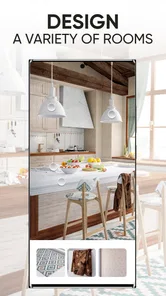
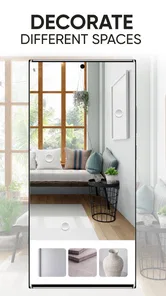
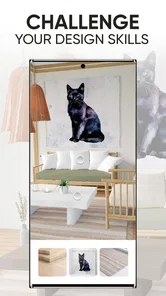
The heart of Redecor lies in its design challenges. Each challenge presents a fresh opportunity to flex your creative muscles. Whether you're tasked with revamping a cozy bedroom or a modern kitchen, the possibilities are endless. And let me tell you, the satisfaction of seeing your design come to life is something else! You can choose from a wide range of furniture, textures, and colors to create a space that reflects your unique style.
What's cool is that these challenges are updated regularly, so there's always something new to tackle. Plus, you get to see how your creations stack up against those of other players. It's a friendly competition that keeps you coming back for more.
How I’d use a design challenge
For a useful exercise, I’d pick one room and set a simple goal before selecting materials: make it feel brighter, calmer, or more welcoming. Then I’d choose one focal point, such as the main furniture piece, and build the rest of the palette around it. This keeps the number of competing ideas down and makes the final room feel deliberate rather than like a collection of attractive items.
More From Our News Desk

 Gmail
Gmail in a Busy Inbox: Who Benefits Most?
From first account to crowded workday, Gmail earns its place through dependable search and flexible sorting—but its best fit depends on how much inbox maintenance you can tolerate.

 Prime Video
Switching to Prime Video: What Changes in Your Viewing Routine
Prime Video can make a compelling second home for streaming, but switching means learning a different catalog, rental layer, and route from browsing to playback.

 Universal TV Remote Control
 Works Best as a Reliable Backup
A phone remote earns its place through quick setup and reliable habits. Here is how to get more from Universal TV Remote Control—and where its limits show.

 Weather - By Xiaomi
Weather by Xiaomi Review: Clear at a Glance, Less Clear Up Close
Xiaomi’s weather app makes everyday forecasts quick to scan, but its calm surface can leave useful details and recovery paths harder to find than they should be.

 X
X Under Pressure: Can It Recover When Posting Goes Wrong?
A resilience-focused review of X, examining setup, mistaken posts, interruptions, weak connections, and the gaps that matter when recovery needs to be dependable.

 Clash of Clans
 Is Won Between the Battles
Its raids are quick; its community is a long-term project of coordination, teaching, rivalry, and shared responsibility—with all the friction that entails.
Latest News



A realistic way to fit the game into a busy day is to complete one design when you have a short break, then return later to look at it with fresh eyes before committing. If you tend to spend too long comparing every available finish, give yourself a small decision rule—choose a wall treatment first, then limit the rest of your choices to colors that work with it. The challenge format is most enjoyable when you experiment, not when every selection becomes a hunt for a perfect answer.
Exploring Design Elements
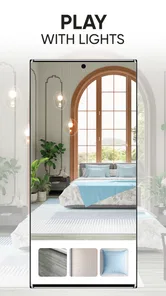
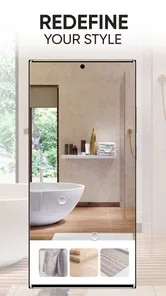
One of the standout features of Redecor is the vast array of design elements at your disposal. Want to add a splash of color to a bland wall? Choose from an extensive palette of paints. Need the perfect sofa to complete your living room? Browse through a catalog that rivals any high-end furniture store. The attention to detail is impressive, and the graphics are crisp and realistic.
And if you're anything like me, you'll appreciate the ability to mix and match different styles. Whether you're into minimalist vibes or cozy boho chic, there's something for everyone. The app encourages experimentation, letting you try out combinations you might not have considered before.
What the design tools are good for
I find the material choices most useful as a low-stakes way to test relationships between color and texture. A neutral room can still feel flat if every surface has the same visual weight; pairing a quiet wall with a more noticeable fabric or finish can make the focal area read more clearly. I’d save combinations I genuinely like as inspiration for real rooms, but I would not treat a game image as a reliable shopping plan: the screen is for exploring ideas, not checking how a physical material will look in your own lighting.
That distinction matters if you are hoping to learn practical interior design. Redecor can help you notice contrast, balance, and mood, but it is not a substitute for measuring a room, checking whether furniture fits, or comparing real-world samples. For those tasks, a room-planning tool with dimensions—or simply paper, a tape measure, and physical swatches—will be more useful.
Community and Interaction
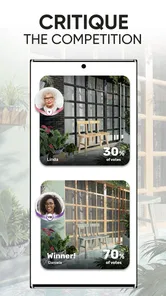
Redecor isn't just about solo play; it's also a vibrant community of design enthusiasts. You can connect with other players, share tips, and even vote on each other's designs. It's a fantastic way to get inspired and learn new tricks. Plus, the feedback you receive can be incredibly motivating.
The social aspect adds another layer of enjoyment. It feels like you're part of a global network of creatives, all striving to create the perfect space. The app also hosts themed events and challenges, adding a fun twist to the usual design tasks.
Competition without overthinking the score
Seeing other designs can broaden your sense of what works, but a voting result is not the same as a professional critique. A popular look may reflect a familiar style or a strong first impression; it does not necessarily mean your own choices were poorly considered. I’d use the comparisons to spot patterns and gather ideas, rather than redesigning every room to chase approval.
This is also where the game differs from a purely creative sandbox. A sandbox lets you make a room at your own pace without an audience, while Redecor’s challenges and player comparison give each design a more social, competitive frame. That can be energizing if you enjoy seeing how others interpret a brief. If outside judgment makes you anxious, or you only want to build without deadlines or comparison, a solo decorating game may be a better fit.
Progress, spending, and fairness
The purchase range is clear, but the exact effect of spending on progression or competitive outcomes is not something I can establish here. I would not assume that buying an item guarantees a better placement, or that a free player has exactly the same access to every design choice. If fair competition is your main concern, pay attention to what a particular challenge lets you select and whether you can enjoy it without purchasing anything. The safest approach is to play within the choices available to you and avoid spending just to keep pace with other people.
Likewise, I would check the current in-game purchase screen carefully before confirming anything, since the listed range covers very different amounts. The game is free to download, but purchases can add up if you make them casually. If you are setting it up for a child, the Everyone rating describes its age suitability; it does not replace checking purchase settings and agreeing on a spending boundary together.
In-App Purchases and Monetization
Now, let's talk about the elephant in the room: in-app purchases. While Redecor is free to play, there are options to purchase additional design elements and currency. However, you can still have a blast without spending a penny. The game is generous with its rewards, allowing you to earn in-game currency through challenges and daily tasks.
If you're tempted to splurge, the purchases are entirely optional. It's all about how much you want to invest in your virtual design journey. But rest assured, you can still create stunning spaces without opening your wallet.
A practical way to judge the spending pressure
I would separate two questions when deciding whether the purchase system feels fair: can I enjoy the basic act of making rooms without paying, and do I feel pushed to buy something to keep up with a result or unlock a particular choice? Those experiences can differ from player to player, so I would pay attention to my own habits rather than assume that a purchase is necessary—or that the free experience will always feel identical to a paid one.
A useful personal safeguard is to pause before any purchase and ask whether I want the item for the design itself or because I feel behind. If it is the latter, I would leave the screen and return to the challenge later. That small pause can keep a relaxing decorating game from becoming an impulse-spending loop. Since the available purchase amounts vary widely, I would also check the displayed amount and payment confirmation each time instead of relying on memory from a previous purchase.
Who will enjoy it—and who may not
I’d recommend it to anyone who enjoys arranging colors and finishes, likes bite-sized creative tasks, or wants a playful source of room inspiration. It is especially appealing if you enjoy comparing interpretations of the same design prompt. I’d skip it if you want a detailed home-renovation simulator, precise floor plans, or a completely uncompetitive creative space. The usual alternatives serve different needs: a sandbox prioritizes unrestricted building, while a planning app focuses on dimensions and practical layout. Redecor is strongest when the goal is to make visual choices and enjoy the challenge.
When another kind of design app is better
If I were choosing a tool for an actual move or renovation, I would start with a planner that lets me work with room measurements and furniture dimensions. That is the practical route for checking clearances, fitting a sofa, or seeing whether a proposed layout leaves enough walking space. Redecor is better for asking visual questions—does a warm wall color suit this fabric, or does a darker accent make the room feel more grounded?—without promising that the simulated arrangement will fit a real home.
It also sits between two familiar styles of play. Compared with an open-ended decorating sandbox, its briefs and community comparisons supply direction, which helps when I want a prompt instead of a blank canvas. Compared with a more management-focused simulation, it puts the emphasis on styling decisions rather than running a household or optimizing a business. That makes it a focused choice, but a narrower one: players looking for a long narrative, detailed construction, or a purely private creative outlet may be happier elsewhere.
Small habits that make the challenges more enjoyable
When I feel stuck, I would avoid selecting every surface independently. I’d choose a dominant material first, then use one or two supporting tones to keep the room coherent. This is a simple way to make a design read clearly even when the prompt offers several tempting directions. I would also compare the room at a glance before submitting: if the focal point disappears, the palette may need a stronger contrast; if every element competes, removing one bold choice can help more than adding another.
After a challenge, I’d look at other entries with a specific question in mind—perhaps how they used contrast or balanced a patterned surface—rather than just asking which one won. That turns community browsing into a learning habit instead of a popularity check. It also helps separate personal taste from a useful design observation: I may not want to copy someone’s whole room, but I can still notice why a particular combination feels calm or lively.
Final Thoughts
All in all, Redecor - Home Design Game is a delightful escape for anyone with a passion for interior design. It's user-friendly, visually appealing, and packed with features that keep you engaged. Whether you're looking to kill some time or seriously hone your design skills, this app has got you covered.
So, what are you waiting for? Dive into the world of Redecor and let your creativity run wild. Who knows? You might just discover your hidden talent for home design and find yourself redecorating your own space with newfound inspiration.
My trust verdict
I’d call it a worthwhile free download for someone who wants a visual design hobby and is comfortable treating competition as part of the experience. The purchase range is substantial, so I would go in with a spending boundary and judge the game by the choices I can enjoy without paying. I would not promise that purchases have no effect on progression or results, because that is not established here; equally, I would not assume that spending is required to make a room I like.
For me, the clearest reason to try it is the mix of a concrete room brief, material choices, and the chance to see how other people interpret the same task. The clearest reason to pass is wanting practical room planning or an entirely private sandbox. If that distinction matches what you want, Redecor offers a pleasant way to play with interior style while keeping real-world decisions—and real-world budgets—separate.
Redecor - Home Design Game Frequently Asked Questions
Does Redecor need a lot of storage space or a powerful phone?
Redecor is a simulation game built around designing and decorating virtual rooms, so the main thing to check before downloading is whether your device meets its operating-system requirements and has room for an app. Android devices need version 7.0 or later. If you are unsure about compatibility or available space, check your device settings and the app store page before installing.
Can I enjoy Redecor if I have no interior design experience?
Yes. Redecor is designed as a creative home-design game, not as professional design software, so you can explore styles and decorate virtual spaces without needing prior experience. You can make choices based on your own taste, then take part in design activities and challenges. It suits players who enjoy experimenting with colors, furnishings, and room looks at their own pace.
Is Redecor suitable for children?
Redecor is rated Everyone, so its content is intended for a broad audience. It is a home-design simulation game centered on decorating virtual spaces, choosing styles, and taking part in design activities. Parents may still want to review the game themselves and consider how its social features and optional purchases fit their child’s preferences and household rules.
Who makes Redecor, and what devices can run it?
Redecor is developed by Reworks Ltd. It is available for Android and iOS, and the current version is 3.59.3. On Android, the listed minimum operating-system requirement is version 7.0, so it is worth checking your device’s software before installing. The game has attracted over 10 million installs and is a free download, with optional in-app purchases.
What is Redecor and how does it work?
Redecor is a home design game that allows users to unleash their creativity by decorating virtual rooms. Players can choose from a wide range of furniture, textures, and color schemes to create unique designs. The app also features challenges and competitions where users can showcase their designs and win rewards.
Pros
- Realistic 3D graphics enhance design experience.
- Wide variety of decor styles and themes.
- Regular updates with new challenges and items.
- User-friendly interface for seamless navigation.
- Engaging community features for sharing designs.
Cons
- In-app purchases can be costly.
- Some items require long wait times to unlock.
- Limited offline functionality.
- Occasional glitches during design saves.
- Ads may interrupt gameplay experience.