No WiFi-Antistress Relax toys
- 331.00
- 4.6
- Installs
- 50.00M
- Price
- Free

Screenshots

Analysis by Reviewed
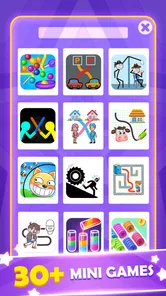
I tend to reach for a casual game when I want a brief break but don’t want to get pulled into a long session. No WiFi - Antistress Relax toys is built around that small-use idea: its collection of mini-games includes simple puzzle challenges, including a draw-line task, that give your hands and attention something to do without demanding a big time commitment. I find that a useful middle ground between opening a demanding game and scrolling through another feed.
A small puzzle can change the pace
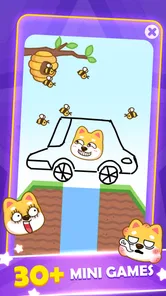
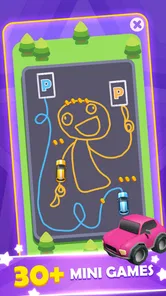
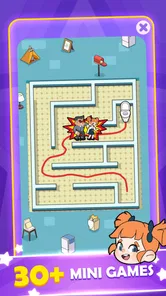
The draw-line challenge is a good example of the game’s appeal. It gives a short, clear problem to focus on, which can make a few idle minutes feel more settled than repeatedly checking messages. The wider mix of more than thirty mini puzzle games also makes the experience less dependent on one activity: when a puzzle stops feeling engaging, I can switch to another kind of task rather than forcing myself to continue.
That variety is best understood as a menu of quick diversions, not a deep puzzle campaign. I would not pick it for a carefully staged story, complex rules, or a sense of progression that keeps building over many sessions. Its strength is the low barrier to starting. In a waiting room or during a quiet pause between chores, I can open it, try a puzzle, and put the phone away when the moment is over.
Offline play suits the in-between moments
The no-Wi-Fi focus is practical when a connection is unreliable or unavailable, such as on a flight or during a commute through patchy service. It makes the game an easy option to keep in mind for short gaps when streaming or online multiplayer would be inconvenient. I would still open it before leaving home if I wanted to choose what to play, rather than waiting until I was already offline and distracted.
For everyday use, I’d treat it as a pocket-sized alternative to a paper puzzle or a quick casual game, not as a tool that can solve stress on its own. A useful habit is to decide on a brief stopping point before starting; a collection of tempting little activities can turn a two-minute pause into longer screen time. That small boundary helps preserve the relaxed, pick-up-and-put-down feel that makes this style of game appealing.
Who will enjoy this kind of game
QY Studio’s casual game is a natural fit for people who like switching between bite-sized puzzles and want something that can be played without a connection. It is free to download, rated for Everyone, and has a 4.7 average from around twenty-two thousand ratings, with over ten million installs. The current version is 1.74.32, and it runs on Android 6.0 or later. Optional in-app purchases are listed at $6.99 per item, so I’d check any purchase prompt carefully if I’m handing the phone to a child.
I would steer players elsewhere if they want one polished puzzle system to master, competitive matches, or a detailed campaign. Those expectations call for a focused puzzle title rather than a bundle of short activities. Here, the appeal is variety and convenience; the trade-off is that individual mini-games may feel lightweight once their basic pattern becomes familiar.
More From Our News Desk

Weather by Xiaomi Review: Clear at a Glance, Less Clear Up Close

X Under Pressure: Can It Recover When Posting Goes Wrong?

Clash of Clans Is Won Between the Battles

Android Auto Makes the Case for Quieter Car Software

MobiOffice: Transforming Mobile Productivity with Seamless Integration

EA SPORTS FC™ Mobile Soccer: Redefining Mobile Sports Gaming
In my view, No WiFi - Antistress Relax toys works best as a backup for small pockets of downtime: a few minutes before an appointment, a quiet break at home, or a stretch without reliable internet. It is a free casual game from QY Studio, released on September 2, 2023, and the simple puzzle format makes it easy to try without planning a whole gaming session. If quick offline distractions sound more useful than a long-term challenge, I’d keep it handy; if you need depth or structured goals, I’d choose something more specialized.
First Impressions
When I first downloaded No WiFi - Antistress Relax toys, I was immediately intrigued by its colorful and inviting interface. It's designed to catch your eye without being overwhelming, which is a nice change from the usual barrage of notifications and alerts we get from other apps. The setup was super simple, and within minutes, I was ready to dive into the world of relaxation.
Features That Stand Out
What really sets this app apart is its wide variety of stress-relief toys. From bubble wraps that pop with a satisfying sound to virtual fidget spinners that you can spin endlessly, there’s something for everyone. I found myself particularly drawn to the kinetic sand simulation. It’s strangely soothing to watch and manipulate, almost like having a zen garden in your pocket.
Another cool feature is the sound therapy section. You can choose from different ambient sounds like rain, ocean waves, or even a cozy fireplace. It’s perfect for those moments when you just need to close your eyes and escape reality for a bit.
User Experience
One of the things I appreciate most about this app is its simplicity. There are no complicated settings or unnecessary features. Just pure, unadulterated relaxation. The app runs smoothly, and I didn’t encounter any glitches or crashes, which is always a plus in my book.
Plus, it’s all offline. Yep, you heard that right! You don’t need an internet connection to enjoy the soothing vibes, which means you can take your relaxation on the go, whether you’re on a plane or in the middle of nowhere with no WiFi.
Final Thoughts
If you're looking for a way to unwind and take a break from the hustle and bustle, this app might just be your new best friend. It’s a delightful mix of fun and calm, and it doesn’t try to be anything more than what it is: a stress-relief tool that fits in your pocket. So go ahead, give it a try. Your mind and soul will thank you!
Making a short session work
The strongest way to use this collection is to match the activity to the kind of pause you actually have. If I’m waiting for a coffee or sitting before an appointment, I’ll choose one small puzzle and treat it as a contained task. That gives the break a beginning and an end, unlike opening a social feed where one item leads to another. The game’s quick-entry appeal matters most in these tiny windows: I don’t need to remember a story or rebuild a strategy from a previous session.
There is also a practical difference between using a mini-game to occupy attention and expecting it to make a difficult moment disappear. A short, uncomplicated challenge can give restless hands and a wandering mind a neutral focus, but it is still screen entertainment. I would use it as a gentle diversion during a dull wait, not as a substitute for sleep, a proper rest, or help with persistent anxiety. That distinction keeps the “antistress” idea grounded rather than treating a casual game as a cure.
A commute, a queue, or a quiet evening
One realistic routine is to open the game before a commute, pick an activity while I still have a stable connection, and then use it only when the journey slows down or I’m safely waiting. The offline angle makes that plan convenient when service drops, but it doesn’t make playing while walking or crossing streets a good idea. I’d keep the phone away whenever I need to pay attention to my surroundings.
At home, the same collection can fill a different role. If I have a few minutes between cooking and setting the table, a puzzle can be more engaging than checking notifications without turning the pause into a full gaming session. If I’m trying to wind down before bed, though, I would set a stopping point and lower the screen’s appeal by putting the phone aside afterward. The activities are easy to pick up, and that convenience can work against a planned bedtime if I keep moving from one to the next.
For a child, the Everyone age rating makes the game broadly suitable in content terms, but I’d still supervise the first use and keep an eye on purchase prompts. The free download makes it easy to try, while optional purchases mean I would not assume every part of the experience is necessarily free. That is a useful distinction for parents: an age rating speaks to suitability, not to whether a child might tap a purchase option while exploring.
How it compares with other casual choices
Compared with a dedicated logic puzzle, this game favors variety over mastery. A specialist puzzle app is usually the better choice if I want a consistent rule set, carefully increasing difficulty, or a reason to return to the same challenge and improve. Here, changing activities is part of the appeal, but it also means the individual puzzles may not hold the attention of someone looking for a long-term test.
Compared with a paper puzzle book, the phone is more convenient to carry and gives me several kinds of short activity in one place. Paper is still better when I want a screen-free break, and it never tempts me to continue browsing on the device after I finish. Compared with a simple fidget object, the game offers more deliberate tasks, but it requires me to look at and interact with a screen. Choosing between them depends on whether I want a little problem to solve or a genuinely device-free moment.
It also occupies a different space from online multiplayer games. There is no need to coordinate with another person or depend on a live match, which makes it easier to open during an unpredictable wait. The trade-off is that players who enjoy competition, shared play, or a strong sense of achievement may find the experience too self-contained. I see it as a small personal pastime rather than a social game.
What to expect from the collection
With more than thirty mini puzzle games, the selection gives me room to change pace, but I would not assume that every activity will suit every mood. A quick puzzle can feel satisfying when I want a clear target; a different kind may be more appealing when I only want to tap around casually. My practical tip is to sample a few options early, notice which ones feel pleasantly absorbing rather than frustrating, and return to those when I only have a short break. That is more useful than trying to work through the entire collection as if it were a campaign.
There is a small trade-off in that approach: variety makes the game flexible, yet switching too often can turn a restful pause into a search for the “best” activity. If I spend the whole break browsing choices, I have not really taken the break I wanted. I’d pick one mini-game quickly and give it a fair try; if it doesn’t click, switch once rather than cycling through everything. That simple limit helps keep the menu from becoming its own distraction.
The draw-line challenge is especially suited to a brief focus reset because it asks me to think about a concrete move instead of leaving the screen open passively. I would not call that a hidden relaxation technique or promise a particular result; it is simply a different kind of attention from scrolling. The best outcome is modest: a few minutes feel occupied, and I can return to what I was doing without having committed to a lengthy level or match.
Small practical details before installing
The game is free, and its current Android version is 1.74.32, with Android 6.0 or later required. If I’m choosing it for an older device, I’d check that the operating system meets that minimum before planning to rely on it during a trip. The title is also available as a casual option for people who want offline play, but I would still launch it once before travel so I can confirm that it opens properly on my own phone and find a preferred activity in advance.
That pre-trip check is worthwhile even when a game is designed for use without Wi-Fi. It avoids the annoyance of trying to learn a new interface while standing in a queue or already on a plane, and it lets me see whether the mini-games suit my taste. Offline access is a convenience, not a reason to leave preparation until the moment I need entertainment.
The audience size suggests that this is not an obscure experiment: it has over ten million installs and a 4.7 average from around twenty-two thousand ratings. I’d treat those figures as a sign that many people have found the format appealing, not as a guarantee that every puzzle will match my preferences. The more helpful question is whether I want a compact bundle of casual diversions or a single game with more depth. If it is the former, the format makes sense; if it is the latter, popularity won’t change the basic trade-off.
When I would choose something else
I would skip this game if my main goal were to spend less time on my phone. Even short activities still mean looking at a screen, so a paper puzzle, a stretch, or simply leaving the device in my bag may be a better break. I’d also look elsewhere if I needed a carefully structured progression system, a demanding brain-training routine, or a multiplayer activity to share with friends. The collection’s convenience is precisely what makes it a weak fit for those more specific goals.
Likewise, someone who dislikes switching among unrelated mini-games may find the bundle less satisfying than a focused title. I prefer that I can move on when a task loses its appeal, but another player may want a single set of rules that deepens gradually. Neither preference is wrong; it is a question of whether quick variety feels refreshing or scattered to you.
For me, the best case is straightforward: I keep it as a low-commitment option for a disconnected wait, choose a puzzle rather than mindlessly opening a feed, and stop when the pause ends. The offline design, the draw-line challenge, and the broader selection give it a clear place among casual games, while the lightweight nature of the activities sets a sensible limit on what I expect. If that is the kind of pocket-sized diversion you want, it is worth trying; if you want depth, competition, or a screen-free way to decompress, I’d choose a different option.
No WiFi-Antistress Relax toys Frequently Asked Questions
Can I play No WiFi - Antistress Relax Toys while traveling or without mobile data?
Yes. No WiFi - Antistress Relax Toys is designed to be played without an internet connection, which makes it a convenient option for travel, commutes, or places with limited connectivity. Its offline focus means you can open it for a quick casual activity without relying on Wi-Fi or mobile data. You can still check your device’s settings and download the game before you go offline.
How much storage space does No WiFi - Antistress Relax Toys need?
Storage space is worth checking before installing any game, especially if your phone is nearly full. No WiFi - Antistress Relax Toys offers a collection of casual activities, including mini puzzles and a draw-line challenge, but its exact download size can vary by device and platform. Check the app’s download page on your device to see the current size, then make room if needed.
Who developed No WiFi - Antistress Relax Toys, and what kind of game is it?
No WiFi - Antistress Relax Toys is a casual game developed by QY Studio. It combines an antistress theme with arcade-style activities, mini puzzle games, and a draw-line challenge, giving players more than one kind of simple pastime to try. Its focus is on accessible, short activities rather than a complex game experience, so it may suit players looking for something relaxed to dip into.
Is No WiFi - Antistress Relax Toys suitable for children?
The game has an Everyone content rating, so it is presented as suitable for a broad audience. Its casual format and simple antistress activities may appeal to players of different ages. As with any app, parents can decide whether its content and optional purchases are appropriate for their child before downloading.
What is No WiFi - Antistress Relax Toys?
No WiFi - Antistress Relax Toys is a mobile application designed to provide users with relaxing and stress-relieving experiences through a variety of virtual toys and activities. The app features a collection of interactive tools such as fidget spinners, bubble wrap, and other calming games to help unwind and relax without the need for an internet connection. It is a casual game from QY Studio, with a collection that also includes arcade-style play, mini puzzle games, and a draw-line challenge.
Pros
- No internet needed for gameplay
- Wide variety of relaxing toys
- User-friendly interface
- Visually appealing graphics
- Regular updates and new content
Cons
- Limited features without in-app purchases
- May consume significant battery
- Ads can be intrusive
- Toys may become repetitive
- Requires device storage space












