My PlayHome School
- 408.00
- 4.3
- Installs
- 100.00K
- Price
- $3.49

Screenshots

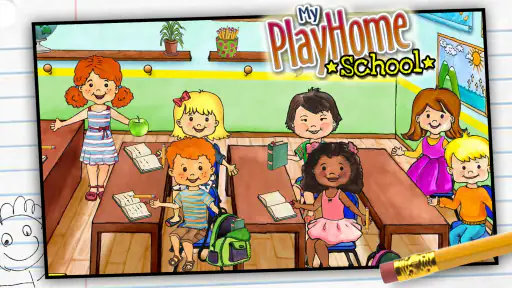
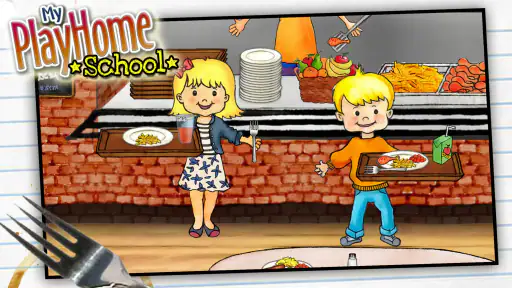
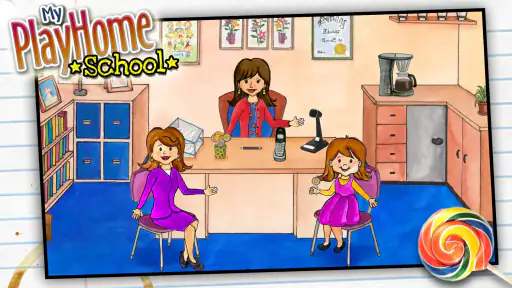
Analysis by Reviewed
When a phone or tablet gets passed around at home, a game needs to be easy to pick up without turning into a source of arguments. My PlayHome School is a casual pretend-play game built around a school setting, where children can move characters through rooms and invent their own scenes. I find that open-ended approach appealing for short, shared sessions: one child can set up a classroom, another can take over the story, and neither needs to beat a level before handing over the device.
A handoff that works for different kinds of play
The shared-device advantage is not simply that the game can be paused. It is that a child can leave a scene unfinished without losing a score, a streak, or a carefully completed challenge. If one sibling has arranged a lesson and another wants to continue the story, the second child can respond to what is already on screen or start something different. That makes the game easier to pass between children with different attention spans, though it also means there is no built-in turn-taking structure to settle disagreements.
For a practical handoff, I’d agree on one small rule before the session: the next player chooses what happens in the next room, or gets to decide whether the current scene continues. This gives each child a meaningful choice without requiring an adult to referee every tap. If the children tend to argue over characters or objects, taking turns with the story idea rather than trying to divide every item may feel more natural. The game offers a setting for shared invention; the household still supplies the rules.
How shared play works in an ordinary day
A useful moment for it might be the wait before dinner or a quiet stretch while an adult finishes a task. A child can stage a school day, decide who is teaching, and move between the classroom, cafeteria, playground, and nurse’s office. The play is easy to pause because it is based on making up scenes rather than keeping a timed run going. For siblings, I’d suggest taking turns choosing the next room or character; that gives the handoff a simple shape without needing a parent to direct every move.
It can also suit a brief visit with a grandparent or a shared family tablet used by children of different ages. One child might narrate a school story while a younger one moves a character or picks an object, so participation does not depend on everyone being equally confident with the controls. I would keep expectations modest, however: the game can give them a common pretend-play setting, but it does not automatically make cooperation happen. If one child wants to control the whole scene, an adult may still need to suggest a turn or give the other child a role.
Who is likely to enjoy the freedom
This is a better fit for children who enjoy storytelling and copying familiar routines than for kids who want goals, scores, or a clear sense of progress. Compared with puzzle games or structured learning apps, it offers more freedom but less guidance: children supply the plot themselves. That trade-off is central to whether it will hold a child’s attention. If they like arranging characters and objects into little stories, the lack of a prescribed task can be a strength. If they ask what they are supposed to do next, a game with explicit challenges may suit them better.
I would also think about how a child usually responds to pretend play away from a screen. A child who likes playing school with toys, making up roles, or retelling a familiar day has a ready-made way into this setting. A child who mainly enjoys collecting rewards or moving through increasingly difficult levels may find it thin, even if the school theme sounds appealing. That is a useful distinction before paying: the central draw is the freedom to invent, not a sequence of achievements.
More From Our News Desk

Weather by Xiaomi Review: Clear at a Glance, Less Clear Up Close

X Under Pressure: Can It Recover When Posting Goes Wrong?

Clash of Clans Is Won Between the Battles

Android Auto Makes the Case for Quieter Car Software

MobiOffice: Transforming Mobile Productivity with Seamless Integration

EA SPORTS FC™ Mobile Soccer: Redefining Mobile Sports Gaming
Setting expectations on a shared device
I’d treat it as a game to open together at first, especially if a child is new to touch-screen play. Showing how to move a character and explore a room can help them get started without turning the session into a lesson. It also gives an adult a chance to agree on a stopping point before the device changes hands. The controls may feel straightforward, but younger players can still benefit from a little help when they are learning where to tap and how to move things.
A useful first session does not need to involve demonstrating every room or interaction. I’d let the child choose one place to explore, then ask what could happen there. That keeps the adult from taking over the storytelling and helps reveal whether the open-ended format is a good match. If the child becomes frustrated, try moving a character or object together once, then hand control back rather than turning the game into a series of instructions.
On a family tablet, it is sensible to make the usual device boundaries clear before handing it over: whose turn it is, how long the session lasts, and whether the device is staying in a shared space. Those are household choices rather than special game features. I would not choose this title as a substitute for an adult’s supervision or as a way to manage device access; its value is in the play itself.
Keep household access separate from the game
If several people use the same device, I’d decide in advance who is allowed to make purchases or change device settings, rather than assuming a child-friendly game handles those boundaries for the family. The game’s price is $3.49, so the adult who manages the device should be the one to make the purchase decision. I would also check the device’s own account and purchase arrangements before handing it to a child, especially if it is shared with people who use other apps or games.
That distinction matters because a simple play experience is not the same thing as a family-management system. I would not rely on the game to set limits, coordinate turns, or separate one child’s access from another’s. Those jobs belong to the household’s existing routines and device settings. For a family that already has a clear shared-tablet routine, this is easy to accommodate; for someone looking for an app to enforce those boundaries, it is the wrong kind of solution.
Age, trust, and the kind of play it supports
The game carries an Everyone content rating, which makes its school-themed role-play a natural option to consider for a broad household audience. It was released on March 4, 2015, and the current version is 2.3.0.47; it runs on Android 5.0 or later. Shimon Young : Play Home Software is the developer. The game costs $3.49, so I’d weigh that one-time purchase against how often a child returns to open-ended pretend play rather than assuming every child will enjoy it equally.
The rating can help a household judge the general content context, but it cannot tell you whether the style of play suits a particular child or whether the child is ready to use a shared device independently. I’d start with a supervised try, then see whether the child can navigate comfortably and put the device down when asked. The school theme may feel familiar, but the game is still a source of play rather than a replacement for conversation, hands-on activities, or an adult’s judgement about screen use.
Its audience response is positive: it has a 4.3 average from around 2.5 thousand ratings, with over 100 thousand installs and 408 written reviews. Those figures suggest that many players have tried it, but they cannot tell me whether it will click with a particular child. My practical test would be to watch whether the child starts inventing scenes after a little exploration, or instead loses interest because there is no guided objective.
Exploring the Virtual School
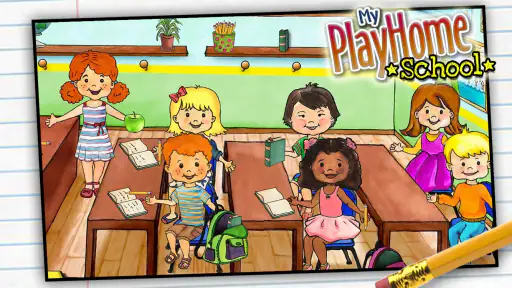
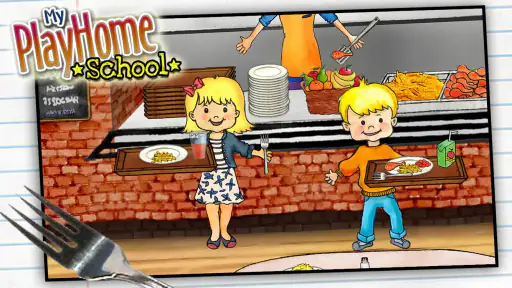
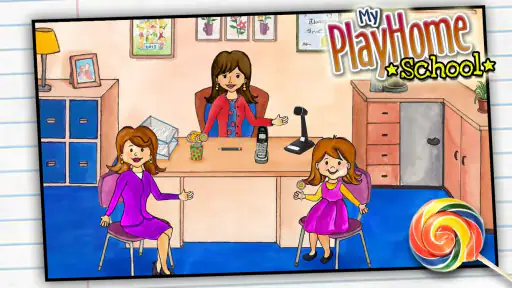
Upon entering My PlayHome School, the first thing you'll notice is the vibrant and inviting interface. It's designed to mimic a real school, complete with different classrooms, a cafeteria, a playground, and even a nurse's office. Each area is meticulously detailed, making the environment not just educational but also incredibly engaging. The kids can swipe through various rooms and interact with almost every object they see. It’s a digital playground where learning and fun go hand in hand.
Immersive Learning Experience
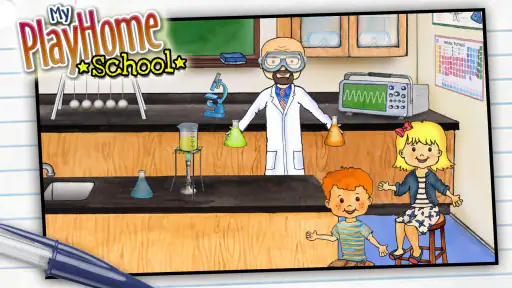
The magic of this app lies in its ability to immerse children in a learning environment without them even realizing it. The characters can engage in numerous activities like solving math problems on the board, experimenting in the science lab, or even enjoying a music lesson. It's a seamless blend of play and education, ensuring that kids are picking up new skills while having a blast!
One of the features I absolutely love is the diversity of characters. Kids can choose characters that look like them, fostering a sense of inclusion and representation. It's a small touch, but it makes a big difference, especially in today's world.
Interactive Features
Another standout aspect of My PlayHome School is its interactive features. Kids can move objects, engage in role-play scenarios, and even "eat" their lunch in the cafeteria. These interactions are not just entertaining, but they also help children develop their fine motor skills and cognitive abilities. Plus, the app encourages imaginative play, allowing kids to create their own stories and adventures within the school setting.
For those concerned about screen time, the app is designed to be intuitive and easy to navigate, minimizing frustration and maximizing engagement. It’s perfect for children aged 4-10, providing a safe space for exploration and learning.
What to expect from the school setting
The school environment gives children familiar places to anchor their stories, which is more useful than it may first sound. A classroom can become the setting for a made-up lesson, while the cafeteria or playground can carry the story into a new part of the day. I’d encourage a child to move between locations when a scene runs out of steam instead of waiting for the game to introduce a new objective. The child’s own narration is what connects the places.
There is a small trade-off in that freedom: an adult looking for a clear lesson plan or measurable practice should not treat the school theme as proof of formal instruction. The game can prompt children to act out school activities, but its strongest value is imaginative role-play. If a child is practising a specific academic skill, a dedicated learning app or an activity with a parent will be a better fit. Here, I would follow the child’s ideas rather than expecting a defined educational outcome.
Making a short session feel complete
Because the play does not depend on finishing a level, a simple beginning-and-ending ritual can make it easier to fit into a family routine. I might ask the child to choose a character, decide what the school day is about, and then tell me one thing that happened before handing over the tablet. That gives the session a shape without pretending the game has a built-in stopping point. It is especially practical when a device needs to be passed to a sibling or put away before a meal.
For a child who likes to linger over details, I would keep the session focused on one small story rather than trying to explore everything in one sitting. A teacher might welcome a class, a student might head to lunch, and the story can end when the child is ready to stop. This is not a challenge the game requires; it is a parent’s simple way to make open-ended play easier to wrap up. If the child resists stopping, the device boundary still needs to come from the adult.
Choosing it over other casual games
Against casual games built around quick taps, matching, or repeated rounds, this one asks for more imagination and offers less immediate feedback. That can be a welcome change when I want a child to invent a scene rather than chase a score, but it is not automatically more engaging. A child who prefers visible goals may find a puzzle game easier to return to, while a child who enjoys pretend scenarios may get more out of arranging characters and moving through the school spaces.
It also occupies a different lane from structured educational apps. Those often make the task and expected answer explicit; this game leaves the child to decide what a classroom activity means in the moment. I would choose it for playful storytelling, not as a substitute for guided practice. The best alternative depends on the need: choose a game with objectives for focused solo play, a learning app for targeted exercises, or this one when the child wants room to create.
Household verdict
My overall take is that this is a gentle, flexible choice for a family that wants a pretend-play game children can explore at their own pace. It is less suitable if you want lessons with measurable outcomes, competitive play, or a strong progression system. The game’s store summary describes an expansion of the PlayHome world into a classroom, and that is the right way to think about its appeal: a familiar kind of role-play in a school environment, rather than a formal teaching tool. For a child who enjoys acting out everyday scenes, I can see it earning a regular place in a shared-device rotation; for a child who needs clear prompts, I’d pick something more structured.
Conclusion: A Must-Have App
In conclusion, My PlayHome School is more than just an app; it's an educational tool that brings learning to life. Whether you're a parent looking to supplement your child's education or an educator searching for innovative teaching aids, this app is a fantastic choice. It’s engaging, inclusive, and most importantly, it makes learning fun. So, if you haven’t already, give it a whirl and watch your child's curiosity and knowledge grow!
My PlayHome School Frequently Asked Questions
How much does My PlayHome School cost, and what kind of game is it?
My PlayHome School is a casual game that expands the PlayHome world into a classroom setting. It costs $3.49, so it is a paid download rather than a free game. If your child enjoys open-ended pretend play, the school environment may offer an appealing way to explore familiar classroom routines and make up stories through play.
What is My PlayHome School and what can children learn from it?
My PlayHome School is an interactive educational app designed for children to explore and learn about a school environment. It offers a virtual school setting where kids can visit different rooms, such as classrooms, science labs, and cafeterias. Children can engage in activities that simulate real-life school experiences, helping them understand school routines, social interactions, and basic educational concepts in a fun and engaging way.
Is My PlayHome School safe for children to use?
Yes, My PlayHome School is designed with child safety in mind. It is free from third-party advertisements, in-app purchases, and external links that could lead children away from the app. The game focuses on providing a safe, child-friendly environment that encourages learning and exploration without exposing children to inappropriate content or interactions.
What age group is My PlayHome School suitable for?
My PlayHome School is ideal for children aged 4 to 10 years. The app is designed to cater to the curiosity and learning needs of young children in this age range, offering age-appropriate activities and settings. It helps foster creativity and learning through play, making it a great tool for both preschoolers and early elementary school students. Its content rating is Everyone, which also makes it easy for families to check its general suitability.
Does My PlayHome School require an internet connection to play?
No, My PlayHome School does not require an internet connection to play. Once downloaded, children can enjoy the app offline, making it a convenient option for parents who want to limit their children's screen time to safe, educational content without needing a constant internet connection.
Pros
- Interactive learning environment
- User-friendly interface
- Encourages creativity
- Enhances problem-solving skills
- Safe for kids
Cons
- Limited free content
- Needs regular updates
- Requires internet connection
- Occasional bugs
- Not suitable for older kids
- Category
- Casual
- Version
- 2.3.0.47