Monster Studio: Music Beats
- 116.00
- 3.0
- Installs
- 10.00M
- Price
- Free

Screenshots
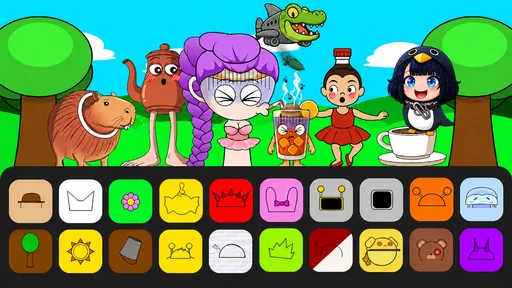
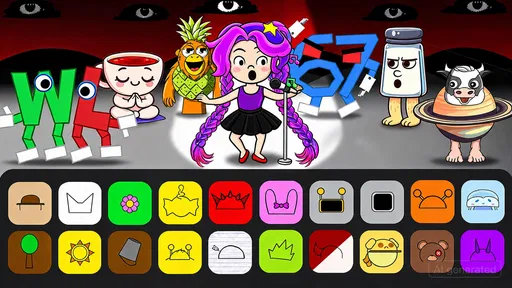
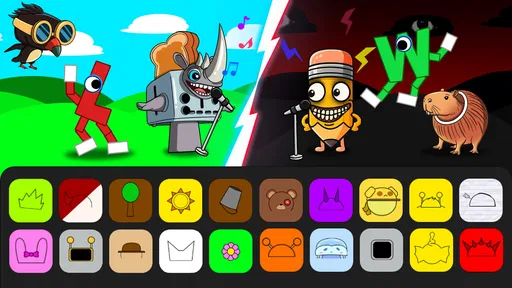
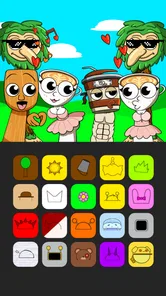
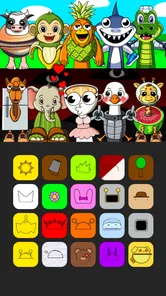
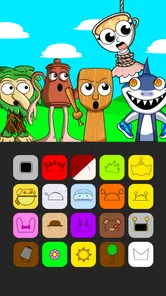
Analysis by Reviewed
Monster Studio: Music Beats is a casual music game from Tappy Game that I found easiest to understand when I treated it as a playful sound toy rather than a serious music-making tool. The basic appeal is simple: you discover monster characters, combine their individual beats, and build a track that feels like your own. That idea is approachable, but the experience depends heavily on how comfortable you are with visual interaction, repeated tapping, and learning by experimentation.
It is free to download and suitable for Everyone, which makes it an easy game to try with children, family members, or anyone who wants a low-pressure distraction. It has also attracted over ten million installs, so it is clearly reaching a broad audience. Still, popularity does not automatically make it suitable for every player. My impression is that it works best for people who enjoy short creative sessions and do not need the depth or precision of a conventional music app.
How Monster Studio feels to use across different needs and situations
I look at Monster Studio through the situations where its sound-combination idea is most useful: a brief creative pause, a shared activity, or a first step into making beats without music theory. Those settings also make its limits easier to judge, because the same simplicity that lowers the barrier can leave players wanting more direction. The next section considers how that balance changes from one kind of session to another.
Readability and navigation during the first session
The strongest part of the concept is that the goal is immediately understandable. You are not asked to study musical notation or learn a complicated production workflow before hearing anything. The monsters provide the personality, and their beats give the player a reason to experiment. I could approach the game with curiosity instead of feeling that I needed musical knowledge first.
That simplicity matters for younger players and for adults who usually avoid music software. A traditional beat-making app can present timelines, tracks, menus, sliders, and technical labels all at once. Monster Studio: Music Beats feels more like arranging characters in a playful studio. The result is less intimidating, especially when the aim is to make something entertaining rather than technically perfect.
However, simple does not always mean perfectly clear. A game built around discovering combinations can require players to remember what each monster contributes and what changed after a new choice. If you have difficulty tracking several visual elements at once, the playful presentation may become busy rather than helpful. I would take a few minutes to explore one character or sound at a time instead of trying to understand the whole studio immediately.
My practical advice is to treat the opening session as orientation. Tap deliberately, listen for the difference each addition makes, and avoid judging the game before you have heard a few combinations. The experience rewards patience more than speed. That is a useful distinction for players who find rapid menus or unexplained icons frustrating.
More From Our News Desk

Weather by Xiaomi Review: Clear at a Glance, Less Clear Up Close

X Under Pressure: Can It Recover When Posting Goes Wrong?

Clash of Clans Is Won Between the Battles

Android Auto Makes the Case for Quieter Car Software

MobiOffice: Transforming Mobile Productivity with Seamless Integration

EA SPORTS FC™ Mobile Soccer: Redefining Mobile Sports Gaming
The game’s casual category is a good fit here. It does not present itself as a demanding rhythm challenge where every input must be perfectly timed. Instead, the pleasure comes from arranging and listening. For someone who wants instant action, that may feel slower than expected; for someone who prefers a gentle creative activity, it is a welcome change from games built around pressure.
Visual clarity, sound, and motor effort
The central interaction joins visual recognition with audio feedback. You see the monster arrangement, then hear how the selected beats work together. This makes the game naturally attractive to players who enjoy sound, but it also means that the experience may be less satisfying if listening is difficult or if the device is being used in a noisy place.
I would not describe it as a substitute for visual feedback. The music is the clearest way to understand whether a combination works, and a player who cannot comfortably rely on the audio may need to make decisions from the screen alone. That can reduce the sense of discovery. Conversely, someone who is sensitive to layered or repetitive sounds may prefer to keep sessions brief and use a quieter environment.
There is also a motor consideration that is easy to overlook. Although the game is casual, it still asks you to interact with small on-screen areas and repeat taps while experimenting. Players with limited reach, hand control, tremor, or fatigue may find extended sessions uncomfortable. The game is more forgiving than an action title because the focus is not on fast reflexes, but that does not remove the physical demands of touching a mobile screen.
I found that a slower approach helps. Instead of rapidly changing several monsters, make one adjustment, listen, and then decide whether to keep it. This reduces unnecessary tapping and makes the creative process easier to follow. It is also a better way to identify which sound actually improved the arrangement, rather than losing track of changes made in quick succession.
For children, the forgiving musical structure can be encouraging. They can experiment without needing to understand rhythm theory, and the monsters give the activity a visual identity that is easier to remember than abstract audio controls. Adults supervising play should still expect exploration rather than a conventional level-by-level challenge. The appeal is in making combinations, not in mastering a formal instrument.
Using it at home, while travelling, or with other people nearby
The best everyday scenario is a short break when I want something creative but do not want to commit to a long game. I can imagine opening it while waiting for an appointment, relaxing after work, or sharing the phone with a child who wants to make a funny beat. The low-pressure format makes it more suitable for those moments than a game that demands concentration for a full match.
It can also work as a conversation starter. Handing the device to another person and asking them to choose a monster creates a simple shared activity. One person can listen for the change while another decides what to try next. That makes the game more socially accessible than its solitary presentation might suggest, especially for families looking for a quick screen activity that does not rely on competition.
There is a trade-off in public spaces. Because the music is central, playing without disturbing other people may require low volume or headphones. If you cannot use headphones comfortably, the game loses some of its feedback. In a loud environment, the sounds may also be harder to distinguish, so I would choose a quieter setting when I want to explore combinations rather than simply pass a few minutes.
The age rating of Everyone makes the concept broadly approachable, but age suitability and ease of use are not identical. A young child may understand the playful characters quickly while still needing help navigating the device. An older adult who enjoys music may appreciate the creative idea but need more time to identify what each visual element does. In both cases, a calm introduction is more useful than expecting the player to discover every interaction immediately.
It is worth remembering that the game is free, while individual in-app purchases can reach $29.99 per item. That does not prevent trying the core experience, but it is an important point for families sharing a device. I would review purchase controls before handing the phone to a child, particularly because a free download can create a different expectation from a game that includes high-priced optional items.
Where it sits beside ordinary casual games and music apps
Compared with a typical casual puzzle game, Monster Studio: Music Beats offers a more open-ended reward. There is less emphasis on clearing a board or beating a score and more on hearing a result that feels pleasing. That makes it a better choice for players who become tired of win-or-lose loops, but a weaker option for anyone who needs clear goals, measurable progress, or a strong sense of challenge.
Compared with a full music-production app, it is much easier to approach but far less suitable for detailed composition. I would not choose it when I need precise editing, serious recording, or control over a finished track. Its strength is immediacy: the monsters make the idea of combining beats understandable without turning the phone into a miniature studio workstation.
It also differs from rhythm games that test timing. If you are looking for songs to tap along with, increasingly difficult patterns, or a performance score, this is probably not the right direction. The focus here is arranging sound rather than proving accuracy. That difference should be clear before downloading, because the store summary may sound musical while the actual appeal is closer to interactive experimentation.
One useful way to decide is to ask what you want at the end of a session. If you want a quick, amusing arrangement that you created through trial and error, this game makes sense. If you want a polished song file, a structured lesson, or a demanding rhythm workout, a dedicated alternative will serve you better.
Small strategies that make experimentation easier
My first recommendation is to change only one element at a time. When several monsters are added or removed together, it becomes difficult to tell which beat created the improvement or the clutter. Single changes turn the game into a more understandable listening exercise and make it easier for players who need extra time to process audio and visual information.
My second recommendation is to build a comfortable starting arrangement before chasing unusual combinations. A stable base gives you something to compare against. This is especially helpful for players who become overwhelmed when every option changes at once. It also gives children a clear sense of cause and effect: one choice changes the sound, and the next choice changes it again.
A third useful approach is to use short sessions instead of trying to complete an imagined “perfect” track. Because the experience is casual, there is no reason to force a long sitting. Short experiments reduce hand fatigue, limit sensory overload, and keep the discovery feeling fresh. If the sound becomes repetitive, stepping away is more productive than tapping through the same arrangement without listening carefully.
I would also separate creative play from evaluation. The first arrangement does not need to be good. Let the player make something strange, then decide what to keep. That attitude is particularly valuable for people who are nervous about music apps, because there is no requirement to understand harmony or rhythm before enjoying the result.
Remaining barriers and who should think twice
The biggest limitation is that the game’s accessibility depends on the player’s ability to interpret its visual and audio feedback. The concept is friendly, but friendliness is not the same as comprehensive support for every need. Players who require large controls, strong text contrast, spoken guidance, captions for sound, or alternative input methods should approach cautiously and test the interaction for themselves.
Repeated touch interaction may also be a barrier for people with limited dexterity. The game is less physically demanding than a fast action title, yet casual tapping can still become tiring when experimentation stretches over time. Using a stand, changing hand position, or taking frequent breaks may help, but those are practical workarounds rather than built-in solutions.
Players with sensory sensitivities may have a mixed experience. The cheerful monster presentation can be inviting, while layered beats and repeated loops may become distracting. I would start at a low volume and play for a short period before deciding whether the sound design feels comfortable. The same advice applies to children who become overstimulated by bright, animated game screens.
There is also a motivational barrier for players who need explicit structure. Without the satisfaction of a conventional puzzle board, a campaign, or a clear performance target, the game may feel like a toy that runs out of purpose quickly. That is not a flaw for everyone; it is simply the cost of choosing a creative sandbox over a goal-driven casual game.
The current version is 1.6.1, and the game supports devices running Android 7.1 or later. That makes compatibility reasonably broad for Android users with older supported devices, although the experience will still depend on the particular phone’s screen, speakers, and responsiveness. I would pay attention to those practical details if the intended player has difficulty seeing small elements or hearing layered audio clearly.
My inclusive verdict
After looking at it through the lens of different abilities and contexts, I see Monster Studio: Music Beats as an inviting starting point rather than a universally comfortable music game. Its best quality is the way it removes much of the intimidation from beat creation. You can approach it without musical training, experiment at your own pace, and share the result with someone else.
Its limitations are equally important. The experience leans on visual discovery, touch interaction, and listening, so it may not work well for players who need alternative controls, extensive text support, or a quieter and less layered sensory presentation. It also lacks the kind of precise control that musicians expect from production software and the competitive structure that rhythm-game fans usually want.
Tappy Game has made a casual title that is easy to recommend for short creative play, especially with children or friends who enjoy sound-based experimentation. I would install it for a relaxed break, begin with one monster at a time, and keep purchase protections in mind because optional items can cost up to $29.99 each. The average rating is 3.2 from around 4.6 thousand ratings, which matches my balanced view: the idea is appealing, but the fit depends strongly on what you expect from it.
My recommendation is simple: choose it if you want a playful way to combine monster beats and do not need a formal music workstation. Skip it if accessibility depends on features the game does not visibly provide, if repeated touch is uncomfortable, or if you are searching for demanding rhythm action. For the right player, it is a cheerful little studio for experimenting; for everyone else, a more structured or more adaptable alternative may be the better choice.
Monster Studio: Music Beats Frequently Asked Questions
How much does Monster Studio: Music Beats cost to download?
Monster Studio: Music Beats is free to download, so you can try its casual music-making gameplay without paying an upfront price. Optional in-app purchases are available, with items priced at up to $29.99 each. If you prefer not to make purchases, review your device’s purchase controls before playing, particularly if children may use the game.
What age group is Monster Studio: Music Beats intended for?
Monster Studio: Music Beats has an Everyone content rating, and its approachable music-making concept can suit a broad range of players. Its playful monster characters and simple creative premise may be especially appealing to children and casual gamers. As with any game, parents can check the device’s purchase settings and decide whether the experience is appropriate for their child.
What devices and operating systems can run Monster Studio: Music Beats?
Monster Studio: Music Beats is available for Android devices, and the listed minimum Android requirement is version 7.1. Before downloading, check the operating system version on your phone or tablet and make sure it meets that requirement. The game is also available on iOS, so users can look for it in the relevant app store and check compatibility with their device there.
What is Monster Studio: Music Beats?
Monster Studio: Music Beats is a music-making game that lets you create tracks by combining animated monster characters, each representing a different beat, melody, or vocal sound. It is designed for casual players and beginners, so you can experiment with musical layers without needing previous production experience. The visual presentation and character animations make the creative process feel more like an interactive game than a traditional music studio. It is developed by Tappy Game and falls into the Casual game category.
How do you create music in Monster Studio: Music Beats?
Creating a track generally involves selecting or dragging monster performers into the available slots and arranging them into a combination that sounds good together. Each character adds a different musical element, allowing you to build rhythms, melodies, and vocal sections step by step. The interface is easy to understand after a short trial, although discovering the most enjoyable combinations requires experimentation and repeated listening.
Pros
- Simple beat-making tools are easy for beginners to understand.
- Loop-based creation lets you build tracks quickly.
- Useful for experimenting with rhythm and musical ideas.
- Short sessions work well for casual mobile use.
- Visual interface makes beat layers easy to follow.
Cons
- The sound library may feel limited after extended use.
- Advanced producers may miss detailed mixing controls.
- Some features may require in-app purchases or subscriptions.
- Projects can become repetitive without more varied samples.
- Performance may depend on your device and available storage.












