Master minecraft mcpe mod
- 96.00
- 3.5
- Installs
- 10.00M
- Price
- Free

Screenshots
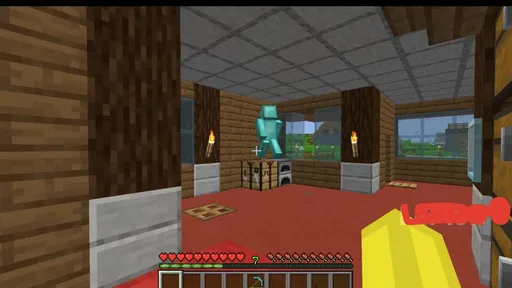
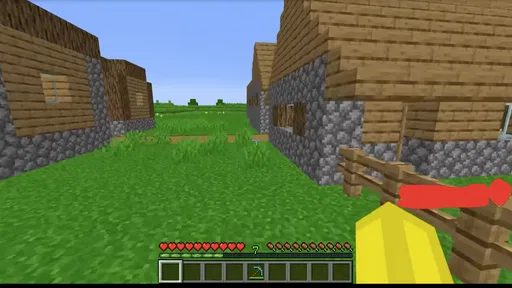
Analysis by Reviewed
I would approach Master minecraft mcpe mod as a companion for exploring Minecraft PE content, not as a replacement for Minecraft itself. Its adventure-game framing and focus on mods and maps make it most appealing when I want ideas for a different way to play, rather than another self-contained story or a polished, guided campaign. That distinction matters: the value here depends on how comfortably I can browse what it offers and whether the available content suits the way I play.
A good fit for curious Minecraft players
I see the strongest use case here as a player who already enjoys Minecraft PE and wants a reason to revisit it. Rather than starting a separate game with its own world and rules, I can use this companion to look for a different direction for a familiar game. It suits casual experimentation: a player can pick one idea to investigate, then decide whether it fits their mood and available time.
It is less suited to someone who wants to install one app and immediately follow a clear sequence of missions. The appeal is choice, and choice takes time. If I have only a few minutes, I would set a simple limit before browsing—choose one kind of experience and stop once I find a promising option. That keeps discovery from taking over the play session.
Finding your way around the content
The central promise is straightforward: bring Minecraft PE players to mods and maps in one place. That gives the game a practical role for someone who already knows the basic appeal of Minecraft but wants fresh directions to explore. I would use it when the familiar routine starts to feel stale and I want to look for a new setting or play idea without first searching broadly across unrelated sources.
There is a useful difference between browsing for inspiration and choosing something with a clear purpose. If I have only a short session, I would decide what kind of experience I want before exploring—perhaps a map-focused change of scenery rather than a mod-oriented change to play. That small bit of planning can make a catalog-style companion feel less overwhelming, especially when the choice is between many kinds of community-made content.
Ali Abbas is the developer, and the game is free. It is rated for Teen players, so parents should treat it as an older-child or teen-oriented experience rather than assume that a Minecraft theme automatically makes every part suitable for younger children. I would check the content in context and consider who will be using the device, particularly if a younger player is browsing independently.
Its audience is already substantial: it has more than 10 million installs and a 3.5 average from roughly 25,000 ratings. That makes it a familiar option in this niche, though popularity does not guarantee that every item will suit a particular player. The rating is a reason to keep expectations measured and to judge the experience by the browsing and content choices that matter to you.
More From Our News Desk

Weather by Xiaomi Review: Clear at a Glance, Less Clear Up Close

X Under Pressure: Can It Recover When Posting Goes Wrong?

Clash of Clans Is Won Between the Battles

Android Auto Makes the Case for Quieter Car Software

MobiOffice: Transforming Mobile Productivity with Seamless Integration

EA SPORTS FC™ Mobile Soccer: Redefining Mobile Sports Gaming
Legibility matters as much as discovery
For players who find dense screens tiring, the key question is whether the labels, descriptions, and choices are easy to scan on their own device. I would avoid racing through a list: pause on an item, read its description fully, and confirm that it matches the kind of Minecraft PE experience I want before moving on. This is a simple workflow, but it reduces the chance of choosing something based on a vague title or thumbnail alone.
Navigation can also be a challenge for anyone who has trouble keeping track of several similar options. I find it helpful to narrow the search mentally to one goal at a time, rather than jumping between maps and mods while trying to remember what each one promised. If a friend or family member is helping, agreeing on that goal first makes browsing more collaborative and less dependent on one person making quick decisions.
Motor and sensory comfort
For players with limited dexterity, any experience that involves repeated taps, precise timing, or extended browsing can become tiring. I would take breaks between decisions and avoid treating the process as a speed task. The game’s adventure category does not by itself tell me how every interaction feels, so the practical test is whether the individual controls and browsing steps are comfortable on the player’s device.
Players sensitive to visual clutter or sound should also judge the experience in their own setting. A quiet room, lower device volume, and a comfortable screen brightness can make a casual session easier to manage. These are general ways to shape a mobile play session, not special features of this title, and they will not solve every sensory barrier. If the presentation feels distracting or hard to follow, it may simply not be the right choice for that player.
A useful trade-off is that variety can make a companion for Minecraft feel more engaging, but a wider range of content also asks the player to make more decisions. For someone who prefers one clear objective and a stable routine, that browsing step may be less enjoyable than opening a familiar Minecraft world directly. I would choose this game for exploration and discovery, not when I want the fewest possible steps between picking up my phone and playing.
When it fits into everyday play
Imagine having a spare stretch of time after school or during a quiet evening and wanting to play Minecraft PE differently without committing to a long session. This is the sort of situation where I would browse for a map or mod idea, choose one that fits the time available, and then return to the main game for the actual play. Keeping the search separate from the play session helps avoid spending the entire break deciding what to try.
It can also be useful when two players want different things from Minecraft. One person might be looking for a new place to explore while another wants a change in the way the game feels. I would compare the options together and agree on one experiment rather than trying to satisfy both preferences at once. That makes the selection process clearer and gives each person a chance to explain what they find interesting.
Players who are new to Minecraft PE may find a content companion useful for seeing the breadth of possible experiences, but they should first be comfortable with the base game and its terminology. If the names of content types or the difference between a map and a mod are unfamiliar, a more guided introduction to Minecraft itself may be a better first step. This game is more naturally suited to players who already have some idea of what they want to change or explore.
Where it may not be the right fit
The main limitation I would keep in mind is that browsing does not guarantee a smooth or perfectly matched experience. A title can sound promising yet still not suit someone’s play style, attention, or comfort needs. I would treat each choice as an experiment and avoid assuming that every item will feel equally clear or enjoyable.
It is also not the best choice for someone looking for a standalone adventure with a carefully paced story, fixed objectives, or a consistent difficulty curve. The focus is on Minecraft PE content rather than a conventional, self-contained adventure campaign. If I want a game that tells me exactly where to go and what to do next, a dedicated adventure game is likely a better fit.
Players who need highly predictable controls or a carefully controlled sensory experience should be especially selective. The title’s purpose is to expand the range of Minecraft-related options, and variety can mean less consistency from one choice to another. I would not recommend it as a guaranteed accessible solution; instead, I would evaluate it with the person who will use it and stop if the browsing or selected content becomes uncomfortable.
Practical expectations and overall verdict
The game is free, has a Teen content rating, and runs on Android starting with version 7.0. It was released on August 26, 2021, and its current version is 3.0.8. Those details make it easier to decide whether it is a plausible option for a particular device and household, while the age rating is a useful reminder to make an informed choice about younger players.
My recommendation is for Minecraft PE players who enjoy trying new content and are comfortable making their own choices. I would start with one clear goal, read each option carefully, and choose something that fits the time and attention available. For a player who benefits from slower decision-making, browsing with a friend or caregiver can make the experience more manageable; for someone who prefers a simple, predictable path, going straight to a familiar Minecraft world may be better.
Master minecraft mcpe mod is most convincing as a discovery-focused companion: it can help keep Minecraft PE feeling fresh, but it asks the player to do some of the work of finding the right experience. Its 3.5 average and sizeable audience suggest it is worth considering, not that it will suit everyone. I would recommend it to curious players who value choice, while advising anyone with particular readability, motor, or sensory needs to judge the actual browsing experience before settling in.
Choosing between this and other ways to find content
Compared with searching the web for Minecraft ideas, having a dedicated companion can feel more focused: the subject stays close to maps and mods rather than drifting across unrelated pages. The trade-off is that a focused catalog still asks me to assess each option myself. A general search may offer more context from different sources, while this game is a more direct starting point for someone who wants to browse in a Minecraft PE frame.
It also differs from simply reopening a saved world. A familiar world is the quicker choice when I want predictable play and no decision-making; this is better when I am willing to spend a little time looking for a change. I would keep those purposes separate instead of expecting the companion to replace the comfort of a world I already know.
A practical way to try it
For an everyday test, I would browse when I have time to read carefully, not while rushing between tasks. I would pick one category of change, inspect the description, and choose only one item to try. If the route from finding an option to using it feels confusing, I would pause and check the steps before continuing rather than tapping through quickly. That small habit helps make the experience more deliberate and makes it easier to tell whether the content itself is a good match.
One question many players will have is whether this is meant for people who do not yet play Minecraft PE. In my view, it is more useful after someone understands the base game: knowing whether they want a different map or a change to play makes the choices easier to evaluate. Another practical question is whether it works for a brief session. It can, but the browsing itself may consume that time, so I would save exploration for a relaxed moment and return to a known world when a quick, dependable game is the priority.
The game is currently at version 3.0.8, and its release date was August 26, 2021. I would treat those details as useful context when deciding whether to try it, while focusing my actual judgment on whether the options are readable, relevant, and comfortable for the person using the device. Its Teen rating also makes a supervised first look sensible for younger players, rather than assuming the Minecraft theme alone settles the question of suitability.
An inclusive verdict depends on the player
For someone who enjoys browsing, can comfortably read the choices on their screen, and is already familiar with Minecraft PE, this can be a handy way to look for a fresh angle. For a player who needs a short, fixed route into play, or who finds menu decisions tiring, a familiar world or a more guided game is likely the kinder choice. I would treat accessibility as a personal fit to check in practice, not a promise that one setup will work for everyone.
That is why my recommendation stays measured. The game’s free entry point makes it easy to consider, but value comes from finding content that suits both the player and the moment. If I were helping someone decide, I would sit with them for a first browse, let them set the pace, and stop if the choices or presentation become tiring. The best outcome is not finding the most options; it is finding one that makes returning to Minecraft feel enjoyable and manageable.
Master minecraft mcpe mod Frequently Asked Questions
What is Master Minecraft MCPE Mod?
Master Minecraft MCPE Mod is described as a companion or modification app for Minecraft: Pocket Edition (often called MCPE or Bedrock Edition). Depending on the version and available content, it may offer items such as maps, skins, textures, or other community-made add-ons. It is not the official Minecraft game, and the exact features can vary between releases, so check the app listing and screenshots to confirm what it currently includes.
Do I need Minecraft installed to use Master Minecraft MCPE Mod?
Usually, content offered by a Minecraft companion app is intended to be imported into or used alongside Minecraft, so you may need a compatible version of Minecraft installed. Whether a particular map, skin, or add-on works depends on your device, Minecraft edition, and game version. Review the app’s instructions and requirements before downloading, and remember that the app itself does not necessarily include the Minecraft game.
Is Master Minecraft MCPE Mod safe to download?
Safety depends on where you obtain the app and what permissions it requests. Prefer a trusted app store or the developer’s verified source, check recent reviews and the privacy information, and avoid unofficial download files that ask you to disable device protections. Be cautious if an add-on requests unrelated access, such as contacts or messages. No third-party mod app can be guaranteed safe solely by its name.
Is Master Minecraft MCPE Mod free, and does it include ads or in-app purchases?
The price and monetization can differ by platform and app version. Some companion apps are free to install but display advertisements, offer optional purchases, or restrict certain downloads; others may charge upfront. Check the current Google Play or App Store listing for pricing, in-app purchase details, and subscription information before installing. Also verify whether particular maps or add-ons require separate downloads or purchases.
How do I install content from Master Minecraft MCPE Mod, and will it work on every device?
The app may provide an import or sharing option for compatible Minecraft content, but the steps vary by device and file type. Follow the app’s on-screen guidance, then confirm the content appears in Minecraft’s relevant menu. Compatibility is not universal: operating-system restrictions, Minecraft updates, storage access, and differences between Bedrock and other editions can prevent an item from working. Back up important worlds before trying unfamiliar add-ons.
Pros
- Adds new content to Minecraft PE without requiring a separate game.
- Mods can offer fresh ways to customize worlds and gameplay.
- Useful for players looking to explore community-made content.
- Can make familiar Minecraft sessions feel less repetitive.
- A convenient option for browsing MCPE mod-related content.
Cons
- Compatibility may vary by Minecraft version and device.
- Some mods may require extra setup or manual installation.
- Content quality and functionality can differ between mods.
- Downloads may include ads or prompts to install unrelated apps.
- Use caution with permissions and files from third-party sources.