Last Light
- 481.00
- 3.9
- Installs
- 500.00K
- Price
- Free

Screenshots
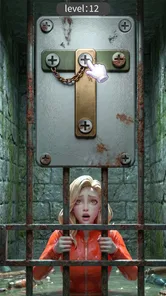
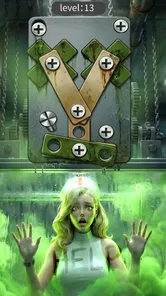
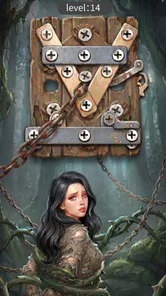
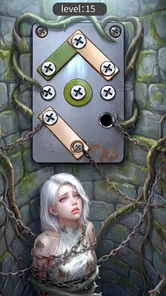
Analysis by Reviewed
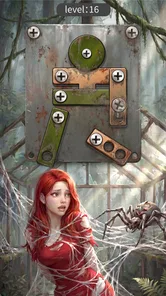
I approached Last Light as a quick casual game rather than a long-form survival experience. Its central idea is easy to understand: you are working through an unscrewing challenge while a zombie-apocalypse theme supplies the pressure and atmosphere. That combination makes it appealing for short sessions, especially when I want something more active than a standard puzzle but less demanding than a full action game.
My first impression was that the game depends heavily on how smoothly the basic interaction feels. A simple puzzle can be relaxing when the controls respond immediately, but even a small delay or awkward touch can make the whole experience feel harder than it should. That is why I think Last Light is best judged not only by its theme, but by how well it fits into the way you actually play on your phone.
Where players can get stuck before the fun begins
The most likely early frustration is not the zombie setting itself. It is understanding what the game expects from each screen. An unscrewing puzzle may look obvious at a glance, yet mobile interfaces often make it unclear whether you should tap, drag, hold, or work in a particular order. I recommend spending a moment observing the arrangement before acting quickly. In this kind of game, rushing can turn a manageable board into a confusing one.
That small pause is especially useful if you are playing with one hand. Fingers can cover the central part of the puzzle, and a tap near an edge may be interpreted differently from the tap you intended. I found that using a lighter touch and moving deliberately is more reliable than repeatedly tapping when something does not respond. If the game appears frozen, first lift your finger and try again from a clearer position rather than immediately closing it.
The apocalypse presentation may also create the wrong expectation. Last Light is a casual game from Dinosaur-Games, not something I would choose when I want a deep story, complex character development, or a broad exploration system. The zombie theme gives the puzzles a stronger identity, but the main reason to install it is the short, focused challenge. Players looking for a conventional zombie action game should know that this is a very different type of experience.
Another point of friction is pace. Some people enjoy solving a board carefully, while others expect instant progress and constant movement. I preferred treating each puzzle as a small problem to read first and solve second. That approach reduces mistakes and makes the theme work better, because the tension comes from deciding what to do next rather than simply tapping as fast as possible.
What I check before blaming the game
When a puzzle does not react, I start with the basics. I make sure the screen is clean, remove any moisture from my fingers, and check whether another app is interfering with touch input. A phone case with a raised edge can also make taps near the border less comfortable. These are ordinary issues, but they matter more in a game built around precise contact with small objects.
More From Our News Desk

Weather by Xiaomi Review: Clear at a Glance, Less Clear Up Close

X Under Pressure: Can It Recover When Posting Goes Wrong?

Clash of Clans Is Won Between the Battles

Android Auto Makes the Case for Quieter Car Software

MobiOffice: Transforming Mobile Productivity with Seamless Integration

EA SPORTS FC™ Mobile Soccer: Redefining Mobile Sports Gaming
I also avoid playing while the device is struggling with several demanding apps in the background. Last Light is a casual title, yet a busy phone can still produce delayed touches, slow loading, or unexpected app closures. Restarting the game after closing unused apps is a sensible first step. If the problem appears only once, I would not assume the installation is damaged.
The game is free to install, which makes trying it straightforward, but free access does not automatically mean every player will have the same experience. In-app purchases range from $0.99 to $99.99 per item, so I would review any purchase prompt carefully before confirming it. I especially recommend this for younger players, even though the content rating is Everyone. A family-friendly age label describes the content, not the spending habits of the person holding the phone.
Last Light requires Android 7.0 or later. That is a broad compatibility range, but meeting the minimum operating-system requirement does not guarantee ideal performance on every device. Older hardware may have less responsive touch input or take longer to load. If you are deciding whether to troubleshoot, check the phone’s available storage and restart it first. Those simple checks can reveal whether the issue is the game or the device environment.
A setup routine that saves time
My preferred setup is simple. I install the game when the phone has a stable connection, open it without several other apps running, and play the first session somewhere with enough screen brightness to see the puzzle clearly. Brightness is not just a comfort setting here; poor visibility can make small visual details harder to distinguish and lead to incorrect taps.
I also keep the phone in the orientation that feels most natural instead of constantly rotating it. Repeatedly changing orientation during a touch-based puzzle can make the layout feel inconsistent, even when the game is behaving normally. If the display seems misaligned after rotation, closing and reopening the game is a safer recovery step than repeatedly pressing around the screen.
Before spending anything, I would play enough to decide whether the basic unscrewing interaction is satisfying. The theme may catch your attention, but the repeated puzzle action is what determines whether the game belongs on your phone. Since the title is aimed at casual play, the right question is not whether it replaces a large console-style game. It is whether you enjoy returning to a compact challenge when you have a few spare minutes.
The current version is 1.0.44, and I would make sure the installation is up to date through the normal app store process before investigating unusual behavior. Updates can address compatibility problems, but they can also change how a title feels on a particular phone. If a problem begins immediately after an update, I would first restart the device and test again before attempting more disruptive steps.
Recovering your workflow when a puzzle session goes wrong
When I lose track of what I was doing, I avoid treating the next attempt as a race. I look at the whole arrangement, identify the part that seems easiest to manipulate, and then make one action at a time. This is a useful habit for Last Light because the game’s appeal comes from turning a small visual obstacle into a sequence of manageable decisions.
If a tap does nothing, I try the same action once from the center of the object rather than its outline. If that fails, I pause and check whether another element is covering the area. Repeating the same tap rapidly rarely helps. It can create more confusion, particularly if the game registers a delayed input after the player has already moved on.
For players who use a screen protector, touch sensitivity can become part of the workflow. A thick or poorly fitted protector may make light touches less reliable. I would not remove it just for one missed action, but if several apps show the same behavior, testing the phone’s touch response elsewhere is worthwhile. That comparison tells you whether Last Light is the source of the trouble.
When the app closes unexpectedly, I would reopen it once before doing anything more complicated. If the same failure repeats, I would restart the phone and confirm that the operating system and the game are current. Clearing temporary app data can be a reasonable Android troubleshooting step, but I would use it carefully because storage and progress behavior can vary between games. I would not clear data casually if preserving a current session matters to me.
There is also a practical recovery rule for interruptions: do not play an important session while the phone is about to switch networks, receive a system update, or run out of battery. Casual games are often used in spare moments, but those moments are also when phones are least stable. A short session on a charged device is more pleasant than trying to recover from an avoidable interruption.
How I would fit it into an ordinary day
Imagine waiting for an appointment with only a few minutes available. Last Light makes sense in that situation because its casual format does not ask me to remember a large world or follow a complicated storyline. I can open it, focus on the immediate unscrewing challenge, and stop when I need to leave. That makes it more convenient than a lengthy action game that becomes frustrating when interrupted.
On the other hand, I would not choose it when I want a calm, completely predictable puzzle session. The zombie-apocalypse framing suggests urgency, and even a simple board can feel less peaceful when I am already tired or impatient. For quiet evening play, a traditional word, number, or logic puzzle may be a better match. Last Light works best when I want a little pressure and visual activity without committing to a major game.
A useful personal routine is to play with notifications muted and the phone held steadily in both hands. That reduces accidental exits and lets me concentrate on the arrangement. I would also stop after a few unsuccessful attempts instead of forcing the issue. When a puzzle starts feeling irritating, taking a break is usually more effective than tapping faster, especially in a game where careful observation matters.
When the game is not the real cause
Not every loading delay, missed touch, or sudden exit points to Last Light. A nearly full phone, an overheated battery, aggressive background restrictions, or a damaged touchscreen can create symptoms that look like an app problem. I compare the game with another touch-heavy app. If both respond poorly, I investigate the phone first.
Network conditions can also complicate the first launch or any activity that depends on online communication, but I would avoid assuming that every pause is a connection failure. I test the connection with another ordinary app, then retry Last Light once. Switching repeatedly between networks can make diagnosis harder. A single controlled test is more useful than changing several settings at once.
Storage is another overlooked cause. Even a free game needs room for installation and normal phone operation. If the device is close to full, I remove unused downloads, restart it, and try again. I would not delete the game immediately, because reinstalling can be disruptive and may affect local progress depending on how the title handles saved information.
Performance can vary between phones even when they use the same operating-system version. A newer device may feel effortless, while an older model may show more noticeable pauses. That does not necessarily make the game unusable, but it changes who I would recommend it to. Players with modest hardware should test the first session before making purchases or deciding that the game is a reliable daily option.
The same reasoning applies to spending problems. If a purchase prompt appears unexpectedly, I check the store confirmation screen and device purchase controls rather than assuming the game has charged me incorrectly. Since individual items can cost from $0.99 up to $99.99, I would use purchase authentication and keep the game away from unsupervised access on a shared device. That is a sensible precaution for any free game with optional paid items.
Who will enjoy it, and who should skip it
I would recommend Last Light to someone who likes casual mobile games with a clear physical objective and a darker theme. It suits players who enjoy studying a compact arrangement, making deliberate moves, and returning for short sessions. The free entry point also makes it easy to test without committing money at the start.
I would be more cautious recommending it to anyone seeking a substantial zombie campaign. The store summary, “Unscrew in a zombie apocalypse!”, communicates the unusual pairing, but it should not be read as a promise of a full survival simulation. If your priority is shooting, exploration, resource management, or a continuing story, another category of game will serve you better.
It is also not my first choice for children who can make purchases without supervision. The Everyone rating makes the content broadly accessible, but the available in-app purchase range means adults should still configure the device responsibly. For a family phone, I would treat the game as suitable to try, not as something that should automatically have unrestricted buying access.
Compared with ordinary casual puzzle games, Last Light has a more distinctive mood and a stronger reason to choose it when familiar match-three or word formats feel repetitive. Compared with action-oriented zombie games, it is less demanding and easier to pause, but it offers less of the direct excitement those games provide. That middle position is its main strength and its main limitation: it is memorable enough to stand out, yet focused enough that players wanting variety may eventually look elsewhere.
My practical verdict after weighing the trade-offs
Last Light is a free casual game from Dinosaur-Games that I see as a good fit for short, hands-on puzzle sessions. Its unscrewing concept gives the zombie theme a specific purpose instead of using it only as decoration, and the compact format makes it convenient for waiting rooms, commutes, or quick breaks. Its average rating is 3.9 from around 5.9K ratings, while the game has passed 500K installs, so there is clear interest without suggesting that it will suit every player.
I like the fact that the game can be approached casually, but I would keep expectations realistic. The experience depends on precise touch interaction, and that makes screen condition, phone performance, and playing posture more important than they might be in a simple tapper. The best way to avoid frustration is to slow down, inspect the board, and troubleshoot the device before assuming the puzzle itself is broken.
The title was released on November 1, 2025, and its current version is 1.0.44. Those details matter mainly because compatibility and update state are sensible first checks when something behaves strangely. I would install it on a device running Android 7.0 or newer, test the core interaction for free, and only then decide whether it deserves regular space on my phone.
My final recommendation is conditional but positive: try it if you want a themed casual puzzle that feels more distinctive than a generic time-killer. Skip it if you need a deep zombie adventure, dislike touch-sensitive problem solving, or want a completely purchase-free environment. For me, the strongest use case is a short, focused session where I can think through one compact challenge at a time. Its real value is not the apocalypse alone, but the way that theme gives a simple unscrewing task a recognizable character.
Last Light Frequently Asked Questions
Who developed Last Light, and what kind of game is it?
Last Light is a casual game developed by Dinosaur-Games. Its short description is simply “Last Light,” while its store summary invites players to “Unscrew in a zombie apocalypse!” That gives a quick sense of its playful survival premise without requiring a commitment to a long, story-heavy adventure. If you enjoy casual games with an unusual zombie-apocalypse hook, this is the central idea to keep in mind before downloading.
What is Last Light about?
Last Light is a story-driven survival game set in a world facing a catastrophic event. Players must explore dangerous environments, search for useful resources, solve problems, and make decisions while trying to stay alive. The game focuses on atmosphere, tension, exploration, and narrative progression rather than offering a simple action-only experience. Its dark setting may appeal to fans of suspenseful and post-apocalyptic adventures.
Is Last Light free to download and play?
Last Light is free to download, so you can try it without paying upfront. It also offers in-app purchases, with prices ranging from $0.99 to $99.99 per item, so spending may be possible while playing. If you prefer not to make purchases, check your device’s purchase settings or use parental controls to help prevent accidental transactions.
Does Last Light require an internet connection?
The internet requirements for Last Light can vary depending on the version and the features you use. Core gameplay may work offline in some releases, but an online connection could be needed for the initial download, updates, cloud saves, advertising, account services, or additional content. Before starting a long session without Wi-Fi, it is best to test the game offline and confirm which functions remain available.
Is Last Light suitable for children?
Last Light is generally better suited to older players because its atmosphere may include frightening situations, dark themes, danger, and scenes designed to create suspense. The recommended age can differ between Android and iOS listings, so parents should review the current store rating before installation. If a child is using the device, parental controls and purchase restrictions are also advisable.
Pros
- Atmospheric lighting creates a tense
- memorable survival-horror experience.
- Exploration rewards players with hidden rooms
- items
- and environmental clues.
- The post-apocalyptic setting gives the game a strong sense of mystery.
- Resource management adds meaningful tension during dangerous encounters.
- Simple controls make the game easy to pick up on mobile devices.
Cons
- Dark scenes can make important objects difficult to see on smaller screens.
- Some objectives may feel unclear without carefully checking the environment.
- Repeated exploration can become familiar after extended play sessions.
- Sudden threats may feel frustrating when there is little warning.
- Performance and loading times may vary across older mobile devices.












