Fly Challenge: Build a Plane!
- 527.00
- 4.0
- Installs
- 5.00M
- Price
- Free

Screenshots
Analysis by Reviewed
I like games that give me something to tinker with between short bursts of action, and this one has an easy household appeal: one person can build, another can watch a flight, then you can swap and see whose design handles the landing better. Fly Challenge: Build a Plane! is a free simulation game from Freeplay Inc, and its central loop connects plane construction with the risk of putting that design into the air. It has a 4.0 average from around 12,000 ratings and has passed five million installs, so it is not an obscure experiment, but its appeal is still quite specific: it suits curious players who enjoy trial and error more than a straight racing game.
A game that works in short shared turns
In a shared-device situation, I’d treat it as a pass-and-play activity rather than assume it has household profiles or special family tools. One player can make a design choice, while the next takes responsibility for testing it; that naturally creates a small challenge without needing a complicated setup. A useful routine is to agree on one change per turn, such as adjusting the wings or engine, so you can tell whether that decision actually helped. If everyone rebuilds at once, it becomes harder to learn from a successful or failed flight.
That turn-taking approach also gives a shared session a natural stopping point. Before passing the device, I’d leave the plane in a recognizable state and say what changed, rather than relying on the next player to remember a long chain of edits. If someone wants to take a different direction, they can start from the same basic idea and make a deliberate variation. It keeps the activity friendly: the aim is to compare experiments, not to argue over whose design is the “right” one.
Keep expectations and spending clear
The game is free to download, with optional in-app purchases ranging from $0.99 to $19.99 per item. On a device used by several people, I’d make sure the person responsible for purchases has set the usual account and payment boundaries before handing it over. That is sensible housekeeping, not a claim that the game includes household controls. The current version is 1.20.19, and it runs on Android 5.1 or later, which makes it accessible on a range of Android devices; the store also lists it for Everyone.
For a family or group sharing one phone or tablet, the practical question is less about who gets the next turn and more about keeping expectations consistent. I would agree in advance that optional purchases need the device owner’s approval, especially if younger players are involved. The free entry point makes it easy to try the basic idea, but it does not mean every optional item is necessary to enjoy building and flying. I’d let a player explore the core loop first, then decide together whether spending would genuinely improve the experience.
Good for curious kids, with an adult nearby
The Everyone rating makes the game approachable for a broad age range, but I’d still pay attention to how a younger player responds to repeated crashes, challenge pressure, or optional spending. The strongest shared-use value is the conversation around cause and effect: what did the new part change, and what would you test next? It is playful rather than a substitute for a real aviation lesson, so I’d present the flight ideas as game logic, not dependable engineering instruction.
That distinction matters if a child becomes interested in planes through the game. I’d encourage questions and creative guesses, while being clear that successful game behavior does not establish how an actual aircraft should be designed or flown. For older players, the same curiosity can make the experiments more engaging, but the game remains a casual simulation rather than a technical course. I find it works best when an adult joins the conversation without turning every attempt into a lesson.
More From Our News Desk

 Gmail
Gmail in a Busy Inbox: Who Benefits Most?
From first account to crowded workday, Gmail earns its place through dependable search and flexible sorting—but its best fit depends on how much inbox maintenance you can tolerate.

 Prime Video
Switching to Prime Video: What Changes in Your Viewing Routine
Prime Video can make a compelling second home for streaming, but switching means learning a different catalog, rental layer, and route from browsing to playback.

 Universal TV Remote Control
 Works Best as a Reliable Backup
A phone remote earns its place through quick setup and reliable habits. Here is how to get more from Universal TV Remote Control—and where its limits show.

 Weather - By Xiaomi
Weather by Xiaomi Review: Clear at a Glance, Less Clear Up Close
Xiaomi’s weather app makes everyday forecasts quick to scan, but its calm surface can leave useful details and recovery paths harder to find than they should be.

 X
X Under Pressure: Can It Recover When Posting Goes Wrong?
A resilience-focused review of X, examining setup, mistaken posts, interruptions, weak connections, and the gaps that matter when recovery needs to be dependable.

 Clash of Clans
 Is Won Between the Battles
Its raids are quick; its community is a long-term project of coordination, teaching, rivalry, and shared responsibility—with all the friction that entails.
Latest News



Getting Started
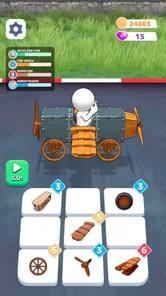
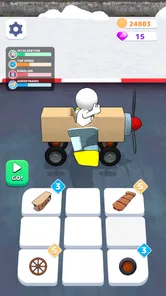
Launching Fly Challenge: Build a Plane! for the first time feels like opening a box of LEGO, but for aviation enthusiasts. The interface is intuitive, guiding you through the basics of building your aircraft. You start with a simple frame and gradually add more components like wings, engines, and landing gear. The app provides a hands-on tutorial that even I, someone who can barely fold a paper airplane, found incredibly helpful.
Building Your Dream Plane
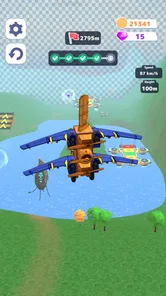
The real fun begins when you start customizing your plane. The app offers a vast array of parts and paint schemes, allowing for endless creativity. I spent hours tinkering with different designs, trying to find the perfect balance between aesthetics and aerodynamics. The physics engine in the app is quite impressive; it made me consider weight distribution and drag reduction, aspects I’d never thought I’d be pondering.
My practical tip is to decide what you want to learn from a build before adding several new pieces. If you change the wings, engine, and landing gear in one go, even a better flight leaves you guessing about which choice mattered. I get more useful results by keeping a simple starting design, then making one clear adjustment and watching what happens. It may feel slower than decorating freely, but it turns each launch into a small test rather than a string of unrelated guesses.
There is also a useful split between building for appearance and building for a particular attempt. A colorful plane can make the craft feel like your own, which is part of the fun, but visual choices are not the same as a handling improvement. When I am focused on a challenge, I postpone cosmetic decisions until I have a design that behaves the way I want. When I am playing casually, I do the opposite and treat the look as the goal. Choosing which mood I’m in prevents the customization from feeling aimless.
Taking to the Skies
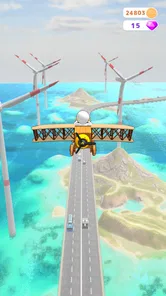
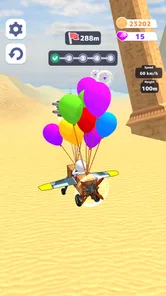
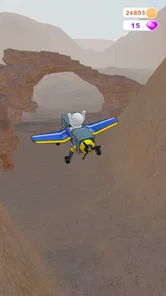
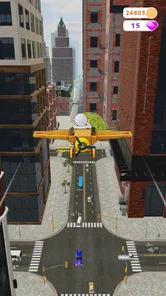
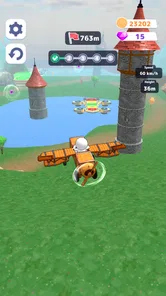
Once your plane is ready, it’s time for the moment of truth. Will it soar gracefully into the sky or plummet to the ground like a rock? The first flight is always nerve-wracking but thrilling. The controls are responsive, and the graphics are surprisingly detailed, making each flight a visual treat. I found myself immersed in the experience, dodging obstacles and performing daring stunts. It’s easy to lose track of time when you’re having this much fun.
For a short play session, I would not start by chasing the most dramatic maneuver. First, give the aircraft a straightforward test and notice whether it gets airborne and how it comes down. That establishes a baseline before you try a riskier flight. If a landing goes badly, resist rebuilding everything immediately: decide whether the next attempt is about a more controlled approach or a different design choice. This makes the flying feel connected to the construction instead of like a separate arcade sequence.
The game is a better fit for someone willing to repeat a flight than for someone who wants every run to feel new. The satisfying moment is often not a perfect performance but recognizing why one attempt differed from another. If repeated retries frustrate you, it may help to set a small personal goal, such as making one improvement or simply completing a calmer test, then stop there. That turns a potentially long session into a manageable break rather than a demand to keep going until everything works.
Challenges and Competitions
To keep things interesting, the app includes various challenges and competitions. From time trials to stunt challenges, there’s always something to test your piloting skills. Competing against friends or players worldwide adds an exciting competitive edge. I particularly enjoyed the stunt challenges; they pushed me to refine my designs and improve my flying techniques.
For shared play, I’d choose a challenge that lets each person try the same broad task, then compare the approaches rather than focusing only on who finished first. One player might favor a stable build, while another experiments with a more ambitious setup; either way, the result gives you something concrete to discuss. If the group prefers a calm session, the construction-and-testing loop can still be enjoyable without turning every attempt into a contest. The competitive element is most fun when it adds a reason to experiment, not pressure to perform.
Compared with the usual alternatives in simulation games, this sits between a cockpit-focused flight experience and a vehicle-building sandbox. A conventional flight sim puts more emphasis on controlling an aircraft that is already made; here, the design itself is part of the puzzle. A general building game may give you more open-ended construction but less reason to test how a plane handles. This game’s particular appeal is that building, launching, and adjusting belong to one loop. If you want procedural realism or a large world to explore, a more detailed flight simulator is the better choice.
Where the trial-and-error loop shines
The most rewarding way I found to play is to treat each crash or awkward landing as a quick experiment, not a reason to replace the whole aircraft. Keep the basic design steady and change one part at a time; that makes it easier to connect a handling difference with the adjustment you made. Paint can make a plane feel personal, but when I’m chasing a better result, I focus first on how it flies and leave the decorative choices until later. This small discipline turns freeform building into a more satisfying puzzle.
A second useful habit is to remember the intention behind each attempt, even if only in a quick sentence: “I’m testing whether this change helps the landing,” for example. That stops a run from becoming a vague verdict on the whole design. With a child or friend taking turns, saying the intention out loud also makes the next person’s role clearer. The trade-off is that this deliberate method can feel less spontaneous; if you simply want to make silly aircraft and watch what happens, there is no need to turn every flight into an experiment.
Who should choose it—and who might not
If you enjoy assembling things, testing your ideas, and improving through repeated attempts, this is a more hands-on choice than a conventional flight game that puts you straight into a cockpit. It also has a different rhythm from a typical racing title: the plane you make is part of the challenge, not just a vehicle you select. On the other hand, if you want realistic aviation procedures, a detailed aircraft-management sim, or a story-led campaign, I’d look elsewhere. The appeal here is experimentation and playful flying, not professional instruction or a deep simulation of real-world piloting.
I’d particularly recommend it to someone who likes tinkering but does not want to commit to a long campaign before getting to the main activity. It can also suit a parent and child who enjoy talking through simple cause and effect, provided they are comfortable sharing turns and keeping purchase decisions with the adult. I would skip it if the household expects separate progress or private profiles on one device, or if competition tends to cause friction. It is also not my pick for a player who wants precise, real-world flight systems rather than playful trial and error.
Making a little time for it
For an everyday example, I’d use it during a relaxed break when a couple of people have a few minutes to spare: one person builds a simple craft, the other tries the landing, then you discuss what to alter before the next run. That keeps the session focused and makes the challenge easy to share. If you’re playing alone, the same approach helps avoid endless random rebuilding. The main trade-off is that this loop asks for patience; players who dislike repeating attempts may find the building less rewarding than the moment of flight.
It also works as a low-key activity while waiting at home for dinner or taking a break from other games, because a single design decision gives the group something to do without needing to plan a long session. I would avoid handing the device around without agreeing on a stopping point if people are likely to keep changing the same plane. A simple rule—finish the current test, explain the result, then pass it on—makes shared play smoother and helps preserve the learning from each attempt.
My household verdict
With 527 written reviews and a free starting point, the game is easy to consider, though the optional purchases are worth keeping in mind on a shared device. I’d recommend it to families or friends who like collaborative tinkering and can take turns without needing separate account features. I’d skip it for a household looking for a realistic flight simulator, a structured learning tool, or an experience where everyone can progress independently on one device. For the right group, though, swapping design ideas and comparing landings gives the game a natural social angle—and the best part is seeing a small, deliberate change make a plane behave differently.
For a household deciding whether to keep it installed, I’d judge it by how people respond to the building phase, not just the first exciting flight. If players enjoy taking turns, talking about a design, and accepting an imperfect landing as part of the fun, it has a clear place in a shared-device rotation. If they mainly want independent advancement or a polished, realistic piloting experience, it is better to choose a different game. The 4.0 average and broad reach suggest that plenty of players find the concept appealing, but the hands-on, retry-heavy style is what will determine whether it suits your own group.
A final note before you take off
My overall impression is that Fly Challenge: Build a Plane! is most enjoyable when I approach it as a creative challenge with flying attached, rather than expecting a full-scale simulator. Freeplay Inc has built a game whose building-and-testing cycle gives curious players a reason to keep trying, while its Everyone rating makes it broadly approachable. I’d start with the tutorial, keep shared-device purchase expectations clear, and make small design changes before each test. If that sounds like the kind of low-pressure experimentation you enjoy, it is worth a look; if you mainly want realistic controls or a campaign to follow, another simulation will likely fit better.
Fly Challenge: Build a Plane! Frequently Asked Questions
Is Fly Challenge: Build a Plane! free to download?
Fly Challenge: Build a Plane! is free to download, so you can try its aircraft-building and flying gameplay without paying upfront. It also offers optional in-app purchases, with individual items priced from $0.99 to $19.99. Those purchases are separate from the initial download, so it is worth checking your device’s purchase settings if children may be playing.
What devices and operating systems can run Fly Challenge: Build a Plane!?
Fly Challenge: Build a Plane! is available for Android and iOS. On Android, it requires version 5.1 or later, so checking your device’s software version before downloading can help avoid compatibility surprises. As with any mobile game, make sure you have enough available storage and use the appropriate app store for your device.
What is Fly Challenge: Build a Plane!?
Fly Challenge: Build a Plane! is an engaging simulation game where players can design, build, and fly their own aircraft. The game offers a realistic physics engine and a variety of customization options, allowing users to experiment with different designs and strategies to optimize their planes' performance in various challenges. Available on both Android and iOS, it's perfect for aviation enthusiasts and casual gamers alike.
How do I build and customize planes in Fly Challenge: Build a Plane!?
In Fly Challenge: Build a Plane!, players have access to a wide range of parts and tools to design their aircraft. You can select different wings, fuselages, engines, and other components, each affecting the plane's performance. The game offers a user-friendly interface for assembling the parts and testing your design. Experimentation is encouraged, as players can try various configurations to improve flight efficiency and meet specific challenge requirements.
Is Fly Challenge: Build a Plane! suitable for all ages?
Fly Challenge: Build a Plane! is designed to be accessible to a wide audience, including both younger and older players. Its intuitive controls and educational aspects make it a great choice for kids interested in engineering and flight mechanics, while its depth and complexity can also engage adults. However, parental guidance is recommended for younger children to assist with understanding the game's more complex elements. It has an Everyone content rating, making it broadly suitable for players of different ages.
Pros
- Intuitive interface for easy navigation.
- Wide range of airplane models to build.
- Engaging graphics and sound effects.
- Offers offline play for convenience.
- Challenging levels that keep players hooked.
Cons
- Contains in-app purchases.
- May have occasional bugs or crashes.
- Requires frequent updates.
- Limited customization options.
- Advertisements can be intrusive.