Crazy Joker
- 131.00
- 4.6
- Installs
- 10.00K
- Price
- Free

Screenshots



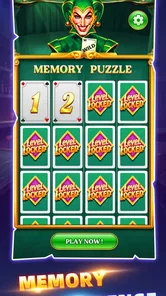
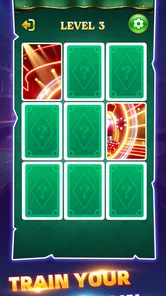
Analysis by Reviewed
I spent time with Crazy Joker as a light memory puzzle rather than treating it like a game that demands a long commitment. That distinction matters. Its appeal is in opening it for a short mental workout, paying attention to the board, and trying to improve your recall on the next attempt. The presentation is simple enough to understand quickly, while the memory challenge gives each round a little more purpose than a completely passive casual game.
My first impression was that it fits the kind of session many people actually have on a phone: a few spare minutes while waiting, a quiet break between tasks, or a quick change of pace before putting the device away. It is free, aimed at Everyone, and belongs firmly to the casual game category. That makes it approachable, but it also sets the right expectations. This is not a replacement for a deep strategy game, a story-driven adventure, or a competitive multiplayer title. It is a focused memory exercise with a playful identity.
How I settled into the basic memory routine
The most useful way to begin is to resist rushing. A memory puzzle can look easy when the first board is familiar, but the real task is not simply spotting a matching image. I found that I played better when I treated the opening moments as a planning phase: scan the available symbols, notice their positions, and decide which details are easiest for me to remember. Trying to tap quickly before forming a mental map usually made the round feel more chaotic.
My baseline routine became consistent. I looked across the board from one side to the other, grouped cards mentally by location, and then acted only after I had a rough picture of what I had seen. When a card appeared again, I tried to recall both its identity and its position instead of relying on a vague feeling that I had seen it somewhere. That small change made the game feel less like guessing and more like a repeatable skill.
This is where the game works best for me. It gives a clear, narrow objective, so I can concentrate without learning complicated controls or reading a long tutorial. The short description presents it as Crazy Joker, while the broader store summary frames it as a fun memory puzzle game. In practice, I would describe it as a compact recall challenge with a casual wrapper. The name adds personality, but the memory task remains the reason to return.
A realistic everyday use is a five-minute break after finishing a message or before an appointment. I can play one attempt, notice where my attention slipped, and stop without feeling that I have abandoned a large campaign. That makes it more convenient than many casual games that rely on long levels, timers that punish interruptions, or a chain of upgrades that only becomes satisfying after extended play.
There is also a useful difference between playing for relaxation and playing for improvement. If I only want something cheerful to occupy my hands, I can make quick choices and accept mistakes. If I want the memory element to matter, I slow down and deliberately build a location map. The same basic activity supports both moods, although the second approach is more rewarding when I am looking for a small mental challenge rather than simple distraction.
More From Our News Desk

Weather by Xiaomi Review: Clear at a Glance, Less Clear Up Close

X Under Pressure: Can It Recover When Posting Goes Wrong?

Clash of Clans Is Won Between the Battles

Android Auto Makes the Case for Quieter Car Software

MobiOffice: Transforming Mobile Productivity with Seamless Integration

EA SPORTS FC™ Mobile Soccer: Redefining Mobile Sports Gaming
What I would do before chasing faster rounds
I recommend playing a few rounds at a comfortable pace before trying to optimize anything. The early goal should be learning how the board feels, how quickly information disappears from working memory, and which visual details remain reliable. I did better when I stopped judging a mistake immediately and instead asked what caused it: did I confuse two similar images, forget a position, or tap before I had finished scanning?
That self-check is more valuable than blindly repeating attempts. For example, if I remember symbols well but lose track of their locations, I focus on spatial anchors such as the upper-left or lower-right area. If positions are easy but similar-looking cards blur together, I give each one a short verbal label in my head. These are simple habits, but they turn a casual round into a small, repeatable exercise.
Another practical habit is to avoid playing while doing something that competes for attention. A memory game is especially sensitive to interruptions because one missed glance can affect several later decisions. I would not use it while listening closely to a meeting, crossing a busy street, or switching between several conversations. Its simplicity makes it easy to start anywhere, but good results still depend on giving the board a few undivided seconds.
Settings and phone habits worth checking
There is no reason to assume that a memory game needs a complicated configuration process. I approached the available experience conservatively and checked the ordinary basics first: whether the controls felt comfortable, whether the screen was easy to read, and whether my phone was behaving normally during a session. Those checks sound obvious, yet they matter more in a visual recall game than they would in a game where audio or rapid movement carries most of the information.
I found that screen comfort can influence performance. A very dim display, glare from a window, or a crowded notification area can make symbols harder to distinguish. Before blaming my memory, I would adjust the phone’s brightness to a comfortable level and play somewhere with fewer visual distractions. That is not a special trick inside the game; it is a practical way to prevent the device environment from becoming an unnecessary source of mistakes.
Notifications deserve similar attention. A banner appearing across the board at the wrong moment can interrupt the exact visual sequence I am trying to retain. For a serious practice session, I prefer to silence nonessential alerts temporarily. For a casual break, I accept that interruptions may happen and do not treat the result as a meaningful test of my recall. This distinction helps keep the game enjoyable instead of turning every imperfect round into a technical annoyance.
I also recommend checking the current installation before judging performance. The version I reviewed is 1.0.1, and it requires Android 7.0 or later. That makes the compatibility question fairly straightforward for many Android users, but anyone with an older phone should check the operating system before planning around it. I would rather confirm that basic requirement first than spend time troubleshooting a game that the device cannot run.
The game is free, which lowers the risk of trying it during a short break. Free access is useful here because the experience is easy to evaluate personally: after a handful of sessions, I can tell whether the memory format suits me. I do not need to commit to a large purchase or learn a complex progression system before discovering that I prefer a different kind of casual game.
At the same time, free does not automatically mean frictionless. A player who expects extensive customization, detailed performance tracking, or a broad collection of modes may find the experience narrower than a larger puzzle package. I would choose it for direct access to a memory challenge, not because I expect a full training suite. That is an important setting of expectations before downloading.
Small changes that make practice more consistent
I get more useful sessions when I keep the conditions similar. Using the same comfortable brightness, holding the phone at a familiar distance, and playing when I am not already exhausted gives me a fairer sense of improvement. If one attempt happens in silence and another happens during a noisy commute, the results are difficult to compare. Consistency turns casual play into a modest personal benchmark without pretending that the game is a formal assessment.
I also avoid immediately replaying after an emotional mistake. When I tap incorrectly because I rushed, restarting in frustration usually repeats the same behavior. A short pause, followed by a slower scan on the next attempt, works better. This is one of the less obvious strengths of a simple memory game: it exposes my playing habits clearly. If I am impatient, distracted, or overconfident, the board reflects that quickly.
For younger players, the Everyone rating makes the game easy to consider as a family-friendly casual option. I would still guide a child toward taking breaks and treating mistakes as part of the activity rather than as a reason to become upset. For adults, the same approachable rating means there is no intimidating presentation to overcome. The experience can be shared informally, with one person explaining a recall method to another, even though the core challenge remains individual.
Faster patterns that do not depend on guessing
Once I understood the basic rhythm, I started experimenting with speed. The important lesson was that faster play does not mean tapping as soon as possible. It means reducing wasted attention. I scan in a fixed direction, assign each position a simple mental reference, and avoid repeatedly looking at areas I already understand. This creates a smoother pattern than jumping randomly around the board.
One useful approach is to divide the board into small zones. I might first remember the upper area, then the lower area, rather than trying to hold every position as one large picture. Another is to connect a symbol with a location using a short phrase in my head. The phrase does not need to be clever; it only needs to be distinct enough to prevent two nearby cards from blending together. These methods are especially helpful when the visual information feels similar from one card to the next.
I also learned to separate recognition from action. Recognizing a symbol is not the same as knowing where its partner is. When I treated those as two separate steps, I made fewer impulsive taps. The extra moment may seem slower, but it often saves time by preventing a failed attempt and the need to rebuild my mental map. In a memory puzzle, accuracy is usually the foundation of speed.
Another repeatable habit is to use mistakes as information. If I repeatedly forget a particular region, I do not simply try harder in a vague way. I change the scan order or give that region a stronger anchor. If I confuse two cards, I create more contrast between their mental labels. This turns each replay into a small experiment, which is more satisfying than repeating the same approach and hoping concentration will improve by itself.
These techniques also show why Crazy Joker is different from a typical reflex-based casual game. A reflex game rewards immediate reactions and physical timing. Here, a slower player can often outperform a quick tapper by organizing information more effectively. Compared with a word puzzle, the challenge is less about vocabulary and more about visual retention. Compared with a large brain-training collection, the appeal is its narrow focus and low learning burden.
The trade-off is variety. If I want several puzzle types in one app, a number-based challenge, word game, or logic collection may offer more to explore. If I want a game that tests memory directly without surrounding it with many unrelated systems, this focused format is easier to return to. I would choose between them based on whether I value concentration on one mechanic or a wider menu of activities.
When speed stops helping
There is a point where trying to improve speed makes the experience worse. If I am no longer observing the board and am simply hoping that a familiar-looking card is correct, the game has shifted from memory practice to guesswork. I found it more useful to slow down until the recall process became reliable again, then increase pace gradually. That approach feels less dramatic, but it creates improvement I can actually repeat.
I would also be careful about comparing attempts made under different conditions. Fatigue, poor lighting, background noise, and interruptions can all affect a visual memory task. A slower result does not necessarily mean I have lost ability; it may mean the session was poorly timed. Keeping that in mind prevents the simple score-chasing mindset that can make a casual game feel unnecessarily demanding.
Advanced limits and who should choose something else
After spending enough time with the game, its boundaries become clearer. The focused memory format is its identity, but it is also the reason some players may move on quickly. Someone looking for a story, character development, online competition, or a long-term collection system will probably find the experience too contained. Its value comes from the act of remembering, not from a large world built around that act.
I would also hesitate to recommend it as a substitute for a structured educational program or a serious cognitive assessment. The game can encourage attention and recall habits, and it can be a pleasant way to exercise those skills informally. That does not make it a diagnostic tool or a guaranteed measure of broader memory ability. I prefer to treat it as entertainment with a mental component, which is both more honest and more enjoyable.
Players who dislike repetition should think about that before installing. The central activity naturally involves returning to a familiar type of challenge, and the satisfaction depends on noticing personal improvement rather than constantly discovering new mechanics. Some people enjoy that loop because it is calming and clear. Others need fresh puzzles, changing rules, or a stronger sense of progression. For the second group, a broader puzzle game would likely be a better fit.
There is also a difference between a game for solitary focus and one for social play. I can explain my memory strategy to a friend, but the core interaction does not require a team or conversation. If your ideal casual game is something to share actively with other people, this may feel quiet. If you want a small private challenge that can be paused naturally between daily tasks, that same quietness becomes an advantage.
The developer, Lingkar Nusantara Pers, has kept the concept easy to approach, and the current reception suggests that the basic idea connects with a modest but interested audience. The game has a 4.6 average from around 150 ratings, with more than 100 written reviews, and it has passed 10 thousand installs. Those figures are encouraging context, but I would still base the decision on the mechanic itself. A strong rating cannot make a memory format enjoyable for someone who prefers action or narrative games.
One practical question is whether it is suitable for a quick, occasional player. In my experience, yes: the low-complexity format makes it easy to return without relearning controls. Another is whether an experienced puzzle player will find any value. I think so, but mainly if that player enjoys refining attention and recall habits. The challenge is not hidden behind complicated systems, so the reward comes from better observation and more disciplined choices.
The most important limitation is that the game does not need to be forced into a larger role than it deserves. I would not use it as my only game, my only brain exercise, or my main source of long-term progression. I would keep it alongside other apps and games, using it when I want a short visual memory task. That narrow role is not a weakness by itself; it simply defines the audience clearly.
My mastery verdict after building a repeatable routine
My preferred way to play is simple: check that the phone is comfortable to use, remove obvious distractions, scan the board in a consistent order, and separate recognition from action. I then review the reason for any mistake instead of immediately blaming luck. Those habits make the game feel more deliberate without turning a casual title into homework.
For a beginner, I would start slowly and focus on location anchors. For a returning player, I would experiment with zoning the board and changing the scan order when a familiar pattern stops working. For someone chasing faster results, I would prioritize accuracy first and only increase pace once the mental map feels stable. These approaches do not require invented shortcuts or complicated settings; they come from using the game’s central memory task more intelligently.
I like Crazy Joker because it respects short sessions. It gives me something specific to do, asks for attention without burying me in rules, and lets me decide whether the moment is relaxed or improvement-focused. The free price and Everyone rating make trying it easy, while Android 7.0 support keeps the technical entry point clear for compatible devices. Its 1.0.1 release also makes it feel like a straightforward, focused experience rather than an overloaded platform.
My recommendation is therefore selective but positive. Choose it if you want a compact casual memory puzzle, enjoy repeating a mechanic to sharpen your approach, and prefer a game that can fit into ordinary gaps in the day. Skip it if you need extensive variety, social competition, a narrative campaign, or formal cognitive tracking. For the right player, the real strength is the clean loop between observation, recall, and correction.
After my sessions, I would happily keep it available for those moments when I want a small challenge without committing to a long game. It is not trying to be everything, and that focus is exactly what makes it useful. Crazy Joker works best when I treat it as a friendly memory workout: play attentively, learn from the misses, and stop while the experience still feels refreshing.
Crazy Joker Frequently Asked Questions
Who developed Crazy Joker, and where can I download it?
Crazy Joker is a casual game developed by Lingkar Nusantara Pers. To get it, search for the game in the official app store available on your device and check that the developer name matches before installing. Using an official store helps you avoid altered or unofficial copies and gives you access to the store’s standard installation and update process.
What device requirements should I check before downloading Crazy Joker?
Before installing Crazy Joker, check your device’s operating system version and available storage. The game requires Android 7.0 or later on Android devices, so older versions may not be compatible. If you use an iPhone or iPad, review the compatibility details shown in its app store. Keeping your device’s software up to date can also help with compatibility and performance.
What is Crazy Joker and how does the game work?
Crazy Joker is a casual casino-style game built around joker-themed card gameplay, colorful visuals, and quick rounds. After launching the app, players can usually select a game mode, place virtual bets or make moves, and try to complete winning combinations. The presentation is designed for entertainment, although the exact rules, available modes, and progression features may vary depending on the version and region.
Is Crazy Joker free to download and play?
Crazy Joker is free to download, so you do not need to pay an upfront purchase price to install it. The game may include optional in-app purchases, virtual currency, advertisements, or other monetization features. Before playing, check the store listing and the payment settings on your device. If children may access the phone, enabling purchase restrictions is recommended, since virtual items can sometimes be bought accidentally.
Does Crazy Joker involve real-money gambling?
Users should carefully verify how Crazy Joker operates in their country before downloading or making any purchase. Some versions of joker or casino-themed games are intended only for entertainment and use virtual credits, while others may offer gambling-related features or links to external services. Never assume that virtual rewards have cash value, and review the app’s terms, age requirements, and local regulations.
Pros
- Simple controls make it easy for new players to start quickly.
- Short rounds are convenient for playing during brief breaks.
- Bright joker-themed visuals give the game a distinctive casino feel.
- Randomized outcomes make each session feel different.
- Lightweight gameplay runs smoothly on many older devices.
Cons
- Luck plays a major role
- so skill has limited influence on results.
- Repeated rounds can become monotonous after extended play.
- Some features may require watching ads or making in-app purchases.
- Casino-style mechanics may not appeal to players seeking strategic depth.
- Availability and features can vary between Android and iOS versions.











