Solitaire for Seniors Game
- 1.59K
- 4.9
- Installs
- 1.00M
- Price
- Free
Screenshots

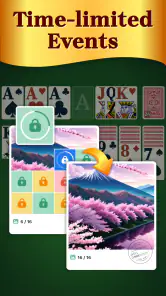
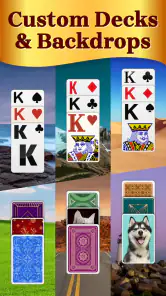


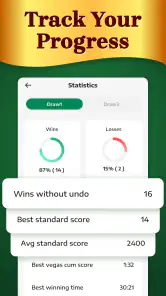
Analysis by Reviewed
On a shared tablet, a quiet card game can be an easy way for different people at home to take a short break without competing for the television or needing to learn a complicated control scheme. I’d treat Solitaire for Seniors as a personal pastime rather than a household game: the appeal is a calm, familiar solitaire session, not multiplayer play or a way to coordinate turns. That distinction matters if you’re choosing something for a parent, grandparent, or anyone who simply prefers cards to faster games.
Sharing a device without sharing assumptions
If more than one person uses the same device, it’s worth agreeing whose game session is whose before handing it around. I wouldn’t assume that a shared screen creates separate player spaces or that one person’s preferences will suit everyone. A simple routine helps: let the next person adjust the game to their own comfort, then return the device when they’re finished. That keeps a relaxed activity from becoming a small household tech puzzle.
The game is free to download, with optional in-app purchases listed at $6.99 per item. On a family device, I’d make sure whoever handles app-store purchases understands that distinction. The game can be tried without paying upfront, but “free” does not mean every optional purchase is automatically part of the basic experience. If the device belongs to someone who doesn’t usually buy apps, a quick conversation before they play is a sensible boundary.
A useful fit for short, quiet breaks
Here’s the kind of everyday moment where I can see it working: someone is waiting for an appointment, sitting down after lunch, or taking a break while the kettle boils. A familiar card game can fill a few spare minutes without asking for a long commitment. The hint option is particularly useful when a player loses track of possible moves; I’d use it as a nudge, not tap it automatically, so the game still feels like solving a puzzle rather than following instructions.
That also points to a practical trade-off. Solitaire is usually a solo activity, and this one is best approached that way. If you want a game that encourages people to talk, take turns together, or compete face-to-face, a physical deck or a clearly multiplayer card game is a better choice. If you want a light digital version of solitaire that can be picked up and put down, the quieter format makes more sense.
Who may want a different kind of game
The uncomplicated presentation is a strength for anyone who wants readable cards and a low-pressure pace, but it may feel too restrained to players who expect elaborate strategy, frequent surprises, or social features. I’d also be cautious about recommending it to someone who dislikes touchscreens or finds moving digital cards awkward; a physical deck gives more tactile control. The senior-focused design is a useful signal about its intended audience, not a reason to assume every older player wants the same look or pace.
Age context is straightforward: it carries an Everyone rating, so it is presented for a broad audience. That doesn’t remove the value of checking whether the controls and screen presentation feel comfortable for the person who will actually play. When setting it up for someone else, I’d let them try a round and decide whether the cards, sound, and pace suit them instead of deciding on their behalf.
More From Our News Desk

Weather by Xiaomi Review: Clear at a Glance, Less Clear Up Close

X Under Pressure: Can It Recover When Posting Goes Wrong?

Clash of Clans Is Won Between the Battles

Android Auto Makes the Case for Quieter Car Software

MobiOffice: Transforming Mobile Productivity with Seamless Integration

EA SPORTS FC™ Mobile Soccer: Redefining Mobile Sports Gaming
For anyone comparing it with other card games, the main question is what kind of break they want. A physical deck is better for shared table time, while a more feature-heavy digital card game may suit someone seeking variety or social interaction. This title’s straightforward solitaire focus is more appealing when convenience and a familiar solo routine matter most. Its developer is Guru Puzzle Game, and its current version is 4.4.0-25041679; it needs Android 6.0 or later.
Making a shared setup feel personal
When I set up a game for someone else, I’d hand over the device early rather than make all the choices for them. Letting the player explore the cards, try a move, and decide whether the screen is comfortable gives a more useful answer than simply telling them the game is designed for seniors. Age is not a reliable guide to eyesight, touch accuracy, or preferred pace. A short trial is a practical way to find out whether this particular digital version feels natural.
A household can also keep the device handoff simple without treating the game as a shared account or shared activity. The next person can start their own session when they take the tablet, and everyone can agree to leave the sound or other preferences as they found them—or adjust them for personal comfort. I wouldn’t build a complicated turn-taking system around a solo card game; a clear “I’m finished” handoff is enough for casual use.
Choosing between digital and physical cards
The digital format is most useful when the deck would otherwise be inconvenient: while waiting away from home, during a quiet pause, or when someone wants a solitary activity without laying cards out on a table. A physical deck wins when the point is to sit together, teach someone face-to-face, or enjoy the feel of handling cards. For solitaire itself, a digital version also avoids gathering and reshuffling a physical layout after each session, though it cannot offer that tactile satisfaction.
Compared with busier card apps, the attraction here is restraint rather than a promise of constant novelty. I’d choose it for a player who wants a familiar solo puzzle and not a stream of social prompts or competitive pressure. Someone who gets bored with a single style of card play, or wants opponents and conversation built into the experience, should look for a different kind of card game. The right alternative depends less on age than on whether the player wants calm repetition, variety, or company.
One useful way to judge the fit is to notice what causes friction during the first hand. If the player can identify cards comfortably and understands the basic actions, the game’s simple format may suit them. If they repeatedly mis-tap, lose their place, or find the screen tiring, don’t assume that more practice will fix it; a physical deck or another activity may be kinder. The senior-oriented presentation is a starting point, not proof that every person will find the controls comfortable.
Hey there, fellow game enthusiast! Today, I want to chat about a delightful little gem I stumbled upon recently - the Solitaire for Seniors game. Now, before you roll your eyes thinking it's just another card game, let me assure you, this one is quite the treat, especially if you're someone who enjoys a leisurely gaming experience.
Why Solitaire?
So, why exactly should you consider downloading Solitaire for Seniors? Well, for starters, it's designed with simplicity and ease of use in mind. The developers have done a great job in making the interface user-friendly, which is a huge plus for those of us who aren't exactly tech-savvy. Whether you're a seasoned Solitaire player or a complete newbie, you'll find this game intuitive and easy to navigate.
Game Features
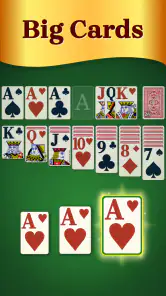
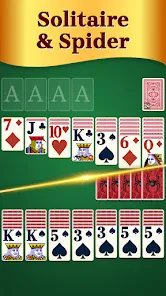
One of the standout features of this app is its large, easy-to-read cards. Trust me, no more squinting at your screen trying to make out whether that's a spade or a club. The app offers various modes and levels, ensuring that you never run out of challenges. Whether you're in the mood for a quick game or a longer session, Solitaire for Seniors has got you covered.
And get this - there's even a hint system! So if you're ever stuck wondering what your next move should be, just tap the hint button, and voila! It's like having a personal card game assistant at your fingertips.
Visuals and Sound
Now, let's talk about the visuals. They're simple yet pleasing, with a soothing color palette that's easy on the eyes. The sound effects are subtle and not overly intrusive, which is perfect for when you want to unwind with a game without any unnecessary distractions.
What really caught my attention was the relaxing background music. It adds a nice touch to the overall experience, making you feel like you're playing in a cozy cabin in the woods. Plus, if you're not a fan of background music, you can easily turn it off in the settings.
Final Thoughts
In conclusion, if you're looking for a game that's both engaging and relaxing, Solitaire for Seniors is definitely worth checking out. It's perfect for those lazy afternoons or when you just need a break from the hustle and bustle of everyday life. Trust me, once you start playing, you'll find it hard to put down.
So, what are you waiting for? Give it a try and let me know what you think. Happy gaming!
As a card game, it sits in a familiar space rather than trying to turn solitaire into something noisy or complicated. Guru Puzzle Game makes this free-to-download option, which has a 4.9 average from around 54,000 ratings and more than a million installs. Those figures suggest that many players have found it approachable, though popularity alone can’t tell you whether its visual style or pace will suit a particular person. It is rated Everyone and was released on January 13, 2023.
Small habits that make a session smoother
I’d start by playing one hand without leaning on hints, then use the hint button only when I genuinely can’t see a move. That gives a new player a chance to learn the card patterns while keeping frustration low. In a shared-device setting, it is also a simple way to avoid one person solving every move for another: offer the hint as an option, rather than taking over the screen.
For someone with limited time, it helps to decide in advance whether this is a one-hand pause or a longer sit-down. The game’s relaxed presentation can make it easy to keep going, so a natural stopping point—after a hand, for example—keeps a quick break from stretching into an unwanted distraction. If the player is sensitive to sound, the music can be switched off in settings, while the subtle effects may be less intrusive than a louder arcade-style game.
What to expect before choosing it
The title is available on Android devices running Android 6.0 or later, and its current version is 4.4.0-25041679. I’d check that compatibility before setting it up on an older phone or tablet, especially if the device is shared and its owner rarely installs games. The app’s senior-oriented presentation may help someone who wants an uncluttered card experience, but it is not a substitute for checking whether that person can comfortably tap and see the cards on their own screen.
The best reason to choose this game is not that it promises endless novelty; it is that it gives solitaire fans a convenient, low-pressure way to play. I’d recommend it to someone who enjoys a solo card puzzle and appreciates readable cards, a hint when needed, and the option to quiet the music. I’d skip it for a household looking for shared challenges, competitive play, or a tactile activity around the table. For the right player, though, it is an easy game to keep on hand for those small stretches of downtime.
A sensible household choice, with the right expectations
For a household considering whether to install it on a commonly used tablet, I’d make the decision around the person most likely to play, not around the assumption that everyone will use it. The app is a solo card game, so its value is in having an easy pastime ready when one person wants a quiet moment. It can sit alongside shared games rather than replace them: one family member can play a hand while others read, talk, or watch something else.
It is also worth separating the comfort question from the age question. An Everyone rating gives a broad age context, but the more practical test is whether the intended player can comfortably see the cards, tap accurately, and enjoy the pace. I’d stay nearby for the first few minutes if I were helping someone set it up, then let them decide whether they want assistance or prefer to play independently. That approach respects the player’s choices without turning a simple game into a supervised activity.
My household recommendation is therefore fairly specific: try it for someone who already likes solitaire, wants a calm digital option, and appreciates large, readable cards and an optional hint. Skip it when the goal is family interaction, a shared challenge, or a more tactile pastime. With those expectations in place, it can be a convenient addition to a shared device without pretending to be something it isn’t.
Solitaire for Seniors Game Frequently Asked Questions
What devices and operating systems are compatible with Solitaire for Seniors?
Solitaire for Seniors requires Android 6.0 or later. Before downloading, check the operating system version on your device to make sure it meets that requirement. The game is a card title from Guru Puzzle Game, so it may suit players looking for a straightforward solitaire experience on a compatible Android device.
Is Solitaire for Seniors suitable for children and families?
The game has an Everyone content rating, which makes it suitable for a broad audience. Its focus is solitaire, a familiar card game that families can enjoy at their own pace. As with any app, it is sensible to supervise purchases on a shared device and review the available settings before letting a child play.
How popular is Solitaire for Seniors?
Solitaire for Seniors has more than a million installs and an average rating of 4.9 from around 54,000 ratings. It also has about 1,600 written reviews. Those figures suggest that many players have tried it and rated their experience, though individual preferences vary; checking whether its senior-focused presentation matches what you want is still worthwhile.
Is Solitaire for Seniors free to download, and are there optional purchases?
Solitaire for Seniors is free to download, so you can try the game without an upfront purchase. It also offers in-app purchases priced at $6.99 per item. Those purchases are optional; consider checking the purchase details before confirming anything, especially if someone else may use the device. The game is listed for everyone, making it suitable for a broad range of players.
What kind of game is Solitaire for Seniors, and who makes it?
Solitaire for Seniors is a card game developed by Guru Puzzle Game. Its store summary describes it as an addictive solitaire game designed for seniors, with an emphasis on playing and relaxing. If you enjoy solitaire and are looking for a version presented specifically for older players, its focus and straightforward card-game format may make it worth considering.
Pros
- Simplified rules for easy learning
- Large cards for better visibility
- Relaxing gameplay experience
- No in-app purchases required
- Offers daily challenges
Cons
- Limited to classic solitaire mode
- No multiplayer options available
- Ads can be a bit intrusive
- Graphics are quite basic
- Requires internet for daily challenges
- Category
- Card
- Version
- 4.4.0-25041679