Signal Private Messenger
- 137.41K
- 4.5
- Installs
- 100.00M
- Price
- Free

Screenshots




Analysis by Reviewed
When I choose a messenger, I start with two practical questions: who will actually use it with me, and what do I want to keep private? Signal Private Messenger is a free communication app from Signal Foundation, with a 4.6 average from around 2.8 million ratings and over 100 million installs. That tells me it has a substantial community, but the people I contact still matter more than any popularity figure. A secure chat is useful only if the conversation can happen there.
Make the decision around your real conversations
Before switching, I’d write down the handful of chats I rely on most: family plans, a close friend, or a small group arranging an event. Then I’d ask whether those people would try Signal. This simple check prevents a common frustration: downloading another messenger, sending a few messages, and then discovering that everyone’s routine remains elsewhere.
I would also separate the need for privacy from the need for reach. If I mainly need to contact a large, varied group, the app people already check may be the more dependable choice. If I want a quieter space for personal conversations and can bring the relevant contacts with me, Signal becomes a more convincing option. It does not have to replace every messaging habit to be useful.
Start with the people you need to reach
Signal makes the most sense when your important conversations can happen with people who also use it. If your group already has a mix of messaging apps, installing another one may mean splitting chats across services rather than replacing anything. I’d first ask the few people I message most often whether they’re open to trying it, then decide whether it can cover a useful part of my day.
That small test is more practical than moving every conversation at once. Pick one ongoing chat, such as planning a weekend visit, and see whether everyone can find the features they need. If the group keeps drifting back to its usual app, Signal may still be worthwhile for specific private conversations, but it probably won’t become your one-stop messenger overnight.
What Signal offers in daily use
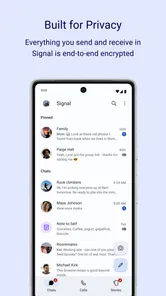
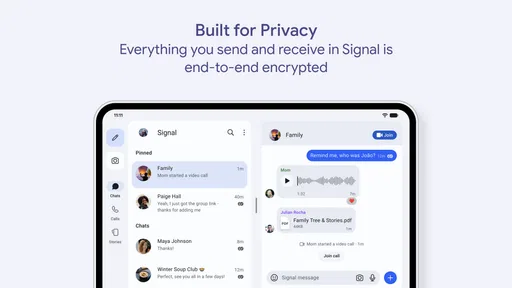
So, what exactly is Signal Private Messenger? In simple terms, it's a messaging app that's designed with a laser focus on security. It's available on both Android and iOS platforms, making it accessible to a wide range of users. With end-to-end encryption, it assures you that your messages can only be read by you and the person you're communicating with. Not even Signal can peek into your chats, which is pretty reassuring in today's digital age.
Features that matter beyond the basics
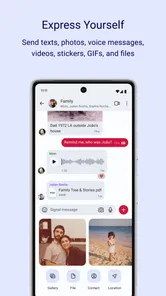
Now, let's talk about some of the features that make Signal stand out from the crowd. Firstly, it supports all the basic functionalities you'd expect from a messaging app, including text messages, voice calls, and video calls. What sets it apart is that all these forms of communication are encrypted. Plus, you can send media and files without worrying about unauthorized access.
More From Our News Desk

 Remini - AI Photo Enhancer
Remini Is Our App of the Week for Bringing Old Photos Back to Life
A quick AI restoration tool earns its place by making faded portraits and soft, older photos feel vivid again—provided you know where its polish ends.

 PayPal - Pay, Send, Save
PayPal Reviewed: Who Benefits from Its Reach, and Who Should Skip It
PayPal is most useful when its reach and familiar checkout solve a real payment problem. These reader-by-reader recommendations show where it earns a place—and where friction wins.

 Millionaire 2026 Quiz & Trivia
 Makes Every Answer Count
A familiar quiz-show format succeeds or falters on tiny design decisions: how clearly the game guides a first answer, handles hesitation, and invites one more round.

 Decor Life - Home Design Game
Decor Life Turns Short Breaks Into Bite-Sized Decorating Jobs
A room-by-room decorating game built for quick sessions gains from modern phone habits, but its gentle pace still depends on patience, repetition, and a steady stream of design jobs.

 Sniper 3D:Gun Shooting Games
Sniper 3D’s Quick-Shot Appeal Faces the Upgrade Treadmill
The appeal is immediate: line up a target, steady your aim, and fire. The harder question is whether Sniper 3D can keep players returning after the first rush.

 Blockudoku®: Block Puzzle Game
Blockudoku vs. the Puzzle Pack: A Quick Puzzle With a Repetitive Edge
Blockudoku turns a clean grid into a quiet test of foresight. Against match-three polish and head-to-head simplicity, its lasting appeal is also its biggest limitation.
Latest News



Another neat feature is the ability to set messages to disappear after a certain period. This is perfect for those sensitive conversations that you'd rather not keep around forever. Signal even lets you customize how long the messages stay before vanishing into the digital ether.
Use temporary messages with care
One useful habit is treating disappearing messages as a cleanup tool rather than a guarantee that nothing can be saved. A recipient can still preserve information outside the chat, so I’d avoid sending anything I would not want copied or shown elsewhere. For temporary details—like a door code shared with a trusted visitor—the timer can help keep old messages from lingering, but it does not replace good judgment.
For a practical routine, I’d use Signal for conversations where I want private communication and keep the group’s expectations clear. If someone misses an important message because they rarely open the app, the privacy benefits won’t solve that coordination problem. A quick check-in before moving a family plan or work discussion helps avoid splitting the conversation between services.
A realistic day with Signal
Imagine I’m coordinating a weekend visit with a sibling who already uses Signal. We settle the arrival time in a chat, make a brief call when plans change, and share a temporary entry detail that does not need to sit in the conversation forever. The app can cover that exchange without asking us to jump between text, a call, and a separate file-sharing service. The important part is agreeing that Signal is where the plan lives; otherwise, one person may keep checking the old chat and miss the update.
This kind of small, defined use is where I’d introduce it first. It lets both people learn the interface and decide whether the call and message habits feel natural, without asking a whole family or work group to reorganize at once. I would not use a disappearing timer for every conversation: practical details may be worth keeping, while sensitive temporary information can benefit from a shorter lifespan.
What the interface gets right—and what it cannot fix
Using Signal feels just like using any other messaging app, which is great because there's no learning curve involved. The interface is clean and intuitive, with everything laid out in a way that's easy to navigate. Whether you're tech-savvy or someone who's not so keen on technology, you'll find Signal's design accommodating.
One of the things I really appreciate is the lack of ads. Unlike other apps that bombard you with advertisements, Signal keeps your experience uninterrupted and focused on communication. It's refreshing to use an app that respects your attention and doesn't try to monetize your every move.
Still, an uncluttered interface cannot make reluctant contacts participate. If a relative checks only the messenger they have used for years, I may need to remind them to look at Signal or keep that routine conversation where it already happens. I see that as the main day-to-day friction: not a complicated screen, but the extra step of maintaining another place for messages.
Where other kinds of messenger may fit better
Compared with the usual alternatives, Signal’s clearest appeal is putting private conversations first, rather than being the place where every contact already gathers. A mainstream messenger your friends and relatives use every day may be more convenient for broad group coordination, while an app built around public communities or channels may suit someone who mainly follows large discussions. I would choose based on the people and conversations I need to reach, not on a promise that one app can replace every communication tool.
There is also a social cost to switching: people need to install Signal and remember to check it. If your contacts are reluctant, keep their existing channel for routine plans and reserve Signal for those who want to use it. That approach is less tidy than moving everyone, but it avoids making privacy feel like a barrier to staying in touch.
That distinction helps when comparing categories rather than brand names. A messenger built around broad social discovery or large public discussions serves a different purpose from a private chat app. If I want to follow an open community, I would choose a service organized for that kind of browsing; if I want ordinary one-to-one and small-group conversations with privacy as a priority, Signal is a more natural fit. The best choice depends on what I do most, not on a single feature checklist.
Who benefits most, and who should stay put
I’d recommend Signal to someone who wants a straightforward place for private chats and calls, and who has at least a few regular contacts willing to join. It can also be a sensible choice for a small group coordinating personal matters, especially when members agree on which conversation belongs there and use disappearing messages thoughtfully.
It is also a good candidate for someone who wants to reduce advertising in their messaging routine and prefers a focused tool over a social feed. People who communicate with a few trusted contacts may get more value from that focused experience than someone whose daily conversations span many unrelated groups. I would begin with one willing contact, make a test call, and settle on a simple rule for which conversations belong in the app.
On the other hand, if your priority is reaching the largest possible number of people with no extra setup, your current messenger may be the better fit. The same goes for anyone whose essential group chats are already established elsewhere and whose contacts have no interest in changing. Signal is free, rated for Everyone, and its current version is 7.66.5, but a current release cannot remove the basic inconvenience of maintaining a separate network.
Privacy is a choice of habits, not just an app
If you're still wondering why you should choose Signal over other messaging apps, it boils down to privacy and trust. Signal is open source, which means its code is available for anyone to inspect. This transparency builds trust among users, as it assures us that there are no hidden backdoors.
Moreover, Signal doesn't collect metadata about your communications. So, while other apps might know who you talk to and when, Signal keeps this information under wraps. It's all about giving you control over your data.
For me, the useful takeaway is to match the tool to the risk and the conversation. A private messenger can help protect the communication itself, but it cannot decide who should receive a message or stop a recipient from sharing its contents. I would still check the recipient before sending a sensitive file, keep temporary-message settings understandable to everyone in a group, and avoid treating a timer as a substitute for trust.
Switch gradually and check device compatibility
Signal is free to download, though in-app purchases are listed at $1.99 per item. It has been available since May 25, 2010, and requires Android 6.0 or later, which is useful to check before installing on an older device. I’d also approach any move as a gradual trial: start with one person or group, see whether calls and everyday messaging fit your routine, and only then decide whether to bring more conversations over.
For someone moving from a familiar app, the first question is not whether Signal can replace every tool, but whether the people involved will actually use it. I’d tell a new contact in advance why I’m suggesting the change, install it together if they want help, and keep the original chat available during the trial. That avoids losing practical coordination while everyone gets used to checking a different inbox.
My recommendation
In conclusion, if you're looking for a messaging app that prioritizes privacy without compromising on functionality, Signal Private Messenger is definitely worth a try. It's reliable, easy to use, and most importantly, it keeps your conversations protected. So go ahead, give it a spin, and enjoy secure communication like never before!
My recommendation is strongest for people who can name a few contacts they want to bring over and who are comfortable maintaining a separate messenger if the wider circle does not follow. It is less compelling as a compulsory replacement for every chat, especially when convenience and universal reach matter more than privacy-focused communication. Try it with one real conversation, judge whether it fits your habits, and keep it only if the people and routine make it worthwhile.
Signal Private Messenger Frequently Asked Questions
Can I keep using my regular messaging app alongside Signal?
Yes. Signal can be used as a separate communication app, so you can keep other messaging services on your phone as well. That may be useful if some of your friends or family are not ready to switch. Signal is most practical when the people you want to contact are also available on it, while your existing apps can remain available for other conversations.
Do the people I want to message need Signal too?
To communicate with someone through Signal, that person needs to be using Signal as well. Before downloading, consider which people you want to reach and whether they are willing to use the app. Signal can still be useful for conversations with contacts who have joined, but it will not replace every messaging option in your routine if important contacts prefer another service.
Can Signal be used on a computer as well as a phone?
Signal offers a desktop app that can be used in conjunction with its mobile app. This gives you another way to keep up with conversations when you are at a computer, while your phone remains part of the setup. If you mainly want to message from a larger screen or keyboard, Signal’s desktop option is worth considering alongside its Android and iOS apps.
Is Signal a good choice for someone who wants private everyday conversations?
Signal is a communication app centered on private messaging, with end-to-end encryption for conversations. That makes it a relevant option for people who want privacy to be a priority in everyday communication. As with any messaging app, its usefulness also depends on whether your contacts are willing to use it and on the habits you follow when managing conversations and privacy.
What can I share with someone through Signal?
Signal supports text conversations as well as sharing photos, videos, and documents. You can send those items in individual chats or share them in group conversations, and the app protects messages and shared media with end-to-end encryption. This makes Signal suitable for more than short text exchanges, whether you are coordinating with friends or exchanging files in a group.
Pros
- End-to-end encryption for secure messaging.
- User-friendly interface and easy navigation.
- No ads or trackers for enhanced privacy.
- Available on multiple platforms.
- Supports voice and video calls.
Cons
- Requires phone number for registration.
- Limited customization options.
- No cloud backup for message history.
- Lacks integration with other apps.
- Occasional connectivity issues.