HD Video Player
- 285.00
- 4.1
- Installs
- 10.00M
- Price
- Free

Screenshots
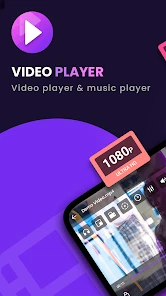
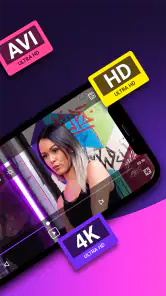

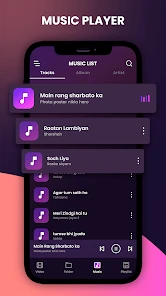
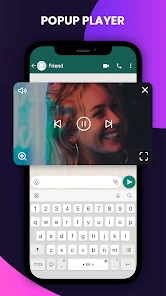
Analysis by Reviewed
When it comes to watching videos on my phone, I’m pretty picky about the kind of app I use. Lately, I’ve been diving into the world of the HD Video Player, and I’ve got some thoughts to share. This app promises to deliver a top-notch viewing experience, and as someone who loves catching up on the latest shows and movies on the go, I couldn’t resist giving it a whirl.
What to expect from a straightforward player
HD Video Player is a free video player from Video Player all Format HD, aimed at people who want to watch media files on a phone rather than manage a large library or edit clips. It sits in the video-player category, and its broad-format focus is the main reason I’d try it: if you already have videos saved on your device, a dedicated player can be more convenient than opening them through a general gallery app. Its 4.1 average from around 40,000 ratings and more than 10 million installs suggest it has found a sizable audience, though popularity alone doesn’t tell me whether it suits a particular viewing routine.
For a first-time user, I’d set expectations around the basics: choose a video, start playback, and see whether the controls and picture work well on your own phone. I wouldn’t treat the HD label as a promise that every file will look sharper than its original resolution. The source video and your screen still determine the picture you see. This distinction matters if you’re comparing it with streaming services, which supply their own catalogues and playback quality rather than simply opening your personal files.
Getting ready for the first play
The app is rated Everyone, and its current version is 1.6. It was released on April 13, 2023, and supports Android 8.0 or later. Those details make it easier to check whether your phone is a fit before installing. Once it’s on your device, I’d begin with a video you can already find in your media library, rather than testing with an obscure file that may have its own compatibility quirks. That gives you a simple baseline for judging whether the app opens the video and whether its playback controls feel comfortable.
If a video doesn’t appear immediately, my practical first step would be to check that it is stored somewhere the app can access and then reopen or browse the library. Media files can be scattered across folders, especially after downloads or transfers, so locating the file directly is often more useful than assuming it is missing. I’d also test a short clip before settling in for a full movie: it is an easy way to confirm that picture and sound behave as expected without losing your place in a longer watch.
Making the first playback useful
For a first session, I’d use one familiar video as a quick check of three things: whether it appears in the player, whether sound comes through as expected, and whether the controls are easy to use one-handed. This small test gives you a practical answer before you rely on the app for a long trip or a film night. If the clip plays well, try a second file from a different folder or in a different format you already have. That helps separate a problem with a particular video from a general issue with the player.
I’d also make a habit of checking a file while I’m still at home if I plan to watch it away from Wi-Fi. Open the video, jump to a later point, and make sure subtitles are visible if you need them. Seeking is a useful check because a video can start normally but behave differently when you skip around. It’s a low-effort way to avoid discovering a snag halfway through a commute, when it’s less convenient to troubleshoot.
More From Our News Desk

Weather by Xiaomi Review: Clear at a Glance, Less Clear Up Close

X Under Pressure: Can It Recover When Posting Goes Wrong?

Clash of Clans Is Won Between the Battles

Android Auto Makes the Case for Quieter Car Software

MobiOffice: Transforming Mobile Productivity with Seamless Integration

EA SPORTS FC™ Mobile Soccer: Redefining Mobile Sports Gaming
Your Perfect Media Companion
First off, let me just say that HD Video Player does exactly what it says on the tin. It’s all about those high-definition visuals, and boy, does it deliver. From the moment I launched my first video, I was greeted with crisp, clear images that made every scene pop. Whether I was watching an action-packed blockbuster or a serene nature documentary, the quality was consistently impressive. It’s like having a mini-theater right in my pocket!
Sleek and User-Friendly Interface
One of the first things I noticed about this app was its user interface. It’s super sleek and intuitive, which makes navigating through my media library a breeze. The developers have clearly put a lot of thought into making sure everything is just a few taps away. The menus are clean, and the playback controls are exactly where you’d expect them to be. Plus, it supports a wide range of video formats, so I didn’t have to worry about converting files. Just upload and play!
Features That Stand Out
Here’s where things get really interesting. The app isn’t just about playing videos; it’s packed with features that enhance the viewing experience. One of my favorites is the gesture control. Swiping up and down adjusts the volume, while left and right skips through the video. It’s super handy, especially when I’m munching on popcorn and don’t want to fiddle with tiny buttons.
Another cool feature is the ability to create playlists. This is a godsend for those times when I’m binge-watching a series and want to keep everything in one place. Also, the subtitle support is top-notch. I had zero issues syncing subtitles, which is a massive relief for foreign films.
Small habits that make playback easier
For a first successful session, I’d pick a file I know well, start it, and try the controls before relying on them during a commute or a long watch. Gestures can be convenient once they become familiar, but they can also be triggered accidentally if you’re holding the phone loosely or adjusting your grip. I’d test a short swipe while paused or during a low-stakes scene so I know how the controls respond on my device. For subtitles, I’d check that the text is readable against the picture and that it stays in sync after seeking; a subtitle file can be the source of a mismatch, not necessarily the player.
Playlists are most useful when you have several local videos you plan to watch in sequence. I’d use one for episodes or clips already saved on the phone, then keep unrelated one-off videos outside it to avoid a cluttered queue. That’s a small organizational choice, but it can save time when you’re trying to resume a series later. A realistic use case is downloading a few permitted travel videos before leaving home, checking one while you still have a reliable connection, and then using the playlist during a train ride. It keeps the viewing task simple without relying on a streaming catalogue during the journey.
Compatibility and Performance
I’m using an Android device, and the app runs like a dream. It’s smooth, with no noticeable lag or crashes, even when I’m watching large video files. I’ve also heard from fellow iOS users that it’s equally reliable on their devices, which is always a plus. The app doesn’t drain my battery too quickly either, which is crucial for those long commutes where I’m glued to my screen.
In day-to-day use, I’d still be selective about where and how long I watch. A large video can take up substantial room on a phone, and a long session uses the screen and battery regardless of which player is open. If storage is tight, removing a watched download before adding another is more useful than keeping a long queue of files you may not revisit. On a commute, headphones and a quick test of volume and subtitles before departure can prevent a frustrating search for settings once you’re moving.
When a different kind of player makes more sense
The main trade-off is focus. A local-file player is useful when the videos you want are already on your device, but it isn’t a replacement for an online service that helps you discover and stream new programmes. Compared with a built-in gallery, a dedicated player may feel more suited to sitting down with a longer video or arranging several clips into a playlist. The gallery can still be quicker for an occasional recording you simply want to check. I’d choose based on what I actually watch rather than installing another app just because it has a longer feature list.
It may also be worth trying another player if your routine depends on a specific advanced control or detailed library organization. HD Video Player’s appeal is its approachable route from a saved file to playback, not necessarily deep customization. Someone who keeps a carefully curated collection, switches between many playback preferences, or wants their player to double as a media-management tool may be happier comparing alternatives. For casual viewing and a practical queue of local files, those extra options may not matter enough to justify the added complexity.
Who will appreciate it, and who may prefer another option
I’d recommend this app to someone whose main need is playing personal video files, especially if they have files in different formats and want playback controls, playlists, and subtitles in one place. It may also suit a first-time user who wants to try a dedicated player without paying for the app. If your priority is finding films or series to watch online, a streaming service is a better fit; if you mainly want to browse photos and occasional clips, your phone’s built-in gallery may already be enough. People who need a highly customized library or a particular advanced playback tool should compare alternatives before making this their everyday player.
The key question after installation is whether your own files open and play comfortably, not whether a feature list sounds impressive. If a file fails, try a different video you know works before assuming the whole library is incompatible. If one clip plays but another does not, the difference may be the file itself. That simple comparison helps you decide whether this app meets your needs or whether you’d be better served by a player with a different set of controls or compatibility options.
Settling into a simple viewing routine
Once the first test goes well, I’d keep the routine uncomplicated: add only the videos I expect to watch soon, use a playlist for a series or a themed group of clips, and remove files when I’m finished if phone space is limited. This is especially practical for someone who transfers videos from a computer or saves permitted material for offline viewing. The player’s value is not only whether it opens a file, but whether it makes that small collection easy to return to without turning the phone into a dumping ground.
Before choosing it as my default, I’d also ask whether the controls suit the way I hold my phone and whether subtitles meet my needs on the screen I use most. A player can be technically capable and still feel awkward during a crowded train ride or when I’m propping the phone on a table. A couple of short tests in those ordinary situations are more revealing than a long session spent evaluating features in isolation.
In conclusion, if you’re on the hunt for a new video player that offers a seamless, high-quality viewing experience, I’d definitely recommend giving HD Video Player a shot. It’s packed with features, easy on the eyes, and performs beautifully across different devices. Whether you’re a casual viewer or a hardcore cinephile, this app has got your back. Go ahead and check it out – your eyeballs will thank you!
HD Video Player Frequently Asked Questions
Can HD Video Player play videos stored on my device?
HD Video Player is designed to play media files, making it a practical option if you want to watch videos saved on your device. Its description highlights support for all media-file formats, while the app’s main purpose is local playback. Before downloading, consider whether a dedicated player for your existing video collection fits the way you usually watch content.
Will HD Video Player work on my Android phone or tablet?
HD Video Player is available for Android devices running version 8.0 or later. It can be considered on a compatible phone or tablet if you want an app focused on video playback. Checking your device’s Android version before installing is a useful first step, and having enough free storage for the app and the videos you want to watch can also help.
Is HD Video Player free to download, and what age group is it suitable for?
HD Video Player is free to download and is rated suitable for Everyone, so it can be considered by a broad range of users. It is a video player and editor app intended for playing media files, with a short description focused on HD video playback. As with any app, it is sensible to review its permissions and the app-store details on your device before installing.
What is HD Video Player, and who develops it?
HD Video Player is an app in the video players and editors category, developed by Video Player all Format HD. Its central purpose is straightforward: playing video files, with support for a range of formats. If you want one app to handle media playback on your device, its format-focused description makes it a relevant option to consider before downloading.
What video formats does HD Video Player support?
HD Video Player supports a wide range of video formats, ensuring you can play virtually any video file without needing to convert them. Formats include MP4, AVI, MKV, MOV, FLV, and more. This versatility makes it a go-to app for users who have diverse video collections and want a single app to handle all their playback needs.
Pros
- Supports a wide range of video formats.
- User-friendly interface for easy navigation.
- High-quality playback with minimal buffering.
- Customizable playback speed options.
- Offers subtitle support for various languages.
Cons
- Contains ads that can be intrusive.
- Limited advanced features for pro users.
- Requires in-app purchases to remove ads.
- Occasional crashes on older devices.
- Lacks support for 4K video playback.
- Category
- Video Players & Editors
- Version
- 1.6











