Google Tasks
- 24.89K
- 4.6
- Installs
- 10.00M
- Price
- Free

Screenshots

Analysis by Reviewed
I often need a dependable place to put a small commitment before it slips my mind: reply to a message, pick something up, or finish a work task after a meeting. Keeping those reminders in my head—or scattered across notes and messages—creates more friction than the tasks themselves. Google Tasks is useful because it gives those loose ends one simple home, without asking me to spend time maintaining an elaborate system.
A quick setup, with a clear purpose
Google Tasks is a free productivity app from Google LLC, available to everyone and designed to work with a Google account. Its current version is 2025.11.17.833092473.0-release, and it supports Android 6.0 and later. The app has a 4.6 average from around 531,000 ratings and more than 10 million installs, which suggests it has found an audience among people looking for a straightforward to-do list rather than a full project-management workspace.
My advice is to start with only a few lists that match real parts of your life—such as errands, work, and home—rather than trying to classify every task perfectly. Add an action you can actually complete, then use a due date when timing matters. That small distinction keeps a list from becoming a collection of vague intentions. The app is easy to begin using, but it works best when I keep the structure as simple as its interface.
Useful in the middle of an ordinary day
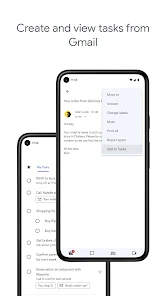
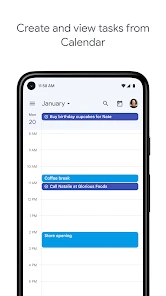
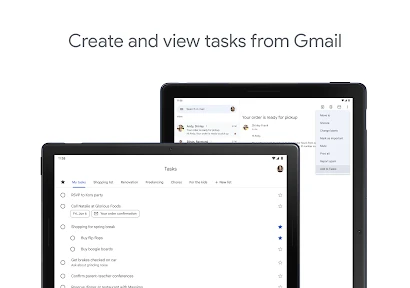
Imagine I’m reading an email about a document I need to send later. Instead of leaving the message unread and hoping I remember it, I can turn it into a task through Google’s connected tools and give it a date. When I look at my calendar, the task can sit alongside scheduled events, helping me judge whether the day is already full. That connection is the app’s strongest practical advantage: it can reduce the distance between noticing something and deciding when to do it.
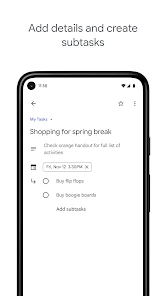
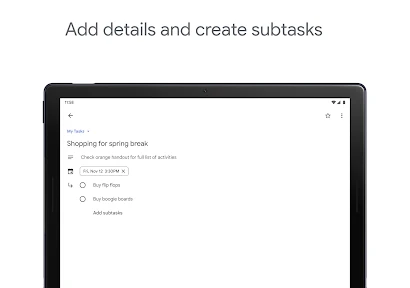
Subtasks are handy when a job has a few clear steps but doesn’t need a complicated project board. For example, preparing for a trip might involve checking transport, packing, and confirming a booking. Breaking that into smaller actions makes the next move obvious without making me manage a separate planning system. Notes are useful for details I’d otherwise forget, such as what to bring or which person to contact; I try to keep them brief so the task remains scannable.
Where it saves effort—and where simplicity has a cost
Recurring tasks suit routines I don’t want to recreate each week, while reminders and dates help distinguish “do this soon” from “do this on a particular day.” I also value syncing across devices: I can capture a task on my phone and check it later elsewhere without keeping separate lists in step. These features save time when my needs are modest and familiar.
The trade-off is that a simple list is not the same as a detailed planning tool. If I need to coordinate a team, track project status across many people, or see complex work as a board with custom stages, I’d choose a dedicated project-management app instead. Google Tasks is also less compelling if I don’t use Google services: its connections to Gmail and Calendar are a major reason to choose it, and without that routine the app can feel like a basic list competing with many others.
You May Like

Clash of Clans Is Won Between the Battles

Android Auto Makes the Case for Quieter Car Software

MobiOffice: Transforming Mobile Productivity with Seamless Integration

EA SPORTS FC™ Mobile Soccer: Redefining Mobile Sports Gaming

How Microsoft OneDrive Became a Mobile Productivity Giant

How Google Translate Breaks Language Barriers Effortlessly
Who will get the most from it
I’d recommend it to someone who already uses Gmail or Google Calendar and wants personal tasks close to the rest of their day. It’s especially suitable for errands, follow-ups, recurring chores, and small work commitments that would otherwise get lost in an inbox. The Everyone content rating makes it broadly accessible, though the more important question is whether its level of simplicity matches the way you organize your responsibilities.
I would skip it if I rely on extensive labels, elaborate filters, shared task ownership, or a visual overview of a large project. Before switching from another task manager, it’s worth asking whether you mainly need a reliable place to capture and complete actions, or a system for planning and reporting on them. For the first need, this app removes enough friction to be useful; for the second, a more specialized option will probably save more time.
Google Tasks is free and easy to maintain, but no app can make a crowded list manageable if every idea becomes an urgent task. I get the best results by adding a due date only when it matters, using subtasks for genuine sequences, and reviewing the list before the day gets busy. That light routine helps me trust the list without turning task management into another chore.
How Google Tasks fits into my routine
Ever found yourself juggling multiple tasks and struggling to keep everything organized? Well, welcome to the club! We've all been there, and that's where the Google Tasks app swoops in to save the day. It's like having a personal assistant right in your pocket, helping you stay on top of your to-do list with ease. Let me take you through my experience with this handy app.
Getting Started with Google Tasks
First things first, downloading and setting up Google Tasks is a breeze. Available on both Android and iOS, you can find it easily on the Google Play Store or Apple App Store. Once installed, it seamlessly integrates with your Google account, allowing for a swift setup that gets you organizing in no time.
Intuitive Interface
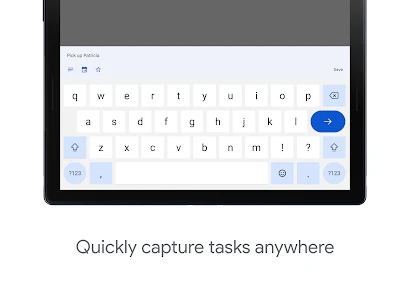
One of the things I love about Google Tasks is its clean and intuitive interface. It's not cluttered with unnecessary features, which makes it super easy to navigate. You can create tasks in an instant and organize them by date or priority. Plus, the ability to add subtasks is a game-changer, especially for those of us who love breaking down projects into manageable pieces.
Seamless Integration
What sets Google Tasks apart from other task managers is its seamless integration with other Google services. If you're already a user of Gmail or Google Calendar, you'll appreciate how Tasks can be accessed from within these apps. This means you can easily convert an email into a task or see your tasks alongside your calendar events, keeping everything in one place.
Features Worth Noting
While Google Tasks keeps things simple, it doesn't skimp on useful features. Recurring tasks are a lifesaver for those pesky, repetitive chores. You can set reminders to ensure you never miss a deadline, and syncing across devices means your task list is always up-to-date, whether you're on your phone or computer. It's like having a little productivity buddy that travels with you everywhere.
Another neat feature is the ability to add notes to tasks. This comes in handy when you need to jot down extra details or reminders related to a specific task. It's all about keeping everything you need in one place, without the hassle of jumping between different apps.
Choosing a workflow that stays manageable
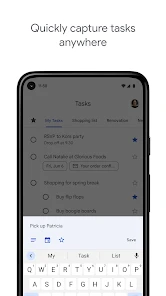
A useful way to keep the app from turning into a second inbox is to capture tasks quickly, then clarify them when you have a quiet moment. I make the task title an action—“send the invoice” rather than “invoice”—and put context in the note only when I’ll need it later. That makes a quick scan more useful and reduces the chance that I’ll have to reopen a message just to remember what I meant.
For a busy day, I’d avoid assigning dates to every item simply to make the list look organized. A due date is most helpful when there is a real deadline or a particular day when the task makes sense. If everything is dated, the calendar view can become a second crowded schedule rather than a decision aid. Keeping flexible errands undated lets me choose them around appointments instead of treating every intention as an obligation.
A small routine for real-life handoffs
One practical use is managing a handoff between work and home. If someone asks me to send a file after a call, I can record the action while the request is fresh, add a short identifying note, and choose a date only if there is a genuine deadline. Later, I can check the task list rather than searching through chat or relying on memory. For a household errand, a separate list keeps it visible without mixing it into work follow-ups.
This is also where the app’s modest scale is an advantage. I don’t need to decide who owns a task, build a workflow, or maintain a project dashboard just to remember a simple commitment. But if a task depends on several people, I’d use a shared planning tool or agree on ownership elsewhere; a personal checklist is not a substitute for team coordination. The time saved comes from making my own next action clear, not from managing a group process.
What to expect across devices
Google Tasks is available on Android and iOS, and its connection to Google services makes it particularly convenient for someone who already moves between Gmail and Calendar. If you’re setting it up on a new device, using the same Google account is the straightforward way to keep your task workflow connected. I would still make a habit of checking the list before relying on it for a deadline, especially when switching devices or changing how I organize lists; a short review is a sensible safeguard for any digital task system.
The app is best understood as a personal action list, not a complete archive of every detail surrounding a commitment. I keep the task itself concise and put only the necessary context in its note. If the information is lengthy, changes often, or needs to be read by several people, I leave it in the appropriate document or conversation and use the task to remind myself what to do with it. That division keeps the list readable and avoids duplicating more information than I need.
How it compares with other task tools
Compared with a notes app, Google Tasks is better when I want a clear action that I can mark complete and, when appropriate, place on a date. Notes are more flexible for collecting loose thoughts, reference material, or longer plans, but that freedom can make unfinished actions harder to spot. Compared with a full project manager, Tasks takes less setup and asks for less ongoing administration, while giving up the detailed views and coordination features that make those tools worthwhile for larger jobs.
That middle ground is its strongest case. If you want a lightweight list that fits naturally into a Google-centered day, it can be easier to keep using than a more elaborate planner. If your preferred alternative already offers the structure you need and you rarely use Gmail or Calendar, switching may add another place to check without saving meaningful time. I’d choose based on where tasks currently get lost, not on which app appears to have the longest feature list.
How I keep the list trustworthy
A list is only useful if I can tell what deserves attention. I periodically remove completed or obsolete items and rewrite vague entries into specific actions. For recurring chores, I use repetition when the schedule is predictable; for something that happens only occasionally, I prefer adding it when it becomes relevant. This keeps routine reminders automatic without filling the app with patterns that don’t match real life.
One trade-off is that simple organization depends on personal habits. The app won’t decide which of several competing tasks matters most, and a date cannot replace a realistic estimate of my available time. I use the calendar connection to notice conflicts, then move or defer work when the day is already full. That brief judgment is more reliable than treating a due date as proof that a task will fit.
For someone deciding whether to try it, the main question is practical: do you need a place to capture and finish small actions, or a system to analyze and delegate complicated work? Google Tasks is at its best in the first case, particularly when Google’s email and calendar are already part of the day. It is less suited to people who want extensive customization, collaboration, or a visual map of project progress.
My verdict
In a world where staying organized is more important than ever, Google Tasks offers a simple yet effective solution. It's not overloaded with features, but it covers all the essentials and does so with a user-friendly touch. Whether you're managing personal errands or keeping track of work projects, this app is a trusty companion that helps you get things done.
So, if you're looking for a no-fuss task manager that plays well with other Google services, give Google Tasks a try. You'll find yourself wondering how you ever managed without it!
Google Tasks Frequently Asked Questions
Can I use Google Tasks offline, and will changes sync later?
Google Tasks is built around managing to-dos within Google’s ecosystem, which can be useful when you move between devices and services. If offline access matters to your routine, consider how often you need to view or change tasks without an internet connection before installing. For work that depends on reliable updates across devices, plan to reconnect so your changes can sync.
Can I set due dates and reminders for tasks?
Google Tasks supports due dates through its connection with Google Calendar, giving you a way to keep time-sensitive to-dos visible alongside your schedule. This can make it easier to remember deadlines without turning the app into a full project-planning tool. If reminders are central to how you manage work, check that the way Tasks and Calendar fit together suits your preferred routine.
Does Google Tasks work well for personal use?
Google Tasks is aimed at straightforward productivity, making it a practical choice for keeping everyday responsibilities in lists. Its focused approach is helpful if you want a simple place to track what needs doing rather than a complicated workspace. People who rely on detailed planning, shared workflows, or extensive organization may prefer to consider whether a basic task-list experience covers their needs.
Is Google Tasks easy for beginners to use?
The app’s central idea is simple: keep to-dos in lists and manage them as you work through your day. That makes Google Tasks approachable for someone who wants to get started without learning a complex project-management system. Its connection to Google services can also feel familiar to people already using that ecosystem, while users seeking advanced controls may find the experience intentionally straightforward.
Can I use Google Tasks without using other Google apps?
Google Tasks is available as a standalone mobile app, but its place within Google Workspace is an important part of the experience. It can be most useful when you also rely on Google services, since tasks fit into that broader ecosystem. If you prefer to keep your productivity tools entirely separate, consider whether a Google-centered task list is the right match before downloading.
Pros
- Seamlessly integrates with Google Calendar
- Simple and intuitive user interface
- Cross-platform synchronization available
- Supports recurring tasks and reminders
- Free to use with a Google account
Cons
- Limited features compared to other task managers
- No offline mode available
- No project management features
- Lacks advanced task prioritization
- Minimal customization options

- Category
- Productivity
- Version
- 2025.11.17.833092473.0-release













