

Fly Delta
- 35.05K
- 4.8
- Installs
- 10.00M
- Price
- Free

Screenshots




Analysis by Reviewed
I don’t judge an airline app by how impressive it feels on day one; I judge it by whether it still saves me effort on a routine trip months later. Fly Delta is most useful when Delta is already part of your travel plans: it brings trip details, check-in, boarding passes and flight updates into one place. For an occasional passenger, that convenience can be welcome without making the app essential. For someone who flies Delta repeatedly, the value is easier to justify because the same practical tasks come around again and again.
What makes the first trip easier
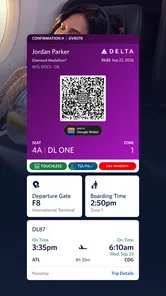
The appeal is immediate if you want to keep travel basics close at hand instead of switching between an airline website, email and a separate pass. Before leaving home, I’d use the app to check the trip and complete check-in; at the airport, having the boarding pass ready can reduce last-minute fumbling. Saving a pass to a mobile wallet is a useful backup workflow: I can open it there if I’d rather not navigate back through the airline app while moving through the terminal.
That convenience has a boundary. Fly Delta is an airline-specific tool, not a universal travel organizer. If your itinerary mixes several carriers, a general travel app or your email may be better for seeing everything together. I’d still keep the airline app for the Delta portion, particularly when a change affects that flight, but I wouldn’t expect it to replace every other travel tool.
Your Travel Companion
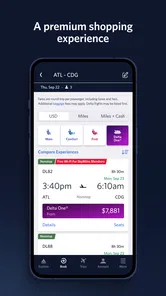
The Fly Delta app is your ultimate travel companion. Right from the moment you book your flight, it’s there to guide you. The interface is super user-friendly, and even if tech isn’t your strong suit, you’ll find it a breeze to navigate. Booking flights, managing trips, and checking in are all just a tap away. Plus, the app sends you real-time updates about your flight status, so you’re always in the loop.
Seamless Check-In
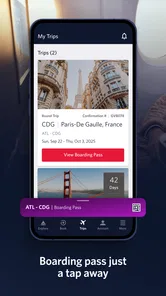
One of the standout features for me is the seamless check-in process. Gone are the days of standing in long airport queues. With the Fly Delta app, you can check-in within seconds. It’s as simple as tapping a button, and voila, your boarding pass is ready! You can even store it in your mobile wallet for easy access. Trust me, it’s a game-changer when you’re rushing to catch a flight.
A small habit makes that process more dependable: I’d check the pass before heading to the airport, then keep the wallet copy available rather than assuming I’ll have time to search for it at the gate. For a family member or colleague who is less comfortable with apps, showing them where the pass is before travel can prevent a stressful handoff. It’s a modest preparation step, but airport routines rarely reward avoidable searching.
SkyMiles and More
If you’re a frequent flyer, you’ll love how the app keeps track of your SkyMiles. You can view your balance, track your progress, and even book award travel directly through the app. It’s all about making your flying experience smoother and more rewarding. I’ve found it super handy for planning my trips and making sure I get the most out of my miles.
More From Our News Desk

 Prime Video
Switching to Prime Video: What Changes in Your Viewing Routine
Prime Video can make a compelling second home for streaming, but switching means learning a different catalog, rental layer, and route from browsing to playback.

 Universal TV Remote Control
Universal TV Remote Control Works Best as a Reliable Backup
A phone remote earns its place through quick setup and reliable habits. Here is how to get more from Universal TV Remote Control—and where its limits show.

 Weather - By Xiaomi
Weather by Xiaomi Review: Clear at a Glance, Less Clear Up Close
Xiaomi’s weather app makes everyday forecasts quick to scan, but its calm surface can leave useful details and recovery paths harder to find than they should be.

 X
XX Under Pressure: Can It Recover When Posting Goes Wrong?
A resilience-focused review of X, examining setup, mistaken posts, interruptions, weak connections, and the gaps that matter when recovery needs to be dependable.

 Clash of Clans
Clash of Clans Is Won Between the Battles
Its raids are quick; its community is a long-term project of coordination, teaching, rivalry, and shared responsibility—with all the friction that entails.

 Android Auto
Android Auto Makes the Case for Quieter Car Software
The car interface is no longer judged by how much it can do, but by how quietly it helps. Android Auto shows what drivers now expect—and what still gets in the way.
Latest News



The recurring value here depends on your habits. If you already fly Delta and pay attention to your miles, having the balance and award-travel option nearby can make it easier to check your progress while planning. If you rarely fly the airline, those account details are less likely to earn a permanent place on your home screen. I’d treat the app as a focused companion for Delta trips, not as a reason by itself to change how or where I travel.
Stay Updated
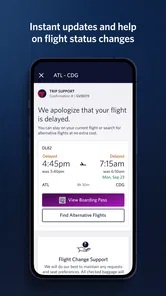
Another feature I can’t live without is the flight updates. The app sends notifications about gate changes, delays, and even baggage claim information. It’s like having a personal assistant keeping you updated every step of the way. Plus, if you’re connected to Wi-Fi, you can even track your flight in real-time. How cool is that?
For a realistic travel day, imagine leaving work for an airport and checking the app before you set off. A changed gate or delay can affect whether you go straight to security, pause for food or contact the person meeting you. I would still pay attention to airport displays and announcements: an app notification is helpful, but it should support your attention rather than replace it. If you prefer not to receive alerts, checking the trip manually is a quieter alternative, though it means taking responsibility for looking at the latest information.
Making it useful between trips
The strongest case for keeping an airline app installed is not that it needs daily attention; it is that the right details are ready when a trip comes around. I’d open Fly Delta while planning or preparing for a Delta flight, then leave it alone when I have no relevant travel. That on-demand pattern avoids turning flight updates into another routine to monitor and makes the app feel like a practical tool rather than a permanent travel dashboard.
For a traveler who takes several Delta trips across the year, the app can earn its space through repeated check-ins, pass access and account management. The payoff is cumulative: each trip involves fewer searches through confirmation emails and fewer decisions about which screen has the current airline information. A person who takes one Delta flight and otherwise uses other carriers may get the same result by installing it only when needed, provided they are comfortable setting it up before travel.
One useful planning distinction is between organizing a whole journey and managing its airline-specific part. I’d use a calendar or general itinerary tool to keep hotel, ground transport and flights from different airlines in one view, while relying on Delta’s app for the Delta segment. That division is especially handy on a multi-stop itinerary: the broad planner helps me see the day as a whole, and the airline app is the place I’d check for details tied to its flight. Neither tool has to do every job.
Where it fits among travel tools
Compared with checking Delta through a browser, the app puts the airline’s trip functions closer at hand and can keep the boarding pass accessible in a wallet. A browser can be enough for someone who rarely flies and would rather not install another app, while the app makes more sense when check-in and flight updates are recurring needs. For mixed-airline travel, general itinerary apps can provide a wider overview; they do not remove the reason to keep Delta’s own channel available for its portion of the trip.
Email remains a useful record of bookings, but it is a poor place to rely on when you need to find a pass quickly among unrelated messages. A mobile wallet reduces that particular friction once the pass has been saved. My practical approach would be to keep the confirmation email as a reference, use the app to handle the trip, and use the wallet for quick pass access. It is a small workflow, but it gives each tool a clear job rather than making me hunt through all of them at the airport.
People often wonder whether the app is worth installing for a single flight. I’d say yes if having the pass and Delta trip details together would make that journey simpler, but there is no reason to keep it afterward if it serves no ongoing purpose. If you fly Delta frequently, the case is stronger because check-in, flight information and SkyMiles are relevant again. If you mostly book other airlines, a general travel organizer is likely to be more useful as your everyday starting point.
How it holds up over time
Maintaining the app is a light commitment if you fly Delta often: keep it installed, sign in when needed, and make sure your phone has the current version. Fly Delta is a free Travel & Local app from Delta Air Lines, Inc., with an Everyone age rating. It launched on February 14, 2011, and version 7.5.2 lists Android 8.0 as its minimum operating-system requirement. Its 4.8 average across around 470,000 ratings, with over 10 million installs, suggests broad use, though popularity can’t tell me whether it fits every traveler.
For everyday maintenance, I would avoid waiting until the airport to discover that I need to sign in or locate a pass. Reviewing the trip beforehand gives me a calmer chance to deal with account access and confirm that the information I expect to use is easy to reach. Keeping the app current is sensible too, but the goal is not to fuss over it between flights; it is simply to avoid making a time-sensitive task depend on last-minute setup.
The main source of fatigue is duplication. If your calendar, email and wallet already cover the information you need, opening another app for every trip may feel unnecessary. I’d use it when I want Delta-specific trip management and timely airline updates, then let broader tools handle non-Delta reservations. That division keeps the app useful without turning it into another place I feel obliged to check constantly.
Who will get the most from it
I’d recommend it most readily to people who regularly choose Delta, keep track of SkyMiles, or prefer to handle check-in and flight details on their phone. It is also a sensible choice for someone coordinating a Delta trip with a companion: one person can help confirm where the pass is and which airline app to open, rather than trying to explain the whole process during a rush. The benefit is practical organization, not a promise that every part of travel becomes effortless.
On the other hand, someone who flies infrequently, uses several airlines interchangeably, or dislikes keeping airline accounts and apps may find a browser, email and wallet combination adequate. A general travel organizer is often better for seeing unrelated bookings together, and airport screens remain important when you are already in the terminal. I would not install Fly Delta expecting it to replace those sources; I’d choose it when Delta-specific access is worth the extra app.
Another reasonable question is whether flight notifications mean you can stop checking other sources. I wouldn’t rely on that. Alerts are useful prompts, but I’d still read airport displays and listen for announcements, especially when a departure is close or plans are changing. The app is best treated as one convenient channel for updates, not as a guarantee that I can tune out everything around me.
A lasting place on the phone
To wrap it up, if you’re someone who loves to travel or needs to travel often, the Fly Delta app is a must-have. It’s efficient, reliable, and makes the whole flying experience much less stressful. Whether you’re booking a flight, checking in, or just keeping track of your miles, this app has got you covered. So next time you’re planning a trip, give it a try and see how it transforms your travel experience. Happy flying!
My more measured view is that its long-term value comes from fit: repeated Delta trips make the app easier to justify, while occasional or mixed-carrier travel makes it optional. It earns lasting space when its specific tools save me from repeating small tasks on every journey. If those tasks rarely apply, I would rather keep my phone lean and use the airline’s other available channels when a Delta trip comes up. For the right traveler, though, having the pass, trip information and account details gathered in one airline-focused place is a convenience that remains useful after the first-week novelty fades.
Fly Delta Frequently Asked Questions
Who develops Fly Delta, and what kind of app is it?
Fly Delta is a travel app developed by Delta Air Lines, Inc. It is built around managing travel on Delta, with access to trip details and mobile travel documents in one place. Travelers considering a download can think of it as a companion for organizing a Delta journey rather than a general-purpose travel planner for every airline.
Is Fly Delta suitable for first-time users and families?
The app is rated Everyone, making its content suitable for a broad audience. Its main purpose is practical travel management: keeping flight information and boarding passes accessible on a mobile device. A first-time user can consider whether those tools fit their plans, while families may find having trip details together on a phone useful when preparing for a Delta flight.
What should I know about Fly Delta before downloading it?
Fly Delta is Delta Air Lines’ travel app for managing trips on a mobile device. It brings together tools such as flight information and boarding passes, making it useful for travelers who want key trip details in one place. The app is free to download, is rated for Everyone, and is available for Android devices running version 8.0 or later.
Does Fly Delta work only for travelers who already have a Delta booking?
Fly Delta is designed around managing travel on Delta, so its most relevant tools are for people with a Delta trip to organize. It can help keep flight details and travel documents accessible on your phone. If you are considering the app before booking, its usefulness will depend on whether you expect to travel with Delta and want to manage those arrangements digitally.
What features does the Fly Delta app offer to enhance my travel experience?
The Fly Delta app offers a range of features designed to enhance your travel experience. These include real-time bag tracking, interactive airport maps, the ability to change or upgrade your seat, and access to your boarding pass even when you’re offline. Additionally, the app provides notifications about flight status updates, gate changes, and lets you manage your SkyMiles account directly from your mobile device.
Pros
- User-friendly interface for easy navigation
- Real-time flight updates and notifications
- Ability to book and manage trips effortlessly
- In-app boarding pass for convenience
- 24/7 customer support directly through app
Cons
- Limited functionality without internet access
- Occasional glitches during app updates
- Requires personal data for full access
- In-app ads can be distracting
- Some features exclusive to Delta members











