Cabify
- 1.43K
- 3.2
- Installs
- 10.00M
- Price
- Free

Screenshots




Analysis by Reviewed
When I need to get across town without arranging a car in advance, I want to know where to request a ride and how to follow its arrival. That’s the basic job I turn to Cabify for: a ride-hailing app from Cabify Technology in the maps and navigation category. It’s free to download, rated for everyone, and has been around since 2011. Its average rating is 3.2 from around 288,000 ratings, so I’d treat it as a practical option to try rather than assume every experience will be flawless.
That starting point matters: I’m not opening Cabify to plan a walking route or compare every way across a city. I’m opening it because I’ve already decided that a booked car would make this particular trip easier. For someone who uses a ride-hailing service occasionally, the main question is whether the steps from choosing a destination to meeting the car feel clear enough to manage without creating another problem along the way.
From opening the app to reaching your destination
First things first, let's talk about the installation process. It's a breeze! Just head over to your app store, whether you're on Android or iOS, and download the app. Easy peasy. Once you've got it installed, you’ll need to sign up or log in. The interface is super intuitive, which is a huge plus for those of us who aren’t exactly tech-savvy. The current version is 8.217.0, and the app has passed over 10 million installs.
Cabify has been available since 2011, and the fact that it has passed over 10 million installs suggests it is a familiar option for many people, though that alone doesn’t tell me how well it will serve a particular neighbourhood or trip. I’d think of it as a free app to try, not as a guarantee that every pickup will be effortless. The value becomes real only when the service is available where I am and the quoted ride works for my plans.
Choosing a ride and checking the pickup
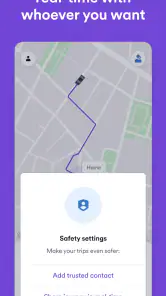
One of the standout features of Cabify is its user-friendly interface. Seriously, you don’t need to be a tech wizard to navigate through this app. Everything is laid out clearly, and booking a ride is as simple as tapping your screen a few times. You also get real-time tracking, which means you can watch your ride approach in real-time. No more wondering if your driver got lost or if they’re just around the corner.
In a busy area, I’d take a moment to check the pickup point before requesting a car. A nearby side street or a clear entrance can be easier for a driver to reach than a crowded main road. This small step can prevent the awkward handoff of trying to spot each other in traffic. If I’m heading to a station, office, or large building, I’d also make sure the destination pin points to the entrance I actually need, rather than simply the right block.
That pin check is especially useful when a place has several entrances or sits beside a one-way road. A destination can look right on a map while still leaving me on the wrong side of a building. I’d use a recognizable entrance as the reference point, then look at the pickup pin from the driver’s likely approach rather than choosing the closest point to my own position. It takes a few seconds, but can save a confusing call or a last-minute walk with bags.
More From Our News Desk

Weather by Xiaomi Review: Clear at a Glance, Less Clear Up Close

X Under Pressure: Can It Recover When Posting Goes Wrong?

Clash of Clans Is Won Between the Battles

Android Auto Makes the Case for Quieter Car Software

MobiOffice: Transforming Mobile Productivity with Seamless Integration

EA SPORTS FC™ Mobile Soccer: Redefining Mobile Sports Gaming
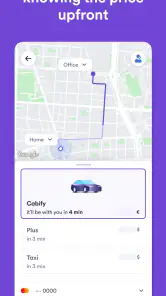
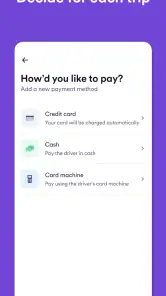
Another cool feature is the multiple payment options. Whether you're a fan of cashless transactions or prefer good old cash, Cabify has got you covered. Plus, they offer various vehicle categories, so whether you’re looking for something budget-friendly or want to ride in style, there's an option for everyone. The trade-off is that the ride choice and payment setup still need a quick check before confirming: I wouldn’t assume a preferred option is selected without looking at the details on screen.
I’d make that check before I’m in a hurry, not while a car is already arriving. If I’m travelling with someone else, I’d agree on the destination and the type of ride first, then confirm the options shown in the app together. The practical benefit of having vehicle categories is choice, but the useful choice depends on what is actually offered for that request; I wouldn’t select an option based only on what I remember seeing on a previous trip.
Making the pickup and ride smoother
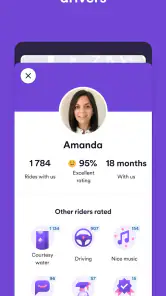
Safety is a biggie, and Cabify takes it seriously. Their drivers are thoroughly vetted, and you can check their profiles before hopping in. It's reassuring to know you're in safe hands. Plus, the cars are usually in top-notch condition, clean, and comfy, which makes for a pleasant ride.
For me, the useful handoff is the moment between tracking a car and getting inside it. I’d compare the driver and vehicle details shown in the app with the car that arrives, rather than relying on a vague match in a busy pickup area. If the location is noisy or crowded, staying near a recognizable landmark can make coordination easier. Once the ride begins, following the route gives me a clearer sense of progress and helps me notice if the destination or route needs attention.
This is one place where preparation matters more than tapping quickly. I’d keep my phone available while waiting, make sure I can identify the car from the displayed details, and avoid crossing a busy road just because the map marker appears close. If the car stops on the opposite side of a divided street, I’d rather move to a safer meeting point or clarify the location than try to intercept it in traffic. The app can help coordinate the handoff, but common-sense awareness still belongs to me.
Comfort isn’t just about the ride itself, but also about the peace of mind knowing you can reach out to customer service anytime you need assistance. Cabify’s customer support is responsive and helpful, which is always a nice touch. Still, I’d keep the app open during the pickup and ride so the trip details are easy to refer to if something needs sorting out.
For an everyday trip, that might mean leaving a late appointment with a laptop bag and wanting a direct ride rather than trying to work out a new transit connection. I would enter the destination while I’m still indoors, check that the pickup point is reachable, and wait somewhere visible. When the vehicle arrives, I’d match its details in the app, then follow the trip until I reach the correct entrance. Each handoff has a small task, but doing them in that order keeps the experience more controlled.
Where it fits—and where it may not
A realistic use for me would be leaving work in the rain with a bag, when walking to a bus stop is inconvenient and I want to see a car approach before stepping outside. Cabify makes most sense when a direct ride is worth the cost and effort of arranging one. It can also suit visitors who prefer requesting transport through an app instead of trying to hail a car on an unfamiliar street, especially when they can check the pickup and destination carefully.
It is also a reasonable option when I’m carrying something awkward, travelling with a companion who would struggle with a longer walk, or trying to get from a transit stop to an address that is inconveniently far away. Those are not automatic reasons to book: I’d still compare the time and cost shown with the alternatives. If a bus or train already takes me close to the door, adding a car may introduce waiting and pickup coordination without improving the trip much.
Compared with public transit, a ride-hailing app offers a more direct door-to-door trip but doesn’t replace the predictability or lower cost that a well-connected bus or train route may offer. Compared with a local taxi, Cabify puts the request and ride details on a phone, which can be convenient; a street taxi may be simpler when one is already waiting nearby. I’d check the available ride choices and payment method before committing, and keep a transit or taxi alternative in mind when timing matters.
The difference from a route-planning app is worth keeping clear, too. A map can help me work out which bus or train to catch, while Cabify is for arranging a car ride; one does not automatically replace the other. I might use a navigation app first to decide whether transit is sensible, then open Cabify if a direct car is the better fit. On the other hand, if I’m already beside a licensed taxi rank, taking the waiting taxi can be simpler than starting a new app booking and coordinating a pickup.
The app isn’t the right answer for every journey. If I’m travelling somewhere with limited service, dealing with a very tight connection, or relying on a specific pickup arrangement, I’d avoid assuming a car will be immediately available. The app’s 3.2 average rating is a reminder to keep expectations realistic: ease of booking doesn’t guarantee every pickup, vehicle, or support interaction will go smoothly. Its 1.4 thousand reviews offer a relatively small sample beside its rating count, so I’d focus on my own local experience rather than treat the score as a promise.
That distinction is useful for anyone deciding whether to depend on it for an important arrival. If missing a train, appointment, or flight would have a serious knock-on effect, I’d leave room for pickup delays and keep a backup plan rather than treating the app’s tracking as a timetable. For a flexible trip across town, a wait is an inconvenience; for a connection with no slack, the same wait can derail the day. I would not make a tightly timed journey depend on a ride request alone.
My take after considering the whole trip
All in all, Cabify is a solid option if you’re looking for a ride-hailing service and value app-based booking, tracking, and a choice of vehicle categories. It’s packed with features that cater to both tech enthusiasts and those who prefer simplicity. With its emphasis on safety, convenience, and comfort, it’s no wonder it’s becoming a popular choice in many cities. For me, the best approach is to use it when a direct ride is genuinely useful, check the pickup and payment details before confirming, and verify the arriving car before getting in.
There are a few small decisions I’d build into every request: set the destination to the entrance I need, choose a pickup spot a car can reach, review the ride and payment details, and wait where I can safely identify the arriving vehicle. These steps are more useful than simply rushing through the booking screen. They also make it easier to notice early if the plan is wrong, while there is still time to change the pickup or choose another way to travel.
For a first-time user, I’d suggest trying the app on a familiar, low-pressure journey rather than making its first test a trip with a hard deadline. That gives me a chance to learn how the pickup and ride details are presented and whether the service fits my usual routes. The Everyone age rating and simple booking flow make it approachable, but a straightforward interface does not remove the need to check the actual trip information before confirming.
So, if you haven’t given Cabify a try yet, I’d say go for it if ride-hailing suits your trip. It might just become your go-to app for getting around town, though I’d keep public transport or a local taxi in mind for journeys where availability, timing, or simplicity matters more.
Cabify Frequently Asked Questions
Is Cabify free to download, and are rides free too?
Cabify is free to download, but the rides you arrange through it are a separate service and should not be treated as free. The app is a Maps & Navigation tool for requesting transportation, with ride details handled in the app. Review the trip information and any fare estimate shown before confirming a booking so you understand the cost of the journey.
Who develops Cabify, and what kind of app is it?
Cabify is a Maps & Navigation app developed by Cabify Technology. Its purpose is to help people arrange rides through the app, making it a practical option to consider when you need transportation. The app’s short description is simply “Cabify,” while its safety-focused summary presents it as a transport app for riding with confidence.
Do I need to create an account before I can use Cabify?
Yes. Cabify is designed around a personal account, which you use to set up your details and request rides. You can download the app for free and explore its setup before booking, but having an account lets you enter trip information and manage your ride through the app. The app is rated for Everyone.
What is Cabify and how does it work?
Cabify is a ride-hailing app that connects users with private drivers for a comfortable and reliable transportation experience. After downloading the app, users can create an account, input their payment information, and start booking rides. Cabify offers various vehicle options, ensuring a tailored experience for different needs, whether for personal, business, or group travels.
Is Cabify available in my city or country?
Cabify operates in several cities across Latin America, Spain, and Portugal. To check if the service is available in your location, you can visit Cabify's official website or download the app and enable location services. This will provide information on availability and the different types of services offered in your city.
Pros
- User-friendly interface with easy navigation.
- Eco-friendly ride options available.
- Multiple payment methods for convenience.
- Real-time tracking of your ride.
- 24/7 customer support for any issues.
Cons
- Limited service in rural areas.
- Higher fares during peak hours.
- Occasional app crashes reported.
- Limited driver availability in small towns.
- No bike options in some cities.
- Category
- Maps & Navigation
- Version
- 8.217.0











